1:14

Jinko - Travel search & booking infrastructure for AI agents
Jinko · Nov 2026
Google · Apr 2019 · 1:24 · AI-annotated
Google’s 1:24 launch film runs 42 scenes, about 2.0 s each. The product shows up at 0:11 and 1 feature is revealed. The call to action lands at 1:16 (91% in), over a voiceover. The video alternates quick 3D phone mockups on white with top down live action tabletop gags, cutting at a steady mid tempo of about thirteen cuts a minute. Its signature moves are the tumbling phone wrapped in colored orbital rings, the fast zoom into screen transitions, and the cartoon cloud cleaner wiping the display.
Is this your launch? to your site or press kit.
A plain white background fills the frame with no visible elements. The scene holds still as the voiceover introduces the topic, providing a clean blank opening before any content appears.
Camera: Static
A black smartphone mockup turns around its vertical axis on a white background. It starts tilted in front of a green disc with blue rays and red dots, which vanish, then the phone swings edge-on and lands face-on, showing a blue home screen with app icons.
Techniques: 3D mockup
Camera: Static
A black smartphone mockup stands upright on a plain off-white background, its screen showing a blue cloud wallpaper and a lock screen. It then tilts and spins rapidly, dissolving into a swirling vortex of red, green and blue streaks around it.
Techniques: 3D mockup, Speed ramp
Camera: Static
A hand holds a smartphone in a blurred party setting; the screen shows a boy with glasses at a birthday cake with a red record button. The hand rotates the phone from landscape to portrait, the on-screen view shifting with the motion.
Camera: Pull out
Two hands hold a black smartphone upright against a gray tiled wall. Thumbs tap the screen, and small emoji stickers pop into a white chat thread while the message list updates.
Camera: Static
Hands hold a phone showing a chat app with an emoji sticker grid, then a top-down shot shows a finger tapping a tomato sticker that fills the screen with the words TOMATO HEAD.
Camera: Static
A 3D smartphone rests on a wooden table, its screen showing a blue app with a mustached tomato character and a yellow Tomato Head logo. A hand grabs the phone and spins it fast, blurring the screen against a white backdrop.
Techniques: 3D mockup
Camera: Pull out
A blue rectangular slab with a red sphere at its center tumbles in place on a white background while green, orange, and blue rings whip around it. The object spins with motion blur, the rings looping in front of and behind the slab.
Camera: Static
A black phone tumbles in 3D as red, blue and green orbital rings and small colored app icons circle it. The rings and icons scatter off frame, leaving the phone upright on a white background, its screen showing a blue lock screen.
Techniques: 3D mockup
Camera: Static
A black phone mockup sits centered on white, showing a blue home screen. The view zooms rapidly into the screen with motion blur, filling the frame with the wallpaper and dock icons.
Techniques: UI zoom
Camera: Push in
A blue liquid-textured wallpaper fills the frame. The Files app icon, a light blue rounded square with a green, yellow and red folder, sits centered with a white Files label below. The icon and label scale gently while the frame stays locked off.
Camera: Static
A hand holds a smartphone over a dark desk, the thumb taps thumbnails in a photo grid to select them, the header counts up to 3 selected and a delete dialog appears. A large Files title scales in over the scene.
On-screen text: “Files”
Techniques: Kinetic type
Camera: Static
Top-down view of a hand holding a phone on a wooden desk. A finger taps the Delete button on a confirmation dialog, which closes to reveal a grid of photos. The voiceover asks about the outside of the phone.
Camera: Static
Top-down shot of a phone on a wooden table, flanked by bowls of curry and rice, displaying a recipe page. A hand stirs the curry with a wooden spoon and flings it onto the screen, leaving a spreading brown stain. A small disclaimer sits at the lower left.
On-screen text: “Sequences simulated. It's best to keep phones away from all liquids.”
Camera: Push in
Top-down flat-lay of a phone showing a YouTube page, set on layered geometric paper in purple, blue and pink, with paint pots and brushes around it. A brush tipped with pink paint slides in from the right and smears a dab across the screen's edge.
On-screen text: “Sequences simulated. It's best to keep phones away from all liquids.”
Camera: Static
Top-down view of a white sink with a faucet and bathroom items arranged around it. A hand holds a phone showing a man, drops it into the water with a splash, then wipes it dry with a white towel. A small disclaimer caption sits at the bottom left.
On-screen text: “Sequences simulated. It's best to keep phones away from all liquids.”
Camera: Push in
A close-up of hands with red glitter nails holds a gold phone while the other hand wipes its dark screen with a small white object. The wiping motion blurs as it sweeps across the display.
Camera: Static
Close-up on a white surface: one hand steadies a black phone while the other rubs its screen with a folded white cloth, wiping back and forth across the glass.
Camera: Static
A hand wipes the dark screen of a black phone with a white cloth over a wooden table, then a person in a yellow shirt lays the phone flat and rubs it with a purple cloth.
Camera: Static
A hand in a yellow glove drags a blue plastic squeegee across a black phone screen held horizontally. The shot cuts to a top-down view of a wooden table covered in phone cases, with a hand holding two phones above the spread.
Camera: Static
Top-down view of a wooden desk scattered with phone cases, a yellow notepad and a tape dispenser. Two hands hold a black smartphone in one and a clear case in the other, aligning the case over the phone to show it fitting on.
Camera: Static
Top-down view of a yellow hard case with a phone nested in black foam, two hands snap the lid shut. Cut to a phone on a desk beside a mousepad printed with app icons.
Camera: Static
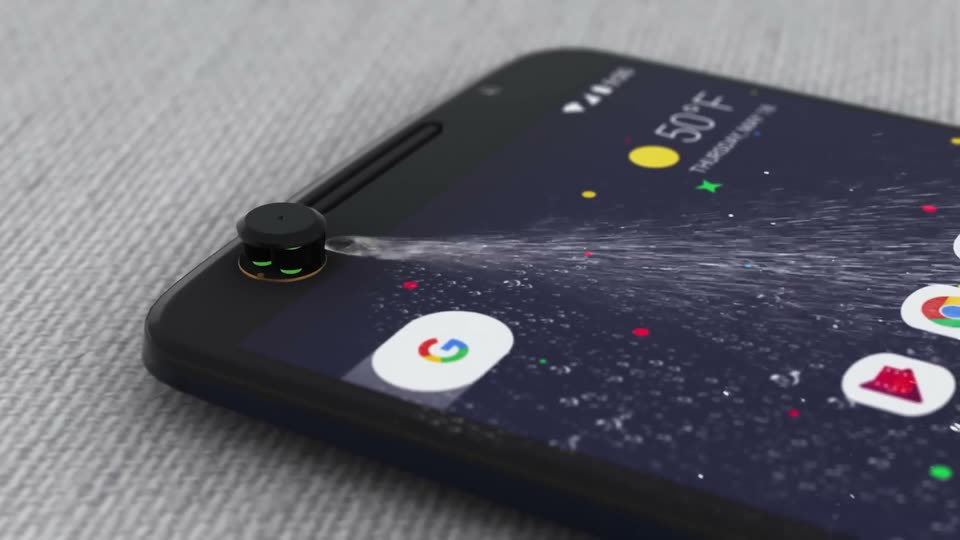
A dark phone lies at an angle on gray fabric, its home screen showing app icons and a weather widget. A tiny black robot with green eyes sits at the screen's corner and sprays a stream of white particles that fans out across the display.
Techniques: 3D mockup, Particles
Camera: Pan
A black smartphone in 3D perspective settles from a blurred tilt into a sharp, angled hold on a white background. A blue streak slides in from the left and a red streak wipes below the phone as a large letter scales in.
On-screen text: “G”
Techniques: 3D mockup
Camera: Static
A black smartphone spins from edge-on to front view while blue, yellow and red brushstroke rings orbit it, the rings fading as the home screen settles. The camera then zooms fast into the blurred screen.
Techniques: 3D mockup, UI zoom
Camera: Static
A close-up of a phone screen scrolls down the Files app cleanup list, past the Junk files and Duplicate files cards, then zooms in on the blue Screen cleaner card showing its Activate button and a small cartoon character holding a broom.
Techniques: UI zoom
Camera: Push in
Top-down live shot of a phone on a sauce-stained wooden table beside a rice bowl. The screen shows a cleaner app with Junk files, Duplicate files and Screen cleaner cards, and a finger taps the Activate button on the blue card.
On-screen text: “Sequences simulated. It's best to keep phones away from all liquids.”
Camera: Static
A smartphone lies at an angle on a stained surface, its screen showing a cleaner app with yellow droplets. White callout lines point to the droplets as a blue scan line sweeps and a small cartoon sweeper wipes them, then the screen wipes to white.
On-screen text: “Sequences simulated. It's best to keep phones away from all liquids.”, “imperfection detected”
Techniques: 3D mockup, Masking
Camera: Static
A phone rests on a stained tabletop, screen angled toward camera, running a blue Screen cleaner card. White HUD tags labeled Imperfection detected track smudges, and animated white puffs with yellow dots wipe the display while a blue line slides right.
On-screen text: “Imperfection detected”, “Sequences simulated. It's best to keep phones away from all liquids.”
Camera: Static
A gray X-ray wireframe diagram of a phone back and side profile, white lines linking nodes to labels that decode from scrambled text. A dotted box holds faceted dirt models. The scene cuts to a live-action phone on a blue desk, pink splatter on its screen.
On-screen text: “geometric dirt models”, “haptic micromovement generator”, “Sequences simulated. It's best to keep phones away from all liquids.”
Techniques: Kinetic type, 3D mockup
Camera: Static
Macro close-up of a phone on a light blue desk beside a red pen and pink paint splatters. A white smudge and a pink blob on the screen wipe away, revealing a blue Screen Cleaner card with a broom-holding character and an Activate button.
On-screen text: “Sequences simulated. It's best to keep phones away from all liquids.”, “geometric dirt models”, “haptic micromovement generator”
Techniques: Masking
Camera: Static
A black Android phone floats against a plain gray backdrop, its screen showing a blue satellite wallpaper, a date widget and a row of app icons. The device turns from a three-quarter angle to face the camera over the shot.
Techniques: 3D mockup
Camera: Static
A black phone in 3D perspective faces the camera with a blue home screen, then rotates to expose a green circuit board and white internal chassis against a light gray background.
Techniques: 3D mockup
Camera: Push in
Macro 3D view of a phone's internals: the camera holds on the green board and round vibration motor as thin blue rings pulse outward, then pulls back past the black battery and orange flex cable to the separated components floating in a row on white.
On-screen text: “出”
Techniques: 3D mockup, Parallax
Camera: Push in
A close-up of a white phone's upper corner turns in 3D as a translucent blue shield wraps around its edges and top, forming a coating. The device sits on a soft gray gradient, focus pulling from soft to sharp.
Techniques: 3D mockup
Camera: Static
A white phone mockup in 3D rotates from a steep side angle to face the camera over a soft gray gradient. On its blue lock screen, a rounded app icon with a red and yellow triangle appears above the label Files.
Techniques: 3D mockup
Camera: Static
A multicolor Files app icon rests centered on a blue liquid-textured background, with the white app label below it. The frame stays locked off with no visible motion.
Camera: Static
A vertical streak blur wipes across the frame and dissolves, revealing a blue card titled Screen cleaner with a subline, a cartoon cleaner in a hard hat holding a mop, and an Activate button with a sparkle icon.
Techniques: Masking
Camera: Pull out
A black smartphone in 3D perspective sharpens from blur on a white background as a blue rope drops from the top. A smiling cloud character in a yellow hard hat swings down the rope, waving a spray bottle that sprays a yellow sparkle, broom in hand.
Techniques: 3D mockup
Camera: Static
A flat dark-gray phone illustration spins from a tilted angle into a front view on white. Gold and blue starbursts pop at its corners while a dashed ring radiates outward, then a green circle and red target disc stamp over the screen.
Techniques: Particles
Camera: Static
On a white field, a blue square icon with a green and yellow folded corner sits at center inside a red ring, thin green circle, blue corner arcs and scattered orange dots. The rings and dots contract and vanish, leaving the icon framed by a thin red circle.
Camera: Static
On a plain white background, the Files folder icon and gray wordmark hold center. The by Google line fades in below, then gives way to a black Google Play badge, and a gray tagline fades in beneath it. The frame stays locked off and still throughout.
On-screen text: “Files”, “by Google”, “GET IT ON Google Play”, “An app to clean your phone, by Google”
Camera: Static