0:24

Motion Graphics Explainer Video for Podcasting Platform | Chord
Chord · Oct 2026
TensorTest · Jan 2026 · 1:13 · Full motion · AI-annotated
TensorTest’s 1:13 launch film runs 19 scenes, about 3.9 s each. The product shows up at 0:11. The call to action lands at 1:08 (93% in), over a voiceover. Built as a problem-to-solution arc: a typewriter stat on navy, a logo card, a montage of the manual pain, a 'not anymore' pivot, then one continuous tour of the Ritivel editor, and a gradient end card. Its signature is the letter-by-letter text reveal, the slow zooms into white UI cards on a deep navy field, and the 3D-rotating document cards.
Is this your launch? to your site or press kit.
Chord · Oct 2026
Avoice · B2B · Feb 2026
Mesmer · B2B · Sep 2025
Films whose music sounds like this one, voice left out
Storyteller Tactics · Orchestral and electronic corporate music
Nexa Labs · Electronic
Lucis · Modern electronic
On a plain dark navy field, a centered two-line sentence types out letter by letter, incoming characters fading from gray to white. The first sentence about a delayed drug and its cost holds, then cuts to a second about delayed treatment, ending as a circular iris mask opens.
On-screen text: “Every month a drug is”, “delayed costs $45M”, “and delays treatment for”, “thousands of patients.”
Techniques: Kinetic type, Masking
Camera: Static
White ritivel wordmark and a three-line uppercase tagline settle into place over a deep blue field of flowing wireframe lines. At 4.5s the frame cuts to a document-management UI with a folder tree, a matched-documents list, and two tooltip cards.
On-screen text: “ritivel”, “HELPS REGULATORY TEAMS SUBMIT FDA DOCUMENTS 12X FASTER”
Techniques: Kinetic type
Camera: Static
A flat view of a document management interface: a folder tree on the left with one row highlighted orange, and a matched-documents list on the right with Word thumbnails. Two white callout cards overlay the screen, one bottom-left and one top-right with an orange icon. The frame holds static.
On-screen text: “Submissions Manager”, “Streamline data and processes”, “Gain complete oversight of the s”, “management pr”
Camera: Static
A static close-up of a compliance app. A Word clinical study report with red tracked changes and comment boxes fills the left, while a Match Documents panel on the right lists two document thumbnails, one checked. A bold headline sits at the top right edge.
On-screen text: “Gain complete oversight of the s management pr”
Camera: Static
A Word window with a clinical study report sits under a blue Word logo and the label CSR-1145. Two duplicate windows cascade in from the right, labeled (1) and (2), fanning out diagonally as the frame widens.
On-screen text: “CSR-1145”, “CSR-1145 (1)”, “CSR-1145 (2)”
Camera: Static
Three overlapping Word document windows cascade diagonally across a white background, each topped by a blue Word icon and a large black heading. The headings read CSR-1145, CSR-1145 (1) and CSR-1145 (2). The documents stay static throughout the shot.
On-screen text: “CSR-1145”, “CSR-1145 (1)”, “CSR-1145 (2)”
Camera: Static
A Gmail email is crowded with overlapping Word document thumbnails titled CSR-1145. The clutter clears to a clean inbox list of repeated follow-up emails from one sender, and a cursor hovers over the thread.
Techniques: Cursor demo
Camera: Push in
An email thread with two messages and a row of suggested-reply chips pans horizontally to the right across the frame, carrying the Reply, Forward and Share in chat buttons with it, while a mouse cursor hovers near the top.
Techniques: Cursor demo
Camera: Pan
Centered white lowercase text 'not anymore' scales gently on a plain background that shifts from light lavender to deep navy. A white panel with thin horizontal lines holds the left edge in the opening frame, then the field goes solid dark.
On-screen text: “not anymore”
Techniques: Kinetic type
Camera: Static
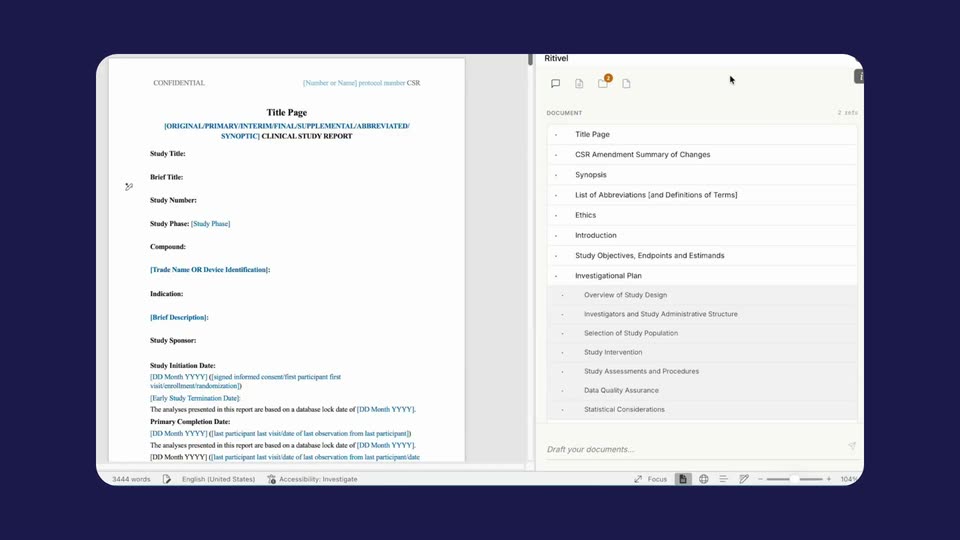
A document editor window rests on a navy field, its right Ritivel panel populating with a numbered outline of the study report. The view zooms into that panel, and the caption not anymore scales in to close the beat.
On-screen text: “not anymore”
Techniques: UI zoom, Kinetic type
Camera: Push in
A cursor clicks a toolbar icon in the Ritivel interface, and the panel slides left to a Connect data sources list showing SharePoint and Veeva Vault, each with a Connect button.
Techniques: Cursor demo
Camera: Push in
A light Ritivel panel settles into frame on a navy field. A cursor clicks Connect on the SharePoint row, the row shows Fetching documents with a spinner, then the panel switches to a list of indexed PDFs with SP and VEEVA badges and a success toast.
Techniques: Cursor demo
Camera: Pan
A PDF title page and a file list sit on a navy background. The right panel becomes a Ritevel chat with connected sources, then the view zooms into the section list while a prompt types out: Write the entire CSR in the document.
Techniques: Cursor demo, UI zoom
Camera: Pull out
A white Word document card on a navy background shows a clinical study report template. Red text fills the empty fields while a right panel logs the AI's reading and editing actions. The view zooms in on the title page, then pulls back to show the completed fields.
Techniques: UI zoom
Camera: Pull out
A split screen shows a clinical study report with red annotations beside an AI outline panel. The view zooms into the panel as a 'Request missing data from team' button pops in and a cursor clicks it.
Techniques: Split screen, UI zoom, Cursor demo
Camera: Push in
A clinical trial document fills the screen on a dark navy background. A white panel opens on the right, its email form populating with recipients, subject and message, as a cursor drifts from the request button toward Cancel.
Techniques: Cursor demo
Camera: Pull out
A document with red tracked changes and an AI chat panel sits as a tilted card on navy. A cursor clicks Send via Outlook; a green toast confirms the email. The card then rotates in 3D and pans to a PDF page, where a red box highlights the synopsis text.
Techniques: Cursor demo, 3D mockup, UI zoom
Camera: Static
A soft multicolor gradient fills the locked-off frame as a Ritivel badge, a two-line headline and a URL fade in at center, then hold static for the rest of the clip.
On-screen text: “See how Ritivel transforms”, “regulatory workflows”, “www.ritivel.com”
Camera: Static
A locked end card on a soft gradient of purple, blue, pink and teal. A purple pill logo sits above a centered two-line white headline, with a black URL beneath it. Nothing moves.
On-screen text: “See how Ritivel transforms”, “regulatory workflows”, “www.ritivel.com”
Camera: Static