1:00

Introducing Canvas in Gemini
Google · AI · Mar 2025
Avoice · Feb 2026 · 1:44 · Full motion · AI-annotated
Avoice’s 1:44 launch film runs 38 scenes, about 2.7 s each. The product is on screen from the first frame and 4 features are revealed. The call to action lands at 1:35 (91% in), over a voiceover. The video is built as a logo open, a value-prop counter, then four back-to-back feature demos (Assistant, Workflows, Projects, Library) shown as tilted 3D browser mockups that flatten into flat UI on a warm orange-to-purple gradient, closed by onboarding and a logo card. Signature moves are the ghosted double-exposure dissolves between interface states, the locked-off black text cards that type out benefit lines, and the recurring glowing logo disc anchoring the dark network diagrams.
Is this your launch? to your site or press kit.
Google · AI · Mar 2025
Rippling · Jun 2026
Films whose music sounds like this one, voice left out
ElevenLabs · Electronic
DJI · Modern electronic
A white AVOICE wordmark assembles letter by letter on a black background, then a gray headline appears above a 3D wireframe cube holding an orange brain illustration with glowing nodes.
On-screen text: “AVOICE”, “The AI workspace built f”
Techniques: Kinetic type, 3D mockup
Camera: Static
A black frame holds an isometric illustration of gray buildings on a gradient base, inside a wireframe box. A circuit-patterned brain floats above, wired to glowing points on the rooftops. The white headline completes at top as architects fades in.
On-screen text: “The AI workspace built for architects”
Camera: Static
A blurred Avoice browser window sharpens and settles into frame over a starry orange-to-purple gradient. A large white headline slides in at the right edge, its tail reading “atform,” while the interface shows the Assistant view and project cards.
On-screen text: “The AI workspace built for architects”
Techniques: Kinetic type, Masking
Camera: Pull out
A browser window of the Avoice assistant slides left off frame over a gradient dot-grid background as white text builds on the right: One Platform, a giant for, then documentation and coordination. It ends on the dimmed full interface with 16 hrs in large white type.
On-screen text: “One Platform”, “for”, “documentation and coordination”, “16 hrs”
Techniques: Kinetic type
Camera: Push in
A blurred product window brightens over a dark gradient as the big counter ticks from 159 to 25 hrs, with a thin rule and stacked “Month saved” to the right. The window fades to black and the gray word “Every” fades in left.
On-screen text: “25 hrs”, “Month saved”, “Every”
Techniques: Kinetic type
Camera: Pull out
A dark, grainy backdrop holds a centered white headline that slides in, then three task lines appear one after another beneath it. The frame stays locked off throughout the sequence.
On-screen text: “Every practice works differently”, “Read drawings”, “Draft RFls”, “Generate schedules”
Techniques: Kinetic type
Camera: Static
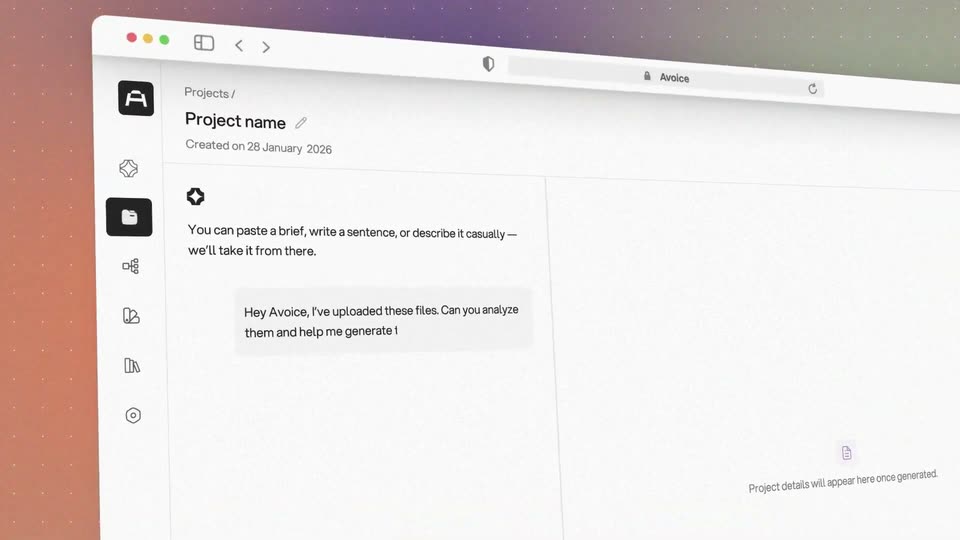
A tilted browser mockup of the Avoice app resolves from blur, then the camera zooms onto the Projects page as the cursor hovers the Create project button. The view reframes onto a chat thread where a user asks Avoice to analyze three uploaded PDF files.
On-screen text: “Every practice works differently”, “Read drawings”, “Draft RFls”, “Generate schedules”
Techniques: 3D mockup, Cursor demo, UI zoom, Kinetic type
Camera: Push in
A browser window of the Avoice interface tilts in 3D and flattens to a straight-on view, revealing a project page with a chat panel and a generated overview for Harborview Hotel. A cursor moves to the top right and clicks the Create project button.
Techniques: 3D mockup, Cursor demo
Camera: Pull out
A tilted browser mockup floats on a peach gradient. The interface dissolves from a project detail page to a projects grid of cards, with a cursor resting at the top right. Sidebar and card text blur during the crossfade.
Techniques: 3D mockup
Camera: Static
A tilted 3D browser window of the Avoice app floats on a dotted orange-to-purple gradient. A cursor clicks Assistant in the sidebar, and the window rotates flat as the Projects card grid cross-fades into the Assistant home screen.
Techniques: 3D mockup, Cursor demo, Morph
Camera: Push in
A tilted 3D browser window of the Avoice app floats on a dark purple field. The view zooms into the chat input, then pulls back as a cursor hovers the Library button, opening a file tree in the sidebar.
Techniques: 3D mockup, UI zoom, Cursor demo
Camera: Static
The product interface sits tilted in 3D perspective, showing a library folder tree on the left and a chat panel on the right. The view zooms into the left panel as a cursor hovers over the 01_General folder, popping a small tooltip with a green plus icon.
Techniques: 3D mockup, UI zoom, Cursor demo
Camera: Push in
A white file library panel on the left settles from a tilted 3D angle into sharp focus. A small folder chip, held by a green drag cursor, floats above the gray chat interface and its greeting prompt on the right.
Techniques: 3D mockup, Cursor demo
Camera: Pull out
A white product interface crossfades in, then the frame pulls back to present it as a floating window on a peach background. The left panel holds an AI chat with three uploaded PDF files, the right panel a floors table with floor codes and area codes.
Camera: Pull out
A flat white app window on a dotted orange-to-purple gradient shows a two-panel interface: a chat thread with three PDF file chips on the left and a floors table with codes on the right. The window eases slightly smaller over the shot.
Camera: Push in
A browser window of the Avoice app sharpens from a ghosted double image, then the view slowly zooms down the Generate Areas page, past the AI chat panel and Floors table, to reveal the Areas section at the bottom.
Techniques: UI zoom
Camera: Pan
An angled product screen fills the frame, an AI chat panel on the left beside floor and area tables on the right. The camera drifts down and right, sliding the chat reply and the Areas table into view.
Camera: Pan
A product interface fills the frame, showing a chat panel on the left and a data table of areas and levels on the right. The view pulls back to reveal the screen as a tilted browser window floating in 3D perspective.
Techniques: 3D mockup
Camera: Pull out
A glowing 3D cylinder anchors a network of smaller gradient cylinders joined by thin white lines, with a logo disc hovering above on a dark grid. UI panels and a perspective dashboard fade in around the edges as the frame widens.
Techniques: 3D mockup
Camera: Pull out
A dark grid holds a constellation of gray panels, browser windows and orange-purple cylinders, all wired to a glowing white logo at the center by thin dotted lines. Near the end, an orange ring and a white arc curve in at the frame edges.
Techniques: Masking
Camera: Static
A flat app window on a peach background shows a specifications list and a document; a Coordination check dialog slides up from the bottom while a cursor ticks each checkbox in turn.
Techniques: UI zoom, Cursor demo
Camera: Push in
A tilted product interface rests on a wooden desk in 3D perspective. A cursor clicks Run in a coordination-check dialog, and a list of seven flagged issues fills the panel. The cursor scrolls the list as a large white word Batch appears over the center.
On-screen text: “Batch”
Techniques: 3D mockup, Cursor demo
Camera: Pan
On a plain black frame, a centered line of white text builds up word by word, starting with “Batch” and ending with the full phrase. The camera stays locked off while the words pop in in sequence.
On-screen text: “Batch submittals and RFIs”
Techniques: Kinetic type
Camera: Static
A plain black background holds a single white headline centered in the frame. The text stays locked and static for the full duration while the voiceover continues.
On-screen text: “Batch submittals and RFIs”
Camera: Static
On a black, grainy background, “Review contracts in minutes” types in word by word in white sans-serif. Then a larger bold “What once took” slides in while a soft orange-to-purple oval glides behind the words from right to left.
On-screen text: “Review contracts in minutes”, “What once took”
Techniques: Kinetic type
Camera: Static
On a black background, concentric rounded rings in muted orange, purple and cream drift right. The white word “takes” slides in on the left while “minutes” scales up at the center of the rings.
On-screen text: “What once took”, “takes”, “minutes”
Techniques: Kinetic type
Camera: Static
The Avoice Projects interface, a grid of project cards in a browser window, sits on a warm orange-to-purple gradient. The window eases in with a brief ghosted double exposure, then scales up as the large words “takes” and “minutes” slide and pop in.
On-screen text: “takes”, “minutes”
Techniques: Kinetic type
Camera: Push in
A browser window of the Avoice file manager dissolves from a doubled ghost into a clean frame. A cursor clicks the Drawings group, opens a small menu, then a centered move-file dialog appears; the cursor travels to the Move button.
Techniques: UI zoom, Cursor demo
Camera: Push in
A browser mockup floats over a blurred backdrop. In the left chat pane, AI messages type in and a phase dropdown opens. On the right, a material card gives way to a video player that scales up to reveal a full specification document.
Techniques: UI zoom
Camera: Pull out
A tilted 3D mockup of the Avoice specifications editor rests on a peach gradient. The camera pushes in on the right-hand document pane while the part list and numbered clauses scroll into view.
Techniques: 3D mockup, UI zoom
Camera: Pan
A tilted browser window mockup of the Avoice schedule database zooms out from a close-up to float over a blurred document, as the product table scrolls down through rows of furniture and equipment. The view then zooms back in on the lower rows and pagination.
Techniques: 3D mockup, UI zoom
Camera: Pull out
A flat browser window for the Avoice app sits centered under a warm gradient banner. A spec sheet card slides out to the left while the white headline glides in from the right, settling above the document table.
On-screen text: “Your firm's knowledge, reusable”
Camera: Pan
A Library interface shows a search field and a table of document rows with category, status, and source columns. The screen scrolls up, sliding a starry gradient headline banner out of the top of the frame.
On-screen text: “Your firm's knowledge, reusable”
Camera: Static
A close-up of a Library search field types the word Manual, filtering a document list, then the frame pulls back to reveal the full app window with a left sidebar. The search is cleared and upload is typed, refiltering the rows.
Techniques: Cursor demo, UI zoom
Camera: Pull out
A browser window on a starry orange-to-green gradient shows the Avoice onboarding form. The view opens close on the fields, pulls back to the full window, a cursor clicks a team-size radio, and the page slides left to a workspace setup screen.
Techniques: UI zoom, Cursor demo
Camera: Pull out
A pale onboarding form with a black app icon, two input fields and three buttons sits centered on a light background. The view slowly zooms in, tightening the frame on the form.
Techniques: UI zoom
Camera: Static
A glowing logo circle anchors a dark network diagram, thin white lines linking isometric office buildings, cloud icons and 3D UI panels. The frame racks from blur into focus, green checkmark badges pop in beside the buildings, then the whole scene softens out again.
Techniques: 3D mockup
Camera: Pull out
The white AVOICE wordmark holds center on a black field, then scales down to a smaller lockup. The tagline appears beneath it and the locked-off frame holds still.
On-screen text: “Start today at avoice.co.”
Camera: Static