0:29


Totalis - Today @Outcomexyz rewards are live on Totalis > $1,000,000 in rew
Totalis · Fintech · Nov 2026
Prime Intellect · Oct 2026 · 0:18 · AI-annotated
Prime Intellect’s 0:18 launch film runs 13 scenes, about 1.5 s each. The product shows up at 0:04 and 5 features are revealed. There is no explicit call to action. The video opens on a glowing monospace promise over a black grid, then fires five capability words as static centered labels over short, glitched and scanline-distorted clips, and closes on the dual brand lockup. Its signature moves are the CRT scanline and glitch treatment plus the locked-center glowing label, with slow 60 BPM pacing cut against quick jumps between capability beats.
Is this your launch? to your site or press kit.
Totalis · Fintech · Nov 2026
Vercel · Developer tools · Sep 2022
Spacesheep · B2B · Nov 2026
A near-black grid background holds two centered lines of monospace text. The type starts dim and brightens to a soft white glow, while a faint horizontal shimmer flickers across the letters.
On-screen text: “TRAIN AND DEPLOY”, “FRONTIER MULTIMODAL MODELS”
Camera: Static
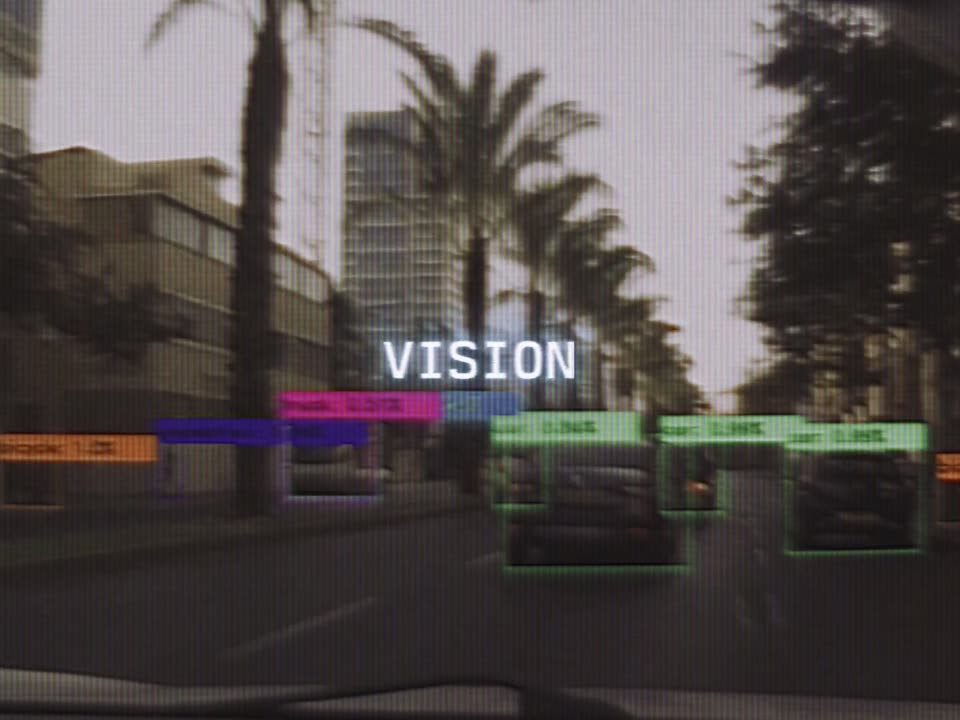
A static glitch dissolves a two-line headline into a dashcam street view lined with palm trees. A green bounding box and label lock onto a car ahead, white VISION text holds center, and colored glitch bars streak horizontally across the frame.
On-screen text: “TRAIN AND DEPLOY”, “FRONTIER MULTIMODAL MODELS”, “VISION”
Camera: Push in
From inside a moving car, a palm-lined street scrolls forward under a scanline texture. Green, red and magenta bounding boxes lock onto cars and buildings, while the word VISION holds steady in the center.
On-screen text: “VISION”
Camera: Push in
A shaky, blurred street view with palm trees and cars shows green detection boxes framing the vehicles. The word VISION holds centered in white while the footage moves beneath it.
On-screen text: “VISION”
Camera: Push in
A CRT-style screen with horizontal scanlines shows a flowchart of bordered text panels and a hand pointing at the lower left. The white caption COMPUTER USE glows at the center, held static over the diagram.
On-screen text: “COMPUTER USE”
Camera: Static
A tilted close-up of a monitor, washed in scanlines, shows overlapping document windows with faint text lines; a hand rests at the lower left. The panels drift slowly while the white title COMPUTER USE holds fixed at center.
On-screen text: “COMPUTER USE”
Camera: Static
A grainy, scanline-textured shot opens on a close-up of hands holding a dark device, then widens to a figure in a long coat standing in a rocky cave. The white word DECISION stays fixed at the center of the frame.
On-screen text: “DECISION”
Camera: Static
A grainy monochrome shot shows a figure in dark clothing standing at the right against a rough wall, the whole frame rippled by vertical scanline glitch distortion. The word DECISION glows in white at the center, held static.
On-screen text: “DECISION”
Camera: Pull out
A dark field holds a rotating vortex of pale light dashes that swirl and expand outward from the center, growing brighter and wider across the shot. The word VOICE stays fixed in the middle over the motion.
On-screen text: “VOICE”
Techniques: Particles
Camera: Push in
A dark fingerprint-like spiral of pale dashes fills the frame, its center pulsing bright and dark. The word VOICE sits centered in white, static against the rotating pattern.
On-screen text: “VOICE”
Camera: Push in
A grainy, low-resolution green landscape of trees and open field fills the frame, soft and out of focus. A small white VIDEO label sits centered and stays fixed while the footage drifts slowly.
On-screen text: “VIDEO”
Camera: Static
A blurry green landscape with vertical scan lines fills the frame, shifting subtly as if the signal is unstable. The word VIDEO sits centered in white with a soft glow, locked in place throughout.
On-screen text: “VIDEO”
Camera: Static
A white lockup of the PRIME Intellect and Moondream logos sits centered over a blue-gray field of vertical scanlines. A soft field of dark speckles behind it sharpens from a heavy blur, then scatters out, while the text stays still.
On-screen text: “PRIME Intellect”, “Moondream”
Camera: Push in