1:11

Resin EDA
Resin Technologies · B2B · Oct 2026
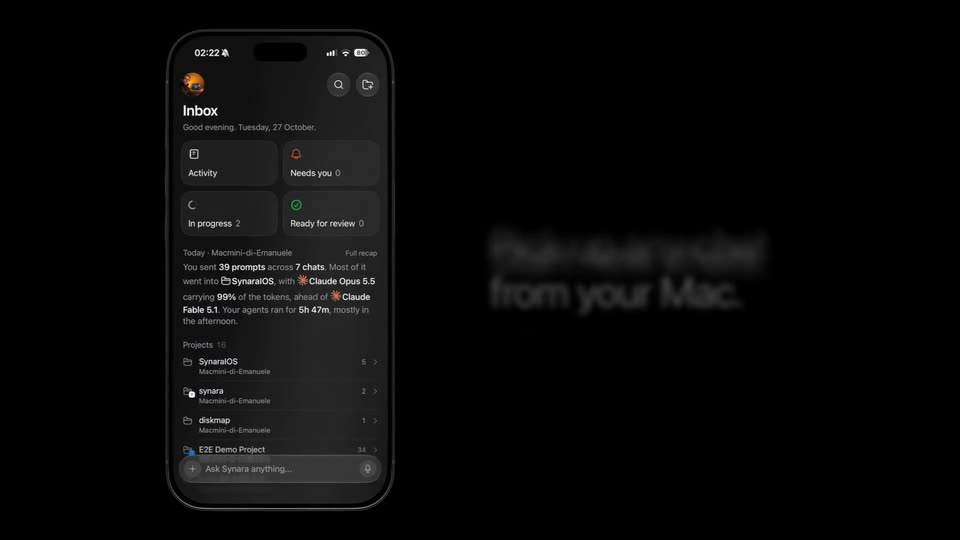
Synara’s 0:30 launch film runs 17 scenes, about 1.8 s each. The product is on screen from the first frame and 6 features are revealed. There is no explicit call to action; a voiceover carries the film. The video is a black-canvas reel of 3D iPhone mockups, each beat pairing a two-line headline with the device and swapping copy through blur crossfades, closing on an icon-ring orbit that collapses into the logo lockup. Pacing is quick at about 20 cuts per minute, driven by blur-in headlines, 360 degree phone spins, and a single coral accent word per claim.
Is this your launch? to your site or press kit.
Resin Technologies · B2B · Oct 2026
Unitree 4D LiDAR L1 · Mar 2023
Airtable · Productivity · Oct 2026
Films whose music sounds like this one, voice left out
Sume · Hip-hop, trap
Fin · Electronic, Hip-hop, Trap
ElevenLabs · Electronic
On a black background, the white-and-coral headline holds center while a gray subline fades in beneath it, then the frame cuts to a centered, slightly blurred iPhone mockup displaying the app inbox.
On-screen text: “Meet Synara iOS.”, “Your agents, in your pocket.”
Techniques: 3D mockup
Camera: Static
A dark-mode inbox app on a 3D phone mockup against black. The device tilts and rotates, framing a close-up of the stat tiles and recap text, then settles into a front-on view of the full screen.
Techniques: 3D mockup, UI zoom
Camera: Push in
A dark phone mockup sits at a slight angle on the left, its inbox UI resolving from a soft blur into sharp focus, while a two-line white headline fades in on the right.
On-screen text: “Pick up any chat from your Mac.”
Techniques: 3D mockup
Camera: Static
A 3D phone mockup showing an inbox app sits flat on the left with a white two-line headline on the right, then the headline clears and the phone spins in 3D to reveal its dark back on black.
On-screen text: “Start new chats.”, “Spin up worktrees.”
Techniques: 3D mockup
Camera: Static
A white two-line headline, 'Connect all your computers.', sharpens from blur into focus on the left, while an angled 3D iPhone mockup showing an inbox screen sits on the right against black.
On-screen text: “Connect all your computers.”
Techniques: 3D mockup, Kinetic type
Camera: Static
On a black background, a 3D iPhone tilted to the right displays the dark Inbox screen. On the left, a two-line white headline cycles, blurring as it changes from Connect all your computers to Run it on your Mac mini.
On-screen text: “Connect all your computers.”, “Run it on your MacBook.”, “Run it on your Mac mini.”
Techniques: 3D mockup, Kinetic type
Camera: Static
A tilted iPhone mockup in 3D perspective holds a dark inbox app on the right. On the left, the white headline “Run it on” stays fixed while the coral second line crossfades from “your Mac mini.” to “any computer.”
On-screen text: “Run it on”, “your Mac mini.”, “any computer.”
Techniques: Kinetic type, 3D mockup
Camera: Static
On a black background, the previous headline blurs out on the left as the white line Every chat settles in, while a phone mockup in 3D perspective appears on the right showing a dark activity feed.
On-screen text: “Every chat,”
Techniques: 3D mockup
Camera: Static
A dark phone mockup in 3D perspective sits on the right, showing a chat activity list, then a near-empty follow-up screen. On the left, a white two-line headline switches from “Every chat, at a glance.” to “Watch it work, live.” on a black background.
On-screen text: “Every chat, at a glance.”, “Watch it work, live.”
Techniques: 3D mockup
Camera: Static
A black iPhone mockup sits at a slight angle on the right, its chat screen filling with messages one by one, while the white headline stays locked on the left against a black background.
On-screen text: “Watch it work, live.”
Techniques: 3D mockup
Camera: Static
A 3D phone mockup on the right shows a chat thread with an AI assistant. White headline text holds on the left, then blurs and fades as the phone slides left and scales down, exiting the frame on black.
On-screen text: “Watch it work, live.”
Techniques: 3D mockup
Camera: Static
A phone mockup sits centered on black, its chat screen facing the camera, while rounded square app icons fade in and spread into a circular arc around it. A two-line headline holds above, the last word in coral.
On-screen text: “All your agents,”, “in your pocket.”
Techniques: 3D mockup
Camera: Static
A phone mockup in 3D perspective sits under a two-line headline, ringed by floating app icons at varying depths. The phone and icon ring tilt and rotate as the camera orbits, then everything defocuses and fades to black.
On-screen text: “All your agents,”, “in your pocket.”
Techniques: 3D mockup, Parallax, Speed ramp
Camera: Static
On a black field, a faint cluster of small app icons blurs and collapses, then a white three-pronged logo mark sharpens into the center and holds still.
Techniques: Morph
Camera: Static
On a black background, the white Synara mark and wordmark scale into the center, then a small caption fades in below in gray with the final phrase in orange.
On-screen text: “Synara”, “Synara iOS beta. Available now.”
Camera: Static
A black sign-off holds the white Synara logo and wordmark centered, with the tagline beneath it, the final phrase in orange. The logo scales in subtly on a locked-off frame.
On-screen text: “Synara iOS beta. Available now.”
Camera: Static
On a black background, the Synara wordmark scales up at the center of a locked-off frame, acting as the brand sign-off. No other element moves or enters.
On-screen text: “Synara”
Techniques: Kinetic type
Camera: Static