0:43
Explore
Eugenia Kuyda - Wabi 2.0 is live! personal agents are one person, one chat. but the
Wabi · Oct 2026 · 1:15 · AI-annotated
- Length
- 1:15
- Scenes
- 37 · 2.0 s avg
- Product on screen
- 0:00
- Features shown
- 3
- Voiceover
- No
00:00:00 / 01:15:05
Wabi’s 1:15 launch film runs 37 scenes, about 2.0 s each. The product is on screen from the first frame and 3 features are revealed. There is no explicit call to action. The video is built as a chain of short beats on a flat light gray field, alternating centered text cards, 3D phone mockups, and glossy 3D object animation, moving from a tagline into three feature demos (group chat mini-apps, Marathon Coach, bill negotiation) and closing on a logo lockup. Signature moves include words scaling or swapping in place at center, rings of objects orbiting the text, and flat UI reframing into 3D perspective, all cut at a brisk, even pace.
No filming indicatedEstimated needs: 4 capture groups — your screens or recordings · 1 official logo — reused across the film · 8 graphic passages — draw or supply · 13 3D passages — build or supply
Is this your launch? to your site or press kit.
More like this
1:38

The Pika x ChatGPT Plugin Extension is here
Pika · AI · Oct 2026
1:28

Customer Support Software Demo | Help Scout x MotionCue
Help Scout · Oct 2026
Eugenia Kuyda - Wabi 2.0 is live! personal agents are one person, one chat. but the, scene by scene
· 37 scenes as text
01 · Product intro · 0:00–0:02
A white countdown card sits centered on a light gray field. Its header photo fades in, showing a golden statue beneath purple blossoms, while black flip tiles tick down and airport codes flip from JFI/KAT to JFK/MEX. The card lifts and dissolves as a wabi logo rises above.
Camera: Pull out
02 · Product intro · 0:02–0:04
A white iPhone mockup sits angled in 3D on a light gray background. The screen shows the wabi home screen with a pink music widget, a countdown flip clock, and an orange sunset card. The frame starts tight on the top widgets and pulls back to reveal the full phone.
Techniques: 3D mockup
Camera: Static
03 · Product intro · 0:04–0:10
Centered black sans-serif lines swap in sequence on a light gray field: The personal AI, The powerful AI assistant, The visual AI assistant, you use. The last line, together, holds while circular video clips of people pop in around it, some blurred in motion.
On-screen text: “The personal AI”, “The powerful AI assistant”, “The visual AI assistant”, “you use”, “together”
Techniques: Kinetic type, Masking
Camera: Static
04 · Feature reveal · 0:10–0:12
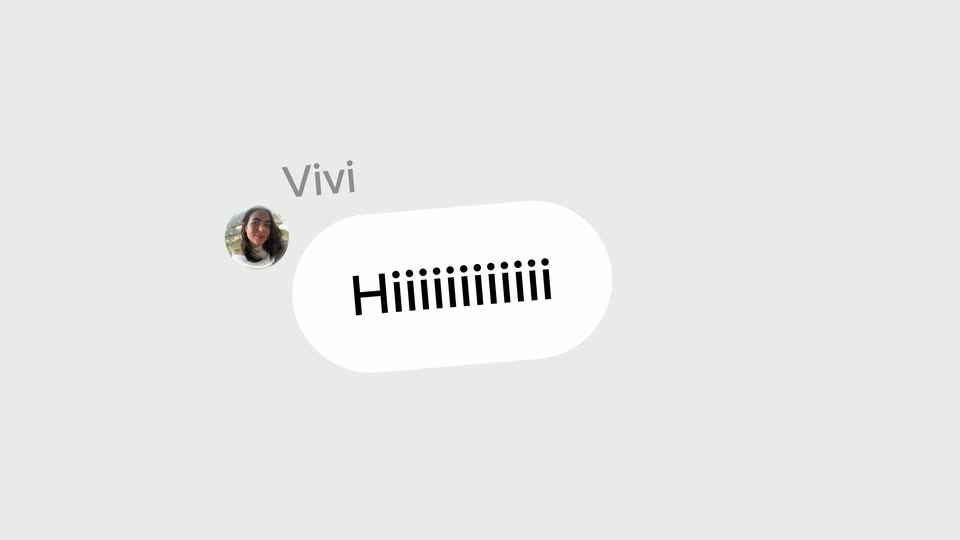
A circular avatar labeled Vivi sits on a light gray field. A white message bubble begins as a small circle reading Hi, then stretches horizontally into a wide pill as the letters elongate into a long row of i's topped with dots.
Techniques: Kinetic type, Morph
Camera: Static
05 · Feature reveal · 0:12–0:15
A light gray group chat builds up: a join notice fades in, then Vivi's and Leo's message bubbles drop in, a heart reaction pops onto Leo's bubble, and the thread scrolls up to reveal Wabi's message with a Local recs card.
Camera: Pull out
06 · Feature reveal · 0:15–0:18
A white iPhone mockup on a pale gray background rotates from a three-quarter angle to face the camera. Inside, a Mexico City map pans across neighborhoods as the bottom place card crossfades between Rosetta and Casa Gilardi.
Techniques: 3D mockup
Camera: Pull out
07 · Feature reveal · 0:18–0:22
A phone mockup in 3D perspective on a light background shows a group chat scrolling up through travel messages, ending on a black booking bubble and a Confirm booking button; the camera then zooms into the button.
Techniques: 3D mockup, UI zoom
Camera: Push in
08 · Feature reveal · 0:22–0:24
A single line of black text slides in and holds centered on a plain light gray background. The frame stays locked off while the words settle into place.
On-screen text: “Your group chats now have”
Techniques: Kinetic type
Camera: Static
09 · Feature reveal · 0:24–0:25
A white phone mockup in 3D perspective sits centered over a large black “mini-apps” headline. Its screen scrolls a list of movie entries with posters and red X buttons, while faint gray feature words drift upward behind the phone at a different speed.
On-screen text: “mini-apps”
Techniques: 3D mockup, Parallax
Camera: Pan
10 · Feature reveal · 0:25–0:26
A white phone mockup in 3D perspective stands before a wall of oversized gray and black words. The phone screen scrolls up through tracker cards while the large background word shifts from trackers to games.
On-screen text: “mini apps”, “trackers”, “experiments”, “insights”, “looks”, “games”
Techniques: 3D mockup
Camera: Static
11 · Feature reveal · 0:26–0:27
A white iPhone floats in 3D perspective over a pale gray field of large gray words, with the black word games above it. The screen plays a 3D snowboarder carving down a snowy slope, then cuts to a music flow UI showing a DANCE card and a color palette as the word list scrolls up.
On-screen text: “games”, “experiments”, “inspires”, “loves”, “player”
Techniques: 3D mockup
Camera: Static
12 · Feature reveal · 0:27–0:28
A white click-wheel iPod in 3D perspective tilts and rises at center, its screen switching from a dark Cover Flow view to a bright magenta playback view. Behind it, the black headline “experiments” and rows of large gray words drift upward at different speeds.
On-screen text: “experiments”
Techniques: 3D mockup, Parallax
Camera: Static
13 · Feature reveal · 0:28–0:29
A blue boarding pass card, tilted in 3D, sits at the center of a light gray frame and rotates right to expose a darker card behind it. The black words Some and last a day stay fixed on either side.
On-screen text: “Some”, “last a day”
Techniques: 3D mockup
Camera: Static
14 · Feature reveal · 0:29–0:31
A fanned stack of product cards sits center frame beside the word Some, with small words day, a, last scattered lower right. The stack slides off left as grow with you scales in, the scattered words fade, and two large gray W letters pop in between the words.
On-screen text: “Some”, “day”, “a”, “last”, “grow with you”, “W”
Techniques: Kinetic type
Camera: Static
15 · Feature reveal · 0:31–0:32
A light gray card holds a white app icon with red concentric rings at the left edge and a black headline where the letter W scales up in four steps between 'grow' and 'with you'. The frame then slides right as a tilted dark gray pill with 'Help me train for my half marathon' enters from the right.
On-screen text: “grow W W W W with y”, “SPLITS”, “Help me train for my half marathon”
Techniques: Kinetic type
Camera: Static
16 · Feature reveal · 0:32–0:33
A light gray chat screen shows a black message bubble on the right and a white Wabi reply on the left. As a new bubble with a circular icon and loading dots slides in at the bottom, the two messages shift upward.
Camera: Static
17 · Feature reveal · 0:33–0:34
A chat thread on a light gray field: a dark user bubble asks for half-marathon help, then a Wabi reply bubble and a Marathon Coach build card slide in. The build card expands into a large white card with a bold Marathon Coach title.
Techniques: UI zoom
Camera: Push in
18 · Feature reveal · 0:34–0:37
A flat white phone mockup is centered over a blurred clip of runners. The Marathon Coach screen inside scrolls up through a weekly calendar, a bar chart and a large 7:30 time, while the runners behind keep moving.
Camera: Pull out
19 · Feature reveal · 0:37–0:39
A white phone mockup of the Marathon Coach app is centered over blurred, moving runners. The screen crossfades from a race-day view to a weekly volume bar chart, then the large black word 'Most' slides in across the display.
On-screen text: “Most software is dead...”
Techniques: 3D mockup, Kinetic type
Camera: Pan
20 · Other · 0:39–0:40
On a flat light gray field, the black phrase slides horizontally into the center of the frame and then holds on a locked-off shot.
On-screen text: “Most software is dead...”
Techniques: Kinetic type
Camera: Static
21 · Other · 0:40–0:42
A plain light gray frame holds the dark gray line 'Most software is dead...', which slides in and is then replaced by 'wabi is alive' while blurred 3D shapes, a blue disc, a purple sphere, a pink star and an iridescent disc, streak across the scene.
On-screen text: “Most software is dead...”, “wabi is alive”
Techniques: Kinetic type
Camera: Static
22 · Other · 0:42–0:44
The word alive in black serif sits centered on a pale gray field as a ring of glossy 3D objects and emoji faces orbits it. It cuts to a locked-off frame where talks appears oversized between an and to you, ringed by glass spheres holding a chess queen.
On-screen text: “alive”, “an talks to you”
Techniques: Kinetic type, 3D mockup
Camera: Pan
23 · Other · 0:44–0:45
A ring of glossy circular bubbles, each holding a small product shot, orbits clockwise around the centered black headline 'and talks to you', passing in front of the letters on a light gray field.
On-screen text: “and talks to you”
Camera: Static
24 · Other · 0:45–0:46
A ring of small black numbers rotates on a light gray field, each trailing a faded duplicate. The bold center word swaps from not to you while a small orange triangle marker spins around the dial.
On-screen text: “not”, “you”
Techniques: Kinetic type
Camera: Static
25 · Other · 0:46–0:47
On a flat light gray field, a ring of minute numbers from 00 to 55 rotates around a bold black center word. An orange triangle pointer marks a spot on the ring. As the dial spins, the center word swaps from 'set' to 'reminder'.
On-screen text: “set”, “reminder”
Camera: Push in
26 · Other · 0:47–0:52
A collage of photo clips scatters across a light gray field, then blurs and flies off as the line because it knows you. holds center. The text swaps to It pays attention., then It shows up when it matters as a single photo slides in across the words.
On-screen text: “because it knows you.”, “It pays attention.”, “It shows up when it matters”
Techniques: Kinetic type
Camera: Pan
27 · Other · 0:52–0:53
A black headline scales in across a light gray field, flanked by two tilted photo cards: a person in pink taking a selfie and two women holding drinks. The words settle into place while the photos ease from a slight rotation.
On-screen text: “It shows up when it matters”
Techniques: Kinetic type
Camera: Pull out
28 · Demo · 0:53–0:58
A light gray chat screen shows a Wabi message about renegotiating an internet bill. A black “yes please” bubble and two more Wabi replies appear in sequence as the list scrolls up. The flat interface then reframes into a 3D phone mockup in perspective.
Techniques: 3D mockup
Camera: Pull out
29 · Demo · 0:58–1:02
A flat iPhone shows a chat where the assistant renegotiates an internet bill, then the view zooms into the monthly total as a savings line slides in. The phone rotates into 3D and home-screen widgets pop out around it.
Techniques: UI zoom, 3D mockup
Camera: Pan
30 · Feature reveal · 1:02–1:05
A white iPhone mockup sits centered, its home screen swapping the top widget pairs, while a horizontal row of colorful widgets scrolls left behind it. The black headline fades in above the device.
On-screen text: “A home screen that's truly yours”
Techniques: 3D mockup, Parallax
Camera: Pan
31 · Feature reveal · 1:05–1:06
A white iPhone with a home screen of app icons sits centered on a light gray field beneath a black headline. A row of colorful widgets floats behind the phone and slides right while the phone drifts left, the layers moving at different speeds for depth.
On-screen text: “A home screen that's truly yours”
Techniques: Parallax
Camera: Pan
32 · Other · 1:06–1:08
Centered on a light gray field, the words iOS., Android. and Desktop. appear one by one and scale up slightly. The background then crossfades to a warm peach gradient as the line softens into a translucent frosted state.
On-screen text: “iOS.”, “Android.”, “Desktop”
Techniques: Kinetic type
Camera: Static
33 · Other · 1:08–1:09
Centered cream text “iOS. Android. Desktop” scales over a soft pink-to-orange gradient, then the gradient resolves into glossy 3D abstract shapes and floating spheres as the text clears and the view pushes through the depth.
On-screen text: “iOS. Android. Desktop”
Techniques: Kinetic type, Parallax
Camera: Static
34 · Outro · 1:09–1:10
A glossy purple-to-orange gradient surface curves across the frame, with small reflective spheres resting on a thin ridge. The camera drifts across it, bringing a large out-of-focus sphere into the foreground.
Techniques: Parallax
Camera: Static
35 · Outro · 1:10–1:11
A glossy translucent band tilts across a pink-to-orange gradient, carrying small pearl-like spheres. The band curves and coils into a spiral as the view orbits, the spheres rolling along its length.
Techniques: Morph
Camera: Static
36 · Outro · 1:11–1:12
Five copper spheres hover over a pale gradient as two white rings tilt and rotate around them. The spheres darken to brown and the rings flatten into a horizontal orbit.
Camera: Pull out
37 · Outro · 1:12–1:15
A white rounded card fills the frame, five glossy black spheres scattered across it. The card scales down to a small app icon as the spheres snap into a tight five-dot cluster, then the wordmark wabi.ai slides in to its right on a plain white field.
On-screen text: “wabi.ai”
Techniques: Morph
Camera: Pull out