1:33

NOW AVAILABLE: GitHub Copilot Chat for JetBrains IDEs
GitHub · Developer tools · Mar 2024
Supabase’s 1:53 launch film runs 20 scenes, about 5.7 s each. The product is on screen from the first frame and 2 features are revealed. The call to action lands at 1:27 (77% in), over a voiceover. A host-led launch video that alternates a talking-head in a dim studio with split-screen dark UI and white line-drawn icon graphics on near-black. Each feature gets a title card followed by a tight UI demo, with a green accent marking brand actions and a steady, conversational pace.
Is this your launch? to your site or press kit.
GitHub · Developer tools · Mar 2024
Framer · Design · Mar 2026
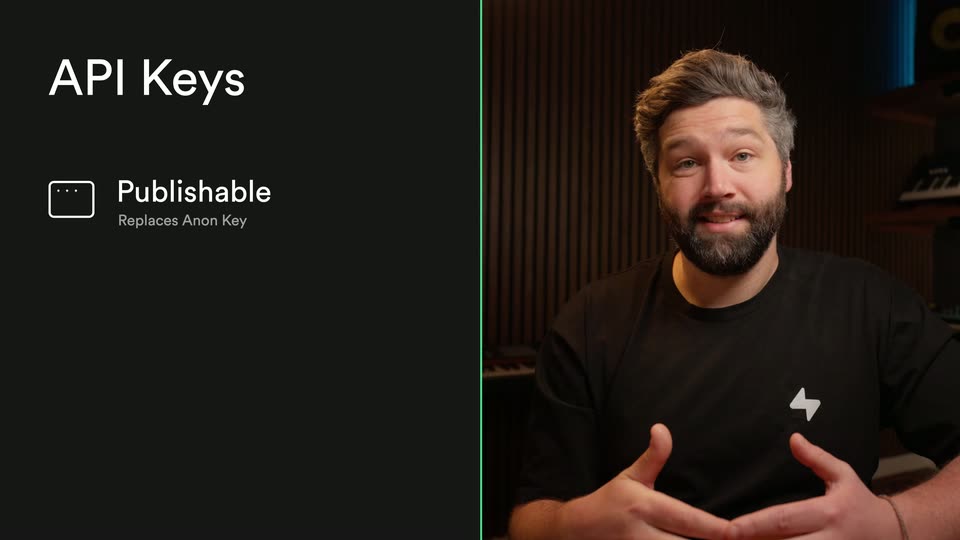
A bearded man in a black t-shirt with a small white lightning mark sits at a desk in a dim studio, hands open and gesturing as he talks. Synths on shelves and a wood-slat wall fill the background.
Camera: Pan
Split screen: a dark login form with email and password fields and a green Sign In button on the left; a bearded man in a black T-shirt talking on the right. The form gives way to a white line-drawn person icon, a checkmark is drawn beside it, then it fades.
Techniques: Split screen
Camera: Static
A bearded man in a black t-shirt with a small white bolt logo sits in a studio, synthesizers on shelves to his right. He speaks to camera, gesturing with both hands and holding up two fingers to count points.
Camera: Pan
Split screen: a dark API-keys panel on the left where outline highlights shift between the publishable and secret key rows and two new key cards fade in below, while a bearded presenter in a black tee gestures on the right.
Techniques: Split screen
Camera: Push in
A bearded man in a black t-shirt sits at a desk in a music studio, gesturing with both hands as he speaks to the camera. Keyboards and synths sit on lit shelves behind him against dark acoustic paneling.
On-screen text: “Publishable key”, “Secret keys”
Camera: Static
Two white outlined rounded rectangles sit stacked in the center of a dark field, each holding a small dot near its left edge. A thin checkmark draws in at the top right of the upper box, holds briefly, then fades out.
Camera: Static
Two stacked white outlined rounded rectangles sit on the left of a dark screen, opposite a user icon that brightens from gray to white. A dashed line stretches between them, and a small segmented ring spins next to the head.
Camera: Static
Two white line icons sit on a near-black background: a stacked pair of rounded rectangles with dots on the left and a person silhouette on the right, joined by a faint dashed line. The icons fade out to a plain dark screen.
Camera: Static
A bearded man in a black tee talks and gestures at a studio table. Checkmark captions “Opt in to use” and “No code changes” appear on the left, then a dark split panel titled “API Keys” lists “Publishable” and “Secret” with sublines and icons while he continues on the right.
On-screen text: “Opt in to use”, “No code changes”, “API Keys”, “Publishable”, “Replaces Anon Key”, “Secret”, “Replaces Service Role Key”
Techniques: Kinetic type, Split screen
Camera: Pan
A bearded man in a black t-shirt sits at a desk in a wood-paneled studio, gesturing with both hands as he speaks. A dark API keys settings panel appears on the left, showing publishable and secret key fields.
Camera: Static
On a dark API Keys settings page, a cursor opens a create-key modal, types 'stripe' into the Name field and clicks Create. The modal closes, a confirmation toast pops top right, and a stripe row joins the key list.
Techniques: Cursor demo
Camera: Static
A dark API Keys settings screen dims as a Create new secret API key modal pops into the center. The Name field fills in as open_ai, then the cursor clicks the green Create button, which shows a loading spinner.
Techniques: Cursor demo
Camera: Static
A dark API Keys settings page sits in a locked-off frame. A cursor hovers over the default row of the secret keys table, and a toast notification appears at the top right confirming a new secret API key is ready.
Techniques: Cursor demo
Camera: Static
A bearded man in a black t-shirt sits at a desk in a dim music studio, speaking to the camera and gesturing with both hands. Synthesizers rest on shelves behind him against a wood-slat wall.
Camera: Static
The API Keys settings page is shown in a dark theme. A cursor opens the stripe key's row menu and selects Delete, a centered confirmation modal appears, the cursor types stripe and clicks the red confirm button, then a success toast appears top right as the row disappears.
Techniques: Cursor demo
Camera: Static
A bearded man in a black t-shirt sits at a desk in a dim studio with wood-slat walls and shelves of keyboards, talking to the camera and gesturing with both hands.
Camera: Pull out
Two white outlined rounded rectangles, each with a small dot on the left, sit stacked in the center of a dark field. A checkmark draws in at the top right of the upper box, holds briefly, then fades out.
Camera: Static
On a black field, two white line icons face each other: stacked toggles on the left and a person silhouette with a small circle on the right. The toggle knobs slide to the left edge, a dashed line draws between the two icons, then the whole composition fades to black.
Techniques: Morph
Camera: Static
A bearded man in a black t-shirt sits in a dim studio with wood-slat walls and keyboards on shelves, talking to camera and gesturing with open hands. He then points with both index fingers off to the side as the frame tightens on him.
Camera: Push in
A bearded man in a black t-shirt sits in a dim studio with synths on shelves, raising both index fingers to gesture, then lowering his hands as he speaks directly to the camera.
Camera: Static