0:39

Ashley Hunter - 🚀 Introducing Angular Native The stunning developer experience and e
Angular Native · Sep 2026
SIMA 2’s 1:37 launch film runs 57 scenes, about 1.7 s each. The product shows up at 0:05 and 4 features are revealed. The call to action lands at 1:33 (96% in), over a voiceover. The video is a capability walkthrough: a fast montage of game clips in sliding rounded cards, a title reveal, then one short demo per feature, ending on a real-world vision and a URL. Its signature moves are the glowing rounded-corner cards sliding over a dark blurred backdrop, the white text cards on black, and the black pill game-name badges pinned to the corner.
Is this your launch? to your site or press kit.
Angular Native · Sep 2026
Reconero · Government · Oct 2026
Films whose music sounds like this one, voice left out
Incandor · Electronic
Wonder Studio · Cinematic Orchestral and Electronic Ambient
OpenAI · Electronic
A rounded-corner panel frames a third-person game view. A suited figure in white runs across a green field toward a downed red aircraft, the camera tracking behind. Corner HUD shows vitals and a quest prompt.
Camera: Pull out
A rounded-corner card frames a third-person game view: a suited character runs across a green field toward a red and white aircraft. The card slides left, revealing the edge of a second panel on the right, against a dark blurred background.
Camera: Pull out
Two rounded panels of game footage slide in from opposite edges over a blurred dark blue backdrop. The left shows a suited character running toward the camera on a grassy field with an orange ship behind. The right shows a first-person view of a metallic hangar deck.
Techniques: Split screen
Camera: Pan
Two rounded video panels sit side by side on a deep blue field with a blurred copy behind. The left panel shows a third-person view of a red aircraft on a green plain, the right a first-person cockpit looking out at a space station, both sliding and settling into place.
Techniques: Split screen
Camera: Pan
A rounded-rectangle panel showing a first-person space station view slides left as a second panel opens on the right with a character running near a house, all over a blurred backdrop.
Techniques: Masking, Split screen
Camera: Pan
Two rounded game views sit side by side on a blurred dark blue field: a sci-fi hangar with a HUD on the left and a sunlit farm with a tractor on the right, the right view panning across the barn.
Techniques: Split screen
Camera: Pan
A rounded card holds a 3D render of a goat walking down a sunlit farm path. The card scales up over a blurred backdrop until it fills the frame, with motion blur at the edges as the in-scene camera tracks the goat.
Techniques: Masking
Camera: Push in
A rounded card of a green alien game world, with a runner and HUD, zooms from a small centered frame to full screen. The blurred title SIMA sharpens and a 2 slides in beside it, above a static subtitle.
On-screen text: “SIMA 2”, “An agent that plays and reasons in virtual worlds”
Techniques: UI zoom
Camera: Push in
An astronaut in a green suit walks across a 3D alien landscape of rolling hills and floating rocks, viewed from behind. A large white title and a one-line subtitle sit centered over the scene, static while the world scrolls past.
On-screen text: “SIMA 2”, “An agent that plays and reasons in virtual worlds”
Camera: Static
A 3D rendered alien terrain with a suited figure in the foreground drifts as the camera tracks across it, while a large white title SIMA 2 and a smaller subtitle stay fixed in the center over the moving scene.
On-screen text: “SIMA 2”, “An agent that plays and reasons in virtual worlds”
Techniques: Parallax
Camera: Static
A figure in a green coat stands with back to camera in a misty green valley, facing a waterfall pouring from floating inverted rock spires. The camera slowly pushes in as small rock shards drift in the pale sky.
On-screen text: “Genie”
Techniques: Parallax
Camera: Static
A locked-off game screen shows a red-suited astronaut drilling a rock wall in a grey cave, sparks flying. A black pill label reading Space Engineers sits top right while the in-game tool panel and prompts stay static.
On-screen text: “Space Engineers”, “Genie”
Camera: Static
A 3D monarch butterfly flutters forward along a dirt path through a sunlit meadow of purple, yellow and red wildflowers. The camera tracks low behind it, the grass and blooms sliding past in warm golden light.
On-screen text: “Genie”
Techniques: Parallax
Camera: Push in
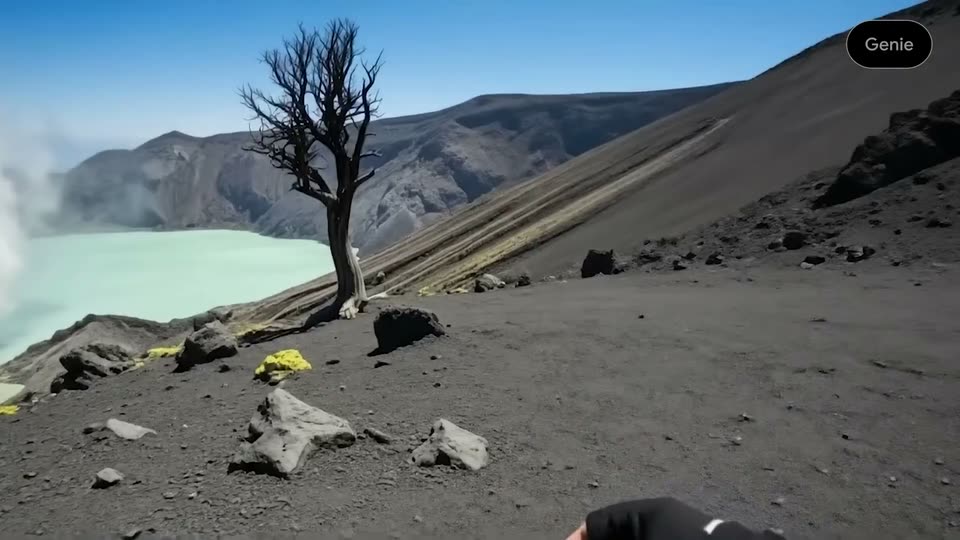
First-person view from a person in black fingerless gloves at a volcanic crater rim; the camera pans right across a turquoise lake, yellow sulfur deposits, and a bare dead tree set against grey mountains under a blue sky. A black Genie badge holds the top-right corner.
On-screen text: “Genie”
Techniques: Parallax
Camera: Pan
First-person Minecraft view of a grassy dirt slope with a tree trunk at the left edge and a grey stone block mid-frame. The player holds a pickaxe at the right while the view drifts right. Health hearts, hunger icons and a hotbar sit along the bottom.
On-screen text: “Genie”, “MineDojo”
Camera: Push in
A first-person Minecraft view pans right across a grassy dirt slope toward a stone wall and a thin strip of water. The player holds a pickaxe at the bottom right, with the health and hunger bars and hotbar fixed along the bottom edge. A white crosshair stays centered.
On-screen text: “MineDojo”
Camera: Push in
A spacesuited character stands on a green alien plain in a No Man's Sky playthrough. A vertical panel of numbers slides in at the right edge while a dark caption box with the line 'SIMA 2: Okay, the on-screen instruction is' appears at the bottom, then both slide out.
On-screen text: “No Man's Sky”, “MineDojo”, “SIMA 2: Okay, the on-screen instruction is”
Camera: Static
A No Man's Sky starship inventory screen shows a red and white 3D starship on the right over a blurred green field. A MODIFY panel with craft and transfer options opens in the center as a small cursor ring clicks, while a bottom subtitle narrates the repair task.
On-screen text: “SIMA 2: Okay, the on-screen instruction is to repair the Pulse Engine. I'll start by accessing the starship's inventory.”
Techniques: Cursor demo
Camera: Static
A blurred green backdrop sits behind the No Man's Sky starship inventory screen. A crosshair cursor clicks the damaged Pulse Engine icon, expanding a panel that lists a Repair option with Hermetic Seal and Metal Plating. A white subtitle caption runs along the bottom.
On-screen text: “SIMA 2: Okay, the on-screen instruction is to repair the Pulse Engine. I'll start by accessing the starship's inventory.”
Techniques: Cursor demo
Camera: Static
A No Man's Sky starship repair menu blurs and dims to a soft green haze. A white caption types out letter by letter at lower left, reading SIMA 2: I've opened the starship, while the interface panels fade behind it.
On-screen text: “SIMA 2: I've opened the starship”
Techniques: Kinetic type
Camera: Static
A game screen of a starship with an open brown panel; a glowing Engine Part icon drops in and a dotted line links it to a target reticle on the panel. A quest banner slides in top right while a subtitle types out at the bottom.
On-screen text: “No Man's Sky”, “SIMA 2: I've opened the starship inventory. I see the damaged Pulse Engine.”
Techniques: Kinetic type
Camera: Static
The No Man's Sky repair interface overlays a green starship: a tooltip on the damaged Pulse Engine part updates to a repaired state while a two-icon diagram stays pinned. The camera slowly pushes in as embers glow behind the hull.
On-screen text: “No Man's Sky”, “SIMA 2: I've opened the starship inventory. I see the damaged Pulse Engine. Now I'll check what's needed to fix it.”
Camera: Static
On a black background, the white headline “Multimodal Prompting” reveals left to right at center, and four line icons (chat bubble, microphone, image, document) below it flare up in sequence with a soft glow that settles to flat white.
On-screen text: “Multimodal Prompting”
Techniques: Kinetic type
Camera: Static
A locked-off view of a green game landscape with an astronaut in the foreground and a crashed ship ahead. A red outline sketch of a ship is drawn line by line across the hill, while a caption at the bottom types out the user's prompt.
On-screen text: “Multimodal Prompting”, “User: Find the object drawn in the sketch and jump on top of it.”
Camera: Static
A glowing white rounded rectangle sits centered on black. Inside, the bold label SIMA 2 and a three-line caption fill in line by line, the type brightening from gray to white as each line completes.
On-screen text: “SIMA 2:”, “Okay, I see the crashed ship.”, “I'll head towards it and jump”, “on top of it.”
Techniques: Kinetic type
Camera: Static
Overhead locked-off view of a 3D game scene: a white-suited astronaut stands on a red crashed ship as a fireball bursts from the hull; subtitle lines appear at the bottom.
On-screen text: “SIMA 2:”, “Okay, I see the crashed ship.”, “I'll head towards it and jump”, “on top of it.”
Camera: Pan
A 3D render shows an astronaut in a white suit standing on the orange wing of a spacecraft, a fire plume and blue electric arcs erupting beside them. The camera pushes in toward the helmet as the flames shrink to a glow. A black tag reading the game title sits in the top right.
On-screen text: “No Man's Sky”
Techniques: Particles
Camera: Push in
A gray koala robot walks down a sunny suburban street, camera tracking behind it past a white picket fence toward a red house. A round minimap sits bottom left and a black Wobbly Life badge top right while dialogue captions appear in a dark bar below.
On-screen text: “Wobbly Life”, “User: Go to the house colored like a ripe tomato.”, “sIMA 2: Okay, I see the house that looks like a tomato. Heading there now.”
Camera: Push in
A white glowing rounded-rectangle outline sits centered on black. Inside, a bold heading line appears, then a paragraph types out word by word from the left and holds for the rest of the clip.
On-screen text: “SIMA 2 Reasoning: The user wants me to go to the 'tomato house'. Based on the description 'ripe tomato', I identify the red house down the street.”
Techniques: Kinetic type
Camera: Static
A grey koala character with a backpack runs down a sidewalk past red and blue houses, then steps onto the grass as the camera tracks behind. A circular orange minimap sits in the lower left corner.
On-screen text: “Wobbly Life”
Camera: Push in
A first-person 3D game view of a rocky cavern floor with a blue block, tan pipes and a pale gold ore. The camera pans quickly to the right with heavy motion blur, passing a glowing furnace on the right edge.
On-screen text: “Wobbly Life”
Camera: Push in
A 3D game view of a row of glowing smelters on cracked ground, a white gem at the right and a blue cursor dot. The camera pushes in and reframes onto one smelter, which gains a bright orange selection outline as embers drift upward.
On-screen text: “Hydroneer”
Techniques: UI zoom
Camera: Push in
A dark cave chamber in 3D perspective. A black octagonal furnace with orange glowing edges sits center as orange cube particles burst around it. The camera tilts up and reframes onto the machine. A white selection dot hovers at its opening.
Techniques: 3D mockup, Particles
Camera: Push in
A 3D simulated room with blue walls holds a pile of brown wooden blocks, a stacked grid and a standing triangular prism, with a vertical blue laser line. A pink path with green endpoints and a green X marker flash over the blocks, then vanish as the camera pans right toward a robotic arm.
On-screen text: “Research Environment”
Techniques: 3D mockup
Camera: Pull out
A 3D rendered room with blue walls, shelves and mannequins; a tilted brown pyramid of blocks with a blue laser beam on it; green X markers and curved pink lines with green endpoints sweep over the blocks as a bottom caption shows the user's command.
On-screen text: “Research Environment”, “User: That's not a cube put it down and pick up the cube”
Camera: Push in
A rendered 3D room holds a tilted wooden pyramid block with green X targets and a purple arc linking two green dots, a blue laser beam crossing the frame. Bottom caption bars show the user's command, then the agent's reply.
On-screen text: “Research Environment”, “User: That's not a cube put it down and pick up the cube”, “SIMA 2: You're right, my mistake. I'll put this pyramid down and find”
Techniques: 3D mockup
Camera: Static
A 3D warehouse environment with blue shelving and mannequins; a brown pyramid object tilts in the center as a blue laser beam passes through it, while the camera orbits slowly. A subtitle bar at the bottom shows the agent's dialogue.
On-screen text: “SIMA 2: You're right, my mistake. I'll put this pyramid down and find”
Techniques: 3D mockup
Camera: Pull out
A brown wooden pyramid hovers above the floor of a 3D warehouse, a thin blue beam rising from below. A red dot and a small red-outlined X icon pop onto its face as the camera slowly pushes in.
On-screen text: “Research Environment”, “SIMA 2: You're right, my mistake. I'll put this pyramid down and find a cube.”
Camera: Push in
A clay-textured 3D village: a raccoon carrying a wooden crate walks a cobblestone path past terracotta houses with blue and green tiled roofs, the camera following from behind as it turns toward a doorway. A black Genie badge sits in the top right corner.
On-screen text: “Research Environment”, “SIMA 2: You're right, my mistake. I'll put this pyramid down and find”, “a cube.”, “Genie”
Techniques: Parallax
Camera: Push in
A 3D claymation village of orange houses with tiled roofs fills the frame, a raccoon climbing the green roof of the central house. The camera pulls back to reveal the clustered houses under a warm hazy sky.
On-screen text: “Genie”
Techniques: Parallax
Camera: Push in
A yellow character in a hat and overalls walks away from the camera along a white picket fence between low-poly houses, the camera tracking behind at walking pace. A round minimap sits bottom-left and a black pill label reads Wobbly Life top-right.
On-screen text: “Wobbly Life”
Techniques: Parallax
Camera: Push in
A goat sprints away from the camera across a sunlit farmyard, past red barns, white fences and hay bales, while the game's quest text and logo stay fixed in the upper corners.
Camera: Push in
A suited character sprints toward a smoking, flaming starship on a green-sky hillside, then a hard cut drops a goat onto a wooden platform by a lake. Black game-name badges sit top right throughout.
On-screen text: “No Man's Sky”, “Goat Simulator 3”
Camera: Push in
A suited figure stands on a brown alien hill under a pale green sky, while a vehicle in the foreground vents orange flames and dark smoke. The camera holds a low, slightly tilted angle on the scene.
On-screen text: “No Man's Sky”
Camera: Static
A first-person 3D-rendered coral reef. The camera pushes in on a cluster of orange bubble coral, then two black-gloved hands rise from the bottom of the frame and press into the cluster.
On-screen text: “Genie”
Camera: Push in
A dark cave screen from a space game, framed as a full UI capture. A character with a flashlight drills into rock; a burst of orange sparks erupts from the impact point. HUD panels, a minimap and a hotbar stay locked in place around the action.
Techniques: Particles
Camera: Static
First-person view of a rocky terrain; a gloved hand lifts a black and orange tool upward from the lower right toward a large pale boulder. A centered prompt and the Satisfactory logo stay fixed in the HUD.
Camera: Static
First-person Minecraft view with a locked-off frame: the crosshair sits on a dirt block that cracks and breaks as the pickaxe swings, grass flanking the sides. Hearts, hunger and a hotbar line the bottom, and a MineDojo badge stays fixed in the top-right corner.
On-screen text: “Satisfactory”, “Press and hold E to pick up Limestone. (Impure)”, “MineDojo”
Camera: Static
A third-person view of a forested game world; a character in dark armor swings a pickaxe at a glowing copper deposit, sending yellow sparks scattering. The hotbar, minimap and health bars stay fixed at the screen edges.
On-screen text: “MineDojo”
Techniques: Particles
Camera: Static
A third-person game view follows a character in a forest swinging a tool at a gray stone clump. The rock's health bar drops from 300 to 290 as an orange damage number pops up, while a full HUD frames the scene with a hotbar and control hints.
Camera: Static
A person with a red backpack walks away from the camera along a railed path in a dim cave, a glowing blue ring on the floor beside them, the camera following from behind. A Genie badge holds the top right corner.
On-screen text: “Genie”
Camera: Static
A silhouetted person with a backpack stands in a grand stone station hall beneath a large arched clock window. The camera pulls back to reveal the footage as a rounded card with a glowing white edge, a second card sliding in at the right edge.
On-screen text: “Genie”
Techniques: 3D mockup
Camera: Pull out
Two rounded video cards slide left across a dark background. The left card shows a person from behind in a grand station hall with a large clock; the right card shows a top-down bed with folded clothes and pillows.
On-screen text: “1”
Camera: Pan
A horizontal carousel of rounded, glowing cards slides left on a black background. The center card holds a top-down shot of a bed with a purple bag and black pillow; a building facade and a black sneaker appear at the edges.
On-screen text: “1”
Camera: Pan
Two rounded-corner photo cards slide left across a black background. The left card shows a top-down view of a purple jacket and shoes on a light floor; the right card shows a blurry rack of shoes. The left card exits frame as the right card moves to center.
Camera: Pan
A rounded rectangle on a black background frames a blurry home scene with a robot vacuum. The mask opens to full frame as a hand lifts a yellow mop pad above the vacuum.
Techniques: Masking
Camera: Push in
On a black background, the white URL deepmind.google/sima fades in at center with a soft glow, holds briefly, then fades out to black.
On-screen text: “deepmind.google/sima”
Techniques: Kinetic type, Light sweep
Camera: Static