0:39

Ashley Hunter - 🚀 Introducing Angular Native The stunning developer experience and e
Angular Native · Sep 2026
Wonder Studio · Mar 2023 · 2:06 · AI-annotated
Wonder Studio’s 2:06 launch film runs 48 scenes, about 2.6 s each. The product shows up at 0:09 and 4 features are revealed. The call to action lands at 1:59 (94% in), over a voiceover. The video intercuts letterboxed cinematic character vignettes with dark UI demos, bridged by vertical light wipes and zoom transitions that move between the player frame and the app. Pacing holds on slow character push-ins against quick cursor-driven UI beats, resolving on a minimal black logo and signup card.
Is this your launch? to your site or press kit.
Angular Native · Sep 2026
TagadaRx · Nov 2026
Hyperagent · Nov 2026
The frame fades up from black into a dim, underexposed outdoor scene. A faint horizon line runs across the lower third, and a dark silhouette, possibly a person or a bare tree, resolves on the right edge. The pace is slow and quiet, matching the voiceover.
Camera: Static
A man in a navy, cream and green track jacket walks along a stone facade, then stops and glances back at the camera with a questioning look as the shot pushes in to a close-up. Blurred pedestrians and trees fill the street behind him.
Camera: Push in
A man in a black and cream jacket looks off to the side on a stone street, pedestrians blurred behind him. The shot then scales down inside a dark video player frame, revealing a scrub bar, pause button and zoom control along the bottom.
Camera: Pull out
A dark editing interface opens zoomed into a preview of a man in a black jacket outdoors. The view pulls back to show the full layout, an actor panel on the right and a multi-clip timeline below, as selection boxes frame the man.
Techniques: UI zoom
Camera: Pull out
In a dark editor, a cursor drags a robot character card from the right library onto a man in the preview, drawing a selection box around his head. The left panel updates to list him as Actor 1.
Techniques: Cursor demo
Camera: Static
Inside the Wonder Studio editor, a selection box frames a man in the preview as the cursor drags a bearded character card from the right panel onto him. The label switches from Unassigned to The Professor and the left panel adds Actor 2.
Techniques: Cursor demo
Camera: Static
A dark editing interface fills the frame, with an actor list on the left, a character grid on the right, and a timeline below. The center preview cuts from a colorful silhouette to a man in a plaid shirt against a cliff as the playhead advances.
Camera: Static
A dark editing UI with a right grid of character cards. In the preview, a girl in a blue sweater is boxed and labeled Unassigned; a cursor drags an alien card onto her, the label becomes Small Alien Man, and a new actor row appears left.
Techniques: Cursor demo
Camera: Static
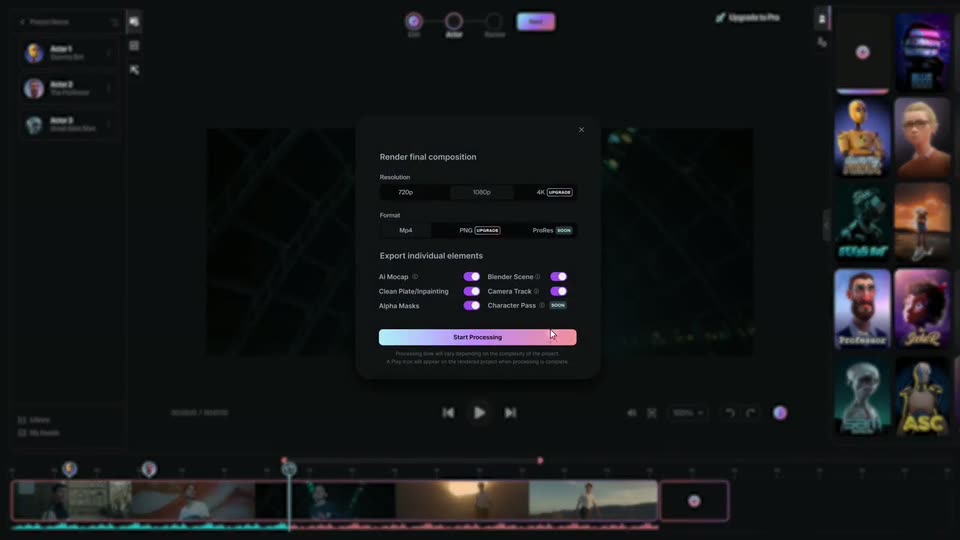
A render dialog box sits centered over a darkened editor with a timeline below. The view then zooms out to reveal the full project dashboard and a grid of live-action project cards, while the dialog stays fixed in place.
Techniques: UI zoom
Camera: Static
A dark dashboard shows a left navigation sidebar and a grid of video project thumbnails labeled Live Action or Custom. A cursor glides from a thumbnail in the grid up to the second card in the In Progress row and rests on its circular play button.
Techniques: Cursor demo
Camera: Static
A dark project dashboard fills the frame, its left rail and grid of labeled video thumbnails in view. The In Progress preview expands into a larger frame, revealing a yellow CG figure walking down a street, while a cursor hovers near the top edge.
Techniques: UI zoom
Camera: Push in
A dark product interface shows a video preview of a yellow humanoid robot walking along a city sidewalk past brick buildings. A cursor moves to the play button while a timeline scrubber sits below the preview and a row of pass buttons lines the bottom.
Techniques: Cursor demo
Camera: Static
A dark editor interface fills the frame; its central viewport plays a live-action street plate where a yellow humanoid robot walks past a brick building. The left menu, top bar and bottom render buttons stay static while the footage plays and the timeline playhead holds at the start.
Camera: Push in
Inside the app's viewer, a yellow humanoid robot walks down a sunlit city street past brick buildings. The bottom project panel and node graph slide out of frame as the preview zooms to fill the screen.
Techniques: UI zoom
Camera: Push in
A yellow CG robot standing on a city sidewalk is replaced by a man in a black and white shirt with a green bag as a vertical wipe travels across the frame. Thin pink and cyan lines mark the moving edge of the reveal.
Techniques: Masking
Camera: Static
A man in a cream, black and green track jacket turns his head on a city sidewalk, a vertical beam of pink and cyan light beside him. A brick building and a few passersby fill the background.
Camera: Static
A small yellow robot with radiation decals stands centered on a city walkway, blurred pedestrians passing behind it as a thin vertical lens flare runs down the frame and its mouth lights flicker.
Camera: Static
A black frame fades up to a tight close-up of a grey alien head emerging from shadow. The head turns slightly toward camera, its large dark eye and wrinkled brow catching dim light against a textured dark background.
Camera: Static
A pale, bald CGI alien with large blue eyes in a dark room. The shot opens tight on its face and slowly dollies out to a medium shot as the creature turns its head and blinks, a chevron-patterned floor and warm background light emerging behind it.
Camera: Pull out
A pale creature with large eyes sits in a dark room, then cuts to a man in a grey jacket walking beside a teal humanoid robot on a tree-lined sidewalk as a cyclist rides past, fading to black.
Camera: Pull out
A person stands on an empty paved street at dusk, a pink motion-capture skeleton overlaid on their body. A vertical scan line wipes across the frame, replacing the person with a 3D pig character in a blue dress. The shot then fades to black.
Techniques: Masking
Camera: Static
A 3D-rendered head fitted with a sensor-laden headset fades in from black and turns slowly against a drifting field of blue, green and yellow organic shapes, then fades back to black.
Techniques: 3D mockup
Camera: Pull out
A 3D-rendered bearded man in round glasses and a blue vest stands in profile before a warm orange and green painted mural, his head tilted upward in a tight medium shot that holds still.
Camera: Push in
A 3D rendered bearded man with round glasses and a blue vest looks upward against a soft painterly dune background. His head turns slightly while the camera holds a centered medium close-up in cinematic letterbox framing.
Camera: Static
A gray alien with a large bald head and wide blue eyes holds a locked-off shot against a hazy city skyline. A man in a light gray fleece jacket steps in beside it and talks, his head turning toward the alien.
On-screen text: “33”, “23”
Camera: Static
A humanoid robot with a visored helmet and olive torso stands centered against a blurred city skyline of glass towers and a red brick building. The frame opens dark and brightens to a frontal medium shot with shallow depth of field, the robot's eyes glowing.
Camera: Pan
A gunmetal robot with a spherical, multi-eyed head stands before a soft-focus city skyline. Its head swings from front to profile and back while the camera arcs around it, the blurred towers sliding in the background.
Techniques: 3D mockup, Parallax
Camera: Push in
A golden humanoid robot walks away from camera across a smooth, pale dune under a hazy pink sky. The shot opens on a cross-dissolve from a city skyline and a large robot head, then settles on a wide static frame as the figure shrinks toward the horizon.
Camera: Static
A gray CGI alien with large blue eyes and a bald head holds a tilted three-quarter profile, then slowly turns its face toward the lens, settling into a centered close-up against pale vertical drapes.
Camera: Push in
A bearded man in round glasses, white shirt and grey vest stands in a blue-toned 3D plaza at dusk. The camera arcs from his profile to a three-quarter view as he turns his head. Behind him, a low building with glowing string lights and wide steps sits in soft focus.
Techniques: Parallax
Camera: Pan
A small white robot with glowing blue eyes sprints down a graffiti-covered alley, turning its head toward the camera. The camera tracks alongside at running speed, the brick walls streaking past in motion blur.
Techniques: Parallax
Camera: Push in
A small yellow robot stands in the corner where two painted landscape backdrops meet. It slowly lifts both arms from a bent position to fully overhead, tilting its head up. The camera holds a steady medium shot.
Camera: Push in
A 3D rendered woman with glasses and an orange sweater stands in a dim cathedral with tall stained-glass windows. She faces the camera and speaks while the shot slowly pushes in on her face.
Camera: Static
A pale bald CG alien with blue eyes stands centered in a dark tunnel of glowing grid lines. A man in a maroon jacket walks past behind it, then a woman in a black jacket and red boxing gloves steps into the foreground.
Camera: Static
A girl in a dark blue sweatshirt with a red sequined heart walks forward through a dim set rimmed with green lights, her head tilted up. Motion blur softens the opening frame as the shot tightens on her face, a blurred figure holding the right background.
Camera: Pull out
A dark fade-in reveals a tan humanoid robot standing still in a dim outdoor canyon. A bright sun glows behind a rocky ridge on the right, casting the scene in low-key light. The robot faces the camera, motionless.
Camera: Static
A yellow humanoid robot advances through a hazy desert canyon at sunset. The shot tightens to a close-up of its face, then cuts to a rear view as it walks away across open ground.
Camera: Static
A gold humanoid robot, seen from behind, walks away across a gravel desert plain at dusk. The camera tracks it from behind as it moves toward low hills, with the sun glowing on the horizon.
On-screen text: “人”
Camera: Static
A yellow humanoid robot walks away across a desert at sunset inside a letterboxed viewport. The shot opens tight on its torso, then widens to the full body as the app's pink timeline and export buttons slide up along the bottom edge.
Camera: Pull out
A flat product interface shows a video preview of a man walking in a desert. The cursor moves to the AI Mocap button as the man is replaced by a 3D robot character.
Techniques: Cursor demo, Morph
Camera: Pull out
The Wonder Studio interface frames a desert sunset preview where a walking 3D figure cycles from a segmented purple mesh to a red silhouette, then vanishes to reveal the clean plate. A cursor steps through the pass buttons below as the timeline advances.
Techniques: Cursor demo
Camera: Static
A dark editing interface frames a desert sunset preview; a cursor moves to the Blender Scene button and the preview swaps to a yellow 3D humanoid walking, then the camera zooms into the preview so the character fills the frame as it strides across the rocky plain.
Techniques: Cursor demo, UI zoom
Camera: Push in
A yellow humanoid robot walks away over rocky desert ground toward a low sun. The editor viewport expands to full frame, then a wireframe skeleton and a human motion-capture figure appear over the robot, then vanish.
Techniques: UI zoom, 3D mockup
Camera: Push in
A yellow humanoid robot walks across a rocky plain at sunset. A chrome sphere and a matte white sphere sit on the right. A multicolored orbital wireframe blooms near the center, then contracts into a flat ring.
Techniques: 3D mockup, Morph
Camera: Static
A yellow articulated mannequin walks across a dark gray 3D grid as the camera orbits around it, passing a black wireframe box and scattered white spheres on the floor.
Techniques: 3D mockup, Parallax
Camera: Pan
A yellow humanoid robot walks inside a gray wireframe box, then the box dissolves into a fully rendered desert landscape with rocky ground and a cloudy sky as the robot keeps its stride.
Techniques: Morph
Camera: Push in
A yellow humanoid robot walks away across a dry desert plain at sunset. The camera tracks behind it and slowly closes in, keeping the robot centered against the bright horizon and distant hills.
Techniques: Parallax
Camera: Static
On black, a centered logo lockup fades in: a rounded icon holding a pastel 3D robot head beside the white wordmark wonder. The small-caps line beneath scales from gray DYNAMICS into colored STUDIO, then the lockup fades out and a thin beta signup line appears.
On-screen text: “sign up for beta at wonderdynamics.com”
Techniques: Morph
Camera: Static