
0:45
Explore
Sherloq Collaborative SQL Repository Demo
Sherloq · Nov 2024 · 0:30 · Full motion · AI-annotated
- Length
- 0:30
- Scenes
- 10 · 3.1 s avg
- Product on screen
- 0:00
- Features shown
- 4
- Call to action
- 0:25 · 81%
- Voiceover
- No
- Views
- 2.4K on YouTube
as of November 26, 2026
00:00:00 / 00:30:26
- Length
- 0:30
- Scenes
- 10 · 3.1 s avg
- Product on screen
- 0:00
- Features shown
- 4
- Call to action
- 0:25 · 81%
- Voiceover
- No
- Views
- 2.4K on YouTube
as of November 26, 2026
Sherloq’s 0:30 launch film runs 10 scenes, about 3.1 s each. The product is on screen from the first frame and 4 features are revealed. The call to action lands at 0:25 (81% in). A flat, light-gray product demo built as a left-right split: a 3D-tilted browser mockup plays the cursor demo on one side while a two-line pink-and-black headline holds on the other, with the headline crossfading to the next feature as the window rotates or slides away. The pacing is even and unhurried, anchored by the recurring tilt-and-rotate window move and the magenta accent that ties the logo, headlines and UI highlights together.
No filming indicatedEstimated needs: 2 capture groups — your screens or recordings · 1 official logo — reused across the film · 4 3D passages — build or supply
Is this your launch? to your site or press kit.
More like this




Similar soundtrack
Films whose music sounds like this one, voice left out
1:08

3:18


Altair Health: manifesto
Altair Health · Electronic
0:54

Supabase - You asked, we delivered! Supabase is now available as a Codex plugin!
Supabase · Electronic
Sherloq Collaborative SQL Repository Demo, scene by scene
· 10 scenes as text
01 · Product intro · 0:00–0:00
A magenta exclamation mark floats on a pale blue field. A deep purple circle expands from the center, wiping over the frame, and the sherloq wordmark with its tagline appears at the center.
On-screen text: “The collaborative SQL extension”
Techniques: Masking
Camera: Static
02 · Product intro · 0:00–0:01
A light title card holds the centered sherloo wordmark with a magenta Q and the tagline below it. Purple corner shapes clear from the top edges while the text stays still.
On-screen text: “sherloo”, “The collaborative SQL extension”
Camera: Static
03 · Feature reveal · 0:01–0:06
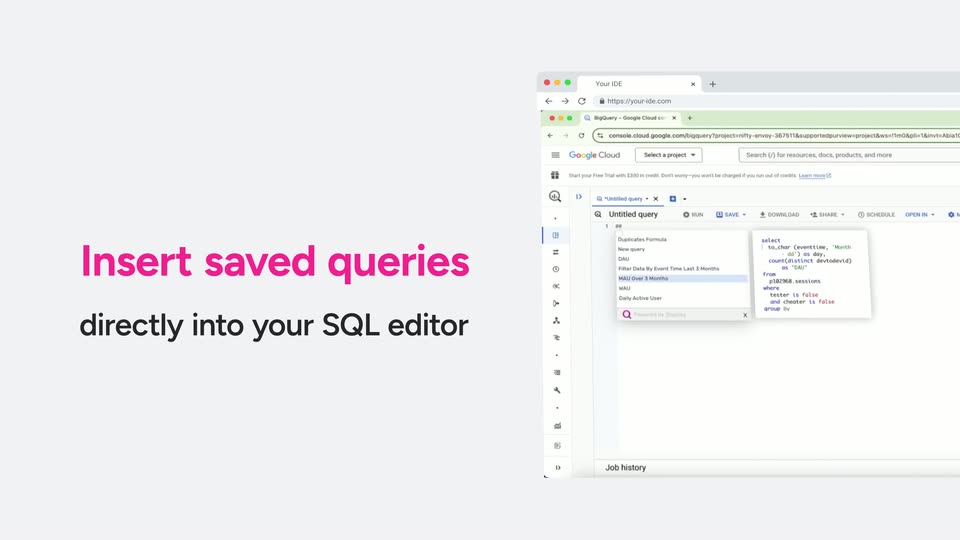
A flat browser mockup of the Google Cloud BigQuery console sits on the right while the pink headline slides up on the left. A saved-queries dropdown opens over the editor, a query is highlighted, and SQL code fills the editor as the menu closes.
On-screen text: “Insert saved queries”, “directly into your SQL editor”, “sherloo”, “The collaborative SQL extension”
Techniques: Kinetic type
Camera: Static
04 · Feature reveal · 0:06–0:11
Two tilted browser mockups on a light gray background show the Sherlock query list and the BigQuery editor. The windows slide apart, revealing a pink and black headline, and the left dialog types in a query name, description and folder.
On-screen text: “Insert saved queries”, “directly into your SQL editor”, “Save and organize”, “queries in folders”
Techniques: 3D mockup, Cursor demo
Camera: Push in
05 · Feature reveal · 0:11–0:12
A tilted 3D mockup of a query editor shows a save dialog whose content shifts between two states, with a cursor hovering the Save Query button. To the right, two lines of text sit on a plain light background.
On-screen text: “Save and organize”, “queries in folders”
Techniques: 3D mockup, Morph, Cursor demo
Camera: Static
06 · Feature reveal · 0:12–0:13
A 3D-angled product window rotates on the left, switching from a folder list to a share dialog, while the right-side text crossfades from the first phrase to the second before the window fades out.
On-screen text: “Save and organize queries in folders”, “Share and collaborate with your”
Techniques: 3D mockup
Camera: Static
07 · Feature reveal · 0:13–0:20
A tilted 3D browser window of the Sherloq app plays a cursor demo: a share dialog opens, a team is picked, then a saved SQL query card appears. The pink-and-black headline 'Share and collaborate with your team' sits right, swapped for 'Search' as the window slides down.
On-screen text: “Share and collaborate with your team”, “Search”
Techniques: 3D mockup, Cursor demo
Camera: Static
08 · Feature reveal · 0:20–0:25
A tilted 3D view of the Sherloq query interface plays on the left as a cursor opens the user and tag filter dropdowns. On the right, the static headline holds, fading near the end.
On-screen text: “Search”, “for your queries”
Techniques: 3D mockup, Cursor demo
Camera: Pan
09 · CTA · 0:25–0:25
A light end card centers the headline “Get sherloq for free” above two rows of small tool logos. Below, two outlined buttons for the Chrome extension and IntelliJ plugin sit over the URL, all static on a plain background.
On-screen text: “Get sherloq for free”, “https://sherloqdata.io”
Camera: Static
10 · CTA · 0:25–0:30
A plain light-gray frame holds the headline “Get sherloq for free” above two rows of small multicolored tool icons, with two outlined download buttons and a URL beneath. The composition is locked off and static for the full clip.
On-screen text: “Get sherloq for free”, “Download Chrome Extension”, “Download Intellij Plugin”, “https://sherloqdata.io”
Camera: Push in