
0:20
Explore
Supabase - You asked, we delivered! Supabase is now available as a Codex plugin!
Supabase · Apr 2026 · 0:54 · AI-annotated
- Length
- 0:54
- Scenes
- 11 · 5.0 s avg
- Product on screen
- 0:00
- Voiceover
- No
00:00:00 / 00:54:20
Supabase’s 0:54 launch film runs 11 scenes, about 5.0 s each. The product is on screen from the first frame. There is no explicit call to action. The video runs as one continuous walkthrough: a word-by-word title card, the plugin page and install dialog, then a live Codex chat that creates and queries a Supabase table, closing on a rotating logo lockup. Cuts land at roughly nine per minute, with slow push-ins, a gliding white cursor, and a shifting teal-and-cream gradient behind the dark interface as the recurring signature moves.
No filming indicatedEstimated needs: 1 capture group — your screens or recordings · 1 official logo — reused across the film · 1 3D passage — build or supply
Is this your launch? to your site or press kit.
More like this






Supabase - You asked, we delivered! Supabase is now available as a Codex plugin!, scene by scene
· 11 scenes as text
01 · Product intro · 0:00–0:01
On a plain white background, the headline reveals word by word across two lines, unrevealed letters sitting in light gray before turning black. A thin wireframe sphere with small green nodes rests in the bottom right corner.
On-screen text: “Supabase is now available in Codex”
Techniques: Kinetic type
Camera: Static
02 · Demo · 0:01–0:02
A dark Supabase plugin page sits on a shifting teal-and-yellow gradient; a white cursor glides up across the description while the window settles from a tight crop to a full frame.
Techniques: Cursor demo
Camera: Pull out
03 · Demo · 0:02–0:03
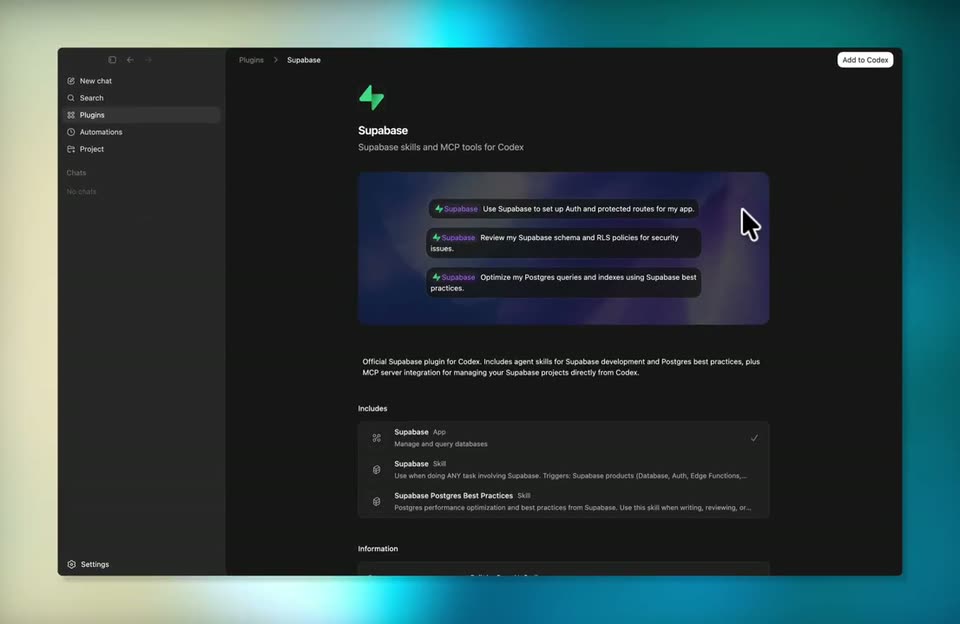
A dark plugin detail page shows the Supabase icon, title, and prompt cards. A cursor moves to the top-right Add to Codex button, then an Install Supabase modal fades in over the center of the screen.
Techniques: Cursor demo
Camera: Push in
04 · Demo · 0:03–0:06
A dark plugin window opens on the Install Supabase dialog, which scales in from a blurred echo. A white cursor glides to the Install Supabase button and clicks it. The dialog then shrinks into a small Installing Supabase status pill, revealing the full app with its left sidebar.
Techniques: Cursor demo, UI zoom
Camera: Pull out
05 · Demo · 0:06–0:08
A dark Supabase plugin page settles as a translucent install dialog fades out, revealing three prompt chips and an includes list with toggles. A cursor glides from the loading spinner up to the right side of the card.
Techniques: Cursor demo
Camera: Static
06 · Demo · 0:08–0:09
A dark plugin page for Supabase displays three prompt chips on a purple gradient card. A white cursor glides to the top right and clicks the Try in chat button as the view slowly zooms in.
Techniques: UI zoom, Cursor demo
Camera: Push in
07 · Demo · 0:09–0:11
A dark chat interface pulls back from a zoomed crop of the prompt box into a full window, a large title and oversized input box resolving into the layout. A white cursor arrow hovers at the top right while the caption “Try in chat” scales in.
On-screen text: “Try in chat”
Techniques: UI zoom
Camera: Pull out
08 · Demo · 0:11–0:14
A dark chat screen holds the heading 'What should we work on?' above a rounded input box. The box shows a Supabase-tagged prompt with a loading bone, then a second prompt types out character by character, over a static list of suggestion rows.
Camera: Pull out
09 · Demo · 0:14–0:28
A dark chat interface floats in 3D over a blurred teal-and-cream gradient, settling from a tilt into a flat front view. The conversation streams in as the assistant lists Supabase projects, a cursor hovers, the user sends “demo”, and a permission dialog scrolls into view at the end.
Techniques: 3D mockup, Cursor demo
Camera: Pull out
10 · Demo · 0:28–0:51
A dark AI chat streams a response as a Supabase permission card expands; the cursor clicks Allow, a follow-up prompt is typed, the view zooms onto a second query card, and a one-row results table appears.
Techniques: Cursor demo, UI zoom
Camera: Push in
11 · Outro · 0:51–0:54
On a black background, a green two-triangle mark rotates and scales up to the center, then the white lowercase wordmark supabase fades in to its right and the lockup holds.
Camera: Static