0:35


Canva - Yep, you heard it right. No watermarks, no paywalls, no awkward expor
Canva · Design · Oct 2025
Samsung’s 0:49 launch film runs 41 scenes, about 1.2 s each. The product shows up at 0:08 and 7 features are revealed. There is no explicit call to action; a voiceover carries the film. A 49 second Samsung Galaxy Book6 launch built as a tight feature montage on a single violet gradient stage, alternating glossy 3D device renders with short live-action hand and model shots. Pacing is fast at about 27 cuts per minute, each feature announced by a white sans-serif headline that scales in over the device, with floating glass cards, 3D emoji stickers and orbiting camera moves as the signature moves, closing on a product-name title card and the SAMSUNG wordmark.
Is this your launch? to your site or press kit.
Canva · Design · Oct 2025
Descript · Design · Nov 2022
Films whose music sounds like this one, voice left out
Samsung Galaxy Z Fold8 · Cinematic electronic pop
Samsung Galaxy S26 Ultra · Cinematic electronic
Adobe · Electronic dance music, house, deep house, and pop-rap crossover.
A dark gray tablet back, marked SAMSUNG, floats in 3D perspective on a violet gradient. The camera pulls back to reveal the full rounded panel and a soft drop shadow behind it.
Techniques: 3D mockup
Camera: Static
A dark gray closed Samsung tablet rests on a soft purple gradient, angled in 3D perspective with a soft shadow. The camera slowly pushes in, centering the device as the SAMSUNG wordmark on its lid stays fixed.
Techniques: 3D mockup
Camera: Static
A closed silver laptop rests on a soft purple gradient. The camera orbits slowly around its front corner, tilting from the lid down to the base, exposing the side ports and the embossed brand mark on the top surface.
Techniques: 3D mockup
Camera: Static
A silver laptop floats and rotates in a purple gradient void, its screen showing a dark blue abstract wallpaper. The white headline Thin & Light scales in over the device, then the laptop spins out and the line is replaced by Made for everyday.
On-screen text: “Thin & Light”, “Made for everyday”
Techniques: 3D mockup, Kinetic type
Camera: Static
A soft lavender gradient fills the frame, with a lighter horizontal band near the bottom edge. The white text “Made for everyday” holds centered and static in the middle of the screen, on a locked-off frame.
On-screen text: “Made for everyday”
Camera: Static
A dark Samsung laptop mockup spins slowly in 3D against a flat lavender backdrop, turning from a low front angle to a high side view. A white headline sits on the left, with the final words sliding in as the device rotates.
On-screen text: “Made for everyday”, “25 hours of video playback”
Techniques: 3D mockup, Kinetic type
Camera: Pull out
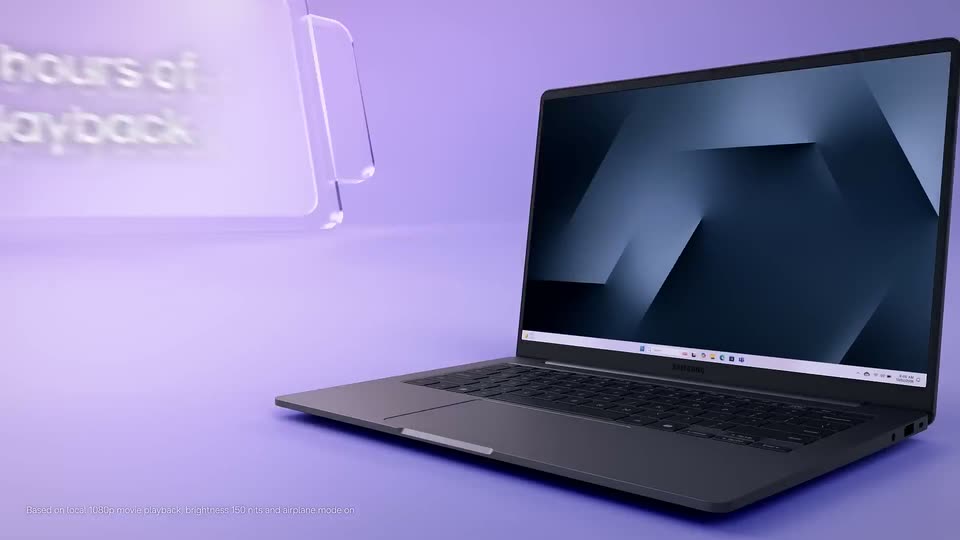
A silver laptop sits at an angle on a lavender backdrop. A green rounded glass card with white text, Up to 25 hours of video playback, slides in from the left. A small disclaimer caption sits at the bottom left.
On-screen text: “Up to 25 hours of video playback”, “Based on local 1080p movie playback, brightness 150 nits and airplane mode on”
Techniques: Kinetic type, 3D mockup
Camera: Pull out
On a lavender 3D stage, a green rounded panel with white 3D text sits left of an open laptop. The camera tracks right as the panel slides out of frame, reframing the laptop at center-right.
On-screen text: “Up to 25 hours of video playback”, “Based on local 1080p movie playback, brightness 150 nits and airplane mode on”
Techniques: 3D mockup
Camera: Static
A silver Samsung laptop sits centered on a lavender gradient background, its screen playing a night scene of two silhouettes watching fireworks over a city, while a hand reflection ghosts across the glossy display.
Techniques: 3D mockup
Camera: Static
A front-facing Samsung laptop on a purple background shows a fireworks video over a city skyline. A ghostly reflection of a person's face and hands fades off the glossy screen, then the white text Glare free appears centered as the camera pulls back to reveal the keyboard.
On-screen text: “Glare free”
Camera: Pull out
A laptop sits at an angle on a soft blue surface, its screen showing a Windows file explorer. A magnified crop of the sidebar floats on the left beside the full window on the right. A cursor glides to the S26 FE row and clicks it, the row lighting up blue as image thumbnails populate the right pane.
On-screen text: “Glare free”, “Requires Galaxy smartphone with One UI 7 or above. Samsung account login required. Sequence shortened.”
Techniques: UI zoom, Cursor demo, Split screen
Camera: Static
A tight crop on a Windows file explorer window, showing a storage share folder and image thumbnails, pulls back to reveal a Galaxy phone on the left with a photo grid and the laptop screen on the right, both angled in 3D.
On-screen text: “Requires Galaxy smartphone with One UI 7 or above. Samsung account login required. Sequences shortened.”
Techniques: 3D mockup
Camera: Pull out
A lavender gradient backdrop holds a phone and a laptop in 3D perspective, the phone showing a photo grid and the laptop a file explorer open to a shared folder. A white headline fades in at left while a cursor hovers the sidebar.
On-screen text: “Storage share”, “Requires Galaxy smartphone with One UI 7 or above. Samsung account login required. Sequence is for illustration purposes.”
Techniques: 3D mockup, Cursor demo
Camera: Static
A silver laptop rests at a tilted angle on a soft purple backdrop, its screen filling the frame with a photo-library grid. The thumbnails shuffle and rescale across the view while the keyboard stays in sharp focus below.
On-screen text: “Requires internet connection and Samsung account login. Accuracy of results is not guaranteed.”
Techniques: 3D mockup
Camera: Static
A hand with thin rings and pale nails hovers over a dark laptop touchpad, fingers spread and shifting slightly. The keyboard sits angled in the lower left against a soft lavender background, the shot held static.
On-screen text: “Requires internet connection and Samsung account login. Accuracy of results is not guaranteed.”
Camera: Pull out
A dark Samsung laptop rests centered on a flat purple backdrop. On its screen a grid of photo thumbnails shows one image of a woman in a purple sweater selected, gaining a glowing outline and enlarging into a central preview card. Small white disclaimer text sits at the lower left.
On-screen text: “Requires internet connection and Samsung account login. Accuracy of results is not guaranteed.”
Techniques: 3D mockup, UI zoom
Camera: Static
A Samsung laptop in 3D perspective rests on a lavender gradient. On its screen, a design app builds a layout around a photo of a woman in a purple cardigan: pink shapes and a purple card appear, then blue selection handles snap onto the elements.
On-screen text: “Requires internet connection and Samsung account login. Accuracy of results is not guaranteed.”
Techniques: 3D mockup
Camera: Push in
Top-down shot of a dark laptop on a lavender background. Two hands type on the keyboard and glide the trackpad while the screen shows a photo editor with a portrait of a woman in a purple sweater. A white disclaimer line sits at the bottom left.
On-screen text: “Requires internet connection and Samsung account login. Accuracy of results is not guaranteed.”
Camera: Static
A woman in a purple cardigan sits smiling against a pastel pink and purple set, hand on her chin. Around her a sticker collage pops in: a large Dressed to dance. headline, a D-0 Ready to Go note, a CAN'T WAIT! tag, a concert photo and doodles.
On-screen text: “Dressed to dance.”, “good music bestie people brighter nights”, “Counting down <3”, “D-0 Ready to Go”, “MUSIC FRIENDS NIGHTS YOU”, “CAN'T WAIT!”, “Requires internet connection and Samsung account login. Accuracy of results is not guaranteed.”
Techniques: Kinetic type, Masking
Camera: Static
A laptop mockup sits on a lavender backdrop, its screen showing a social post of a woman in a purple cardigan beside a comment thread. Glossy 3D emoji stickers, a red heart, smiling faces and stars, float around the machine while the camera pushes in slowly.
Techniques: 3D mockup
Camera: Pull out
A MacBook in 3D perspective on a lavender gradient shows a social post with a woman in a purple sweater. 3D emojis, a smiley, a red heart, a laughing face and a star, float around it while the white headline 'Make it yourself' holds center as the laptop scales up.
On-screen text: “Make it yourself”
Techniques: 3D mockup
Camera: Static
Low-angle shot of a laptop on a lavender backdrop. A pair of hands with rings and a bracelet types on the keyboard from the right while the screen shows a search page with a query and a row of small colored icons.
On-screen text: “Make it yourself”, “Requires internet connection and Samsung account login. Accuracy of results is not guaranteed. Sequence shortened.”
Camera: Pull out
A 3D laptop on a purple background tilts as the camera pushes in on a Samsung Notes page about matcha. A cursor glides over the article, then a glossy Summarize button floats in above the drink photo.
On-screen text: “Requires internet connection and Samsung account login. Accuracy of results is not guaranteed. Sequence shortened.”
Techniques: 3D mockup, UI zoom, Cursor demo
Camera: Push in
A glassy Summarize button hovers over a 3D tablet on a lavender background, its screen showing a Matcha note with an iced drink photo. The camera pulls back, then the interface splits to add a Summary panel of bullets on the right.
Techniques: 3D mockup, UI zoom, Split screen
Camera: Pull out
A tablet in 3D perspective shows a OneNote document with a Summary panel on the left, while the word Summarise scales up in white on a purple gradient to the right.
On-screen text: “Summarise”, “These are the results from Samsung OneNote and Samsung account login. Accuracy of results is not guaranteed. Sequence shortened.”
Techniques: 3D mockup, Kinetic type
Camera: Push in
A tablet screen in 3D perspective shows a serif document beside a Summary panel. A blue selection highlight sweeps down the bullet points, covering the matcha text line by line beneath the Translate button.
Techniques: 3D mockup
Camera: Pull out
On a pale lavender field, a cluster of blue and teal four-pointed stars shimmers left of the word “Generating” in dark gray sans, while three blue dots pulse to its right. A small gray disclaimer line runs along the bottom edge.
On-screen text: “Generating”, “Requires internet connection and Samsung account login. Accuracy of results is not guaranteed. Sequence shortened.”
Techniques: Kinetic type
Camera: Static
A close-up of an English-to-Korean translate panel zooms out to reveal the full note window, with a serif matcha article on the left and a vertical icon toolbar on the right.
Techniques: UI zoom
Camera: Pull out
A tight close-up of a laptop screen showing a document with an open translation panel pulls back and orbits, revealing the full laptop in 3D perspective on a lavender gradient. A small disclaimer caption sits at the bottom.
On-screen text: “Requires internet connection and Samsung account login. Accuracy of results is not guaranteed. Sequence shortened.”
Techniques: 3D mockup
Camera: Pull out
A laptop sits angled in 3D perspective on a plain lavender background, its screen showing a webpage with a Korean translation panel over the top right corner. The word Translate holds in white on the left while the frame stays locked off.
On-screen text: “Translate”
Techniques: 3D mockup
Camera: Static
A tilted Galaxy phone floats in 3D perspective on a lavender gradient, its screen showing a note app with Korean text. The view pulls back from a close crop of the upper screen to reveal the whole device.
On-screen text: “Requires Galaxy smartphone with One UI 3.1 or above. Samsung account login required.”
Techniques: 3D mockup
Camera: Pull out
A laptop, tablet and phone float in 3D perspective on a purple gradient, each screen showing a Matcha article, with a white caption on the right. The rig tilts and a hand in a light blue sleeve reaches in to touch the tablet as the caption clears.
On-screen text: “Copy & Paste across Galaxy devices”
Techniques: 3D mockup
Camera: Static
A laptop in 3D perspective rests on a flat surface against a sunset gradient sky. A hand with thin rings types on the keyboard while the screen shows a photo grid. The lid then folds shut into a wedge.
Techniques: 3D mockup
Camera: Static
A closed Samsung laptop lid rests on a glossy dark table, the SAMSUNG mark faint on the panel. The ambient light shifts from warm red to cool blue while the lid stays centered in a 3D perspective.
Camera: Static
A closed silver laptop with a faint Samsung logo on its lid sits centered on a glossy dark surface. A soft beam of blue light sweeps across the black background from left to right, gradually lighting the device and its reflection.
Techniques: Light sweep, 3D mockup
Camera: Static
A closed gray Samsung laptop lid rises slowly into the lower frame against a soft purple-blue gradient, the embossed SAMSUNG wordmark centered on the lid.
Camera: Static
A closed gray Samsung laptop lid fills the lower frame against a soft purple gradient. The white headline Performance for everyday use sits centered above it. The shot is locked-off and static throughout the clip.
On-screen text: “Performance for everyday use”
Camera: Static
A woman in a purple shirt and cream trousers walks left to right across a soft lavender gradient studio background, holding a closed dark laptop under her arm. The camera stays locked off as she crosses the frame.
On-screen text: “Performance for everyday use”
Camera: Static
A woman in a lavender shirt and white trousers walks from left to right across a soft purple backdrop, tucking a closed dark laptop under her arm. A white title holds fixed in the left-center as she passes in front of it and exits right.
On-screen text: “Galaxy Book6”
Camera: Static
A soft lavender gradient fills the frame while the white title “Galaxy Book6” sits centered and remains static. The composition is minimal and locked off.
On-screen text: “Galaxy Book6”
Camera: Static
A black screen holds the white SAMSUNG wordmark centered, static and locked off. The mark stays fixed in the middle of the frame for the full beat, with no motion or camera move.
On-screen text: “Galaxy Book6”
Camera: Static