0:33
Explore
Salesforce Mobile App Demo
Salesforce · Dec 2019 · 1:19 · AI-annotated
- Length
- 1:19
- Scenes
- 26 · 3.0 s avg
- Product on screen
- 0:00
- Features shown
- 5
- Call to action
- 1:07 · 85%
- Voiceover
- Yes
- Views
- 202K on YouTube
as of November 20, 2026
00:00:00 / 01:19:02
- Length
- 1:19
- Scenes
- 26 · 3.0 s avg
- Product on screen
- 0:00
- Features shown
- 5
- Call to action
- 1:07 · 85%
- Voiceover
- Yes
- Views
- 202K on YouTube
as of November 20, 2026
Salesforce’s 1:19 launch film runs 26 scenes, about 3.0 s each. The product is on screen from the first frame and 5 features are revealed. The call to action lands at 1:07 (85% in), over a voiceover. The video alternates locked-off phone mockups on a wooden desk with live-action shots of professionals on the move, pairing each lifestyle beat with a UI demo of one feature. Cartoon mascots, the Einstein airplane and the bear, pop into the corners as playful accents, while a steady 120 bpm pace keeps each feature to a quick setup-then-demo rhythm.
Footage neededEstimated needs: 4 capture groups — your screens or recordings · 1 official logo — reused across the film · 16 filmed passages — shoot, supply or replace · 5 3D passages — build or supply
Is this your launch? to your site or press kit.
More like this


1:14


Perplexity - We are excited to launch the next version of Introducing login, threa
Perplexity · AI · Apr 2023
1:15

Similar soundtrack
Films whose music sounds like this one, voice left out
1:18


Introducing Notetaker for iPhone, a new way to capture meetings on-the-go.
Wispr Flow · Upbeat indie rock with a corporate ad feel
1:18

A Robot for Your Parents. Meet Rhem.
Rhem Labs · Upbeat instrumental jazz
1:51
Grant - Introducing the sickest agentic video editing setup: Tella Agent, Tel
Tella · Modern electronic
Salesforce Mobile App Demo, scene by scene
· 26 scenes as text
01 · Product intro · 0:00–0:01
A front-facing iPhone stands on a wooden desk, its home screen showing app icons over a blue-green wallpaper. The frame is locked off, with the office background softly blurred and the screen content still.
Camera: Static
02 · Product intro · 0:01–0:02
A black iPhone stands upright on a wooden desk, its home screen facing the camera against a blurred office background. At the end, a cartoon man with white hair and a mustache flies in from the right on a purple airplane labeled MOBILE.
On-screen text: “MOBILE”
Camera: Static
03 · Product intro · 0:02–0:03
A smartphone stands upright on a wooden desk, showing the blue salesforce cloud logo on a white screen, with a blurred office and desk phone behind it. A cartoon sticker of a white-haired man in a purple airplane with a MOBILE label sits in the top right corner. The frame is locked off and still.
On-screen text: “MOBILE”
Camera: Static
04 · Product intro · 0:03–0:06
A smartphone stands upright on a wooden desk against a blurred office set, displaying the Salesforce Mobile menu list. A welcome modal with an astronaut illustration pops up over the dimmed list. A cartoon Einstein-in-airplane logo with the word MOBILE sits at the right edge.
Techniques: 3D mockup
Camera: Static
05 · Feature reveal · 0:06–0:07
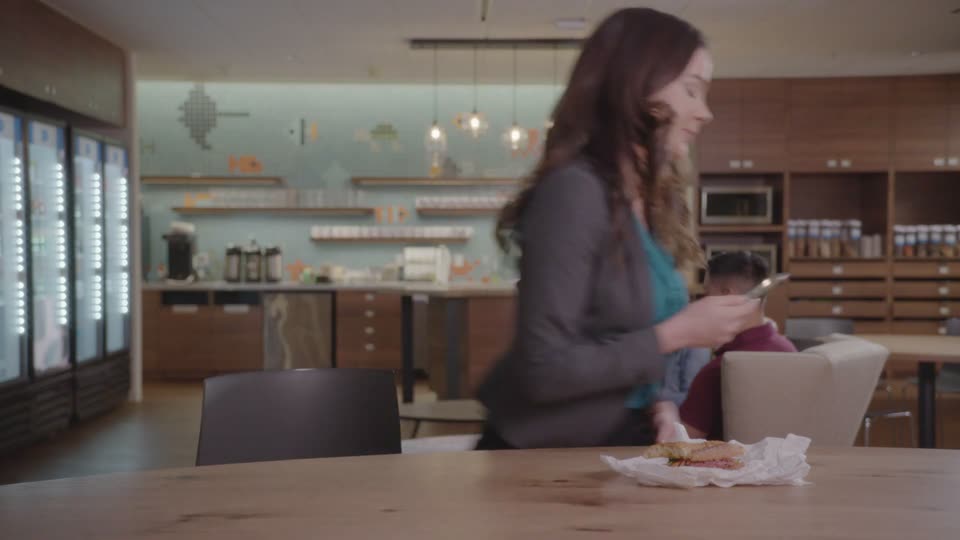
A woman in a gray blazer looks at her phone while seated at a wooden table, then rises and walks off, leaving a sandwich on a paper napkin. Two people sit at a table with a laptop in the soft-focus background.
Camera: Static
06 · Feature reveal · 0:07–0:09
A wide locked-off shot of an office break room: a sandwich rests on a wooden table in the foreground while a woman walks across the frame, and a seated man and woman use phones and a laptop in the background.
Camera: Static
07 · Feature reveal · 0:09–0:12
A woman in a dark blazer and checkered scarf walks toward the camera on a sunlit city sidewalk, holding a tablet and reading it. Stone columns and square planters with ferns line the path, with a few pedestrians in the distance.
Camera: Static
08 · Feature reveal · 0:12–0:14
A smartphone stands upright on a wooden table against a blurred outdoor background, its screen showing a menu list of colorful app icons. The highlighted tab at the bottom shifts from Menu to Daily Report while the list stays still.
Camera: Static
09 · Feature reveal · 0:14–0:20
A smartphone stands on a wooden table against a blurred garden background. Its screen scrolls down a performance dashboard, moving past a bar chart, a world map, a donut chart and a line graph, then switches to a menu list of app items.
Camera: Push in
10 · Feature reveal · 0:20–0:22
A phone in 3D perspective stands on a brick surface before a blurred outdoor background. Its screen shows the app menu; the Opportunities row lights up blue, then the view transitions to an opportunity detail card with a stage progress bar and a blue action button.
Techniques: 3D mockup
Camera: Static
11 · Feature reveal · 0:22–0:29
A phone standing on a wooden table shows a CRM opportunity screen; its content scrolls up through account fields, stage pills and a guidance list. It cuts to a woman walking on a city sidewalk holding a phone, with a Trailblazer logo and a bear mascot in the corner.
On-screen text: “TRAILBLAZER”
Camera: Pull out
12 · Feature reveal · 0:29–0:31
A woman in a dark coat and checkered scarf walks toward a locked-off camera on a sunlit sidewalk past stone columns. A cartoon mascot with the label TRAILBLAZER holds the lower right corner. The live action blurs and a phone screen fades in at center.
On-screen text: “TRAILBLAZER”
Camera: Static
13 · Feature reveal · 0:31–0:41
A smartphone stands upright on a wooden desk, blurred office and desk phone behind it. The screen plays a voice-assistant demo: a blue skills list cuts to a white chat view where the assistant's questions and the user's spoken answers type in line by line, then an account picker and a draft contact card slide up.
Camera: Static
14 · Feature reveal · 0:41–0:43
A man in a black blazer and white shirt stands before a wooden staircase, glancing down at a smartphone held in both hands. He turns and walks out of frame to the left, leaving the empty staircase in focus.
Camera: Static
15 · Feature reveal · 0:43–0:45
A man in a gray sweater walks right across a sidewalk, phone in hand, past a glass revolving door. The cut lands on a woman in a black blazer strolling toward camera on a city sidewalk, eyes on her phone, a tree and brick building behind her.
Camera: Static
16 · Feature reveal · 0:45–0:48
A woman in a black cardigan and dark trousers walks a city sidewalk, tapping a smartphone in her hand. The camera tracks her at street level as cars pass on the road behind a brick building.
Camera: Pan
17 · Feature reveal · 0:48–0:49
A phone mockup stands upright on a wooden table against a blurred outdoor backdrop. The screen shows a concierge app with a search bar, a greeting over a low-poly mountain illustration, and a bottom tab bar. The shot holds still.
Techniques: 3D mockup
Camera: Static
18 · Feature reveal · 0:49–0:52
A smartphone stands upright on a wooden table before a blurred outdoor backdrop. On screen, the search field types out the query while the list below switches from keyword suggestions to a results list.
Camera: Static
19 · Feature reveal · 0:52–0:55
A man in a green shirt stands at a wooden standing desk, typing on a keyboard in front of a desktop monitor. The bright office has white brick walls, tall windows and several potted plants. Static side profile shot, slow pace.
Camera: Pan
20 · Feature reveal · 0:55–0:59
Split screen holds: a man in a green shirt works at a desk in a sunlit office on the left, while an upright iPhone mockup on a wooden table displays a map app on Sandy Springs on the right. The shot ends with a full-frame blur.
Techniques: Split screen, 3D mockup
Camera: Pan
21 · Feature reveal · 0:59–1:02
A smartphone stands on a wooden desk against a blurred office. On its map app, numbered pins flip from red to blue one by one, then the screen splits into a list pane and a map pane with a fast horizontal blur.
Techniques: Split screen
Camera: Pan
22 · Feature reveal · 1:02–1:07
A phone stands on brick pavement against a blurred outdoor backdrop. The app screen flips to a green success banner and a Closed Won stage, then confetti rains down the screen while a cartoon bear with HOORAY! pops in at left.
On-screen text: “HOORAY!”
Techniques: Particles
Camera: Static
23 · CTA · 1:07–1:08
A smartphone stands upright on a wooden desk, its screen showing the Salesforce app search page. The search field fills with the letters “Sa” while the shot holds still against a blurred office background.
Camera: Pan
24 · CTA · 1:08–1:11
A phone mockup stands on a wooden desk against a blurred office background. Its screen switches from a search results list to the Salesforce app detail page as the camera slowly pushes in, tightening the frame.
Techniques: 3D mockup
Camera: Push in
25 · Outro · 1:11–1:14
A man in a gray sweater and dark pants exits a glass office building through a revolving door, eyes on his phone, then walks right past a parking meter. The camera holds a static wide shot of the entrance.
On-screen text: “Salesforce”
Camera: Static
26 · Outro · 1:14–1:19
A blue Salesforce cloud logo with a white wordmark sits centered on a beige background, the tagline below it. The frame opens heavily blurred and snaps into focus within the first second, then holds locked off.
On-screen text: “Blaze your trail.”
Camera: Static