1:14


Perplexity - We are excited to launch the next version of Introducing login, threa
Perplexity · AI · Apr 2023
Greptile’s 1:15 launch film runs 29 scenes, about 2.6 s each. The product is on screen from the first frame and 2 features are revealed. The call to action lands at 1:00 (80% in), over a voiceover. The video alternates live action host shots with flat pastel grid UI panels, cutting at a steady pace near 130 BPM. Its signature moves are the pixel shatter dissolves, the branching PR diagrams, and the bold rounded headlines that build word by word.
Is this your launch? to your site or press kit.
Perplexity · AI · Apr 2023
ClickUp · Productivity · Nov 2026
Films whose music sounds like this one, voice left out
Stripe · Upbeat electronic, with a brief funk/disco instrumental break and a short distorted guitar riff
DJI · Cinematic electronic and orchestral trailer music
BioStack Platforms · Electronic
Three men sit at a table before a leafy window. A gradient TREX wordmark and a yellow Computer Use bar pop in over them while white wireframe lines drift across the frame. A bottom caption reads We're excited to introduce, then changes to Computer use in TREX.
On-screen text: “TREX”, “Computer Use”, “We're excited to introduce”, “Computer use in TREX.”
Techniques: Kinetic type
Camera: Static
A man in a gray t-shirt sits before leafy plants and speaks. A large white TREX title covers his face, then clears. On the right an animated diagram builds: a yellow PR #482 bar, columns of pink and green bars labeled DIFF, lines branching to blue WEB, API, POSTGRES, AUTH boxes. A lower-third fills in with his name and title, then the diagram fades.
On-screen text: “TREX”, “TREX now spins up”, “Daksh Gupta”, “CEO, Greptile”, “the relevant services for your”, “changes and uses computer use”
Techniques: Kinetic type
Camera: Static
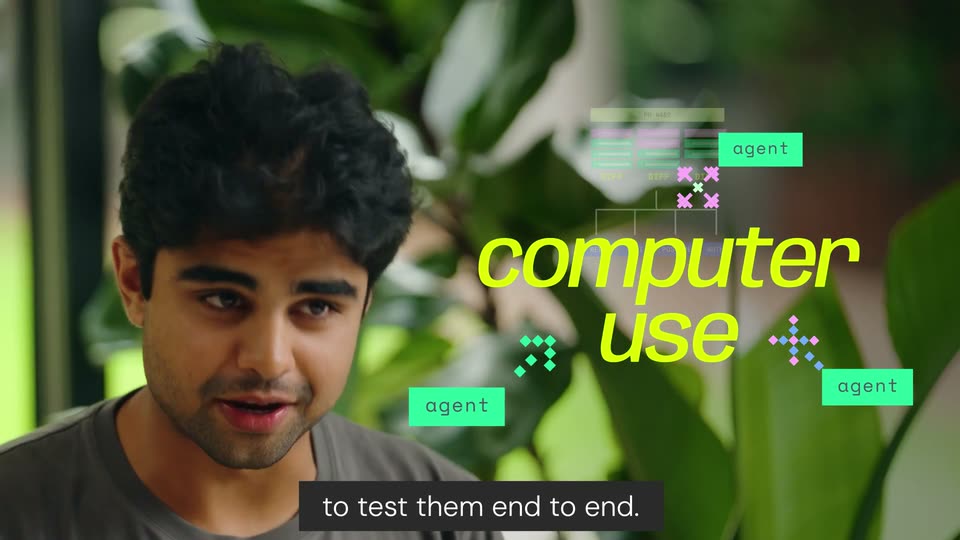
A man in a gray tee speaks to camera in front of blurred houseplants. To his right, a lime-green italic headline 'computer use' anchors the frame; a striped code-diff diagram, small pixel clusters, and green 'agent' tags pop in around it. A dark caption bar sits at the bottom.
On-screen text: “computer use”, “uses it to send to computer.”, “agent”, “to test them end to end.”
Camera: Static
Three men sit at a table before a leafy window. A flat desktop-app mockup fades in at center, covering the middle man, then a row of color swatches and a green agent tag appear below it.
On-screen text: “to test the desktop apps,”, “It can test desktop apps,”
Camera: Static
Two men sit at a table with a laptop, filmed before a leafy window. A flat desktop-app window mockup with selection handles and a color toolbar floats over the center, drifting slightly upward, while a subtitle line updates at the bottom.
On-screen text: “It can test desktop apps,”, “open browsers, and click through”
Camera: Static
Three hosts sit at a table in a plant-filled room while a flat browser mockup floats in front of them, scaling up and drifting upward to reveal the middle host. A green agent tag and a pink X marker track the login button. Subtitles run along the bottom.
On-screen text: “open browsers, and click through”, “a web app to simulate”, “user flows, or even use”
Techniques: UI zoom
Camera: Static
A man speaks to camera in front of leafy plants while a dark terminal window slides in on the right, typing a command and 'starting review...' above a magenta X loader and a green agent chip. White subtitles run along the bottom.
On-screen text: “user flows, or even use”, “a terminal to test your CLI.”
Camera: Static
Three men sit at a table before a leafy window; the center speaker gestures as a light-green headline builds line by line across the frame and a black caption box updates at the bottom.
On-screen text: “a terminal to test your CLI.”, “Let's say you have a PR”, “PR that adds CLI OAuth”, “that adds CLI OAuth”, “via your web app.”
Techniques: Kinetic type
Camera: Push in
Curly-haired man in a green patterned shirt is interviewed against blurred foliage. A green and yellow headline states a PR scenario, then a terminal window and a browser sign-in mockup appear on either side of him, linked by dashed lines, while a lower third names him.
On-screen text: “Let's say you have a PR that adds CLI OAuth via your web app.”, “Rodrigo Caridad”, “Engineering, Greptile”, “With computer use, TREX is able to spin up a terminal and a browser at the same time and test the entire flow end to end.”
Techniques: Kinetic type, Cursor demo
Camera: Push in
Three men sit at a light table in a sunlit office with greenery behind the windows. The center man in a green patterned shirt gestures with his right hand as he speaks; a black laptop sits open before the man on the left. A caption bar runs along the bottom.
On-screen text: “TREX runs the login command”
Camera: Static
Terminal and browser windows sit side by side on a pink grid. The terminal prints a green GREPTILE logo, the label switches to 02 SIGN IN, and the view zooms to the browser as a cursor types credentials and moves to the Sign in button.
On-screen text: “01 RUN COMMAND”, “TREX runs the login command”, “in the terminal, which”, “02 SIGN IN”, “then redirects to the login page.”, “It'll enter its credentials in”, “the browser, which would then”
Techniques: Split screen, UI zoom, Cursor demo
Camera: Push in
A white panel on a pink grid background shows a browser sign-in dialog, then switches to a terminal beside the browser window as a green scanline bar slides across. A blue step label reads 02 SIGN IN, then 02 SIGN IN CLI, while a caption bar sits at the bottom.
On-screen text: “02 SIGN IN”, “the browser, which would then”, “02 SIGN IN CLI”
Techniques: Cursor demo
Camera: Static
A white terminal window sits on a pink grid backdrop, framed by a blue 03 BACK TO CLI banner and a black caption below. A green pixelated GREPTILE logo fills the terminal as a blue cursor hovers and new command lines type out.
On-screen text: “03 BACK TO CLI”, “redirect back to the terminal.”
Techniques: Cursor demo
Camera: Static
A terminal window with the green GREPTILE wordmark and a browser panel sit on a pink grid backdrop. The terminal shatters into drifting green pixel blocks while the blue 03 tag and the bottom caption stay fixed.
On-screen text: “03 BACK TO CLI”, “redirect back to the terminal.”
Techniques: Particles
Camera: Static
A young man with curly hair in a green patterned shirt sits at a table with a laptop, speaking while two others sit at the frame edges. Soft green foliage blurs behind a window. A caption reads “Everything works.” at the bottom center.
On-screen text: “Everything works.”
Camera: Static
Three men sit at a table in a bright room with a laptop in the foreground; the left one speaks as the camera slowly pushes in. A mint green line, Testing the happy path, scales in over the frame, then a bold lime line, isn't enough, appears beneath it.
On-screen text: “Everything works.”, “Good engineers know that testing”, “Testing the happy path”, “the happy path isn't enough.”, “isn't enough”
Techniques: Kinetic type
Camera: Push in
A bespectacled man in a dark shirt speaks to a colleague against a soft green backdrop. Scattered letters assemble into the lime headline, then a white name card with yellow corner squares slides in at right. Subtitles run along the bottom.
On-screen text: “Testing the happy path isn't enough”, “the happy path isn't enough.”, “Ravern Koh”, “Engineering, Greptile”, “TREX will test possible”, “edge cases in the user flow”, “in parallel.”
Techniques: Kinetic type
Camera: Static
Three men sit at a table by a window as the left one speaks. Over them, a tree diagram grows: an AGENT node branches into test-case rows that pop in one by one, each paired with a status chip.
On-screen text: “in parallel.”, “AGENT”, “In this case, TREX”, “running edge cases”, “HAPPY_PATH”, “passed”, “tests the situation where the”, “NO_BROWSER_CALLBACK”, “manual code”, “browser fails to connect to”
Techniques: Kinetic type
Camera: Static
A bespectacled man speaks outdoors against a blurred green backdrop while a test-case tree and a browser window showing a CLI auth error and copy button float at right. A small user tag pops in beside the button as he talks.
On-screen text: “the user has to copy the authentication code.”
Camera: Static
On a lime grid background, a terminal window and a browser sign-in panel slide left while the blocky green GREPTILE logo slides above them. A black caption bar at the bottom reads the line, and near the end the blue headline Newlines break login fades in at the top.
On-screen text: “It pastes the code in”, “Edge case: manual code entry”, “Newlines break login”
Techniques: Kinetic type
Camera: Static
A white terminal window sits on a lime-green background crossed by pink grid curves, under a blue headline. Code lines type in as a blue pointer drifts across the window. Pink and blue label chips slide in on the right while a black caption bar updates at the bottom.
On-screen text: “Edge case: manual code entry”, “Newlines break login”, “It pastes the code in”, “NO BROWSER FALLBACK”, “test failed”, “the terminal, but discovers that”, “01 - const code = input”, “the copied URL includes new”
Techniques: Cursor demo
Camera: Static
On a yellow wireframe grid, a terminal window sits left of a code diff; a greptile comment card pops in under the diff. A black caption bar rolls the voiceover line beneath the static blue headline “T-Rex flags the bug”.
On-screen text: “caught before merge”, “T-Rex flags the bug”, “the copied URL includes new lines, so the login fails.”
Techniques: Split screen, Kinetic type
Camera: Static
A yellow grid background holds a terminal window and a code-diff card with a greptile note, under the blue headline T-Rex flags the bug. The composite shatters into pixel blocks, revealing a man in glasses speaking, as the bottom caption switches to That's a bug caught by T-Rex.
On-screen text: “caught before merge”, “T-Rex flags the bug”, “lines, so the login fails.”, “That's a bug caught by T-Rex.”
Camera: Static
A man with glasses speaks on the left against a blurred green outdoor background. A code diff card with a greptile review comment floats on the right, and a caption bar sits at the bottom.
On-screen text: “That's a bug caught by TREX.”
Camera: Static
Three men sit at a table with a stickered laptop, green foliage blurred behind the window. A white caption sits on a dark bar at the bottom as the title “TREX Computer Use” scales in across the frame, with pixelated green squares flickering at the edges.
On-screen text: “With computer use powering TREX,”, “TREX Computer Use”
Techniques: Kinetic type
Camera: Static
Three men sit at a table outdoors, the footage cut by a pixelated dithered edge over a mint green field. TREX Computer Use scales in across their chests, then Greptile Review pops in below in large yellow type, with white subtitles at the bottom.
On-screen text: “With computer use powering TREX,”, “TREX Computer Use”, “Greptile Review”, “along with Greptile review,”
Techniques: Kinetic type
Camera: Static
A man in a gray T-shirt speaks to camera against blurred green foliage. Right of him, a blue PR #482 chip slides in, then a branch diagram grows with green check labels and a pink ready to merge chip appearing one by one. Subtitles sit at the bottom.
On-screen text: “you spend less time reviewing”, “PR #482”, “✓ review passed”, “✓ happy path passed”, “✓ edge cases · 1 bug fixed”, “→ ready to merge”, “and testing code and have”, “way more confidence in every change.”
Camera: Static
Three men sit at a table in a bright room with a laptop in front of them. A pink label TREX COMPUTER USE pops in above a large lime headline that builds word by word, while white subtitles run along the bottom.
On-screen text: “TREX with computer use”, “TREX COMPUTER USE”, “is now available in beta,”, “Now available in beta”, “and we'd love for you”, “to try it.”
Techniques: Kinetic type
Camera: Static
A small black diamond at center scales up into the greptile mark on a bright green field. Thin white lines link yellow square nodes into a polygon, and pale wireframe curves drift in the corners. The wordmark greptile.com materializes beside the logo and holds.
On-screen text: “greptile.com”
Techniques: Kinetic type
Camera: Pull out