1:33

Seijin Jung - Introducing Helena: the world's first autonomous AI marketer. Busine
Enrich Labs · Mar 2026
Kortix · Nov 2026 · 1:51 · AI-annotated
Kortix’s 1:51 launch film runs 41 scenes, about 2.7 s each. The product is on screen from the first frame and 15 features are revealed. The call to action lands at 1:40 (90% in), over a voiceover. A founder talks to camera in a warm, dim living room while the cut jumps to near-white UI screens, each feature announced by a large headline that builds word by word in sync with the voiceover. Pacing is a fast ~136 BPM montage (about 3 cuts per minute) with signature moves: pixel-burst logo reveal, 3D tilts of the interface, and a single blue accent color on a neutral palette.
Is this your launch? to your site or press kit.
Enrich Labs · Mar 2026
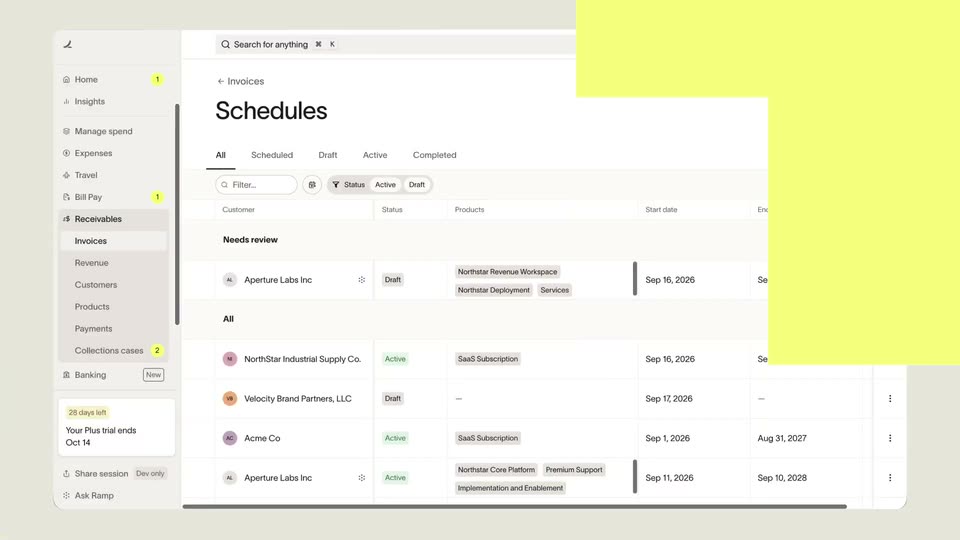
Ramp · Finance · Sep 2026
Hemut · B2B
A man in a black jacket sits in an armchair in a living room, gesturing as he speaks to camera. A large white headline “Meet CompanyOS” holds the top of the frame, then swaps to a huge “80%” with the caption “work in a company” beneath it.
On-screen text: “Meet CompanyOS”, “80%”, “work in a company”
Camera: Static
A young man in glasses and a black jacket sits in a chair in a warm living room, gesturing with both hands as he speaks. A large lower-third caption reads AI agents across the bottom of the frame while he explains the topic.
On-screen text: “AI agents”
Camera: Static
A man in glasses and a black zip jacket sits in a beige armchair in a furnished living room, gesturing with his hands as he talks. A large white 24/7 spans the top behind his head, and a white caption reads around the clock. at the bottom. The shot is static.
On-screen text: “24/7”, “around the clock.”
Camera: Static
A man in glasses sits in an armchair in a dim living room, gesturing as he speaks. A large caption 'operating system.' sits at the bottom as 'And that company needs an' types in above it; a name lower-third appears, then pixel squares burst to reveal the 'CompanyOS' title.
On-screen text: “around the clock.”, “operating system.”, “And that company needs an”, “Marko Kraemer”, “FOUNDER @ KORTIX”, “CompanyOS”
Techniques: Kinetic type, Masking
Camera: Push in
A plain white frame holds the CompanyOS wordmark low and centered, with 'Company' in dark gray and 'OS' in blue. A small caption reads FOUNDER @ KORTIX. The shot is locked off with no motion.
On-screen text: “CompanyOS”, “FOUNDER @ KORTIX”
Camera: Static
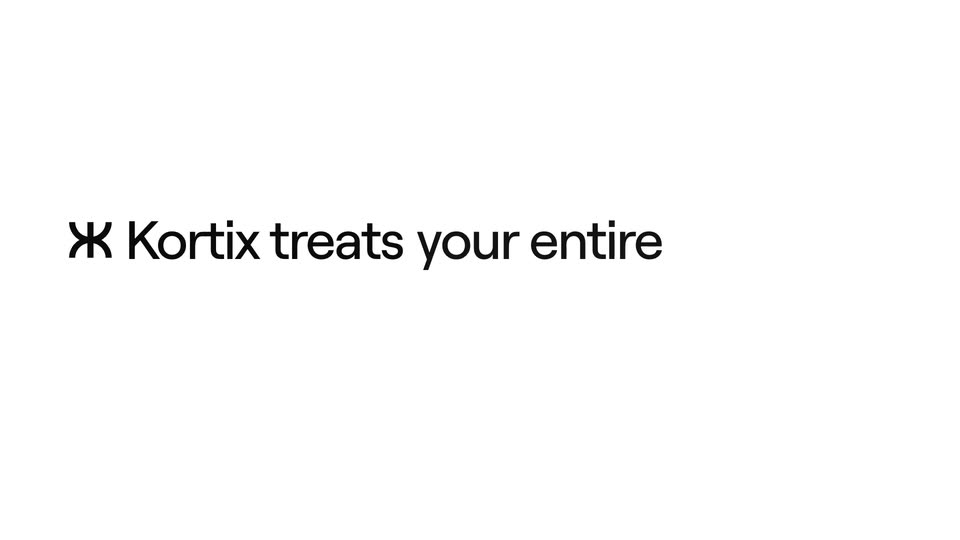
A plain white background holds a black asterisk mark and the words “Kortix treats” on the left, vertically centered. The phrase “your entire” fades in to the right in light gray, building the sentence phrase by phrase at a steady pace.
On-screen text: “Kortix treats”, “your entire”
Techniques: Kinetic type
Camera: Static
A white card shows the headline “Kortix treats your entire company like code.” in black sans, “like code.” in light blue, words blurring in, then a hard cut to the Northwind app’s Repo tab listing six folders and three files as “Every” fades in at the top.
On-screen text: “Kortix treats your entire company like code.”, “Every”
Techniques: Kinetic type
Camera: Push in
A repo screen on a white field sits under a centered headline that cycles 'Every agent,' 'Every skill,' 'Every connector,' and 'Every rule,' in sync with the voiceover. The view reframes to the repo panel as a blue highlight moves from the skills folder to the rules folder.
On-screen text: “Every agent,”, “Every skill.”, “Every connector,”, “Every rule,”
Techniques: Kinetic type, UI zoom
Camera: Push in
A light web-app window slides in from the right and settles as the headline swaps to “You define agents as.” The view changes from a repo folder grid to a YAML editor with an overview panel; a hand cursor hovers the branch dropdown.
On-screen text: “Every piece of context in one repo you own.”, “You define agents as”
Techniques: UI zoom, Cursor demo
Camera: Static
A dark headline caps a product screen showing a YAML code editor beside an overview panel. The headline drops away as the view zooms in and pans left to right, reframing onto the session sidebar, the markdown file, and the connectors list.
On-screen text: “You define agents as code.”
Techniques: UI zoom
Camera: Static
A full dashboard view zooms into the Overview panel, where a hand cursor hovers as the Own computer, Own identity and Connectors cards come into focus one after another, the rest of the screen falling to blur.
Techniques: UI zoom, Cursor demo
Camera: Push in
A white Connectors panel floats over a blurred settings page as a caption slides in. A hand cursor taps the Gmail toggle, then the Slack toggle, each flipping dark as the picked count reaches two. A small video card of a seated person appears bottom right.
On-screen text: “Own identity”, “Acts as itself, never as you. Every action is signed by the agent.”, “@sales-agent”
Techniques: Cursor demo
Camera: Static
A light Tools settings panel fills the frame as a cursor clicks allow, ask, and block on three tool rows, each button turning green, yellow, or red. A headline builds word by word above, and a small video of a man in a room sits in the corner.
On-screen text: “For every tool, you decide allow ask block.”
Techniques: Kinetic type, Cursor demo
Camera: Push in
A white Connectors panel lists Gmail, GitHub, Slack, Notion, Google Drive and Linear rows with checkboxes. A hand cursor clicks the first three boxes, the selected count ticks up, a centered headline swaps phrases, and the view reframes onto the list.
On-screen text: “Connect every data source”, “Connect across the company”, “Connect every app you use”, “Connect in one place.”
Techniques: Kinetic type, Cursor demo, UI zoom
Camera: Static
A white integrations panel titled “Connect in one place.” lists Gmail, GitHub, Slack, Notion, Google Drive and Linear with icons and checkboxes; the top three are checked. A hand cursor hovers at the Notion row, then slides down to the Google Drive row as the subtitle line below the heading disappears.
On-screen text: “Connect in one place.”
Techniques: Cursor demo
Camera: Static
A close-up of a model-provider settings list pulls back as a large headline builds word by word above it. A cursor types an API key and clicks Save, adding Anthropic to the in-use list.
On-screen text: “Any model, any key, any provider.”
Techniques: Kinetic type, Cursor demo
Camera: Static
A rounded prompt box on a plain light background fills with a typed sentence character by character, the round send button turns solid black, then the line slides up into a faded bar and the box resets to its gray placeholder. A hand cursor idles at the lower right.
Camera: Static
A light chat interface fills in as the agent's task log completes: three green checkmarks and a Renewals app card fade in under the prompt bubble, while a hand cursor icon pops in beside the empty input field.
Camera: Static
Split screen of the product UI: left, an agent chat showing the steps that built a renewals tracker; right, the renewals dashboard with a monthly bar chart and account table. A headline reveals word by word across the top.
On-screen text: “internal app, right inside of the OS.”
Techniques: Kinetic type, Split screen
Camera: Push in
A light dashboard shows the Skills tab with a list of reusable instructions. A cursor clicks the customer-writing row, opening a detail panel that lists its step-by-step workflow and a yaml snippet. The view then crossfades as the Triggers tab title slides in from the top.
Techniques: Cursor demo, UI zoom
Camera: Static
A flat product screen showing a Triggers list sits centered on white. A large black headline builds across the top word by word, ending with the last word in blue.
On-screen text: “Triggers run them in loops, 24/7.”
Techniques: Kinetic type
Camera: Static
A product interface shows a code review panel with a list of changed files. A cursor moves to the 'Apply changes' button and clicks it, changing the label to 'Applying...'. The headline above transitions from 'Triggers run them in loops, 24/7.' to 'You approve what ships.'
On-screen text: “Triggers run them in loops, 24/7.”, “You approve what ships.”
Techniques: Cursor demo, Kinetic type
Camera: Push in
A blue line draws itself across a pale gray field, stopping at three ringed dots labeled Run, Correction and Decision, then arcs up to a COMPOUNDS tag. A caption types in beneath it, and the scene cuts to a man seated in a living room.
On-screen text: “Run”, “Correction”, “Decision”, “lands in one shared context.”, “COMPOUNDS”, “Your company's knowledge compounds.”
Techniques: Kinetic type
Camera: Static
A man in glasses and a black jacket sits in a beige armchair in a modern office, talking and gesturing. White caption lines stack up on the left side of the frame as he speaks.
On-screen text: “and the agents”, “get better”, “every single day.”
Techniques: Kinetic type
Camera: Static
A light product dashboard with sidebars and a connectors panel tilts into 3D perspective while a file panel slides up from the bottom. A dark headline appears above the interface.
On-screen text: “Underneath, a”, “and the agents”, “get better”, “every single day.”
Techniques: 3D mockup
Camera: Pull out
A tilted 3D view of a settings interface, with a left sidebar and a right connectors panel, sits behind a flat code editor card labeled kortix.yaml. The headline holds at the top while the word framework fades from light gray to dark.
On-screen text: “Underneath, a backend framework.”
Techniques: 3D mockup
Camera: Static
A product dashboard with a YAML code editor along the bottom sits under a headline that types out word by word. A cursor flips the Gmail, Slack and GitHub toggles on the right, and matching green lines appear in the code.
On-screen text: “All code.”, “On top, a workspace your whole team uses.”
Techniques: Kinetic type, Cursor demo
Camera: Push in
A light-gray stage shows the app on a desktop window, a tablet and a phone, with Slack message cards beside them. A large heading at top left swaps through “On desktop,” “On mobile,” and “On any channel.” while the mockups rearrange and the phone moves to center.
On-screen text: “On desktop,”, “On mobile,”, “On any channel.”
Techniques: Kinetic type, Split screen
Camera: Pan
A man in glasses and a black jacket sits in an armchair in a warm office living room, gesturing as he speaks. White caption lines build up on the left, then a large white numeral 1 pops in beside him.
On-screen text: “A Company OS has to be precisely three things.”, “1”
Techniques: Kinetic type
Camera: Push in
A man in a black Kortix jacket sits in a dim living room, gesturing with one hand while a large white numeral 1 and the word Multiplayer. hold on the left. The shot cuts to the product's Agents interface, showing a Sales Agent panel with operating rules.
On-screen text: “1”, “Multiplayer.”
Camera: Static
A product interface shows an Instructions panel of checkbox rules tagged with teammate and agent chips while the headline “People and agents on the same context.” types out above. The shot cuts to a man in a black jacket seated in a living room, speaking to camera.
On-screen text: “People and agents on the same context.”
Techniques: Kinetic type, Cursor demo, Masking
Camera: Push in
A man in a black jacket sits in a living room and gestures while a white numeral 2 and the words Hardcore extensible. build on the left. A white card then opens to reveal a screen with a YAML file beside a Triggers list.
On-screen text: “2”, “Hardcore”, “extensible.”
Techniques: Kinetic type, Masking
Camera: Static
A two-panel interface shows a kortix.yaml code editor beside a Triggers list. A cursor glides to a schedule line, highlighting it in green, while the top headline swaps from “All code.” to “Change it any time.”
On-screen text: “All code.”, “Change it any time.”
Techniques: Cursor demo, Kinetic type
Camera: Static
A man in glasses and a black zip jacket sits in a softly lit living room, gesturing with one hand as he talks. A large white numeral 3 wipes in on the left, then the word Sovereign. fades in at the lower left.
On-screen text: “3”, “Sovereign.”
Techniques: Masking
Camera: Push in
The Kortix logo sits left of center on a light gradient field. A three-line stack fades in to its right, “Open source” and “Your infrastructure” in gray, while the middle line swaps from “Sovereign.” to “Any model” in black; at the end “Your infrastructure” turns blue.
On-screen text: “Open source”, “Sovereign.”, “Your infrastructure”, “Any model”
Techniques: Kinetic type
Camera: Static
A bespectacled man in a black zip jacket sits in a beige armchair in a dim living room, gesturing with both hands as he speaks to camera. On the left, a white caption builds line by line: You, then You own your intelligence, then from A to Z.
On-screen text: “You own your intelligence, from A to Z.”
Techniques: Kinetic type
Camera: Push in
A man in glasses and a black Kortix tee sits in a beige armchair in a warm lounge, speaking to camera. White caption lines build on the left, 'That's precisely what Kortix Company OS is.', then the shot fades to white.
On-screen text: “You own your intelligence, from A to Z.”, “That's precisely what Kortix Company OS is.”
Camera: Static
A plain white end card holds a single centered line reading “Go to kortix.com”, with “Go to” in dark gray and the domain in blue. The frame stays locked and static for the full duration, serving as the closing call to action.
On-screen text: “Go to kortix.com”
Camera: Static
A single line of black text holds centered on a plain white background. The phrase reads “Sign up for our cloud,” and stays completely still for the full clip, with no animation, camera move, or other element entering the frame.
On-screen text: “Sign up for our cloud,”
Camera: Static
On a white background, the GitHub mark sits left of a line of text that reveals word by word: or self-host it on your own infra, with infra in blue. The line then cuts to the centered gray Kortix logo.
On-screen text: “Sign up for our cloud,”, “or self-host it on your own infra.”
Techniques: Kinetic type
Camera: Static
The black Kortix logo sits centered on a white field, with a GitHub URL and a black pill button reading Book a call with us stacked below it. The composition holds still, then fades to white.
On-screen text: “github.com/kortix-ai/CompanyOS”, “Book a call with us”
Camera: Static