2:00
Alex - Xcode AI Coding Assistant
Alex · B2B · Jun 2025
Runway’s 0:25 launch film runs 17 scenes, about 1.5 s each. The product is on screen from the first frame and 1 feature is revealed. There is no explicit call to action. A single-feature launch film: it opens inside the editor, names the Smart Mask tool, then fires off three fast label-to-mask examples (glasses, cars, sweater) before a stylized live-action payoff. The look is dark UI on black with quick clean cuts, purple label chips and a green mask highlight, closing on a bold tagline and the R mark.
Is this your launch? to your site or press kit.
Alex · B2B · Jun 2025
Atlassian · Nov 2026
Films whose music sounds like this one, voice left out
Zapier · Electronic
Decipher AI · Modern electronic, hip-hop, and funk instrumental
Polymet · Electronic percussion and sound design
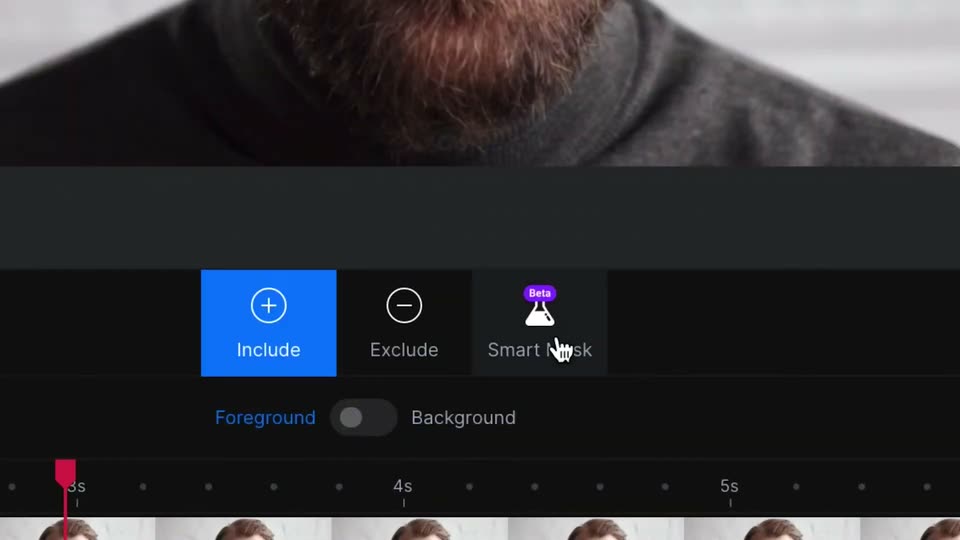
The editor's full interface shows a bearded man with glasses in the preview window. The frame zooms into the bottom toolbar as the cursor moves left onto the Smart Mask button.
Techniques: UI zoom, Cursor demo
Camera: Static
A dark video editor panel shows a blue tooltip reading Smart Mask - Beta above three buttons, Include, Exclude and Smart Mask, with a hand cursor on the last. A Foreground/Background toggle sits below, over a bearded man's face. The frame blurs out at the end.
Techniques: Cursor demo
Camera: Static
A dark UI panel with purple label pills sits over a blurred live-action shot of a bearded man in glasses. A cursor clicks the Glasses pill, which brightens, then moves to the blue Mask button where a spinner appears.
Techniques: Cursor demo
Camera: Static
A dark editor interface fades in, a man's face with a loading spinner over his glasses on the left, a Smart Mask panel with purple labels on the right, the cursor resting on the blue Mask button.
Techniques: Cursor demo
Camera: Pull out
A dark video editor view shows a bearded man with a green glasses mask over his eyes. A Smart Mask panel on the right lists purple body-part labels with Glasses highlighted, and a cursor rests on the blue Mask button. The frame holds steady.
Techniques: Cursor demo
Camera: Static
A dark editor UI frames a preview of a white SUV and a red sports car parked side by side. A Smart Mask panel on the right shows a label field, purple tag chips and a blue Mask button; a bottom toolbar holds Include, Exclude and Smart Mask.
Camera: Static
A red sports car sits on a street at left while a dark Smart Mask panel at right shows a row of purple label chips. A cursor taps the chips in turn, highlighting White then Red. The view then pulls back to the full editor window with its timeline.
Techniques: Split screen, Cursor demo
Camera: Pull out
A dark video-editing interface frames a preview of two parked cars, a white SUV and a green sports car, while a Smart Mask panel lists selectable labels on the right. The preview plays in place; the interface stays static.
Camera: Static
A woman in a grey turtleneck taps a tablet in a warm kitchen. On the right, a dark Smart Mask panel shows Sweater typed in a field, then the field clears and a Sweater chip joins the label list as a cursor hovers over it.
Techniques: Cursor demo
Camera: Static
A woman in a green turtleneck holds a tablet, her sweater highlighted in bright green. A dark panel on the right lists object labels, with Sweater lit in purple and a blue Mask button below.
Camera: Static
A static view of a masking tool: a headless brown knitted sweater on a green screen with a jagged masked edge, beside a dark panel where the Sweater label chip is highlighted in purple.
Camera: Static
A dark editor view shows a white silhouette shaped like shoulders and a neck on the left, with a Smart Mask panel of purple label chips on the right. The view holds, then fades to black.
Camera: Static
A woman in a cafe smiles at a tablet as a blue outline traces her silhouette and a cursor hovers. The lines Type anything and Get a mask. appear, then her hair recolors to purple and her sweater shifts to gray-green.
On-screen text: “Type anything”, “Get a mask.”
Techniques: Masking, Cursor demo, Kinetic type
Camera: Static
A woman in a purple turtleneck sits in a warm cafe, smiling down at a white tablet. Her short hair shifts from green to purple across the shot. Pendant lights, plants and blurred patrons fill the background.
Camera: Static
A centered title card on a black background reads “Make Impossible Things.” The word “Make” is bold white, while the remaining words are gray. The type stays locked in place for the full shot.
On-screen text: “Make Impossible Things”
Camera: Static
A small multicolor logo mark sits centered on a black field, then morphs into a white monoline R outline that holds still in the center.
Techniques: Morph
Camera: Static
A solid black screen holds for the entire clip. No content, text, or motion appears; the frame stays uniformly dark from start to end.
Camera: Static