0:46
Responsive Layouts have landed
Rive · Design · Oct 2024
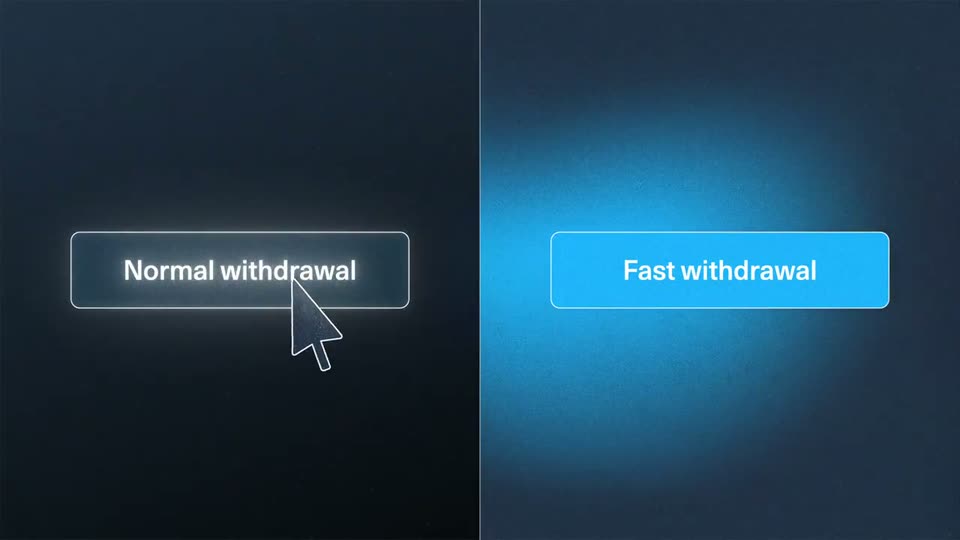
Arbitrum’s 0:40 launch film runs 8 scenes, about 5.0 s each. The product is on screen from the first frame and 1 feature is revealed. There is no explicit call to action; a voiceover carries the film. The video runs as a single-feature launch: a split-screen comparison of normal versus fast withdrawal opens, then a chain of zooms into glassy wallet screens demonstrates the 15 minute transfer, with full-frame value headlines inserted between demos. Pacing is steady around 103 bpm, driven by cursor clicks, gradient progress bars that fill and drain, and smooth zoom-ins, all set against a grainy navy field with a soft central blue glow.
Is this your launch? to your site or press kit.
Rive · Design · Oct 2024
Suno · AI · Sep 2026
Applied Compute · Aug 2026
A split screen compares two withdrawal options. On the dark left, a Normal withdrawal button becomes a circular ring with a 07 00 05 countdown; on the blue right, a filled Fast withdrawal button stays put. Cursors click each side.
Techniques: Split screen, Cursor demo
Camera: Static
Split screen compares two withdrawal options. Left: a circular progress ring above a 06 23 59 countdown under the title Normal withdrawal. Right: a cursor clicks the Fast withdrawal button, which turns into a glowing progress bar that fills and empties as the minutes counter rolls from 15 to 00.
On-screen text: “Normal withdrawal”, “Fast withdrawal”, “06 23 59”, “DAYS HOURS MINUTES”, “15 MINUTES”
Techniques: Split screen, Cursor demo, Morph
Camera: Static
A dark blue field with a soft radial glow and the caption Fast withdrawal zooms into a floating wallet card. The card fills the frame as a wallet label and amount row appear on the right, while a pin and three pill buttons sit on a floor plane below.
On-screen text: “Fast withdrawal”
Techniques: UI zoom
Camera: Pan
A flat blue wallet screen shows two line-art treasure chests and a Withdraw to Arbitrum button. A cursor clicks the button, a chest pops open, a gradient bar counts down from 15 to 00 minutes, and the balance ticks from 0 to 120, then 200 as the second chest opens.
Techniques: Cursor demo
Camera: Static
A white two-line headline holds over a soft blue glow on a dark field, then fades away. A small wallet card with a dropdown row pops in beside a large outlined cursor, and the view zooms into the card until the wallet screen fills the frame.
On-screen text: “Go onchain to fiat”, “by almost 7 days faster”
Techniques: Cursor demo, UI zoom
Camera: Static
A blue wallet screen with a header and a dark amount field. A black cursor glides to the Withdraw to exchange button, which fills from a thin outline to light blue, while the amount ticks up from $20 to $200. The frame stays locked.
Techniques: Cursor demo
Camera: Static
On a dark navy grainy background with a soft blue glow at center, the white headline “Move your Orbit assets” fades in, then “almost instantly” and a smaller “Onchain, Offchain, Any Chain” follow. A faint WALLET label with a wallet icon fades out top-left, and the text block dims at the end.
On-screen text: “WALLET”, “Move your Orbit assets”, “almost instantly”, “Onchain, Offchain, Any Chain”
Techniques: Kinetic type
Camera: Static
A glowing hexagon with white and blue stripes centers on a dark blue field, then shifts left as the wordmark ARBITRUM forms beside it. A blue hexagon outline with ARBITRUM and ORBIT appears on the right, and both lockups hold in a static side-by-side layout.
Camera: Static