1:00
Rork - Introducing Rork Max AI that one-shots almost any app for iPhone,
Rork Max · Feb 2026
Rork Max’s 1:00 launch film runs 25 scenes, about 2.4 s each. The product is on screen from the first frame and 2 features are revealed. The call to action lands at 0:55 (92% in). The video opens with a title card and logo sting, then runs a rapid montage of generated apps across iPhone, Watch, iPad, TV, and Vision Pro, each introduced by a two line headline and a device mockup sliding in from the right. It closes with two workflow beats, a capability grid, and a URL sign off; the signature moves are blur in text, sliding device mockups, and orange accent pops on a near white field.
Is this your launch? to your site or press kit.
Rork Max · Feb 2026
Google · AI · Jun 2014
Replit · Developer tools · Jul 2026
Films whose music sounds like this one, voice left out
Xiaomi · Cinematic electronic and EDM
Glean · Electronic dance music with cinematic and UK Garage influences
Apple · Electronic dance music, hard rock mashup
A white title card: the headline “Introducing Rork Max” sits at top as two gray subtitle lines fade in beneath it, then a small “Powered by Swift” caption. Three front-facing phone mockups showing Pokémon Go screens rise from the bottom edge into place.
On-screen text: “Introducing Rork Max”, “The most powerful AI that can one-shot almost any app even Pokémon Go”, “Powered by Swift”
Techniques: Kinetic type
Camera: Push in
A gray pill button on white holds a dark circle with a bird mark and the gray label Rork Max, a cursor below it. The circle turns orange and slides right across the pill, pushing the label left until it sits partly behind the circle.
Techniques: Cursor demo
Camera: Static
A brown rounded pill holding the cream wordmark “Rork Max” and an orange circle with a brown swift sits centered on a soft peach gradient. The pill and circle slide out, leaving the word “Max” in orange on the plain background.
Techniques: Kinetic type
Camera: Static
A large black word slides across a white field, then settles into a small left-aligned stack reading “for iPhone” with an Apple logo and the caption “3D action running game.” A 3D iPhone mockup showing a running-character game slides in from the right and locks off.
On-screen text: “Rork Max”, “for iPhone”, “3D action running game”
Techniques: Kinetic type, 3D mockup
Camera: Pull out
On a white background, a copper-framed iPhone stands at right, its screen playing a 3D endless runner: a figure sprints down a lane-lined road, weaving past trucks and cars while the score climbs. To the left, the static caption reads “3D action running game for iPhone.”
On-screen text: “3D action running game”, “for iPhone”
Camera: Static
A white background holds the static black headline “Flight tracker with 3D map for iPhone” on the left. On the right, an orange iPhone in 3D perspective shows a dark flight tracker whose flat map pulls back into a 3D globe tracing the SFO to JFK arc.
On-screen text: “Flight tracker with 3D map”, “for iPhone”
Techniques: 3D mockup, Morph, UI zoom
Camera: Static
An orange-framed iPhone mockup sits on a white field, its dark screen showing the Habit Tracker widget gallery. The widget previews scroll left to reveal a new card, while a static two-line headline holds on the left.
On-screen text: “Habit tracker with widgets”, “for iPhone”
Techniques: 3D mockup
Camera: Static
A white card pairs the headline “Tamagochi with Live Activities for iPhone” on the left with an orange iPhone mockup on the right. The phone screen zooms in on the pixel cat until it fills the frame, then settles on the app with status bars and action buttons.
On-screen text: “Tamagochi with Live Activities”, “for iPhone”
Techniques: UI zoom
Camera: Static
A copper iPhone floats at the right of a white frame, angled in 3D, drifting up slowly. Its Dynamic Island widens into a pet Live Activity card while the black headline stands still on the left.
On-screen text: “Tamagochi with Live Activities”, “for iPhone”
Techniques: 3D mockup, Morph
Camera: Push in
A black Apple Watch mockup sits on the right, its screen showing a ClawdBot chat with an orange request bubble and a gray status line typing out. On the left, the headline fades in over a ghost of the previous iPhone card.
On-screen text: “ClawdBot chat app”, “for Apple Watch”
Camera: Static
A black Apple Watch is shown front-on on white; its screen plays a chat app with message bubbles, then cuts to a Doom-like game. On the left, a two-line headline reads “ClawdBot chat app for Watch”, then swaps the top line to “Doom-like 3D game”.
On-screen text: “ClawdBot chat app”, “for Watch”, “Doom-like 3D game”
Camera: Static
An Apple Watch mockup on the right shows a dark Doom-style 3D game on its screen, with the caption “Doom-like 3D game for Apple Watch” at left. The watch slides out right as an iPad mockup slides in from below, its screen showing a Miro-style mind map, and the caption switches to “Miro style notebook app for Apple iPad” at top.
On-screen text: “Doom-like 3D game”, “for Apple Watch”, “Miro style notebook app”, “for Apple iPad”
Techniques: 3D mockup, Parallax
Camera: Push in
A front-facing iPad mockup on a white background shows a Miro-style mind map with pastel sticky notes and handwritten words, under the headline “Miro style notebook app for iPad.” Near the end the screen fades to blank white and the headline swaps in “AR Furniture Planner.”
On-screen text: “Miro style notebook app”, “for iPad”, “AR Furniture Planner”
Camera: Static
A front-facing iPad mockup rests on a white background beneath a two-line black headline. Inside the screen, the AR camera view moves across a wooden floor where a tan coffee table sits.
On-screen text: “AR Furniture Planner”, “for iPad”
Techniques: 3D mockup
Camera: Static
An iPad mockup sits in 3D perspective on a white field beneath the headline AR Furniture Planner for iPad. The screen cross-fades from an AR coffee-table placement view to a movie-listing view, and the headline dissolves to for movies.
On-screen text: “AR Furniture Planner”, “for iPad”, “for movies”
Techniques: 3D mockup
Camera: Static
A white headline reads “Tinder for movies for TV” above a dark Apple TV screen mockup. Inside, a movie card slides in from the left, swapping the title from Furthest Thing to The Matrix while the counter ticks from 4 to 5 of 10.
On-screen text: “Tinder for movies”, “for TV”
Camera: Static
A white headline sits above a dark app panel; the frame then zooms in, pushing the headline off the top edge. Inside the panel, a Pulp Fiction card holds center as the next card slides in from the right, the counter reading 6 of 10.
On-screen text: “Tinder for movies”, “for Apple TV”
Techniques: UI zoom
Camera: Pull out
On a white background, a small line sits above a bold headline, then a rounded window frame plays a first-person VR clip: a hand tosses a red ball that arcs through a hoop on a wall next to a Rork logo.
On-screen text: “VR basketball”, “for Vision Pro”
Camera: Static
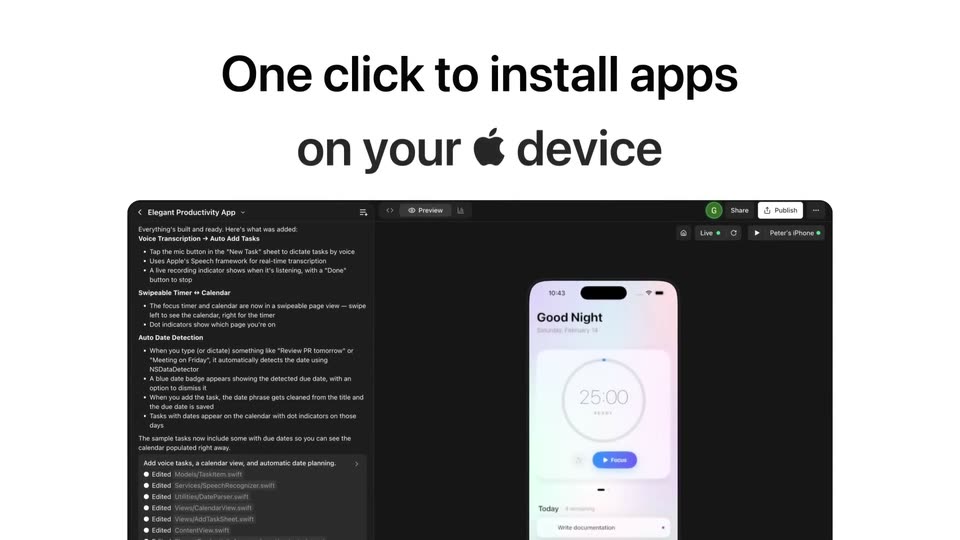
A gray headline 'One click to install apps' floats above a dark app-builder window showing code and a phone preview. The headline shifts to black, a gray line 'on your device' with an Apple logo fades in beneath it, and the window scales up.
On-screen text: “One click to install apps”, “on your device”
Techniques: UI zoom
Camera: Static
A dark app-builder window with a code panel and phone preview sits under a centered headline. The view zooms into the top bar as the headline crossfades to a second line, then reframes to place the window beside an orange iPhone that loads the installed app.
On-screen text: “One click install apps on your Apple device”, “no 99$ dev account no Xcode”
Techniques: UI zoom
Camera: Push in
A dark dashboard panel and a 3D orange iPhone sit side by side on white. The phone screen switches from a 25:00 timer to a February calendar as a second blurred phone slides in at the bottom right. A gray headline fades in across the top.
On-screen text: “Two clicks to ship to the App Store”
Techniques: 3D mockup
Camera: Push in
A black headline sits above a dark app panel on a white background. A cursor clicks the Publish button, a share dropdown opens, then the cursor clicks Publish 3 changes. The panel collapses and the headline fades out as the scene ends.
On-screen text: “Two clicks to ship to the App Store”
Techniques: Cursor demo
Camera: Static
On a plain white background, a black headline fades in from a soft gray blur, then a second line with an orange word drops in below. The two-line block then scales up and blurs out to white.
On-screen text: “If your device can do it,”, “Rork Max can build it”
Techniques: Kinetic type
Camera: Push in
White rounded cards on a light gray background form a feature grid, each pairing a label with an icon or device render. Labels scramble into place, the Siri orb pulses and orange wave lines flow beneath the Animations card.
On-screen text: “For any device”, “AR & LiDAR”, “3D Games”, “NFC”, “Screen Time”, “HealthKit”, “HomeKit”, “Camera & Vision AI”, “iMessage Apps”, “Widgets', 'Dynamic Island', 'Siri Actions', 'Animations', 'Background Tasks”
Camera: Static
On a white background, a two-line black headline fades in from light gray, the second line slides in with a black dot, and a thin URL scales in below. The headline then fades out, leaving the dot and URL centered as the sign-off.
On-screen text: “Start the next App Store hit”, “with ● Rork Max”, “rork.com/max”
Techniques: Kinetic type
Camera: Static