1:23
Explore
00:00:00 / 00:32:03
- Length
- 0:32
- Scenes
- 19 · 1.7 s avg
- Product on screen
- 0:00
- Features shown
- 5
- Voiceover
- No
- Views
- 184K on X
as of November 14, 2026
Rork’s 0:32 launch film runs 19 scenes, about 1.7 s each. The product is on screen from the first frame and 5 features are revealed. There is no explicit call to action. White-field feature reel: each beat pairs a bold two-line headline on one side with a 3D copper-framed phone on the other, and beats hand off through slide-out/slide-in transitions with blur-to-focus resolves. Pacing holds a steady 120 bpm pulse with no hard cuts; captions and phones glide, tilt and reframe rather than cut, and a single orange accent word anchors every headline.
No filming indicatedEstimated needs: 5 capture groups — your screens or recordings · 13 3D passages — build or supply
Is this your launch? to your site or press kit.
More like this

0:54

Google’s new AI chatbot | Meet Bard
Google · AI · Mar 2023
1:03


The new Apple HomeView: Keep the whole home connected, entertained, and in the know.
Apple · Hardware · Oct 2026
Rork - Introducing Rork Max App The first app that allows you to build, pre, scene by scene
· 19 scenes as text
01 · Product intro · 0:00–0:01
A white title card holds a bold black headline with an orange accent word above a thinner subheadline. Below them the top of an orange-framed phone with a blue sky wallpaper and a single app icon rises slowly into frame.
On-screen text: “Introducing Rork Max App”, “Build and preview apps on the go”
Camera: Static
02 · Product intro · 0:01–0:02
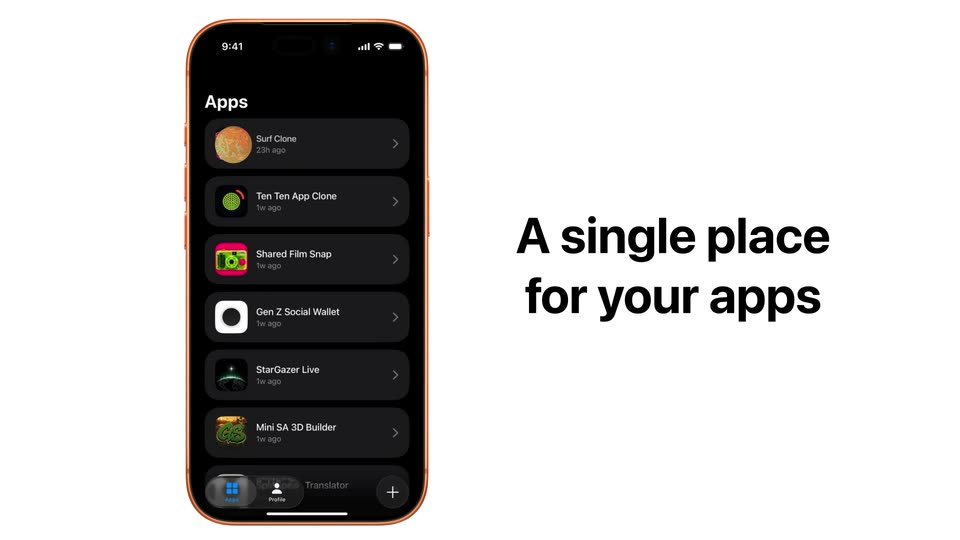
A headline and subhead sit above a front-facing orange-framed phone on white. The phone slides down and the shot reframes onto its screen as the home screen switches to an Apps list, the headline exits upward, and the caption A single place slides in at right.
On-screen text: “Introducing Rork Max App”, “Build and preview apps on the go”, “A single place”
Techniques: UI zoom
Camera: Pull out
03 · Feature reveal · 0:02–0:04
A 3D orange-framed phone mockup on the left scrolls its app list and tilts into perspective, while the headline on the right animates in: the first line sits static in black, the second line fades from light gray to solid black.
On-screen text: “A single place”, “for your apps”
Techniques: Kinetic type, 3D mockup
Camera: Static
04 · Feature reveal · 0:04–0:07
A copper-framed iPhone on the left plays a 3D endless-runner game, a small character sprinting along tracks past trains and coins. On the white right side, two lines of bold black text sit static beside the device.
On-screen text: “Preview instantly”, “No TestFlight needed”
Camera: Pan
05 · Feature reveal · 0:07–0:07
A copper-framed phone mockup sits in 3D perspective on the right, its screen running an AR coin-collecting game with a scrolling track. On the left, the black caption “Even AR” holds steady as the phone and text resolve from blur to sharp focus.
On-screen text: “Even AR”
Techniques: 3D mockup
Camera: Static
06 · Feature reveal · 0:07–0:09
A phone with an orange frame sits on the right, its screen showing an AR game where a yellow train runs along a track laid on the office floor while the room view rotates. Black text Even AR holds static on the white left side.
On-screen text: “Even AR”
Techniques: 3D mockup
Camera: Static
07 · Feature reveal · 0:09–0:10
On a white background, the caption “Even AR” and a phone mockup showing an AR room scan slide out to the right, then the phone re-enters on the left as the caption “Build anywhere” appears on the right.
On-screen text: “Even AR”, “Build anywhere”
Techniques: 3D mockup
Camera: Pan
08 · Feature reveal · 0:10–0:11
An orange phone mockup on the left plays an office video with a glowing orange button on the desk, the view inside panning slowly. The black headline Build anywhere stays fixed on the right as a small orange dot drifts past it.
On-screen text: “Build anywhere”
Techniques: 3D mockup, Particles
Camera: Static
09 · Feature reveal · 0:11–0:11
A phone mockup on the left shows a live office view with a glowing orange marker on the desk; the bold headline sits on the right. The phone drops down and the headline fades to gray as the scene exits.
On-screen text: “Build anywhere”
Camera: Static
10 · Demo · 0:11–0:12
A tight close-up of the bottom corner of a copper-framed phone in 3D perspective; the dark chat screen shows a white message and an input bar with a gold dot, the text pulling into focus as the frame settles.
Techniques: 3D mockup
Camera: Static
11 · Demo · 0:12–0:14
A close-up of a dark phone screen shows a chat message; below it, a black pill input bar types out the prompt word by word, and the circular send button shifts from gray to amber as the line completes.
Techniques: Kinetic type
Camera: Static
12 · Demo · 0:14–0:16
Close-up of the lower half of an orange-framed phone on a white background. A dark chat screen shows a gray prompt bubble and a column of spec text that scrolls upward, then the device tilts and blurs as it rotates in 3D.
Techniques: 3D mockup
Camera: Static
13 · Feature reveal · 0:16–0:17
On a white field, a bold black headline sits above a copper-framed phone that snaps from blur into focus, its dark screen showing a Surf Clone build log with a short body paragraph.
On-screen text: “Install straight from Rork App”
Techniques: 3D mockup
Camera: Pan
14 · Feature reveal · 0:17–0:19
A black headline sits above a copper-framed phone on a white background. The phone's dark interface shows a chat log, then shifts to a smaller preview phone on the left and a menu panel on the right.
On-screen text: “Install straight from Rork App”
Techniques: Morph
Camera: Pull out
15 · Feature reveal · 0:19–0:22
Bold black headline “Install straight from Rork App” above a cropped orange iPhone. A coin drops past the game icon, a long-press menu opens over it, then the headline fades and the screen switches to the in-game friends leaderboard.
On-screen text: “Install straight from Rork App”
Camera: Pull out
16 · Other · 0:22–0:26
A front-facing iPhone displays a Subway Surfers leaderboard widget. The phone scales down as the headline “If your iPhone can do it, Max App can build it” fades in above. It then centers between two more phones labeled Screen and Island under a “Widgets” title as the scores tick.
On-screen text: “If your iPhone can do it”, “Max App can build it”, “Widgets”, “Screen”, “Island”
Techniques: Kinetic type
Camera: Pull out
17 · Other · 0:26–0:29
Three orange iPhone mockups sit angled in 3D on a white background. They swap which phone is centered while gray labels Widgets, Screen Blocking and Dynamic Island slide above to follow each device, their screens cycling a leaderboard widget, a Restricted screen and a flight Dynamic Island.
On-screen text: “Screen Blocking”, “Widgets”, “Dynamic Island”
Techniques: 3D mockup
Camera: Pan
18 · Other · 0:29–0:30
Three iPhone mockups rotate in 3D on a white background, turning to show a lock screen, a home screen and a leaderboard widget, while gray feature labels slide and reposition above them.
On-screen text: “Dynamic Island”, “Screen Blocking”, “Widgets”
Techniques: 3D mockup
Camera: Pan
19 · Other · 0:30–0:32
Three copper-framed iPhone mockups float in 3D perspective on a white background. The center phone shows a game leaderboard widget, the left a black focus timer counting down, the right a flight tracker. Gray labels read Screen Blocking, Widgets, Dynamic Island above each.
On-screen text: “Screen Blocking”, “Widgets”, “Dynamic Island”
Techniques: 3D mockup
Camera: Static