0:26
Google Gemini - Gemini 3 Deep Think is here. Deep Think is our most advanced reasoni
Gemini 3 Deep Think · Dec 2025
Rork · Mar 2026 · 0:25 · Full motion · AI-annotated
Rork’s 0:25 launch film runs 17 scenes, about 1.5 s each. The product is on screen from the first frame and 1 feature is revealed. The call to action lands at 0:21 (85% in). The video is one continuous take: a centered headline hands off to a scrolling UI card that ticks off each preparation step with a spinner-to-check morph and a filling progress bar, then pushes into a 3D phone to land the result. Signature moves are the seamless card-to-device camera push, the green-check status flips and the confetti burst on success, all set on a flat light-gray field with no hard cuts.
Is this your launch? to your site or press kit.
Gemini 3 Deep Think · Dec 2025
On a plain light gray background, the centered headline 'Rork Max now fills out your App Store page' appears; the first line settles in while the second line slides in from the right and the block scales up slightly.
On-screen text: “Rork Max now fills out your App Store page”
Techniques: Kinetic type
Camera: Static
A large headline sits centered on a light gray field, then shrinks and slides to the top as an App Store editor panel fades in below and scrolls down through its text fields, a build row and a colorful app icon.
On-screen text: “Rork Max now fills out your App Store page”
Techniques: Kinetic type
Camera: Pull out
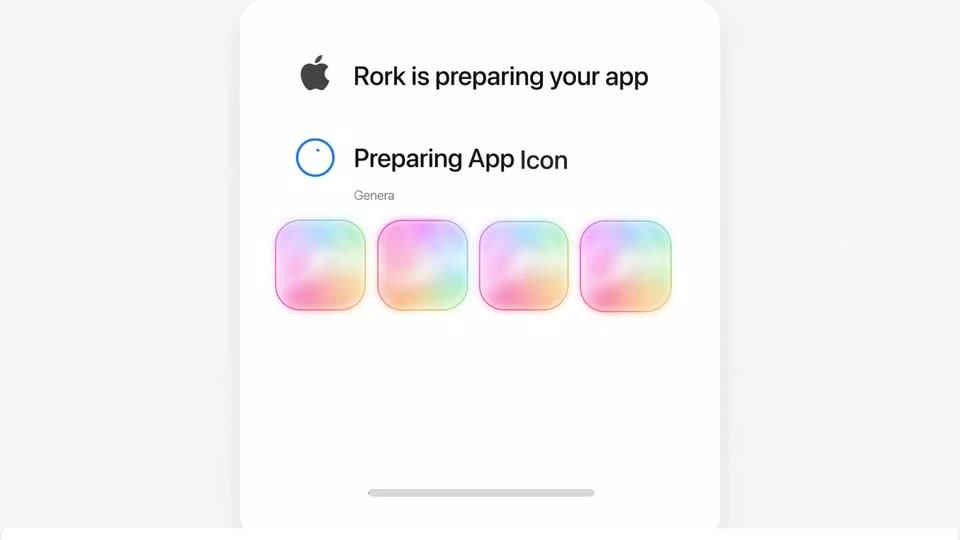
A light product screen shows the heading your App Store page over a faint store page, then scrolls up to reveal an Apple logo, a spinner labeled Preparing App Icon, and four rainbow gradient icon placeholders above the app description.
On-screen text: “Rork Max now fills out”, “Rork is preparing your app”, “Preparing App Icon”, “Generating app icons – 90 sec”
Techniques: UI zoom
Camera: Push in
A white product card on a gray field shows an Apple logo and a loading header. A blue spinner spins beside the status line, then the four app icons reflow from a horizontal row into a vertical list as a progress bar fills at the bottom.
Camera: Static
A white loading card on a light gray field shows a blue spinner beside the bold heading Designing Screenshots and a progress bar that fills. A phone mockup slides in from the left, revealing a music app home screen with project cards.
Camera: Static
A white card on a light gray field shows a loading state: a blue spinner beside the bold heading 'Designing Screenshots' and a gray progress bar filling at the bottom. A horizontal row of phone mockups with app captions scrolls horizontally beneath the heading.
Camera: Pan
A flat mobile app card on a pale gray field, topped by a row of app screenshots, shows an AI writing two description variations. The heading types in, the right card fills and turns green with a checkmark as the progress bar advances.
Techniques: Kinetic type
Camera: Static
A white card on a light gray background scrolls up through a task list. A blue spinner on Preventing rejection becomes a green check, then the spinner on Uploading to the App Store does the same, while a blue progress bar fills at the bottom.
Techniques: Morph
Camera: Static
A white form panel fades in over a pale gray background, sharpening from blur. It scrolls down past a row of phone mockups with small caption labels, then past the Promotional Text and Description fields.
Camera: Push in
A developer dashboard view crossfades from a promotional text field up to the page header, then a cursor slides in from the right and hovers over the blue Add for Review button. A row of five phone mockups with colorful app screenshots sits below the iPhone and iPad tabs.
Techniques: Cursor demo
Camera: Pan
A white success card with a green check and two buttons sits centered on a gray field while multicolored confetti drifts around it. A cursor slides in from the lower right and presses the black Go to App Store button.
Techniques: Particles, Cursor demo
Camera: Push in
A white success card with a green check and two buttons floats centered amid falling confetti, a pixel cursor resting on the black App Store button. The card shrinks as a phone with an orange frame rises from below, the card flying toward its screen.
Techniques: Particles, Cursor demo
Camera: Pull out
A copper phone stands in 3D perspective against a light gray field. On its screen an app store card reads Your Pocket music Studio; a cursor rests on the Open button, then the view pulls back to expose the app icon header and a smaller phone mockup.
Techniques: 3D mockup, Cursor demo, UI zoom
Camera: Static
A copper-framed phone stands in 3D perspective on a light gray backdrop, its screen showing the Voxlab app store page with a 4.6 rating and a Get button. A white cursor glides from the button up to the app icon.
Techniques: 3D mockup, Cursor demo
Camera: Static
An orange-framed iPhone in 3D perspective shows an app store page for Voxlab, a white cursor resting on the app icon. The camera then zooms in on the icon and the top of the page.
Techniques: 3D mockup, Cursor demo, UI zoom
Camera: Push in
A tight close-up of an iPhone's top screen on a gray gradient. Two app icons, each under a white cursor, swap positions then slide down off the screen, leaving only the status bar. The phone drifts downward in frame.
Techniques: Cursor demo
Camera: Push in
On a plain light gray background, the two-line headline 'Start the next App Store hit with Rork Max' sits centered; the second line and the URL below fade in from light gray to black. The headline then fades out, leaving the black dot mark and the URL.
On-screen text: “Start the next App Store hit”, “with● Rork Max”, “rork.com/max”
Techniques: Kinetic type
Camera: Static