0:34
Zomma | Computer-use agents for the enterprise
Zomma · B2B · Nov 2026
Glean · Sep 2024 · 0:56 · AI-annotated
Glean’s 0:56 launch film runs 21 scenes, about 2.7 s each. The product is on screen from the first frame and 4 features are revealed. There is no explicit call to action. The video is a headline-and-demo loop: each feature opens with a word-by-word headline on a flat pastel field, then resolves into sliding 3D prompt cards and interface panels, all cut at a steady ~123 bpm. Signature moves are the tilted gradient prompt cards with ADVANCED tags and avatar dots, diagonal pastel band wipes between color fields, and the recurring solid blue brand field that bookends the piece.
Is this your launch? to your site or press kit.
Zomma · B2B · Nov 2026
Oura · Hardware · May 2026
Granola · Productivity · Apr 2026
On a solid blue background, a white circular glyph with a center dot and a curved tail sits at center, then the lowercase letters lean fill in to complete the glean wordmark. A blurred ID card slides in from the bottom-left corner.
Camera: Static
Tilted prompt cards with headings, ADVANCED tags and small avatar icons drift across a solid blue background, rotating and overlapping in 3D perspective with heavy motion blur as they pass through the frame.
Techniques: 3D mockup, Parallax
Camera: Pan
A white headline reads centered on a solid indigo field, held static in a locked-off frame. A blurred white shape drifts out of the bottom-right corner during the first beat, then the field stays clean.
On-screen text: “Put AI to work”
Camera: Static
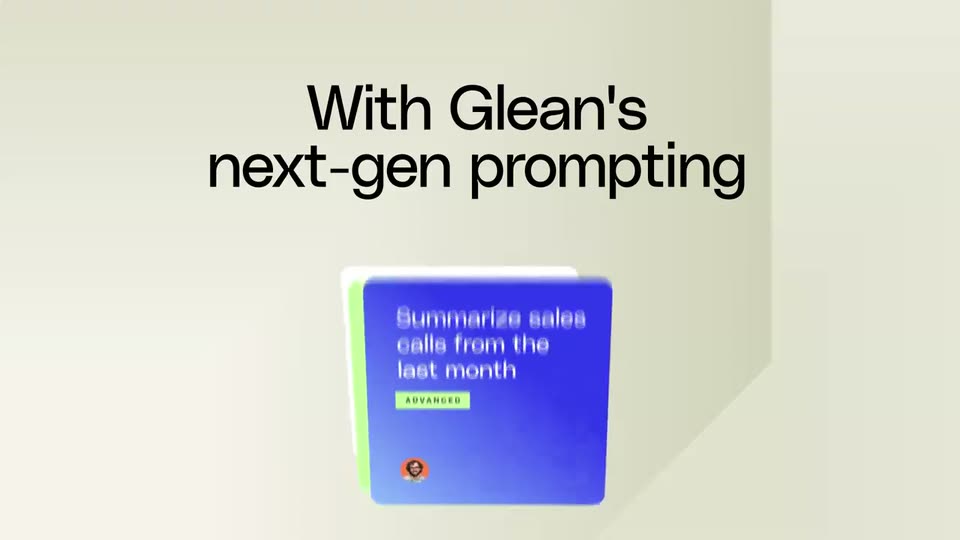
A soft cream 3D set holds a stack of rounded cards. A blue prompt card slides up from behind a white card and settles in the center with a slight tilt, while the headline appears above it.
On-screen text: “Put AI to work”, “With Glean's”, “next-gen prompting”
Techniques: 3D mockup
Camera: Static
A black two-line headline sits above a white prompt card on a cream background. The card types out a follow-up prompt as a blue source card labeled with customer calls slides up into it, while a second card fades in at the lower left.
On-screen text: “With Glean's next-gen prompting”
Camera: Static
A 3D stack of white prompt cards with blue headers sits below a charcoal headline. The cards fan out and fly off to the left with motion blur, revealing diagonal pink and beige stripes.
On-screen text: “With Glean's”, “next-gen prompting”
Techniques: 3D mockup
Camera: Static
A coral background with diagonal light bands holds a black headline that builds word by word above four staggered workflow cards, each a blue-headed note with gray placeholder lines, that slide and scale into place.
On-screen text: “Automate complex, multi-step tasks & workflows”
Techniques: Kinetic type
Camera: Pull out
Black words build up one by one on a peach background of diagonal color blocks, then the finished line slides to the top as a white assistant interface card rises from the bottom edge.
On-screen text: “Create, edit, save, and run”
Techniques: Kinetic type
Camera: Static
A coral gradient backdrop holds a white two-column interface card. The headline above lights up word by word, then slides into a new line, while the right column of blue step cards scrolls down and the left panel swaps to a results list.
On-screen text: “Create, edit, save, and run”, “and run prompt!”
Techniques: Kinetic type
Camera: Static
A coral gradient backdrop with soft abstract shapes holds a white workflow card titled 'Follow up on customer call'. The headline 'and run prompt!' in black and white slides across the top as the whole frame pans right.
On-screen text: “and run prompt!”
Techniques: Kinetic type
Camera: Pan
A wide peachy gradient with soft abstract shapes pans right. A white form card with a purple button slides off the left edge, and the word Collaborate slides in from the right in dark maroon.
On-screen text: “Collaborate”
Camera: Static
A black headline builds word by word over a pastel peach-to-green gradient, reading “Collaborate and share prompts with your teammates.” The lines slide left as two product cards, one with a teammate avatar and one with a woman at a desk, drift in from the top.
On-screen text: “Collaborate and share prompts with your teammates”
Techniques: Kinetic type, Parallax
Camera: Static
A flat collage on a cream background pans right to left. A large black headline scales in over a green circle while rounded photo cards of two women working at desks and colored feature tiles slide past it at slightly different speeds.
On-screen text: “Collaborate and”, “share prompts”, “with your teammates”, “Get started writing code”, “Draft a knowledge base article from a resolved ticket”, “ADVANCED”, “Summarize peer feedback”
Techniques: Kinetic type, Parallax
Camera: Push in
Pastel feature cards and a photo of two women at a desk scroll right across a cream field, thin lines linking small avatar circles to each card. The large gray headline “Explore and discover” slides in from the right edge.
On-screen text: “Explore and discover”
Techniques: Kinetic type
Camera: Pan
A cluster of colorful UI cards slides out to the left, revealing a large black headline that slides in from the right on a cream background.
On-screen text: “Explore and discover”, “in your company's”, “prompt library”
Techniques: Kinetic type
Camera: Pan
A cream field shows a three-line black headline that slides left out of frame. Colored prompt cards at the left edge exit with it, leaving the field blank before a green card slides in from the bottom right.
On-screen text: “Explore and discover in your company's prompt library”
Techniques: Kinetic type
Camera: Pull out
A wall of pastel and blue prompt cards sits in a tilted 3D plane. The camera pans diagonally across the grid, passing cards that read Develop a marketing campaign and Find sales opps that mentions a competitor, each with a small round avatar and an occasional ADVANCED tag.
Techniques: 3D mockup
Camera: Pull out
A solid blue field holds the white line “So you can get more” while a lime word below it swaps through Engineering, Status reports and Brainstorming, then locks on Work. Done. as a gradient 3D card with a small avatar slides in from the top.
On-screen text: “So you can get more”, “Engineering”, “Status reports”, “Brainstorming”, “Work. Done.”
Techniques: Kinetic type, 3D mockup
Camera: Static
A blue background holds colored prompt cards that rotate and fan out in 3D, spreading from one tilted card into five. The static headline “So you can get more” in white and “Work. Done.” in lime green sits in the lower center, partly behind the cards.
On-screen text: “So you can get more”, “Work. Done.”
Techniques: 3D mockup, Parallax
Camera: Pan
On a solid blue background, the white glean wordmark scales in above the tagline. Blurred 3D note cards carrying task prompts fly off to the right and down, clearing the frame so the centered headline reads in full.
On-screen text: “Work AI for all”
Techniques: 3D mockup
Camera: Static
A flat blue field holds the white 'glean' wordmark above the tagline 'Work AI for all', with 'Work AI' in lime green. The tagline fades out as the logo scales up to center frame, then holds still.
On-screen text: “glean”, “Work AI for all”
Techniques: Kinetic type
Camera: Static