0:49

Y Combinator - Stilta (@StiltaIP) is building the Cursor for patent practitioners.
Stilta · B2B · Feb 2026
Rive · Aug 2022 · 1:05 · Full motion · AI-annotated
Rive’s 1:05 launch film runs 17 scenes, about 3.9 s each. The product shows up at 0:00 and 4 features are revealed. The call to action lands at 0:59 (91% in), over a voiceover. The video is built as a feature walkthrough: an abstract neon logo sting, a tour of the dark community gallery, then a step by step demo of the Remix workflow, from remixing a file to tweaking it, sharing links, and running it on every platform. Pacing is steady at roughly eight cuts per minute, driven by slow zooms into UI panels, cursor clicks, and blur in text over a near black canvas with a thin white type system.
Is this your launch? to your site or press kit.
Films whose music sounds like this one, voice left out
Monako Glass · Cinematic electronic
ElevenLabs · Modern electronic
SE3 Labs · Electronic
A near-black field holds a centered row of neon lines that swell into glossy 3D primitives: a red ring, a purple sphere, a pink cone and a small stacked sphere. Tiny teal and pink dots mark the outer edges.
Techniques: Morph
Camera: Static
On a near-black field, the word RIVE forms from glowing geometric shapes, an orange ring, a cyan chevron and a violet bar, then settles into thin white lettering that holds still.
On-screen text: “RIVE”
Techniques: Morph
Camera: Static
A dark webpage displays a top bar with the R logo, menu links, and a pink Editor button. Beneath it, a grid of flat illustration tiles scrolls upward, swapping in new community pieces: a witch, a row of emoji faces, and multicolored blob figures.
Camera: Pan
A locked-off frame of a dark community page shows eight looping travel icons in a grid, with a right sidebar naming the pack and offering a download. The compass needle spins, the car wheels turn, the figure walks and the cutlery crosses.
Camera: Static
The Rive editor opens on a Travel Icons Pack, a grid of blue line icons on a dark canvas. The cursor selects the compass icon, the layers panel highlights Root, and a state machine graph with Entry, idle and active nodes fades in along the bottom timeline.
On-screen text: “Pricing”
Techniques: Cursor demo
Camera: Static
A dark gallery grid of colorful community illustrations scrolls, a right-hand detail panel with metadata and toggles flashes in, then the view zooms into a blue rain cloud tile that expands to fill the frame as a cursor hovers.
Techniques: Cursor demo, UI zoom
Camera: Pan
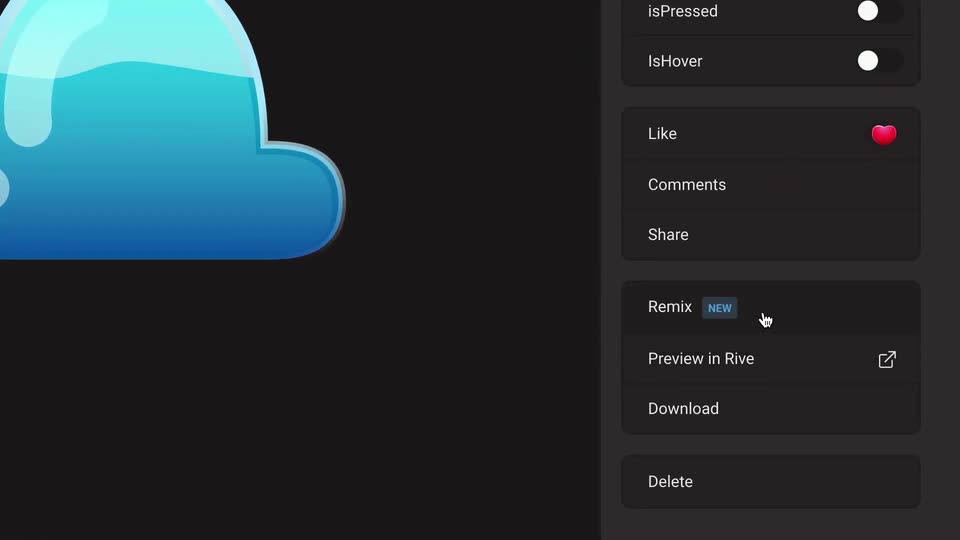
A dark community page shows a glossy blue cartoon cloud shedding raindrops on a black canvas, with a details sidebar at right. The frame zooms in, the cursor clicks Remix, and a dialog with a pink preview and two buttons pops over the dimmed interface, then fades out.
Techniques: UI zoom, Cursor demo
Camera: Static
A dark design-tool interface fills the frame, a blue cloud vector with anchor points centered on the canvas. The view zooms in, the cloud recolors pale blue, and white snow dots fall beneath it while a state-machine graph below highlights a node. A cursor moves and clicks.
Techniques: UI zoom, Cursor demo
Camera: Push in
Dark motion-design interface with a node tree on the left and a pale blue cloud on the canvas. A cursor moves to the top toolbar and clicks the share button, opening a dropdown menu with export and link options.
Techniques: Cursor demo
Camera: Push in
A dark editor interface opens a dropdown menu; a cursor selects Share Link, and a Share Link panel slides into the center while a light blue cloud icon on the right canvas begins to emit small rain dots.
Techniques: Cursor demo, UI zoom
Camera: Pan
A dark editor screen pairs a Share Link panel with a preview of a light-blue cloud icon shedding raindrops. A cursor clicks Generate link, the panel updates to show a share URL, embed link, and iframe code. The cursor then rests on Manage your links.
Techniques: Cursor demo
Camera: Static
A dark webpage shows a row of flat device mockups, each screen looping the same orange cartoon character running. The white headline and gray caption settle into place with a brief blur, above a row of platform logos.
On-screen text: “Run Rives anywhere.”, “Render your interactive Rive animations with our open-source runtimes.”
Camera: Push in
A row of five purple screens, from TV to phone, each loops the same orange cartoon character running. Below, the white headline 'Run Rives anywhere.' sits above a gray subline and a line of platform logos.
On-screen text: “Run Rives anywhere.”, “Render your interactive Rive animations with our open-source runtimes.”, “Web Flutter iOS Android React React Native C++ Defold Tizen Unity coming soon”
Camera: Static
A cursor clicks a pale-blue cloud icon in a dark Rive editor; the cloud squashes and white snow dots fall from it. The camera zooms into the right-hand detail panel, where the cursor hovers the Rain Icon credit link and it underlines.
Techniques: Cursor demo, Particles, UI zoom
Camera: Push in
The shot opens on a close-up of the details panel of a dark community page, then pulls back to reveal the full screen. A cursor moves onto a glossy blue cloud icon; the isPressed and isHover toggles flip on and blue raindrops fall from the cloud.
Techniques: UI zoom, Cursor demo
Camera: Pull out
A dark Rive community page scrolls up, revealing the top navigation bar and logo. A grid of animated artwork tiles fills the view: a pale cloud shedding rain, a glossy blue cloud, a purple planet, and a meditating character whose face shifts.
Camera: Pull out
A solid black frame holds the white URL Rive.app centered in the middle, perfectly still with no camera move or animation across the full six seconds.
On-screen text: “Rive.app”
Camera: Static