
1:51
Explore
Motion Graphics Explainer Video for Fintech Product | Ramp
Ramp · Feb 2025 · 1:11 · Full motion · AI-annotated
studio Burnwe
- Length
- 1:11
- Scenes
- 35 · 2.0 s avg
- Product on screen
- 0:16
- Features shown
- 5
- Call to action
- 1:04 · 90%
- Voiceover
- Yes
- Views
- 10K on YouTube
as of November 27, 2026
00:00:00 / 01:11:15
- Length
- 1:11
- Scenes
- 35 · 2.0 s avg
- Product on screen
- 0:16
- Features shown
- 5
- Call to action
- 1:04 · 90%
- Voiceover
- Yes
- Views
- 10K on YouTube
as of November 27, 2026
Ramp’s 1:11 launch film runs 35 scenes, about 2.0 s each. The product shows up at 0:16 and 5 features are revealed, with social proof. The call to action lands at 1:04 (90% in), over a voiceover. Tone is calm and confident, a clean corporate explainer that pairs a muted sage-and-stone palette with a single bright lime accent. The build is a steady problem-to-proof arc: drifting UI cards and big low-contrast words state the pain, a dark-green question card pivots, then the ramp wordmark opens a run of feature blocks where flat interface panels slide, stack and tilt in 3D while thin line diagrams and beige headlines punctuate each point, closing on a gauge and a lime sign-up button. Pacing
No filming indicatedEstimated needs: 7 capture groups — your screens or recordings · 1 official logo — reused across the film · 4 graphic passages — draw or supply · 3 3D passages — build or supply
Is this your launch? to your site or press kit.
More like this




Similar soundtrack
Films whose music sounds like this one, voice left out
1:44
George Matelich - Today, I’m excited to share that we’ve raised a $4.5 Million seed rou
Rely · Upbeat, modern electronic
0:54


Introducing the Sales Chat for Microsoft 365
Microsoft · Upbeat electronic
1:22

All new Analytics | Shopify Editions Summer '24
Shopify · Corporate electronic
Motion Graphics Explainer Video for Fintech Product | Ramp, scene by scene
· 35 scenes as text
01 · Problem · 0:00–0:00
On a light gray field, three accounting cards (a balance list, an income line, an invoice) drift and reposition at different depths. The word Complicated fades in large over the invoice card on the right.
On-screen text: “Complicated”
Techniques: Parallax
Camera: Static
02 · Problem · 0:00–0:05
A grid of accounting UI mockups (checklist, balance list, bank statements, email, budget, folders) assembles on a light background. Big dark words 'Complicated' then 'draining' scale in over the right card as a cursor hovers the green folder, and the camera slowly zooms in.
On-screen text: “Complicated”, “draining”
Techniques: Kinetic type, Cursor demo
Camera: Pan
03 · Problem · 0:05–0:06
A cluttered stack of overlapping panels, a yellow folder labeled Statements and a big black word Training fills the frame, then clears away to reveal a full-screen spreadsheet table. A cursor hovers over the rows as the sheet settles into view.
On-screen text: “Training”
Techniques: UI zoom, Cursor demo
Camera: Pan
04 · Problem · 0:06–0:08
A full-screen spreadsheet grid lists transaction rows with company, amount and status columns. A cursor moves down the list, a green Accountant tooltip trails it, and a black burnwe credit badge sits in the top left corner.
On-screen text: “Video Created by burnwe”
Techniques: Cursor demo
Camera: Static
05 · Problem · 0:08–0:09
A flat spreadsheet of raw transactions morphs into a clean app view: a white sidebar on the left and a perspective-angled list of completed transactions on the right. A dark green Accountant tag hovers at the cursor throughout.
On-screen text: “Accountant”
Techniques: Morph, 3D mockup
Camera: Pull out
06 · Problem · 0:09–0:12
A transactions list from a finance dashboard fills the frame as a spreadsheet panel slides out to the left. A dark Accountant pill drifts right and fades while a cursor hovers over the rows.
On-screen text: “Accountant”
Techniques: Cursor demo
Camera: Static
07 · Problem · 0:12–0:13
A light accounting dashboard with a left sidebar and a transactions list of amounts and payment types. A black cursor hovers over a row, revealing a dark green 'Accountant' tag, while the list scrolls upward and the sidebar text resolves from a doubled ghost into a clean state.
Techniques: Cursor demo
Camera: Push in
08 · Problem · 0:13–0:13
A close-up of a spreadsheet with transaction rows zooms out to reveal a finance dashboard, adding a left sidebar and status and date columns. A black cursor rests at the right edge.
Techniques: UI zoom
Camera: Push in
09 · Hook · 0:13–0:16
On a dark green field, a white headline scrambles into place at center, then the line scales up and drifts left, turning gray. A small black burnwe credit badge stays fixed in the top-left corner.
On-screen text: “What if there's a smarter approach?”
Techniques: Kinetic type
Camera: Static
10 · Hook · 0:16–0:16
A huge light-gray headline sits low-contrast on a flat gray field, locked off. The phrase nearly vanishes in the span of the clip, leaving a single faint letter.
On-screen text: “'s smarter approach?”, “Video Created by”
Camera: Static
11 · Product intro · 0:16–0:17
On a flat light gray field, the lowercase wordmark ramp fades from gray to black at center while its curved logo mark assembles to the right, growing from a thin stroke into a solid crescent. A small black burnwe credit badge sits in the top-left corner throughout.
On-screen text: “ramp”, “'s smarter approach?”
Camera: Static
12 · Product intro · 0:17–0:17
The black ramp wordmark and symbol sit centered on a light gray field, then slide up and left as the Ramp accounting screen with a Ramp Card list slides in from the right. A small burnwe credit badge stays fixed in the top-left corner.
On-screen text: “Video Created by burnwe”, “ramp”
Techniques: Kinetic type
Camera: Pull out
13 · Product intro · 0:17–0:19
The black ramp wordmark slides in at left above a beige-and-grey tagline that fades up, while the white Ramp accounting screen with its transaction table slides in from the right.
On-screen text: “Ultimate finance Automation platform”
Techniques: Kinetic type
Camera: Pan
14 · Feature reveal · 0:19–0:22
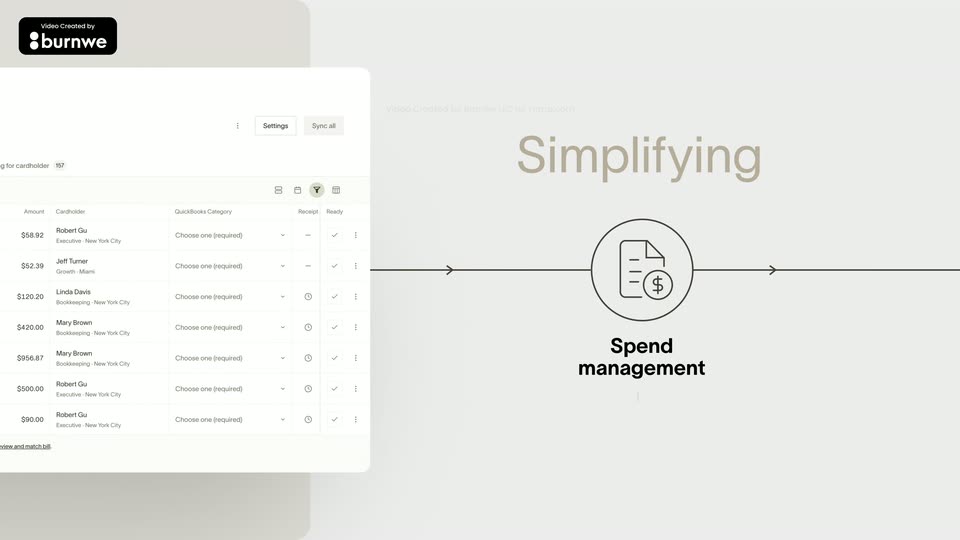
A flat spend-table UI panel slides out left, revealing a diagram that eases into place: a horizontal arrow line joins two circular line icons, Spend management and Prone-to-error tasks, beneath the beige headings Simplifying and Eliminating.
On-screen text: “Simplifying”, “Spend management”, “Eliminating”, “Prone-to-error tasks”
Camera: Pan
15 · Feature reveal · 0:22–0:24
A light gray diagram with the words Simplifying and Eliminating and two line icons on a horizontal arrow line reflows, then a white integration panel scales in showing a QuickBooks row, a pilot mark and a yellow mark, then settles into an empty Connect your ERP view.
On-screen text: “Simplifying”, “Eliminating”, “Spend management”, “Prone-to-error tasks”
Techniques: Morph
Camera: Pull out
16 · Feature reveal · 0:24–0:29
A white integrations window sits on a light gray field: a provider list on the left, a radial diagram on the right with the yellow Ramp logo at the center and accounting badges on concentric rings. Thin arrows grow from the center toward three badges.
Camera: Static
17 · Feature reveal · 0:29–0:30
A flat Ramp Card accounting screen fills the frame; the transaction list scrolls slowly downward past vendor rows while a yellow Sync all button glows top right. A black burwwe badge sits in the top-left corner and a faint white watermark crosses the center.
On-screen text: “Video Created by burwwe LLC.”, “burwwe.com”
Camera: Push in
18 · Feature reveal · 0:30–0:31
A flat accounting dashboard titled Ramp Card with a left sidebar and a transaction list. The top three vendor rows lift up into floating cards with drop shadows while the lower rows stay in place, creating a stacked depth effect over the static list.
On-screen text: “Video Created by burnwe”
Techniques: Parallax
Camera: Static
19 · Feature reveal · 0:31–0:33
A Ramp accounting dashboard settles from a stack of sliding panels into a clean transaction list. A cursor then opens a category dropdown on the right and scrolls down to highlight the Advertising option.
On-screen text: “Video Created by burnwe”
Techniques: Cursor demo
Camera: Pan
20 · Feature reveal · 0:33–0:34
Two angled interface panels float on a pale background. The left lists transactions under a yellow Sync all tab; the right shows a Review & sync table of vendors with a green Sync to QuickBooks button. A cursor hovers over a checkbox.
On-screen text: “Video Created by burnwe”
Techniques: 3D mockup, Cursor demo
Camera: Pan
21 · Feature reveal · 0:34–0:35
A tilted 3D mockup of an accounting interface shows a row list on the left and a Review & Sync panel on the right. A cursor hovers by the green sync button. A black burnwe credit badge sits in the top left corner.
On-screen text: “Video Created by burnwe”
Techniques: 3D mockup, Cursor demo
Camera: Static
22 · Feature reveal · 0:35–0:36
A 3D QuickBooks sync panel cross-dissolves to a flat light-gray background. The word Have scales in at left while a line-drawn briefcase inside a thin circle settles at right.
On-screen text: “Video Created by”, “Have m”
Techniques: Kinetic type
Camera: Static
23 · Feature reveal · 0:36–0:38
A stacked-briefcase line icon in a circle holds the center as the blurred headline resolves, then the frame zooms out to a faint world map dotted with small briefcase markers. The tan headline sharpens center-left while a black subline slides in below it.
On-screen text: “Video Created by burnwe”, “Have multiple entities?”, “International operations?”
Techniques: Morph, Kinetic type
Camera: Pull out
24 · Feature reveal · 0:38–0:40
A dimmed app view with a centered Create legal entity form and a sliding headline overlay. The view reframes to show the form and the Entities list side by side as a cursor clicks through the country and currency dropdowns.
On-screen text: “Have multiple entities?”, “International operations?”
Techniques: Cursor demo, UI zoom
Camera: Pull out
25 · Feature reveal · 0:40–0:41
Two flat interface panels sit side by side on a blurred background: a Create legal entity form on the left and an Entities dashboard on the right. A cursor moves down the form and selects USD in the currency field.
On-screen text: “Video Created by burnwe”
Techniques: Cursor demo, Split screen
Camera: Static
26 · Feature reveal · 0:41–0:45
Two product screens sit side by side on a light gray field with blurred duplicates behind. The left Create legal entity form holds still while the right Entities list adds rows one by one. A cursor drifts from the green button toward the list as the frame pulls back.
On-screen text: “Video Created by”
Techniques: Cursor demo, UI zoom
Camera: Pull out
27 · Feature reveal · 0:45–0:46
On a dark gray field, a thin olive-green ring holds a plus mark at its center. The cross strokes rotate from a tilted position into a straight plus while the ring stays steady and centered.
On-screen text: “Accourting”
Camera: Static
28 · Feature reveal · 0:46–0:48
A light gray interface shows a vertical stack of white category cards. The cursor slides up to Travel Transport, which brightens and lifts with a shadow as the list scrolls slightly. A blue Ramp Intelligence tag sits above the bold title Accounting automation.
On-screen text: “Accounting automation”
Techniques: Cursor demo
Camera: Static
29 · Feature reveal · 0:48–0:50
A light accounting UI shows a merchant list on the left and a transaction detail panel on the right with a $58.92 Uber charge. A small blue loading spinner pulses in the panel, then fades out. The scene opens with a soft crossfade from the previous view.
Camera: Static
30 · Feature reveal · 0:50–0:53
A thin line diagram assembles on a light gray background: an arrowed line drops to a clock icon, then branches to a gear icon, each with a sliding label. The diagram shifts left as a white Ramp Card accounting panel slides in from the right.
On-screen text: “Saving time”, “Manual effort”
Techniques: Kinetic type
Camera: Pull out
31 · Feature reveal · 0:53–0:58
The Ramp Card accounting table fills the frame, then scales down as a line-drawn bell with a 9 badge appears on the right, an arrow linking it to the Sync all button, while a second panel of POS and Bank Transfer rows slides up below.
On-screen text: “Saving time”, “Manual effort”
Techniques: UI zoom
Camera: Pull out
32 · Feature reveal · 0:58–1:00
A product UI showing a Ramp Card row and a bell icon sits at the top as a beige panel slides up to cover it, leaving a thin strip. The headline fills in line by line on the panel in a muted brown sans.
On-screen text: “Video Created by”, “Any resolution steps are auto-prompted”
Techniques: Kinetic type, Masking, Parallax
Camera: Static
33 · Social proof · 1:00–1:01
White interface cards for Asana, UPS, Ari, Furniture Corp and two condition chips float into a dark 3D space above a thin circular ring, fading and settling into a grid as a white line draws an arrow along the ring.
On-screen text: “Any resolution steps are”
Techniques: 3D mockup, Parallax
Camera: Static
34 · Social proof · 1:01–1:04
Flat UI cards (invoices, vendor, approval rules) float over a dark backdrop above a circular gauge. A yellow arc fills the dial while a white needle sweeps clockwise, and the yellow headline grows from 8x to 8x Faster at the bottom.
On-screen text: “8x Faster”
Techniques: Kinetic type
Camera: Static
35 · CTA · 1:04–1:11
The black ramp wordmark and swoosh mark sit centered on a light gray background. A gray tagline fades in below, then a yellow button with a cursor arrow pops in at the bottom.
On-screen text: “It can be a reality”, “Sign up today”
Camera: Static