1:38

Best Product Launch Video | DrM Group
DrM Group · Aug 2026
Antropi Robotics · Oct 2026 · 1:23 · AI-annotated
The video is a scrapbook: live-action factory clips and UI screens are pinned onto a beige graph-paper canvas inside purple or paper frames, with captions that type out the voiceover phrase by phrase. Cuts run at about 17 per minute with slide, wipe and scale moves, so the collage stays brisk while the grid backdrop keeps every element aligned.
DrM Group · Aug 2026
Screenpipe · Sep 2026
Runway · AI · Aug 2026
A factory floor with two white CNC machines and two white robot arms handling parts. The clip opens inside a graph-paper frame with corner badges, then slowly zooms until the footage fills the screen; a caption appears at the bottom.
On-screen text: “Backed by Combinator”, “ANTROPI ROBOTICS”, “This factory runs without operators, day and night!”
Camera: Push in
A wide static shot of a factory floor shows two white CNC machines with blue doors behind a conveyor holding blue bins. A vertical wipe from the right then covers the frame with a graph-paper grid.
On-screen text: “This factory runs without operators, day and night!”
Techniques: Masking
Camera: Pan
On beige graph paper, a black-and-white portrait of two men in black shirts widens from a thin strip to a full frame. Purple arrows point to the names Naman and Shubh, which slide in below. The photo then scales up to fill the frame and the company logo appears.
On-screen text: “Hi, we are”, “Naman”, “and”, “Shubh”
Techniques: Masking, Kinetic type
Camera: Push in
A black-and-white portrait of two smiling men in dark shirts, framed by a beige grid-paper border, slowly zooms in. A pixelated white-and-purple logo with the Antropi Robotics wordmark sits over the lower photo, and small captions read 'Hi, we are Naman and'.
On-screen text: “Hi, we are”, “Naman”, “and”, “ANTROPI”, “ROBOTICS”
Camera: Static
A locked-off wide shot of a workshop: men work around a white robotic arm on a bench, one sits at a monitor desk on the left, all inside a beige grid-paper border. A brand logo scales in at the corner as white captions slide in at the bottom.
On-screen text: “ANTROPI ROBOTICS”, “We've been building”, “hardware together for nine years”
Techniques: Kinetic type
Camera: Static
Two men in a workshop: one in a striped shirt assembles boards on a cluttered bench while a man in a black hoodie leans in to watch. The clip sits inside a beige grid border with an episode marker, and a subtitle slides in at the bottom.
On-screen text: “12”, “EPISODE 12”, “hardware together for nine years”
Camera: Pan
On a paper-textured canvas with a faint grid and ruler ticks, a workshop clip and a robotics-lab clip with a white arm slide side to side, one enclosed in a purple selection frame. A white caption slides along the lower edge.
On-screen text: “hardware together for nine years”, “nderground”
Camera: Pan
A white robotic arm sits on a metal table; two men stand beside it, one holding a tablet, others work at desks behind. The footage sits in a purple film-strip frame on a beige grid, a black caption box sliding in at the bottom.
On-screen text: “How the world Builds Hardware”
Techniques: Kinetic type
Camera: Static
A workshop inside a paper-textured frame: a white robotic arm reaches toward a CNC machine while an engineer works a control panel. The shot opens with a brief blur wipe, and the caption slides up from the bottom.
On-screen text: “How the world Builds Hardware”
Camera: Static
A man at a workbench works a white six-axis robot arm with a handheld controller, blue bins and a CNC machine behind him. The clip sits in a purple-bordered frame on graph paper and slides up off screen, carrying the title band with it.
On-screen text: “How the world Builds Hardware”
Camera: Pan
On a cream graph-paper grid with a top centimeter ruler, a large panel shows a 3D machine arm working on a metal box, crossed by orange laser lines. A peach card at right holds a line sketch of a two-lens part, and a thin dark strip runs along the bottom.
Camera: Static
On a cream grid, a 3D factory interior with a robotic arm pans slowly, while a wireframe drawing of a two-lens device zooms and rotates in a right panel. The drawing resolves into a solid orange 3D model as a blurred dark strip runs along the bottom.
On-screen text: “12”
Techniques: Split screen, Morph
Camera: Static
On a cream grid-paper backdrop, rectangular image panels (a 3D interior, an orange object, a dark strip) slide off to the right, uncovering the static caption 'No machines' and a workshop photo at the right edge.
On-screen text: “No machines”
Camera: Pan
A man in a black shirt works a CNC milling machine in a workshop with pale blue walls, the frame locked off as a white bar wipes away from the left. Small white captions swap at the bottom in sync with the voiceover.
On-screen text: “No machines”, “to buy”, “No factories”
Techniques: Masking
Camera: Pan
A man in a white cap and striped sweater crouches at a large industrial machine, turning a handle, in a dim cluttered workshop. A second man in a dark jacket walks away toward the back. White caption text swaps at the bottom of the frame.
On-screen text: “No factories”, “to run”, “the future”
Camera: Static
Slow pan left across a bright factory floor: a blue press brake and a grey shear stand beside stacked metal parts and blue barrels, while white captions scale in at the bottom.
On-screen text: “the future”, “We are building”, “US quality parts”
Techniques: Kinetic type
Camera: Pan
A rounded-corner clip of a CNC spindle cutting a turbine fan holds the left half of the frame; on the right, over a beige grid, short phrases pop in one after another.
On-screen text: “US quality parts”, “China prices”, “at your door”, “in 24 hours”
Techniques: Split screen, Kinetic type
Camera: Static
A 3D CAD part rotates in a software viewport on the left as the line You design the part today appears word by word on a grid-paper background. The view then zooms into the model until it fills the frame in a blur.
On-screen text: “You design the part today”, “in 24 hours”
Techniques: Kinetic type, 3D mockup, UI zoom
Camera: Static
A film-strip frame on a gridded paper background holds a clip of three men standing in a workshop, one holding a small camera-like device. The footage starts blurred and sharpens into focus. A caption sits below the frame.
On-screen text: “You're holding it tomorrow”
Camera: Push in
On a beige graph-paper background with a top ruler, a desaturated factory shot scales up from a small centered frame to fill the screen: a black robot carrying a blue bin beside a CNC machine. Bottom captions read “So we started”, “building”, “And our first”.
On-screen text: “So we started”, “building”, “And our first”
Camera: Pan
A wide static shot of a factory floor with two white CNC machines labeled 01 and 02 behind a conveyor line; a black autonomous cart carrying a blue bin drives right to left across the foreground as white subtitles swap at the bottom.
On-screen text: “And our first”, “We are shipping”, “and we are booked”, “for the next”
Camera: Static
A white robotic arm on a CNC machine stands over roller conveyors in a gray workshop, with a blue bin of metal parts in the foreground. The view shifts left while white outlined subtitles at the bottom state the booking status.
On-screen text: “for the next”, “three months”
Camera: Pan
Over a beige grid backdrop, a CNC factory photo slides out to the left as the product landing page UI slides in from the right. The caption 'You just upload' holds still at center while small '01' and 'three months' labels slide along the left edge.
On-screen text: “01”, “three months”, “You just upload”
Techniques: Parallax
Camera: Pan
A light new-order interface fills the frame, with a purple upload zone and a hand cursor hovering over the browse area. A caption reads “You just upload” while the cursor stays still.
On-screen text: “You just upload”
Techniques: Cursor demo
Camera: Static
A Windows open-file dialog sits over a web page. The cursor clicks the hydraulic_1_inch zip in the Adapters folder and the name fills the file-name field. Behind it, a preview panel reads PREVIEW INACTIVE.
Techniques: Cursor demo
Camera: Static
Full app window on a light grid background. In the New Order upload panel, a hand cursor hovers as file rows appear one by one, each showing a Parsing badge, while the Optional Details fields below stay in a waiting state.
Techniques: Cursor demo
Camera: Static
A light order form fills the frame with a 3D part in the right viewport. A text cursor types 300 into the quantity field, then a pointer clicks Continue. The screen crossfades into a submitted-for-review confirmation as the panel swaps to a rough estimate.
Techniques: Cursor demo
Camera: Static
A product interface window floats over a light grid backdrop, easing from a slight 3D tilt into a flat position. It shows an order card titled 'Submitted for technical review' with a four-step tracker, while a cursor sits in the lower right.
Techniques: 3D mockup
Camera: Static
A white order card showing a four-step review tracker slides left, revealing a photo of a white robotic arm loading a CNC machine, with blue bins of machined parts in front. A cursor sits at the card's lower corner.
Techniques: Cursor demo
Camera: Static
Three vertical panels of factory footage slide apart to form a triptych: a white robot arm loads parts into a CNC machine, a metal impeller is cut, and a second arm works in an enclosed cell.
On-screen text: “Loading”, “Cutting”
Techniques: Split screen
Camera: Pull out
Three vertical panels on a white card over graph paper show a robot arm loading a part into a lathe, a turbine blade milled under coolant, and the arm inspecting a part. White captions Loading, Cutting, Checking sit at each panel's bottom.
On-screen text: “Loading”, “Cutting”, “Checking”
Techniques: Split screen
Camera: Static
Three vertical panels on a beige field show a gripper loading a part, a blade cut under coolant spray, and a white ABB arm checking a part. The middle panel wipes diagonally to a bench shot. White captions label each stage.
On-screen text: “Loading”, “Cutting”, “Checking”
Techniques: Split screen, Masking
Camera: Static
A workshop bench with a white robotic arm over a metal table; a man in a green shirt stands at left watching while a man in black works at a PC on the right. The camera drifts slowly as the arm's end effector shifts, and captions name the steps.
On-screen text: “Loading”, “Cutting”, “Checking”
Camera: Static
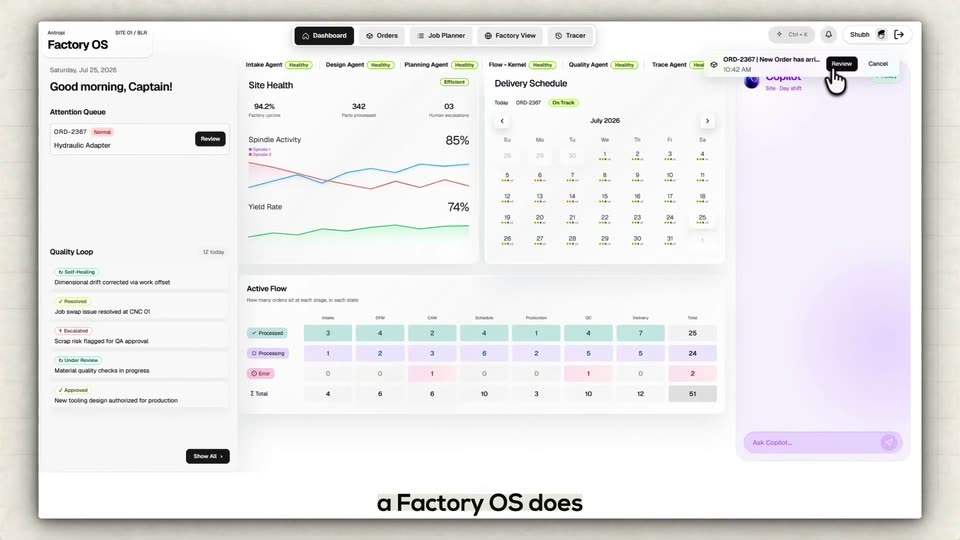
Front-on view of the Factory OS dashboard in a browser window on a pale background. A cursor hovers the Review button, then the layout shifts: the left queue narrows, center panels slide, and the right Copilot panel opens a chat thread. A caption builds a sentence at the bottom.
On-screen text: “That's what”, “a Factory OS does”
Techniques: Cursor demo, Kinetic type
Camera: Static
The Factory OS review screen runs a cursor demo: a 3D fitting and a diagnosis card pop into the bench, the cursor picks the fix, and a completion badge appears while the Copilot panel updates. Captions swap phrase by phrase at the bottom.
On-screen text: “You focus on”, “what you are building”, “will handle”, “the rest”
Techniques: Kinetic type, Cursor demo
Camera: Static
A locked-off Factory OS dashboard holds still while a cursor clicks Split Job, opening a modal whose sliders flip to a Job Split Complete panel. The timeline below refills with the split job blocks.
On-screen text: “the rest”, “We started with one factory”, “and we are going to put a 1000”
Techniques: Cursor demo
Camera: Static
Static wide shot of a factory floor with two white CNC machines labeled 01 and 02. A black autonomous mobile robot carrying a blue bin drives across the foreground while a white robotic arm loads parts at the machines. The shot fades to black.
On-screen text: “and we are going to put a 1000”, “behind you”
Camera: Static