
1:46
Explore
SaaS Explainer Video for the FinTech Product: Peko / Motion Graphics Animation #explainervideo
Peko · May 2025 · 1:13 · Full motion · AI-annotated
studio What a Story · producer Ashish & Kashif · director Kalpajit · animation Shailendra
- Length
- 1:13
- Scenes
- 33 · 2.2 s avg
- Product on screen
- 0:00
- Features shown
- 8
- Call to action
- 1:06 · 90%
- Voiceover
- Yes
- Views
- 21K on YouTube
as of November 27, 2026
00:00:00 / 01:13:03
- Length
- 1:13
- Scenes
- 33 · 2.2 s avg
- Product on screen
- 0:00
- Features shown
- 8
- Call to action
- 1:06 · 90%
- Voiceover
- Yes
- Views
- 21K on YouTube
as of November 27, 2026
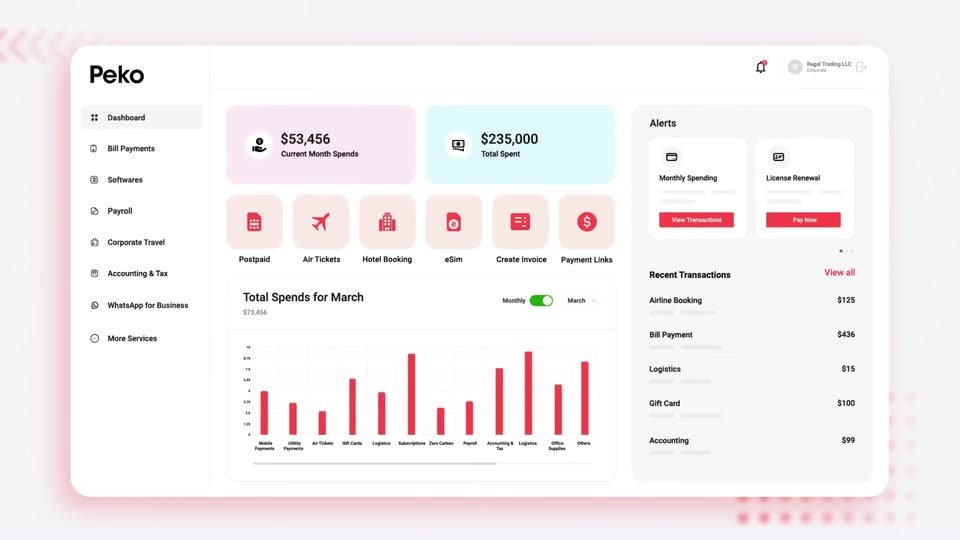
Peko’s 1:13 launch film runs 33 scenes, about 2.2 s each. The product shows up at 0:00 and 8 features are revealed. The call to action lands at 1:06 (90% in), over a voiceover. The video is built as a feature tour: a question hook, a logo sting, then eight consecutive feature blocks, each pairing a 3D-tilted dashboard mockup with a voiceover line and a glowing presenter avatar. Its signature moves are shallow-focus perspective tilts, dashed orbit rings around brand logos, and red chevron and dot-grid accents on a pale pink field.
No filming indicatedEstimated needs: 4 capture groups — your screens or recordings · 1 official logo — reused across the film · 10 graphic passages — draw or supply · 13 3D passages — build or supply
Is this your launch? to your site or press kit.
More like this



Similar soundtrack
Films whose music sounds like this one, voice left out
2:00
Kandao Focus & Focus SE is LIVE NOW!
Kandao · Upbeat electronic
1:05


Palisade: Personalized sales agents for online marketplaces
Palisade · Modern electronic
0:52


monday sidekick: AI that actually works
monday sidekick · Corporate promotional voiceover with upbeat electronic backing track
SaaS Explainer Video for the FinTech Product: Peko / Motion Graphics Animation #explainervideo, scene by scene
· 33 scenes as text
01 · Hook · 0:00–0:00
A white disc in the center morphs into a rounded pill that opens to reveal a red link icon and the gray text “Payment Link.” Two white discs rest on faint pink curved lines against a white background with a red dot grid and red chevrons in the corners.
On-screen text: “Payment Link”
Techniques: Morph
Camera: Static
02 · Product intro · 0:00–0:05
A close-up on a white Payment Links chip pulls back to reveal a network of feature chips, Corporate Travel, Payroll, Insurance, Logistics, Office Supplies, Accounting & Tax, Whatsapp for Business, connected by thin lines on pale pink. The view settles as the outlined Peko wordmark draws itself in.
On-screen text: “Peko”
Techniques: UI zoom, Parallax, Kinetic type
Camera: Push in
03 · Product intro · 0:05–0:07
The Peko wordmark reveals from a thin outline to solid black at center, with red dashed guide lines above it that fade out. Red chevron and dot accents sit in the corners, then a red rounded-rectangle frame scales in around the logo.
Camera: Pull out
04 · Demo · 0:07–0:09
A tilted 3D close-up of the app's white sidebar on a pale pink backdrop opens on the large Peko wordmark, then scrolls down through the service menu (Payroll, Corporate Travel, Accounting & Tax, WhatsApp for Business) next to a March total figure.
Techniques: 3D mockup
Camera: Pull out
05 · Demo · 0:09–0:11
A tilted 3D view of a finance dashboard pans slowly right across pastel stat cards and a row of red icon tiles, with shallow depth of field blurring the edges.
Techniques: 3D mockup
Camera: Pan
06 · Demo · 0:11–0:13
A white dashboard card titled Total Spend for March sits tilted in 3D space with shallow focus. The camera pans right across a row of red bars, each labeled by category, while a green Monthly toggle stays fixed at the top right.
Techniques: 3D mockup
Camera: Pan
07 · Feature reveal · 0:13–0:14
A white Peko billing dashboard card sits centered on a pale pink field, sharp against a blurred copy behind it. The card then tilts into a 3D perspective, rotating toward the camera while its logo and sidebar label drift forward in the lower left.
Techniques: 3D mockup, Parallax
Camera: Pull out
08 · Feature reveal · 0:14–0:15
A white dashboard tilts in 3D perspective as the camera glides across a grid of pastel cards, each with a red icon and a label like Telecom, Electricity, Water, Gas and Parking, then reveals a beneficiaries list on the right.
Techniques: 3D mockup
Camera: Static
09 · Feature reveal · 0:15–0:19
A 3D-tilted dashboard of pastel bill tiles, blurred at the edges, with a benefits list on the right. A circular avatar of a bearded man with a play icon glides across the tiles, then a payment card pops up over the Gas tile.
Techniques: 3D mockup, Cursor demo, UI zoom
Camera: Pull out
10 · Feature reveal · 0:19–0:21
A tilted 3D dashboard with a left menu and category tiles sits in soft focus. A white payment modal scales in at the center, showing a card field and a red amount button, with a circular presenter avatar and cursor at its corner. The scene drifts slowly in perspective.
Techniques: 3D mockup
Camera: Pull out
11 · Feature reveal · 0:21–0:22
A white payment card reading Choose Payment Method sits at the center while software logos orbit it on dashed circles. The shot opens defocused on a globe icon, then pulls back and sharpens to reveal the full layout.
Camera: Pull out
12 · Feature reveal · 0:22–0:26
A white two-option card floats at the center while brand logos for Microsoft 365, Chrome, Nord, Windows, McAfee, AVG and Google Workspace orbit it on dashed rings. A cursor clicks the Exciting Discounts radio, which turns green.
Techniques: Cursor demo
Camera: Pull out
13 · Feature reveal · 0:26–0:26
A white field of integration logos (Microsoft 365, Windows, Google Workspace, McAfee, AVG) orbits a central Pay Now card on dashed rings. The view then zooms into the Peko HR dashboard, tilted in 3D, showing the sidebar menu and stat cards.
Techniques: UI zoom, 3D mockup
Camera: Pull out
14 · Feature reveal · 0:26–0:29
A white HR dashboard sits in 3D perspective and pans right, revealing salary and benefits cards. A circular headshot of a smiling woman, with a black play triangle, pops in over the lower left corner.
Techniques: 3D mockup
Camera: Pull out
15 · Feature reveal · 0:29–0:30
A tilted HR dashboard card floats on a pink dotted backdrop. A cursor hovers the Salary tile as a circular portrait of a woman glows red at the chart's center, with stat cards and an activities list filling the layout.
Techniques: 3D mockup, Cursor demo
Camera: Pull out
16 · Feature reveal · 0:30–0:32
A circular employee portrait with a soft red glow glides downward over a blurred payroll list, its rows lighting up with red borders as it passes. A black cursor points at the portrait at the start. The full dashboard sits out of focus behind.
Camera: Pull out
17 · Feature reveal · 0:32–0:33
A directory list on a pink background highlights a user row with a red outline, a glowing circular portrait, and a cursor. It then cuts to a booking card where an Air Ticket tab is active and a second portrait sits over a map pin.
Techniques: Cursor demo
Camera: Push in
18 · Feature reveal · 0:33–0:36
A travel booking interface tilts in 3D perspective on a pale pink background. A black cursor moves across the form and clicks the red Search Flights button, then a flight results list slides up from below. A circular avatar of a smiling woman in a striped top travels along the right edge of the screen.
Techniques: 3D mockup, Cursor demo
Camera: Pull out
19 · Feature reveal · 0:36–0:36
A tilted flight-booking interface on a pink background. A circular photo of a smiling woman floats over the search form, which switches from a flight search to a location dropdown, while a black cursor moves toward the Hotel Booking tab. Flight result cards sit blurred below.
Techniques: 3D mockup, Cursor demo
Camera: Push in
20 · Feature reveal · 0:36–0:39
A circular photo of a smiling woman glides right across a hotel search form, the black cursor trailing her as Dubai hotel listing cards slide in below. She then rises to point at the Travel eSIM tab.
Techniques: Cursor demo
Camera: Static
21 · Feature reveal · 0:39–0:40
On a light blue sky, four circular cutouts of smiling people on phones float in a cluster at the center. A red script word Float with a small plane sits above, then fades, while a cloud with a Wi-Fi icon and a SIM outline flank the group.
On-screen text: “Float”
Camera: Push in
22 · Feature reveal · 0:40–0:43
On a light blue sky with drifting clouds, four circular cutouts of smiling people on phones cluster below the red handwritten Float title. White eSIM cards with national flags and prices pop in around them, then the whole frame defocuses and blurs out.
On-screen text: “Float”, “10GB”, “VALID FOR 30 DAYS”, “$100”, “10GB”, “VALID FOR 10 DAYS”, “$50”, “10GB”, “VALID FOR 30 DAYS”, “$100”
Camera: Pull out
23 · Feature reveal · 0:43–0:44
A row of white rounded cards scrolls left across a pale lavender background, each filling in with a pink line-art icon and a feature caption. A pink calculator icon hovers above the middle card, and pink chevron arrows sit at the bottom edge.
Camera: Static
24 · Feature reveal · 0:44–0:47
A light gray panel shows the heading Accounting with a red calculator icon above four white cards, each holding a red line icon and a caption. The cards settle into place with a stagger, then the view pans right as each card pops with a soft shadow in turn.
On-screen text: “Accounting”, “CFO Services”, “Dedicated Accountant”, “AI Powered Bookkeeping”, “Bank Reconciliation”
Camera: Static
25 · Feature reveal · 0:47–0:48
A tilted 3D view of the Peko dashboard, showing the Accounting & Tax sidebar and an Add Tax Details form, eases to a flatter frontal angle. A circular avatar of a smiling man in a suit, ringed in red with a play button, hovers over the form fields.
Techniques: 3D mockup
Camera: Static
26 · Feature reveal · 0:48–0:52
The Add Tax Details form sits in a tilted 3D perspective that straightens toward the front. A cursor types into the Organization Name, Address line 1, and Country fields while a circular avatar of a smiling man in a suit, tagged Dedicated Support Specialist, trails the cursor.
On-screen text: “Dedicated Support Specialist”
Techniques: 3D mockup, Cursor demo
Camera: Pan
27 · Feature reveal · 0:52–0:53
A tilted 3D mockup of a tax-details form fades out, leaving the green WhatsApp icon centered on a pale background, ringed by dashed concentric circles and small dot and chevron accents.
Techniques: 3D mockup
Camera: Static
28 · Feature reveal · 0:53–0:58
The green WhatsApp logo sits centered on a pale background with pink dashed rings. White pills with icons and labels pop in around it, then the layout shifts to add a Reduce Operational Cost pill at the top.
On-screen text: “Engagements”, “Broadcast Messaging”, “Seamless Integration”, “Realtime Analytics”, “Smart Chatbots”, “Reduce Operational Cost”
Techniques: Kinetic type
Camera: Pan
29 · Feature reveal · 0:58–1:02
Two flat white cards on a pale lavender field: a red line draws itself down to a circle marker on the left, three red bars grow upward on the right. Pill labels Reduce Operational Cost and Maximize Efficiency frame them, then the camera zooms into the left card.
On-screen text: “Reduce Operational Cost”, “Maximize Efficiency”
Techniques: UI zoom
Camera: Push in
30 · Feature reveal · 1:02–1:04
A red target shape opens into a circular frame revealing two smiling business people, while a red string stays attached. White pill labels with red icons and text pop in around the circle one by one on a plain white background.
On-screen text: “Corporate Cards”, “License Renewal”, “Document Attestation”, “Gift Cards”, “Vendor Payout”, “E-Sign”, “Rewards”
Techniques: Morph, Masking
Camera: Static
31 · Feature reveal · 1:04–1:06
A circular portrait of a suited man and a woman in white anchors a pale lavender layout, ringed by eight white pill tags with red line icons. Pink chevrons sit at the top left and a dot grid marks the bottom right corner.
On-screen text: “Corporate Cards”, “Document Attestation”, “Vendor Payout”, “Rewards”, “E-Sign”, “Gift Cards”, “License Renewal”
Camera: Static
32 · CTA · 1:06–1:08
On a light gray field, diagonal guide lines sketch the word Peko, the letterforms fill solid black, then invert to white with black outlines as the construction lines return.
On-screen text: “Peko”
Techniques: Kinetic type, Masking
Camera: Static
33 · CTA · 1:08–1:13
A pale gray card holds the black Peko wordmark, with pink chevrons in the top right and a pink dot grid in the bottom left. A red rounded Signup Today button and the URL www.peko.one appear beneath the logo, then hold still.
On-screen text: “Signup Today”, “www.peko.one”
Camera: Static