1:04
Explore
00:00:00 / 02:00:10
- Length
- 2:00
- Scenes
- 52 · 2.3 s avg
- Product on screen
- 0:00
- Features shown
- 16
- Voiceover
- Yes
- Views
- 101 on YouTube
as of November 24, 2026
Kandao’s 2:00 launch film runs 52 scenes, about 2.3 s each. The product is on screen from the first frame and 16 features are revealed. There is no explicit call to action; a voiceover carries the film. A narrated feature tour for Kandao Focus and Focus SE alternates a bright office, a creator’s boutique setup and a neon gaming room. Product close-ups, a sensor graphic, labeled before-and-after comparisons and Focus Studio interface demos explain the advertised features. Mint detection outlines, vertical wipes, a rotating portrait frame and a continuous product-lineup pullback organize the film; the claims are presented by the advertiser rather than independently tested.
Footage neededEstimated needs: 1 capture group — your screens or recordings · 1 official logo — reused across the film · 47 filmed passages — shoot, supply or replace · 1 graphic passage — draw or supply · 2 3D passages — build or supply
Is this your launch? to your site or press kit.
More like this


2:24

Introducing DJI RS 5: Lightweight Commercial Stabilizer | Built to Lead the Scene
DJI · Hardware · Jan 2026
0:20

Top SaaS Marketing Video Example | NeuraFlow
NeuraFlow · May 2025
Similar soundtrack
Films whose music sounds like this one, voice left out
1:00
Motion Graphics Explainer Video for AI Education Platform | BYT
BYT · Upbeat electronic
1:16


Best AI SaaS Product Launch Video | Covu
Covu · Modern corporate electronic
1:39

Netlify - Build your way. Ship on one platform. Start with a prompt or your ed
Netlify · Upbeat electronic dance music with funk and nu-disco influences
Kandao Focus & Focus SE is LIVE NOW!, scene by scene
· 52 scenes as text
01 · Product intro · 0:00–0:02
A man in a green striped shirt enters a bright office and takes his place behind a desk. A black webcam is mounted above the silver monitor beside a yellow mug.
Camera: Static
02 · Product intro · 0:02–0:05
A black Kandao webcam sits on the top edge of a monitor against white curtains. The title Kandao Focus appears on the dark lower band.
On-screen text: “Kandao Focus”
Camera: Static
03 · Feature reveal · 0:05–0:10
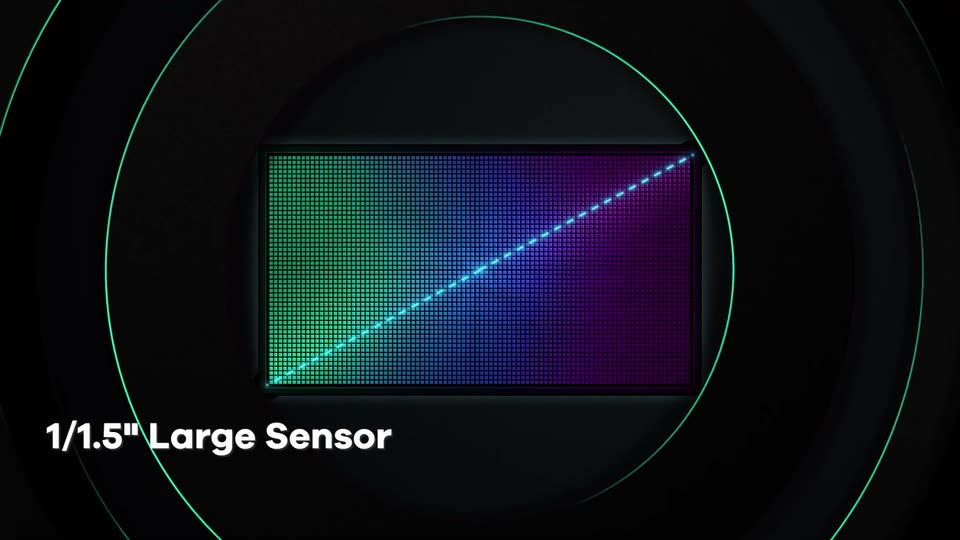
A green-to-purple sensor grid builds inside concentric teal rings. The large-sensor caption appears, then fades as a radial zoom rushes through the sensor into a monitor showing a video call.
On-screen text: “1/1.5" Large Sensor”
Camera: Push in
04 · Feature reveal · 0:10–0:11
An iMac on a desk shows a video call with a man in a living room, framed by a blue and purple gradient border. The camera pushes in on the monitor as the HDR OFF label on the chin gains a gray pill background.
On-screen text: “HDR OFF”
Camera: Push in
05 · Feature reveal · 0:11–0:14
A presenter in a green striped shirt sits at a desk in a home office, gesturing with both hands. The dull, vignetted frame wipes via a vertical line into a vivid version as the gray HDR OFF pill becomes a teal-green HDR ON pill.
On-screen text: “HDR Mode”, “HDR OFF”, “HDR ON”
Techniques: Masking
Camera: Static
06 · Feature reveal · 0:14–0:15
The black webcam sits on a small tripod against a beige curtain, its green base indicator illuminated. A clean product insert without feature captions.
Camera: Static
07 · Feature reveal · 0:15–0:18
A woman in pink is duplicated into a side-by-side webcam comparison. Circular earring detail insets appear above the two labels. A vertical band then reveals a product shot in the purple gaming room.
On-screen text: “4K Ultra-Clear Clarity”, “Other Webcam”, “Kandao Focus”
Techniques: Split screen, Masking
Camera: Static
08 · Feature reveal · 0:18–0:19
A black webcam is mounted above a monitor in a purple-lit gaming room with blue and magenta lights softly out of focus behind it.
Camera: Static
09 · Feature reveal · 0:19–0:23
Two simultaneous views of the same gamer compare a dim left image with a brighter right image. The header Perfect in Low light and labels Other Webcam and Kandao Focus stay fixed as he talks.
On-screen text: “Perfect in Low light”, “Other Webcam”, “Kandao Focus”
Techniques: Split screen
Camera: Static
10 · Feature reveal · 0:23–0:24
Over the gamer’s shoulder, a monitor displays a first-person game. The webcam above the screen remains visible in the purple-lit room.
Camera: Static
11 · Demo · 0:24–0:26
Over-the-shoulder view of a person in a green striped shirt facing an iMac. The screen shows a video call of a smiling man in a home office, with a lit webcam on top. The camera slowly pushes in toward the display.
Camera: Static
12 · Feature reveal · 0:26–0:28
A man in a green striped shirt stands in a bright room and raises his open palm, a green neon outline tracing his fingers. The caption AI Tracking sits in the lower right as the camera holds him centered while he moves his hand.
On-screen text: “AI Tracking”
Camera: Pan
13 · Feature reveal · 0:28–0:30
Split screen: left shows a black AI camera with a green lens ring panning on its mount; right shows a man in a green striped shirt gesturing in a bright studio as the shot tracks him. A white 'AI Tracking' label sits bottom right.
On-screen text: “AI Tracking”
Techniques: Split screen
Camera: Pan
14 · Feature reveal · 0:30–0:32
A man in a green striped shirt stands beside a whiteboard on an easel in a studio, raising two fingers. A glowing cyan outline frames the whiteboard, marking it as detected. The caption sits in the lower right corner.
On-screen text: “Whiteboard Mode”
Camera: Push in
15 · Feature reveal · 0:32–0:36
A close view of a whiteboard shows camera sketches and colored sticky notes. The presenter’s marker hand adds lines while the Whiteboard Mode caption stays at lower left.
On-screen text: “Whiteboard Mode”
Camera: Static
16 · Feature reveal · 0:36–0:37
A hand reaches in and tilts the webcam lens downward on a monitor edge, the green indicator light glowing. The caption Deskview Mode fades in at the lower left.
On-screen text: “Deskview Mode”
Camera: Static
17 · Feature reveal · 0:37–0:38
The webcam view tilts from the presenter’s face down to the desk, revealing his hands, keyboard and a sheet of camera sketches on a cutting mat.
On-screen text: “Deskview Mode”
Camera: Pan
18 · Feature reveal · 0:38–0:41
A straight overhead view shows a sheet of camera and remote-control sketches on a gridded cutting mat. One hand steadies the sheet as the other draws with a white pencil.
On-screen text: “Deskview Mode”
Camera: Static
19 · Feature reveal · 0:41–0:43
The presenter speaks and gestures behind a silver monitor with the webcam on its upper edge. The bright office remains visible around him.
Camera: Push in
20 · Feature reveal · 0:43–0:45
A high angle looks down on the presenter speaking at his desk. The Clear & Vivid Voice caption appears at lower left beside the monitor and webcam.
On-screen text: “Clear & Vivid Voice”
Camera: Pan
21 · Feature reveal · 0:45–0:46
The shot pushes closer to the black webcam against pale curtains. Pale teal circular graphics expand around the camera head above the Clear & Vivid Voice caption.
On-screen text: “Clear & Vivid Voice”
Camera: Push in
22 · Feature reveal · 0:46–0:49
The product close-up fades from a pale curtain background to a beige backdrop. As Portrait Mode appears, two hands enter and turn the webcam head on its mount.
On-screen text: “Portrait Mode”
Camera: Static
23 · Feature reveal · 0:49–0:51
A sideways image of the woman rotates and scales into an upright portrait strip. Enlarged blurred copies fill the sides of the widescreen frame while Portrait Mode stays at lower left.
On-screen text: “Portrait Mode”
Camera: Static
24 · Feature reveal · 0:51–0:52
A black gimbal camera on a stick sits in sharp focus, its head rotating to track a blurred woman in a pink dress. The warm-toned room behind stays soft out of focus, while a green power indicator glows on the device body.
Camera: Static
25 · Feature reveal · 0:52–1:01
The woman demonstrates an L-shaped hand gesture, outlined in mint light. The view zooms closer, holds on her and then zooms back out as she repeats the gesture. Gesture Control remains at lower left.
On-screen text: “Gesture Control”
Camera: Push in
26 · Feature reveal · 1:01–1:02
Seen from behind the presenter, a monitor shows her live video with comments and floating hearts. The webcam faces her from a stand in front of the display.
On-screen text: “LIVE”
Camera: Static
27 · Feature reveal · 1:02–1:07
A woman in a pink top holds up a small pink jewelry box. A glowing teal focus bracket locks on her face, then moves to the box as she presents the earrings, pulling focus to them, then back to her face. A white caption sits in the lower left.
On-screen text: “Auto Focus”
Camera: Static
28 · Feature reveal · 1:07–1:08
A hand in a pink top rests on a white mouse at a wooden table, the fingers tap the buttons and nudge it a few millimeters while the blurred background and the frame hold still.
Camera: Static
29 · Feature reveal · 1:08–1:09
An angled product interface pairs the woman’s live preview with a dark settings panel. A white cursor selects virtual-background thumbnails under the Customize Your Background caption.
On-screen text: “Customize Your Background”
Techniques: 3D mockup, Cursor demo, Split screen
Camera: Push in
30 · Feature reveal · 1:09–1:15
The woman remains seated in the same foreground framing as vertical wipes replace her background with several interior settings, from a blurred room to shelves, a bright hallway and a furnished living room. Customize Your Background stays at lower left.
On-screen text: “Customize Your Background”
Techniques: Masking
Camera: Static
31 · Feature reveal · 1:15–1:16
A woman in a pink top sits at a desk before a green screen, gesturing as she speaks. The shot pushes in from a wide frame with a laptop, gimbal and ring light in the foreground to a tight medium shot, pulling focus onto her.
On-screen text: “Customize Your Background”
Camera: Push in
32 · Feature reveal · 1:16–1:23
A mint face frame appears around the woman in a softly lit boutique setting. A moving comparison edge changes the image treatment; a vertical wipe later replaces the scene with the darker gaming setup.
On-screen text: “Beauty Effects and Filters”
Techniques: Masking
Camera: Static
33 · Feature reveal · 1:23–1:25
A dark foreground shape clears to reveal the webcam above a gaming monitor. A hand reaches in and physically tilts the camera head while Pan and Tilt Manually appears at lower left.
On-screen text: “Pan and Tilt Manually”
Camera: Static
34 · Feature reveal · 1:25–1:28
The gamer reaches toward the webcam and manually changes its framing. The image shifts from a close view to a wider centered view of his face in the neon-lit room.
On-screen text: “Pan and Tilt Manually”
Camera: Pan
35 · Feature reveal · 1:28–1:29
A high side angle shows the gamer using his keyboard and mouse at the dark desk, with monitors, microphone and purple-blue lighting around him.
Camera: Static
36 · Feature reveal · 1:29–1:29
A right hand grips a black gaming mouse with red LED dots on a dark desk, a blue light glowing out of focus behind. The camera holds a low close-up as the hand moves the mouse slightly. The caption fades in at the lower left.
On-screen text: “Kandao Focus Studio”
Camera: Static
37 · Feature reveal · 1:29–1:31
A close view of Focus Studio shows the gaming preview beside exposure, white-balance, brightness and contrast controls. A white cursor adjusts the sliders as the interface framing moves.
On-screen text: “Kandao Focus Studio”
Techniques: Cursor demo
Camera: Pan
38 · Feature reveal · 1:31–1:32
Over-the-shoulder view of a person in a red jacket facing a monitor showing a video call with a young man in headphones; a webcam sits on the top edge in a purple-lit room. The white title holds at lower left while the camera pushes in, blurring the frame.
On-screen text: “Kandao Focus Studio”
Camera: Push in
39 · Feature reveal · 1:32–1:34
A young man in a red jacket and headphones smiles at the camera in a neon-lit room. A dark settings panel with sliders for exposure, white balance and saturation slides in on the right, its values shifting. The scene fades from dim to bright.
On-screen text: “Kandao Focus Studio”
Techniques: Split screen, Cursor demo
Camera: Static
40 · Feature reveal · 1:34–1:35
The frame moves from the gamer’s hands at the illuminated keyboard toward his hand on the mouse. Kandao Focus Studio remains in the lower left.
On-screen text: “Kandao Focus Studio”
Camera: Pan
41 · Demo · 1:35–1:37
A young man in a red jacket and orange headphones sits at a desk under purple and teal neon lights. The shot opens sharp on a small black webcam clipped to the monitor, then racks focus to the man as he stares at the screen.
Camera: Static
42 · Demo · 1:37–1:38
A low side view shows the gamer’s left hand operating the illuminated keyboard and his right hand on the mouse as play continues.
Camera: Pull out
43 · Demo · 1:38–1:39
A young man in a red and black track jacket and red headphones sits at a desk in a dark room lit by blue neon. He talks and gestures toward a monitor while the camera tracks slightly around him.
Camera: Push in
44 · Demo · 1:39–1:41
The monitor displays a bright in-game explosion of particles. VICTORY appears and pulses across the game image as the surrounding webcam-and-monitor setup stays visible.
On-screen text: “VICTORY”
Techniques: Particles, Kinetic type
Camera: Pull out
45 · Feature reveal · 1:41–1:42
A young man in red headphones and a red jacket sits in a neon-lit room, reaching a hand toward the camera as if filming himself. A white caption fades in at the lower left.
On-screen text: “Protect the Privacy”
Camera: Static
46 · Feature reveal · 1:42–1:44
The player reaches toward the webcam, then a close view shows his hand rotating its head downward into the privacy position. The base indicator remains green.
On-screen text: “Protect the Privacy”
Camera: Static
47 · Feature reveal · 1:44–1:45
With the camera head turned down, a finger presses the illuminated oval area on the base. The indicator changes from green to pale white before the hand moves away.
On-screen text: “Protect the Privacy”
Camera: Static
48 · Demo · 1:45–1:47
A smiling young man in a red jacket and gaming headset sits at a desk in a dark room lit by neon strips, looking at an off-screen monitor. The camera eases in slightly as his hand rests on a mouse.
Camera: Push in
49 · Demo · 1:47–1:49
The office presenter speaks and gestures toward the webcam on his monitor as the framing eases back, returning to the meeting use case.
Camera: Pull out
50 · Demo · 1:49–1:51
A woman in a pink top sits at a light wood desk, hands clasped, speaking toward a laptop, ring light and tripod-mounted camera. The camera pulls back to reveal a potted plant in the foreground and the full home-office set with a plant and abstract art behind.
Camera: Pull out
51 · Outro · 1:51–1:56
A black webcam rotates against black, then the framing pulls back to reveal a second model and two monitor tops. The heading Kandao Focus | Focus SE and slogan Stay in Frame. Stay in Focus. settle above the product lineup.
On-screen text: “Kandao Focus | Focus SE”, “Stay in Frame. Stay in Focus.”
Techniques: 3D mockup
Camera: Pull out
52 · Outro · 1:56–2:00
A teal tagline 'SEE TO BELIEVE' scales in at the center of a pale gray field. The dark KANDAO wordmark then settles in above it while the tagline shrinks to sit directly beneath, locking into the brand sign-off.
On-screen text: “SEE TO BELIEVE”, “KANDAO”
Techniques: Kinetic type
Camera: Static