
0:31

Win More Chargebacks With DisputeNinja AI
DisputeNinja · B2B · Apr 2025
Paragon’s 3:20 clip runs 14 scenes, about 14 s each. The product shows up at 1:45 and 3 features are revealed. The call to action lands at 3:07 (93% in), over a voiceover. Built as one unbroken screen-share demo with a fixed webcam inset, the video walks through three integration flows in order, letting the cursor do all the moving. Pacing is real-time and unhurried, with no transitions or motion graphics, so the cursor and the presenter's face are the only dynamic elements.
Is this your launch? to your site or press kit.
DisputeNinja · B2B · Apr 2025
Fish Audio · Sep 2026
A Chrome window shows an empty AI chat panel. A cursor types and sends a meeting request, the AI replies with busy times and follow-up prompts, and the thread scrolls as more messages appear. A man in a plaid shirt speaks in a rounded webcam inset at the bottom right.
Techniques: Cursor demo
Camera: Static
A browser window shows an integrations page with Salesforce, Slack and Google Calendar cards above a chat panel. A cursor glides across the cards, then the chat scrolls up to reveal a list of busy times. A small webcam feed of the presenter sits in the bottom-right corner.
Techniques: Cursor demo
Camera: Static
A full-screen Google Calendar week view sits static while a cursor glides across the grid, pausing on the Wednesday SDE Intro Call block. A small rounded video-call window in the lower right shows a man in a plaid shirt speaking to camera.
Techniques: Cursor demo
Camera: Static
A light chat interface lists busy time slots; the page scrolls down as text is typed in the input field. The cursor hovers over the October 23 line, highlighting it, then moves to the browser tab. A rounded webcam video of a man in a plaid shirt plays bottom right.
Techniques: Cursor demo
Camera: Static
A Google Calendar week view fills the screen with a small video call window of a man in the lower corner. A cursor clicks an event to open a detail card, then hovers over the guest email, revealing a contact tooltip with a profile photo and address.
Techniques: Cursor demo
Camera: Static
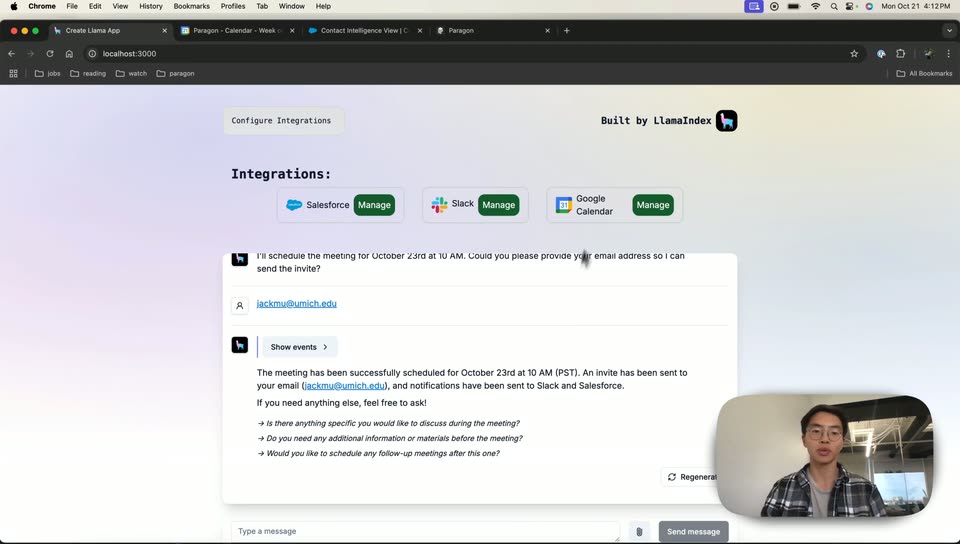
A browser window shows the Paragon integrations page: Salesforce, Slack and Google Calendar cards sit above a chat panel confirming a scheduled meeting. A presenter's webcam occupies the lower right corner, then a Slack window tilted in 3D slides in from the right.
Techniques: 3D mockup
Camera: Static
A dark Slack channel lists meeting-scheduled notifications. A cursor travels down the thread and hovers over an email link, popping a small tooltip. A presenter in a plaid shirt talks from a video-call box in the lower right corner.
Techniques: Cursor demo
Camera: Static
A screen recording shows an integrations page with a chat panel confirming a meeting sent to Slack and Salesforce. A small webcam feed of a presenter sits in the lower right corner. The cursor drifts up to the tab bar and hovers over a tab, opening a tooltip.
Techniques: Cursor demo
Camera: Static
A browser window shows a Salesforce contacts list under a blue header. A cursor moves down the rows, highlighting names, then the page transitions to a blank blue loading screen. A small webcam of the speaker sits in the lower right corner.
Techniques: Cursor demo
Camera: Static
A browser window shows a CRM interface with a blue topographic background and an empty content area. A small rounded video call inset in the bottom right shows a man in a plaid shirt speaking. A cursor rests on the left edge.
Camera: Static
A Salesforce contact page for Jack Mu fills the frame, a rounded video inset of a man in a plaid shirt sits bottom right. The cursor moves from the email field to the Opportunities row, then to the SDR Intro Meeting task in the Activity panel.
Techniques: Cursor demo
Camera: Static
A screen recording shows a Salesforce CRM interface with a blue navigation bar and an empty content area. A small video call window in the bottom right shows a man with glasses in a plaid shirt speaking. A cursor hovers in the open space.
Camera: Static
A Salesforce task page titled SDR Intro Meeting fills the screen. A cursor glides to the Due Date field showing 10/23/2024. A small video of a man in a plaid shirt and glasses talks from the bottom right corner.
Techniques: Cursor demo
Camera: Static
A Chrome window shows a LlamaIndex integrations page with Salesforce, Slack and Google Calendar cards and a chat confirming a scheduled meeting. A rounded webcam video in the lower right shows a man in a plaid shirt speaking to the camera. The cursor rests at the left edge.
Camera: Static