1:15


Trope (YC S26) Launch Video
Trope · B2B · Jul 2026
Fish Audio · Sep 2026 · 0:49 · AI-annotated
Fish Audio’s 0:49 launch film runs 20 scenes, about 2.5 s each. The product shows up at 0:07 and 5 features are revealed. The call to action lands at 0:43 (88% in), over a voiceover. The film opens on black with archival Apollo 13 footage and word-by-word typed captions, then scales the photo into the app's transcript card to reveal the product before cycling through five feature demos on a flat peach gradient. Its signature moves are the typed captions, the vertical-bar waveform motif, and the monospace metadata tags that frame every line of text.
Is this your launch? to your site or press kit.
Trope · B2B · Jul 2026
Notion · Productivity · Jul 2026
A still Earth photo sits on a black field with a monospace header and a running timecode in the corners. At the lower left, a speaker tag holds while a white caption types out word by word: Okay, Houston, we've had a problem here.
On-screen text: “APOLLO 13 AUDIO · APRIL 13, 1970”, “SPK_1”, “0:00.53 - 0:02.35”, “[voice from the radio]”, “C7#C%”, “Okay, Houston, we've had a problem here.”, “AUDIO & PHOTOS: NASA”
Techniques: Kinetic type
Camera: Static
Black-and-white archival footage of mission control, where several men in headsets lean over consoles. A green speaker tag and a purple radio tag sit above a white caption that types out word by word, while a timecode ticks in the corner.
On-screen text: “APOLLO 13 AUDIO · APRIL 13, 1970”, “0:03.26”, “SPK_2”, “0:03.37 - 0:04.75”, “[voice from the radio]”, “This is Houston. Say again, please.”, “AUDIO & PHOTOS: NASA”
Techniques: Kinetic type
Camera: Static
A black and white archival photo of the Apollo 13 spacecraft glows against a black field while a transcript builds at the lower left. The subtitle types out word by word as a running timestamp ticks in the top right corner.
On-screen text: “APOLLO 13 AUDIO · APRIL 13, 1970”, “0:05.90”, “SPK_1”, “0:05.61 - 0:06.79”, “[voice from the radio]”, “Uh, Houston, we've had a problem.”, “AUDIO & PHOTOS: NASA”
Techniques: Kinetic type
Camera: Static
A black-and-white photo of an Apollo module fills the frame, captioned with the line Uh, Houston, we've had a problem. The clip then scales down into a preview card, revealing the app's transcript list and controller panel around it.
On-screen text: “APOLLO 13 AUDIO · APRIL 13, 1970”, “0:06.93”, “SPK_1 0:05.61 - 0:06.79 [voice from the radio]”, “Uh, Houston, we've had a problem.”, “AUDIO & PHOTOS: NASA”
Camera: Pull out
A flat transcription interface on a pale peach background lists three speaker lines for nasa_problem.wav beside a controller panel. A dark rounded callout pops over the third line, then clears, and a small gray caption fades in at the bottom.
On-screen text: “TRANSCRIBED BY FISH AUDIO SPEECH TO TEXT · WEB APP”
Camera: Static
On a locked-off pale peach gradient, a dark bar-mark logo sits centered. “Fish Audio” fades in beneath it, then the large headline “Speech to Text” builds word by word, settling into black.
On-screen text: “Fish Audio”, “Speech to Text”
Techniques: Kinetic type
Camera: Static
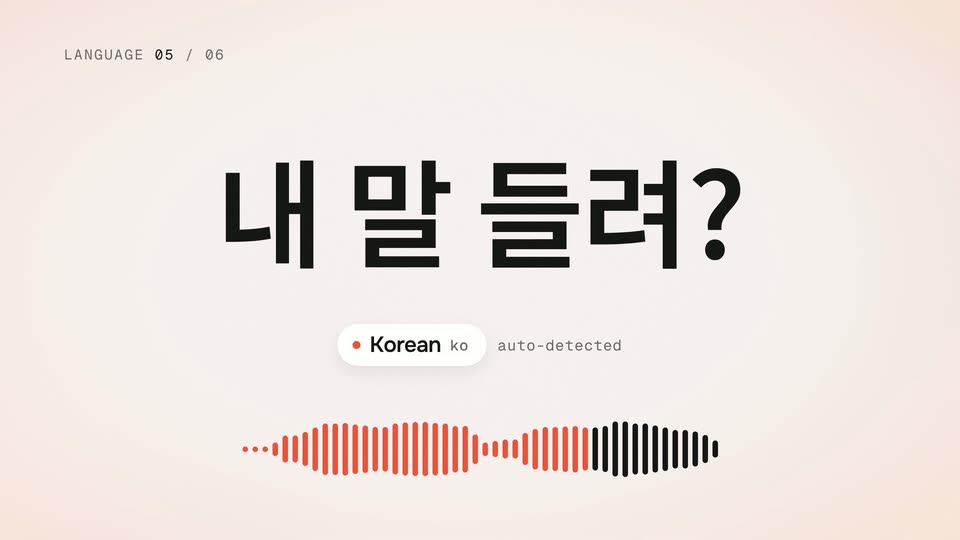
On a cream background, the question 'Can you hear me?' cycles through six languages, each swap glitching into place while the counter, language pill and waveform update. The phrases then fade into a faint grid behind a large bold 53.
On-screen text: “LANGUAGE 01 / 06”, “聞こえますか?”, “Japanese ja”, “auto-detected”, “LANGUAGE 02 / 06”, “¿Me escuchas?”, “Spanish es”, “LANGUAGE 03 / 06”, “Hörst du mich?”, “German deLANGUAGE 04 / 06LANGUAGE 05 / 06LANGUAGE 06 / 0653”
Techniques: Kinetic type
Camera: Static
A pale cream card holds a large black 80 as an orange plus scales in beside it. The word languages drops in below, then a row of white pills with language codes and a gray caption slide in. Faint multilingual phrases sit behind.
On-screen text: “80+”, “languages”, “ja”, “es”, “de”, “zh”, “ko”, “ar”, “detected automatically”
Techniques: Kinetic type
Camera: Static
A bold black 80+ with an orange plus and languages sits on a cream field, faint multilingual phrases drifting behind it, language chips along the bottom. A white transcript card slides in from the left, covering the number, showing speaker metadata and the line So
On-screen text: “80+”, “languages”, “ja”, “es”, “de”, “zh”, “ko”, “ar”, “detected automatically”, “CROSSTALK · 2 SPEAKERS, SPK_1 0:00.00 - 0:02.24, So,”
Techniques: Parallax
Camera: Static
A white rounded transcript card sits on a pale peach background. A gray SPK_1 pill and a monospace timecode sit above large black text that types out word by word to read “So, is the launch.”
On-screen text: “CROSSTALK · 2 SPEAKERS”
Techniques: Kinetic type
Camera: Static
A white transcript card labeled SPK_1 sits on a peach background; its line fills in from gray to black, then the card shrinks and slides up as a second SPK_2 card with the word Almost slides in from the right.
On-screen text: “CROSSTALK · 2 SPEAKERS”
Techniques: Kinetic type
Camera: Static
A transcript view on a soft peach background types out a short exchange between two speakers. Each bubble carries a speaker pill and a timestamp; the lines “So, is the launch video done?”, “Almost.” and “[laughing] You said that yesterday.” fill in word by word.
Techniques: Kinetic type
Camera: Static
A dark background of blurred warm bokeh circles holds still while a small NOISY ROOM label sits top left and SPK_1 and [crowd talking noise] pills hover in the center. The caption Can you send me the notes from this morning? builds word by word across two lines.
On-screen text: “NOISY ROOM”, “SPK_1”, “[crowd talking noise]”, “Can you send me the notes from this morning?”
Techniques: Kinetic type
Camera: Static
Under a monospace WORD-LEVEL TIMESTAMPS label, a white transcript card slides left, revealing red word-time markers and a controller sidebar with an Export button and a black Import to Studio button, where a cursor hovers.
On-screen text: “WORD-LEVEL TIMESTAMPS · noisy_room.wav”
Techniques: Cursor demo
Camera: Pull out
A faded transcript UI sits in the background as three overlapping format cards (JSON, SRT, VTT) slide rightward across the frame, revealing the JSON card on the left. The monospace headline tracks in from the left edge in one quick horizontal shift.
On-screen text: “EXPORT · JSON (RAW) / SRT / VTT”
Camera: Static
Three white rounded cards titled JSON (raw), SRT and VTT sit in a 3D row on a peach gradient, the middle SRT card outlined in dark. The row pans left to right while faded duplicate cards trail behind, and a scrollbar runs along the bottom.
On-screen text: “EXPORT · JSON (RAW) / SRT / VTT”
Techniques: 3D mockup
Camera: Push in
Two rounded export cards, JSON (raw) and SRT, sit over a faded audio player showing a waveform and a 0:00/0:03 timeline. The JSON card drifts left while the SRT card on the right comes into view, the background layer sliding at a slower speed.
On-screen text: “EXPORT · JSON (RAW) / SRT / VTT”
Techniques: Parallax
Camera: Pan
A dark code card with a curl request and JSON response slides in over a white transcript panel, which fades out. The Fish Audio label slides in as the card settles; a DEVELOPER API caption sits top-left.
On-screen text: “DEVELOPER API”, “Fish Audio”
Camera: Push in
A dark rounded code card sits centered on a cream background, showing a curl request above a JSON response in syntax-highlighted monospace. A small gray DEVELOPER API caption marks the top-left, a highlight box steps between two timestamp values, and a Fish Audio wordmark slides in.
On-screen text: “DEVELOPER API”, “Fish Audio”
Camera: Static
On a soft peach gradient, the Fish Audio waveform logo sits above two pill buttons holding product URLs. The brand name and a large Speech to Text headline slide in word by word with motion blur, then Hear everything. settles beneath, locking the stack into place.
On-screen text: “fish.audio/app/speech-to-text”, “api.fish.audio/v1/asr”, “Fish Audio”, “Speech to Text”, “Hear everything.”
Techniques: Kinetic type
Camera: Static