
1:20
Explore
00:00:00 / 01:33:26
- Length
- 1:33
- Scenes
- 16 · 5.9 s avg
- Product on screen
- 0:00
- Voiceover
- No
- Views
- 1.1K on YouTube
as of November 23, 2026
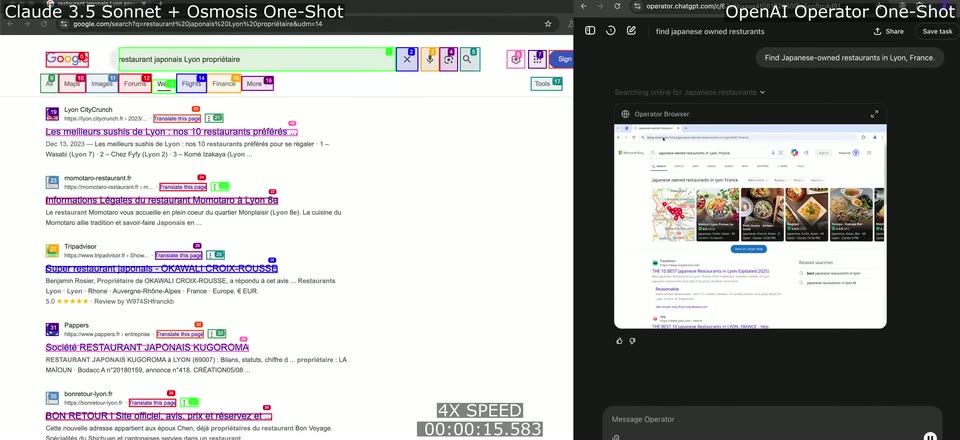
Osmosis’s 1:33 launch film runs 16 scenes, about 5.9 s each. The product is on screen from the first frame, with social proof. There is no explicit call to action. A locked split-screen benchmark races two AI browser agents on a single Lyon restaurant search, the pale left half tagged with numbered boxes against the dark right half's nested browser. Pacing comes from a 4X then 8X speed counter, and the comparison closes on a pixel SUCCESS stamp that compares step counts and durations.
No filming indicatedEstimated needs: 3 capture groups — your screens or recordings
Is this your launch? to your site or press kit.
More like this
0:22

Offstream: Streamlined carbon compliance for project developers
Offstream · B2B · Jul 2024
2:40

Durable Actors Launch YC Demo Video
Terse · B2B · Oct 2026
Osmosis Demo (Head-to-Head with OpenAI Operator), scene by scene
· 16 scenes as text
01 · Product intro · 0:00–0:01
A split screen compares two browser agents side by side. On the left, a blank page fills with Google search results; on the right, a dark Operator panel expands to open a blank browser window. White titles label each side, and a 4X speed counter runs at the bottom.
On-screen text: “Claude 3.5 Sonnet + Osmosis One-Shot”, “OpenAI Operator One-Shot”, “4X SPEED”, “00:00:02.186”
Techniques: Split screen
Camera: Static
02 · Demo · 0:01–0:04
Split screen at four times speed compares two AI agents on one task. Left: a Google results page with numbered annotation boxes, then a blank Pappers page. Right: the OpenAI Operator chat and its embedded browser opening Google, then TripAdvisor.
On-screen text: “Claude 3.5 Sonnet + Osmosis One-Shot”, “OpenAI Operator One-Shot”, “4X SPEED”
Techniques: Split screen
Camera: Static
03 · Demo · 0:04–0:06
A split screen compares two AI browser demos: the left pane holds a French company-registry page for a Japanese restaurant, the right pane stacks a chat prompt above a TripAdvisor results window. A cursor hovers in the right window while a speed counter ticks at the bottom.
On-screen text: “Claude 3.5 Sonnet + Osmosis One-Shot”, “OpenAI Operator One-Shot”
Techniques: Split screen, Cursor demo
Camera: Static
04 · Demo · 0:06–0:09
Split screen compares a Google results page on the left with the Operator browser panel on the right; both scroll through restaurant listings for a Lyon search while a 4X SPEED badge and timecode run at the bottom.
On-screen text: “Claude 3.5 Sonnet + Osmosis One-Shot”, “OpenAI Operator One-Shot”, “4X SPEED”
Techniques: Split screen
Camera: Static
05 · Demo · 0:09–0:11
Split screen: a Google results page sits left, the OpenAI Operator app right, its nested browser showing Japanese restaurants in Lyon while a chat message appears at the bottom. White titles name each model above each panel; a 4X SPEED timecode ticks at the bottom.
On-screen text: “Claude 3.5 Sonnet + Osmosis One-Shot”, “OpenAI Operator One-Shot”, “4X SPEED”, “00:00:39,439”
Techniques: Split screen
Camera: Static
06 · Demo · 0:11–0:14
Split screen compares two browser agents. Left, a Google results page for a Lyon restaurant shows numbered shortcut boxes over the search bar and tabs. Right, the Operator Browser chat displays a nested booking page. A 4X speed timer counts up at the bottom.
On-screen text: “Claude 3.5 Sonnet + Osmosis One-Shot”, “OpenAI Operator One-Shot”, “4X SPEED”
Techniques: Split screen
Camera: Static
07 · Demo · 0:14–0:15
A split screen compares two product demos: a Japanese restaurant website on the left and an OpenAI Operator browser searching for restaurants on the right. White title labels sit at the top of each half, and a 4X SPEED timecode runs at the bottom left.
On-screen text: “Claude 3.5 Sonnet + Osmosis One-Shot”, “OpenAI Operator One-Shot”, “4X SPEED”, “00:00:59.316”
Techniques: Split screen
Camera: Static
08 · Demo · 0:15–0:17
Split screen compares two agents. Left: a browser on a Japanese restaurant site, map and action labels over a photo of paper lanterns, then a zoom into the photo. Right: a dark dashboard with a nested browser searching restaurants, status line updating. White model names top.
On-screen text: “Claude 3.5 Sonnet + Osmosis One-Shot”, “OpenAI Operator One-Shot”, “4X SPEED 00:01:02.649”
Techniques: Split screen, UI zoom
Camera: Static
09 · Demo · 0:17–0:19
Split screen compares two AI agents. Left, a restaurant press page loads as article photos fade in and numbered tags pop onto the menu. Right, a dark chat panel types a search into an embedded browser that fills with map and restaurant results. A 4X speed badge sits bottom center.
On-screen text: “Claude 3.5 Sonnet + Osmosis One-Shot”, “OpenAI Operator One-Shot”, “4X SPEED”
Techniques: Split screen
Camera: Static
10 · Demo · 0:19–0:30
Split-screen: left, a browser moves from Google results to a TripAdvisor page; right, the dark Operator UI's nested browser goes from a Google map search to a Yelp list and the KUMA restaurant site. White corner titles label each system; a 4X SPEED badge and timecode sit at the bottom.
On-screen text: “Claude 3.5 Sonnet + Osmosis One-Shot”, “OpenAI Operator One-Shot”, “4X SPEED”, “00:01:20.516”
Techniques: Split screen, Cursor demo
Camera: Static
11 · Demo · 0:30–0:33
A split screen shows a Google results page on the left, with colored number boxes and red link highlights flashing over the listings, and the OpenAI Operator window on the right, its browser switching from a MUBUYTAN site to a KUMA Izakaya page. A 4X speed timecode runs below.
On-screen text: “Claude 3.5 Sonnet + Osmosis One-Shot”, “OpenAI Operator One-Shot”, “4X SPEED”, “00:02:02.116”
Techniques: Split screen
Camera: Static
12 · Demo · 0:33–0:33
A split screen compares two AI browsing agents. The left browser on mubyotan.fr plays a cooking video and pops up a blue closed-notice modal. The right shows the Operator chat with a browser window on a Japanese restaurant page. White corner labels and a 4X speed timecode frame the shot.
On-screen text: “Claude 3.5 Sonnet + Osmosis One-Shot”, “OpenAI Operator One-Shot”, “4X SPEED”, “00:02:14.449”, “00:02:15.089”
Techniques: Split screen
Camera: Static
13 · Demo · 0:33–0:34
Split screen compares two AI browser agents. Left, a sped-up clip of a hand shaping a wooden boat sits under a French chat panel noting a closed restaurant. Right, a dark browser searches Lyon eateries, opens a Yelp page for KUMA Izakaya, then closes the tab to load a second listing.
On-screen text: “Claude 3.5 Sonnet + Osmosis One-Shot”, “OpenAI Operator One-Shot”, “4X SPEED”
Techniques: Split screen
Camera: Static
14 · Demo · 0:34–0:35
A split-screen comparison shows a cooking video on the left with a French overlay panel and a 4x speed timecode, while the right panel displays an AI browser navigating restaurant web pages. White titles label each side at the top.
On-screen text: “Claude 3.5 Sonnet + Osmosis One-Shot”, “OpenAI Operator One-Shot”
Techniques: Split screen
Camera: Static
15 · Demo · 0:35–0:40
A split screen compares two browser runs. Left, a Google results page shows search text highlighted in orange. Right, a dark operator panel cycles through web pages, a Yelp list, a restaurant page and a goodbye screen, while a status line updates above. A speed label sits at the bottom.
On-screen text: “Claude 3.5 Sonnet + Osmosis One-Shot”, “OpenAI Operator One-Shot”, “4X SPEED”
Techniques: Split screen
Camera: Static
16 · Social proof · 0:40–1:33
Split screen compares two agent runs. Left, a plain panel holds a green pixel caption reading SUCCESS, 13 STEPS, 2 MINUTES 42 SECONDS above a running 8X SPEED timecode. Right, an Operator browser demo clicks through Yelp and restaurant pages, ending with a red SUCCESS caption and a result message.
On-screen text: “Claude 3.5 Sonnet + Osmosis One-Shot”, “OpenAI Operator One-Shot”, “SUCCESS 13 STEPS 2 MINUTES 42 SECONDS”, “8X SPEED”, “SUCCESS 78 STEPS 8 MINUTES 21 SECONDS”
Techniques: Split screen, Cursor demo
Camera: Static