0:45
Explore
00:00:00 / 00:43:08
- Length
- 0:43
- Scenes
- 17 · 2.5 s avg
- Product on screen
- 0:00
- Features shown
- 1
- Call to action
- 0:39 · 92%
- Voiceover
- No
- Views
- 23K on X
as of November 23, 2026
Orior AI’s 0:43 launch film runs 17 scenes, about 2.5 s each. The product is on screen from the first frame and 1 feature is revealed. The call to action lands at 0:39 (92% in). A single-feature launch built as a left-text, right-mockup split: bold black headlines step through the workflow (find, drag, character, one click, you're in) while browser mockups and 3D-tilted windows demo the drag-and-drop on a cream field. Pacing is steady at 115 bpm with soft focus-to-sharp racks, zoom pushes, and crossfades; the signature move is the headline swapping on the left as the interface on the right performs the action, capped by a centered logo-and-URL card.
Footage neededEstimated needs: 1 capture group — your screens or recordings · 1 official logo — reused across the film · 1 filmed passage — shoot, supply or replace · 2 graphic passages — draw or supply · 5 3D passages — build or supply
Is this your launch? to your site or press kit.
More like this

1:29


Introducing: Projects
ElevenLabs · AI · Sep 2023
0:26
Google Gemini - Gemini 3 Deep Think is here. Deep Think is our most advanced reasoni
Gemini 3 Deep Think · Dec 2025
Orior - you don’t need a prompt anymore. find a pose. drag it in. one click., scene by scene
· 17 scenes as text
01 · Product intro · 0:00–0:03
On a cream field with a soft central glow, a small black asterisk mark and the gray word Introducing hold center as the large black headline Copy a pose. scales up from the middle, then the gray line Drag. Drop. One click. settles beneath it.
On-screen text: “Introducing”, “Copy a pose.”, “Drag. Drop. One click.”
Techniques: Kinetic type
Camera: Static
02 · Feature reveal · 0:03–0:06
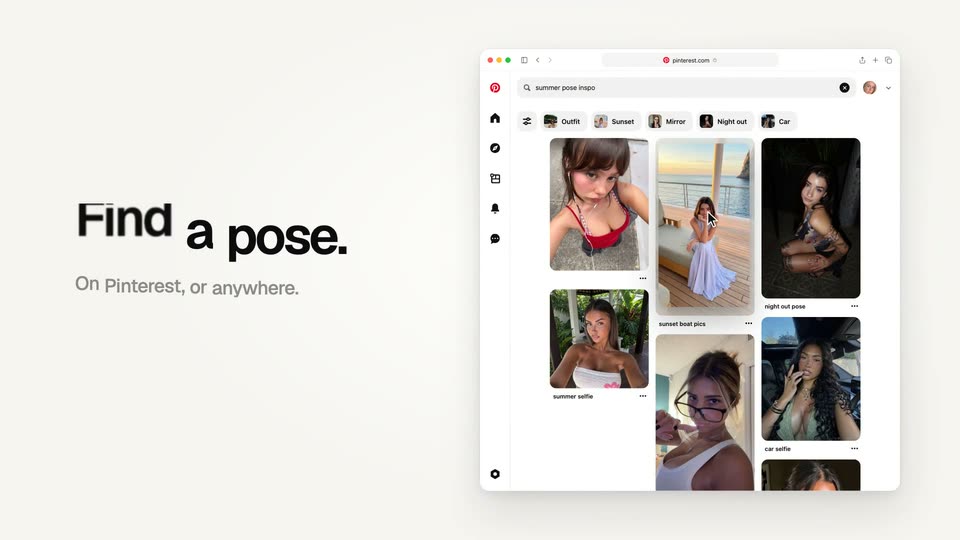
A flat browser window showing a Pinterest grid of selfie pins sits on the right; a cursor hovers a pin, then drags it up so the grid reflows. On the left, a black headline reads Find a pose. with a gray subline, then swaps to Drag it in.
On-screen text: “Find a pose.”, “On Pinterest, or anywhere.”, “Drag it in.”, “Right onto Canva.”
Techniques: Kinetic type, Cursor demo
Camera: Static
03 · Feature reveal · 0:06–0:07
A cream backdrop holds a bold black headline on the left while a tilted 3D browser window on the right shows an image-creation panel beside a grid of portrait photos. The frame opens soft and out of focus, then racks into sharp focus.
On-screen text: “Drag it in.”, “Right onto Copy a pose.”
Techniques: 3D mockup
Camera: Pull out
04 · Feature reveal · 0:07–0:08
A flat Oniral browser window sits on a cream field beside a black headline. A cursor drops a reference photo into the panel, which updates to a 'Creating with Ivy' prompt, while the left headline and subline blur out of focus.
On-screen text: “Drag it in.”, “Right onto Copy a pose.”
Techniques: Cursor demo
Camera: Static
05 · Feature reveal · 0:08–0:18
A 3D browser mockup on the right opens on an Ivy character card, zooms into the creation form, and a cursor clicks Create image. Left-side headlines swap from Your character. to One click. to You're in.
On-screen text: “Your character.”, “Made once in Orior.”, “One click.”, “No prompt to write.”, “You're in.”
Techniques: 3D mockup, Kinetic type, UI zoom, Cursor demo
Camera: Push in
06 · Feature reveal · 0:18–0:21
On a cream background, bold black text reads left while a vertical photo card on the right sharpens from a soft blur. The card shows a blonde woman seated on a deck at sunset. A second card of the same portrait slides in behind the first, stacking to the left.
On-screen text: “You're in.”
Camera: Static
07 · Feature reveal · 0:21–0:22
Two portrait photos sit side by side on a cream background: a woman in a white dress on a seaside deck, dark-haired on the left, blonde on the right, in the same pose. The headline scales in at left above a gray subline, and small captions label each photo.
On-screen text: “You're in.”, “Same pose. Your character.”, “The pose”, “Your character”
Techniques: Kinetic type
Camera: Static
08 · Feature reveal · 0:22–0:25
Two browser windows on a cream background: an Instagram post left, the onical.com create-image panel right. 'From' and the Instagram logo appear top left, a 'You're in.' caption scales in, then the frame zooms into the right window as the first slot shows a generating state.
On-screen text: “From”, “You're in.”
Techniques: UI zoom
Camera: Push in
09 · Feature reveal · 0:25–0:26
A tilted 3D browser mockup of an AI image tool shows a form on the left and a grid of four photos of a blonde woman on the right. The photos fade in from a dimmed state while the camera slowly zooms in, pushing the left login panel out of frame.
On-screen text: “oriorai.com”
Techniques: 3D mockup, UI zoom
Camera: Static
10 · Feature reveal · 0:26–0:27
A zoom-out reveals a two-panel layout: a tablet on the left plays a TikTok video of a woman in glasses, while a browser window on the right shows a creation form and a grid of reference photos. The word From with the TikTok logo sits top left.
On-screen text: “From”
Camera: Pull out
11 · Feature reveal · 0:27–0:29
Two browser windows sit side by side on a cream field, a From headline and TikTok logo above. A cursor drags a pose-reference photo card from the dark TikTok view into the onereal reference grid, while the frame zooms onto the right window.
On-screen text: “From”
Techniques: Split screen, Cursor demo, UI zoom
Camera: Push in
12 · Feature reveal · 0:29–0:33
A close-up of the Create image interface with a grid of reference photos pulls back to reveal a dark X feed beside it, under a From X headline.
On-screen text: “From X”
Techniques: UI zoom, Split screen
Camera: Pull out
13 · Feature reveal · 0:33–0:34
A 3D-angled browser window of an AI image generator sits beside a black tablet edge. The left form panel lists a pose reference and scene prompt while the right shows a grid of generated portraits. The window eases into focus and the camera slowly pushes in.
Techniques: 3D mockup, UI zoom
Camera: Push in
14 · Feature reveal · 0:34–0:35
A tilted 3D browser mockup of the image-creation interface crossfades into a flat layout: the headline Every pose. sits above a row of five portrait thumbnails that fade in from left to right.
On-screen text: “Every pose.”
Techniques: 3D mockup
Camera: Static
15 · Feature reveal · 0:35–0:38
A two-by-five grid of portrait video clips sits on a cream background under a headline. The clips crossfade from a mix of women to the same blonde face, while the gray words “Your character.” fade in beside the black “Every pose.”
On-screen text: “Every pose. Your character.”
Techniques: Kinetic type
Camera: Static
16 · Feature reveal · 0:38–0:39
A 2x5 grid of portrait photos of the same blonde woman in varied settings holds on a cream field, topped by a bold dark headline. The headline and the grid dissolve under a white wash.
On-screen text: “Every pose. Your character.”
Camera: Static
17 · CTA · 0:39–0:43
On a cream background, a small black asterisk mark sits above center. The bold black tagline reveals left to right, then the gray URL fades in beneath it. The frame holds still.
On-screen text: “Drag. Drop. You're in the pose.”, “oriorai.com”
Techniques: Masking
Camera: Static