1:00


Nexus Studios - Nexus Design Studio collaborated with @Google Seed Studio to conjure
Fitbit Ace LTE · Aug 2024
Jurni AI · Jul 2026 · 0:54 · Full motion · AI-annotated
Jurni AI’s 0:54 launch film runs 29 scenes, about 1.9 s each. The product is on screen from the first frame and 2 features are revealed. There is no explicit call to action. A soft pastel gradient field carries the whole film, with a pixel logo mark and serif wordmark bookending a fast montage of floating UI cards, hub diagrams and close-up interface shots. The pacing is snappy at about 130 bpm with quick cuts and scramble text transitions, built from a logo reveal, an engine diagram, a chat interface tour and a funnel build that ends on a green check and the closing lockup.
Is this your launch? to your site or press kit.
Fitbit Ace LTE · Aug 2024
Gemini Omni · May 2026
A black dot centered on a cream field holds for a beat, then unfolds into a small spiral of magenta squares and orange dots. The mark scales up slightly as a lavender vertical bar grows upward from the bottom edge.
Techniques: Morph
Camera: Static
Stepped pixel columns in a blue-to-pink vertical gradient grow upward from the bottom of a cream background, the frame filling as they rise. A small white pixel mark of squares and dots holds steady at the center.
Camera: Static
A white pixelated arrow mark sits at center over vertical stripes of blue, pink and orange. The stripes blend into a pink-to-purple gradient as the serif wordmark jurni appears letter by letter beside the mark, then holds still.
On-screen text: “jurni.”
Techniques: Kinetic type
Camera: Static
A white jurni wordmark and pixel mark sit centered on a purple-to-orange gradient panel, over a soft backdrop of faint product UI screens. The panel scales down and drifts left, revealing the floating interface mockups.
Camera: Pan
A field of Jurni interface panels floats in 3D space over a blue-to-peach gradient. The camera pulls back, spreading the screens into a wide constellation as the Connect your Store dialog and brand panel recede.
Techniques: 3D mockup, Parallax
Camera: Pull out
A wall of scattered app interface panels on a blue-to-orange gradient fades out, leaving a small rounded app icon with a pink pixel pattern in the center. The icon glows with a horizontal light streak, then shrinks and fades to the empty gradient.
Techniques: Light sweep
Camera: Push in
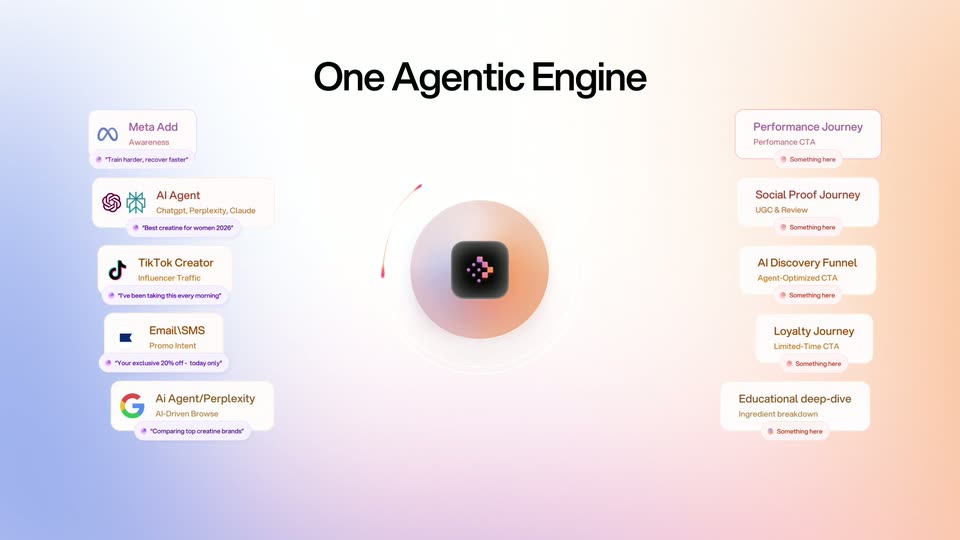
On a blue-to-pink gradient, a glowing central orb holds a black app icon while two columns of white channel cards slide apart from an overlapping cluster into place. The headline resolves from a blurred purple-pink state into sharp solid black.
On-screen text: “One Agentic Engine”
Techniques: Kinetic type
Camera: Push in
Hub diagram on a soft blue-to-orange gradient: a dark rounded icon with a pixel logo glows at center inside a thin ring, flanked by channel cards left and journey cards right. The headline scrambles from One Agentic Engine into orange Social Proof Journey.
On-screen text: “One Agentic Engine”, “Social Proof Journey”
Techniques: Kinetic type
Camera: Static
A blue-to-peach gradient field holds a glowing central orb with a black square icon and two thin rings carrying small pink dashes. The headline sharpens at top center while two columns of white brand and journey cards settle into place on either side.
On-screen text: “Every Shopping Journey”
Camera: Pull out
A black pill with a pink pixel-plus logo and the text “Jurni is Thinking.” rests on a cream field with a soft blue and orange glow. The pill shrinks into a small rounded square, leaving the logo centered.
On-screen text: “Jurni is Thinking.”
Techniques: Kinetic type, Morph
Camera: Static
The black jurni logo, a cross of squares and dots beside a serif wordmark, holds on a white rounded card over a soft pastel gradient. The frame eases in slightly, and a small interface dropdown with a device icon and the label MAC appears at the top of the card.
On-screen text: “jurni.”
Camera: Static
A narrow vertical sidebar for the jurni app sits centered on a pale gradient background. The jurni wordmark at the top scales up slightly while the store chip reading MAC and the menu list of items stay in place.
Techniques: Kinetic type
Camera: Static
On a soft blue-to-peach gradient, the jurni app sidebar zooms in toward the Build section. A black cursor glides to the Funnels row, which fills with a white rounded highlight, while Experiments and Product sit below.
Techniques: UI zoom, Cursor demo
Camera: Static
A slim Jurni sidebar scales into the full app window against a soft peach gradient. A hand cursor then drops a tilted photo card into the chat input field.
Techniques: Cursor demo
Camera: Push in
A chat card greets 'Hey Matt, let's optimize some funnels!' on a blue-to-orange gradient; a cursor types a funnel prompt into the input, then the card slides left and the send button enlarges in the center with a pink glow under a large cursor.
On-screen text: “jurni.”
Techniques: Cursor demo, UI zoom
Camera: Static
A tight close-up of a white card on a pink gradient, its lower corner holding a black share button with an up arrow. A black cursor hovers over the button while two pill prompts, 'How do I connect ads?' and a dashed 'Show more', slide up into view below.
Techniques: Cursor demo
Camera: Static
A white modal dialog, titled Add Figma Link with a frame preview and an input field, scales down from a large size to a small centered card over a soft peach-to-lavender gradient. The Cancel and Done buttons slide into place at the bottom.
Camera: Static
A flat white product interface card sits centered on a soft purple-to-orange gradient. A white hand cursor glides from the right edge of the chat input box toward the left, hovering over the greeting line and the input field while the layout stays static.
Techniques: Cursor demo
Camera: Static
A chat assistant window, tilted in 3D perspective, sits on a soft purple-to-orange gradient. A black cursor hovers over the prompt input bar. The interface holds steady with a faint settle, the menu and greeting text locked in place.
Techniques: 3D mockup, Cursor demo
Camera: Static
A close-up of a white product card with a soft pink glow, holding pill-shaped suggestion chips and a black arrow button. A cursor hovers on the button as the card and the top headline slide slowly leftward.
On-screen text: “Let's optimize some funnels!”
Techniques: Cursor demo
Camera: Static
A flat 2D mockup of the Jurni app floats on a pink-purple gradient. A user prompt bubble sits in the chat area; the assistant's reply text and a results table fill in below it as the window eases slightly smaller. No camera move.
Camera: Static
A white step-list card with a green check, spinners and body copy fades in on a pale gray field, then dims as a large orange headline appears word by word across the center of the frame.
On-screen text: “From context to live funnel in seconds”
Techniques: Kinetic type
Camera: Push in
A pale blue-to-peach gradient background. A dark gray headline reads “From context to live funnel in seconds”; the word “funnel” is swapped for a small square photo of a woman’s face, then the line slides left, leaving the photo near center.
On-screen text: “From context to live funnel in seconds”
Techniques: Kinetic type
Camera: Static
A two-pane SaaS interface shows an AI chat beside a skincare landing page editor. The chat types a question, lists funnel steps, then a bar chart and a green check card appear. The camera slowly zooms into the chat pane, ending on the Finished confirmation.
Techniques: UI zoom
Camera: Push in
A chat interface fades to a plain light background, isolating a green checkmark icon with a pulsing ring and the text “Published & Connected to Persona Ads” in the center.
On-screen text: “Published & Connected to Persona Ads”
Camera: Push in
A green checkmark rests in a white circle at the center of a white field, ringed by thin concentric circles and a soft green glow to the right. The caption sits below in dark gray. The frame is locked off and still.
On-screen text: “Published & Connected to Persona Ads”
Camera: Static
A white circle with a green checkmark sits at center, ringed by faint concentric circles, above the line “Published & Connected to Persona Ads” on a plain off-white background.
On-screen text: “Published & Connected to Persona Ads”
Camera: Static
A pink checkmark badge with concentric ripple rings sits centered on a soft blue-to-peach gradient, captioned below. The badge and rings fade out as the background saturates to pink and faint white specks drift across the frame.
On-screen text: “Published & Connected to Persona Ads”
Techniques: Particles
Camera: Static
On a pink-to-orange gradient with faint star specks, a small white pixel logo mark sits centered above a faint caption. The caption fades out, the mark slides left, and the serif wordmark jurni. fades in beside it to form the centered lockup.
On-screen text: “Published & Connected to Persona Ads”, “jurni.”
Camera: Static