0:56


Introducing the new Notion AI
Notion · Productivity · Sep 2024
Orior AI’s 0:31 launch film runs 9 scenes, about 3.5 s each. The product is on screen from the first frame and 4 features are revealed. The call to action lands at 0:26 (85% in). The video is built as a step-by-step tutorial: flat white title cards with pill headlines alternate with clean UI mockups that blur into focus, giving each step (drag, copy, batch, scale) its own beat at a steady 120 bpm. Signature moves are the scaling pill headlines, the blur-to-sharp window reveals, and the circular iris mask that closes out the thumbnail grid.
Is this your launch? to your site or press kit.
Notion · Productivity · Sep 2024
Wondering · Consumer · Nov 2026
A small icon row of a blue circle, a checkmark, and a black flower sits centered on white. The black headline scales up beneath it, settling into place.
On-screen text: “Copy a pose in Grok Bot.”
Techniques: Kinetic type
Camera: Static
A white chat interface centers a blue circular avatar above the Content Studio title and a one-line subtitle. A mouse cursor drifts across the screen while the prompt Copy these poses with my character is typed into the input field, and a large headline scales in.
On-screen text: “Copy a pose in Grok Bot.”
Techniques: Kinetic type, Cursor demo
Camera: Pull out
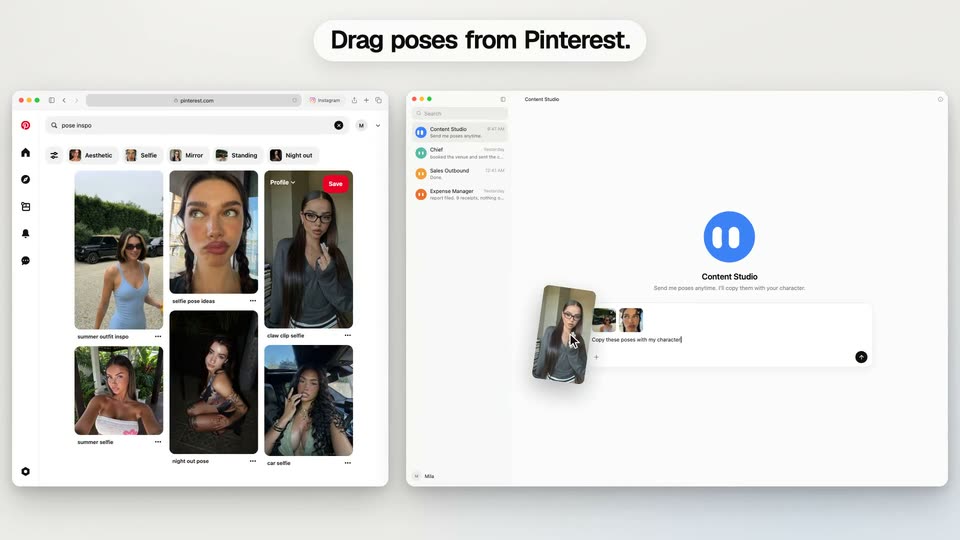
The frame sharpens from a blur to show a Pinterest grid and a chat app side by side. A cursor drags three pose photos into the chat input, where they stack as thumbnails. A white pill caption reads “Drag poses from Pinterest.”
On-screen text: “Drag poses from Pinterest.”
Techniques: Split screen, Cursor demo
Camera: Pull out
Two app windows sit side by side on a light gray background: a Pinterest pose grid left, a chat app right. A cursor sends a message, the four pose thumbnails move to a sent bubble top right, and a blue typing indicator appears as the left window blurs.
On-screen text: “Drag poses from Pinterest.”
Techniques: Split screen, Cursor demo
Camera: Push in
A messaging app window slides left into place, its thread showing four empty placeholder boxes under the label Orior. A dark card with four pose photos floats at the right. A loading spinner spins in the first box.
Camera: Push in
Two rounded photo cards sit beneath a white pill headline. A pale panel slides off to reveal the left photo, then the right card's grayed image morphs into a blonde AI version of the same pose, and the frame zooms out into a blurred app screen.
On-screen text: “Same pose. Your character.”
Techniques: Masking, Morph, UI zoom
Camera: Static
A flat product chat interface on a light background, black headline pill at top. Four portrait images of a woman fill in one by one, status flips from Working to Done, then the UI fades out leaving the four images floating before they fade.
On-screen text: “Get them all at once.”
Camera: Static
A full-bleed grid of thumbnails of a blonde woman fades in while a bottom pill counter ticks from 198 to 400 photos created. The grid zooms in and a circular mask opens from the center, revealing a single photo of her in a white top.
On-screen text: “Make 4. Or 400.”, “198 photos created”, “400 photos created”
Techniques: Masking
Camera: Static
A blue circle character with white oval eyes and mouth sits above the bold black headline, linked by a checkmark line to a black star logo. The face parts hop to new positions as the gray subline and URL fade in below.
On-screen text: “Copy a pose. Now in Grok Bot.”, “Any pose, on your character, in one chat.”, “oriorai.com/mcp”
Camera: Static