1:35

Hue (YC F26) Launch Video
Hue · B2B · Oct 2026
OJO’s 1:22 launch film runs 67 scenes, about 1.2 s each. The product shows up at 0:16 and 6 features are revealed. The call to action lands at 1:18 (95% in), over a voiceover. The video alternates a cinematic design-philosophy hook with a black dotted-grid stage for glowing serif feature titles, then cuts to clean light UI and 3D mockups that demo each capability on a single OJO Coffee case study. Pacing is fast and rhythmic at 120 BPM with hard cuts between macro live-action, 3D renders and flat interface shots, anchored by a recurring dot grid, a blue-glow wordmark and a coffee-bag lineup that ties every feature together.
Is this your launch? to your site or press kit.
Hue · B2B · Oct 2026
Black Forest Labs · Nov 2025
DJI · Hardware · Jan 2019
A white dotted-grid field frames seven illustrated people in a circle around the centered black title “Meet ojo”, which carries a horizontal motion blur. The field then clears and a faint gray sentence fades in at the center.
On-screen text: “Meet ojo”, “Design is not just how it looks.”
Techniques: Kinetic type
Camera: Static
A plain off-white field holds a single centered line of black text. The line stays locked in place for the whole shot, its faint drop shadow dissolving within the first second.
On-screen text: “Design is not just how it looks.”
Camera: Static
A hand holds a pencil and draws a curved line on white paper in a tight close-up. The shot starts overexposed and settles into focus. A centered dark gray caption stays locked off over the sketch.
On-screen text: “Design is not just how it looks.”
Camera: Static
A hand holds a wooden stylus and traces angular line work of a building on a white tablet surface. The close-up keeps the tip in sharp focus while the fingers and background blur. The hand moves right, extending the sketch.
Camera: Static
A pair of hands rolls a large sheet of paper bearing a black line drawing into a tight tube on a worn wooden drafting table. The camera holds a close, slightly high angle as the paper curls away from the left hand toward the right.
Camera: Push in
Two hands grip the corners of a pencil drawing of the Sydney Opera House on a wooden drafting table, then lift it so the sheet curves upward toward the camera.
Camera: Static
Two hands hold a paper sketch of the Sydney Opera House flat over a wooden workbench, framing the drawing center. The hands steady the sheet with a subtle handheld drift as the voiceover plays.
Camera: Static
A distant aerial view of the Sydney Opera House at sunset, its white sail roofs glowing in warm light above calm water. The building sits centered against a hazy horizon as the frame eases slowly closer.
Camera: Static
The camera glides from a dark, out-of-focus surface to a top-down view of a drafting table, where a pencil sketch of a vintage car sits beside a metal ruler and a pen.
Camera: Push in
A vintage black car sits in a white photo studio with angled light panels. A dashed white line traces its silhouette, then the dark frame brightens and a dark shape wipes in from the right to cover the scene.
Techniques: Masking
Camera: Push in
A teal 1950s convertible with a white soft top drives along a coastal highway. The camera tracks alongside it, blurring foreground poles as cliffs and the ocean stretch into the distance behind the car.
Camera: Push in
A silver sedan drifts through a dark forest, dust swirling behind it, then the scene cuts to a silver concept car on a bright elevated highway, a futuristic glass skyline rising in the background.
Camera: Static
A low tracking shot follows the side of a dark car at ground level. The lower body panel and a rolling wheel pass by on a pale surface, while the vehicle's long shadow stretches across the ground.
Techniques: 3D mockup
Camera: Static
A white tray holding a disassembled phone, its chassis, internal chips, screws and back panel fades up from black in low 3D perspective. The mat brightens to reveal the parts arranged in an exploded layout over faint blueprint line art.
Techniques: 3D mockup
Camera: Push in
A top-down macro of an open smartphone's internals shows three camera lenses, a black chip, and a metal shield. The view fades from a dim, translucent state to a fully lit, sharp frame while the camera holds still.
Camera: Static
A black smartphone rests at an angle on a paper sheet covered with faint technical sketches. The screen brightens from dark to reveal a colorful gradient interface showing the question 'Where does the lyric go next?' with a track label below it.
Techniques: 3D mockup
Camera: Static
A black phone lies flat on a pale green surface, shot in 3D perspective. Its gradient music-app screen detaches and lifts upward as a transparent layer, tilting to expose the dark screen below while the headline scales with the motion.
Techniques: 3D mockup
Camera: Push in
A dark stage fades in to a central phone mockup playing a song, its screen glowing with audio bars. Thin lines link it to four floating cards labeled Component, PRD, Wireframe Iteration, and Design System, each holding a design artifact.
On-screen text: “Component”, “Wireframe Iteration”, “PRD”, “Design System”
Techniques: 3D mockup
Camera: Push in
A white serif sentence builds word by word at the center of a black dotted grid, while a blurred grid of light panels fades out behind it.
On-screen text: “Design is how it works”
Techniques: Kinetic type
Camera: Static
A black dotted background holds the centered white serif line Design is how it works, which fades out as the larger Meet ojo scales in, the ojo letters carrying a soft blue and white glow.
On-screen text: “Design is how it works”, “Meet ojo”
Techniques: Kinetic type
Camera: Static
On a black dotted background, the headline “Meet ojo” sits centered, the first “o” glowing blue with a small sparkle above the “j”. The glow fades and the line crossfades to “The world's first”.
On-screen text: “Meet ojo”, “The world's first”
Techniques: Kinetic type
Camera: Static
On a near-black background with a faint dot grid, two centered lines of white serif text hold still. The top line stays fixed while the second line, Design Agent Team Workspace., slides in word by word with a soft blue glow that fades as each word lands.
On-screen text: “The world's first”, “Design Agent Team Workspace.”
Techniques: Kinetic type
Camera: Static
Centered white headline on a black dotted grid. The lower line carries a soft glow on 'Design Agent', then both lines fade to dark gray as a white rounded panel slides up from the bottom edge.
On-screen text: “The world's first”, “Design Agent Team Workspace.”
Techniques: Kinetic type
Camera: Static
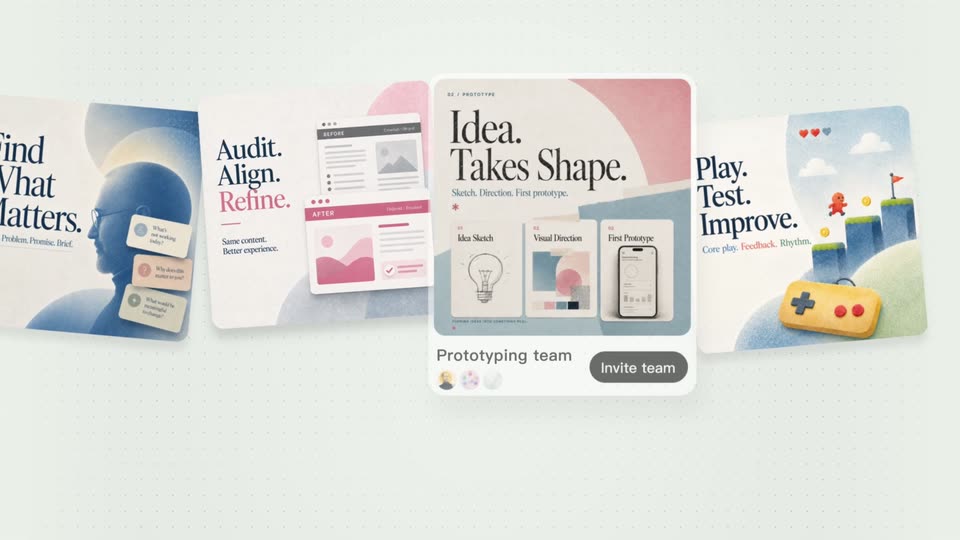
A wide chat screen with a row of design team cards zooms in, settling on the Idea. Takes Shape. card as a Prototyping team label with an Invite team button fades in beneath it.
On-screen text: “Bring an idea. Let the right team shape it.”, “Invite different design teams to work with you, then upgrade them with Skills.”
Techniques: UI zoom
Camera: Push in
A floating prototype card fades out as the prompt text scales in on the chat panel. A cursor slides in from the bottom right and clicks the black send button.
Techniques: Cursor demo
Camera: Static
A light chat interface on white, locked off. A gray prompt bubble with the OJO Coffee request scales in at the top, then a small avatar and the status line 'Prototyping Team is working for you' appear, followed by 'Thinking completed' and a task line fading in below.
Techniques: Kinetic type
Camera: Static
A white chat card fades in on a dotted background, showing a team header and a one-line prompt. The view then zooms and scrolls up, revealing a long insight document with bolded labels and bullet points.
Techniques: UI zoom
Camera: Pull out
A light document view scrolls downward inside a chat window, moving from a positioning summary to a feature-list table with priority rows. A gray headline sentence sits fixed over the content while the page moves beneath it.
On-screen text: “Based on this positioning, I've translated the core strategy into actionable features, prioritized below.”
Camera: Pull out
A chat list of feature rows scrolls up, revealing a centered document card with wireframe mockups. The view then zooms into the team header as a cursor hovers over a plus icon.
Techniques: UI zoom, Cursor demo
Camera: Push in
A close-up of a row of circular avatars and a gray plus sign fades in, then the view zooms out to reveal a full card titled Official skills, showing a grid of skill tiles, each pairing a person's portrait with a short description.
Techniques: UI zoom
Camera: Push in
A light product interface shows a grid of skill cards under the Official skills heading. A cursor clicks the Interaction Design filter, swapping the card set, then the view scrolls up to the My skills section with an Add My skill tile.
Techniques: Cursor demo, UI zoom
Camera: Pan
A light product interface shows a grid of skill cards under a My skills header. A black cursor hovers over one card, which shifts from a white hover overlay to a black-bordered selected state while the list nudges upward.
Techniques: Cursor demo
Camera: Static
A flat white interface panel. A row of pill-shaped tag chips slides left across the frame while a sentence types out along the top edge. A second sentence types in below it, ending on a blinking blue caret.
Techniques: Kinetic type
Camera: Pan
On a pale dotted grid, a centered line of gray sans-serif text reads '> Skill Activated X3', then swaps to '> Visual DNA Generated'. The leading characters of each line fade to a lighter gray while the tail stays dark, like a sliding mask.
On-screen text: “> Skill Activated X3”, “> Visual DNA Generated”
Techniques: Kinetic type, Masking
Camera: Static
On a pale dot-grid background, a single line of gray sans text slides left through the center, the phrase Visual DNA Generated passing through frame, while a faint blurred logo ghost hovers above it.
On-screen text: “Visual DNA Generated”
Techniques: Kinetic type
Camera: Static
Three vertical coffee-brand mockups sit on a dotted gray canvas, the center one in focus with a blue selection border and a cursor at its edge while the outer two sharpen from blur. A gray headline and an Add to canvas button fade in below.
On-screen text: “EDITORIAL MINIMAL”, “TACTILE STORYTELLING”, “DIGITAL COMMERCE”, “I created a moodboard with three completely distinct visual”, “+ Add to canvas”, “Review the moodboard on canvas, then tell me which direction to de”
Techniques: Cursor demo
Camera: Push in
The view opens tight on a coffee moodboard card with seven colorful bag illustrations and serif type, then pulls back to reveal the full agent interface: a task list above, a prototype panel with a loading spinner on the right, and an input bar at the bottom.
Techniques: UI zoom
Camera: Pull out
A design tool workspace shows a chat panel on the left and a dotted canvas on the right. The view reframes onto a bordered Prototype card with a pulsing Loading spinner at its center, moodboard thumbnails resting above.
Techniques: UI zoom
Camera: Push in
A rounded browser frame holds a cream canvas with a blurred brown blob, a spinner ring and a loading label. It opens to the full site: coffee beans scatter across the screen while a section label and the line Precision unlocks flavour. appear under the nav.
Camera: Static
A coffee website scrolls down: the “04 / GRIND” label and “Precision unlocks flavour” line drift up slower than the fanned row of seven illustrated process panels, revealing the “Our Best Sellers” heading at the bottom.
Techniques: Parallax
Camera: Pan
The colorful illustrated banner and tagline dissolve out at the top as the page settles into a two-column product grid. The heading scales in centered, then the Ethiopia and Colombia coffee-bag cards fade up side by side on cream and lavender panels.
On-screen text: “OUR BEST SELLERS”
Techniques: Kinetic type
Camera: Pan
A coffee product page for OJO's Colombia Huila bean fills the screen. A cursor clicks the dark Add to Cart button, then the page pulls back into a rounded frame tagged Prototype, presenting it as an interactive prototype.
On-screen text: “Prototype”
Techniques: Cursor demo, UI zoom
Camera: Pull out
A 3D mockup of a tablet displaying a coffee shop interface rotates and zooms in. A dropdown menu appears on the left, and the view reframes onto the product packaging.
On-screen text: “Prototype”, “Mobile”, “Tablet”, “Desktop”
Techniques: 3D mockup, UI zoom
Camera: Push in
A design-tool screen sits in 3D perspective, its Prototype dropdown open over a purple page showing an OJO coffee bag. A white cursor glides up from Desktop and taps Mobile.
Techniques: 3D mockup, Cursor demo
Camera: Pull out
A phone mockup centered on a dotted grid, framed by blurred interface cards, shows a coffee shop page that fades to a cream field. Three small illustrations, an orange, a coffee bean and a white flower, sit in the middle.
Camera: Pull out
A phone mockup sits centered on a dotted cream background, with blurred app screens floating at the edges. On its pale screen, three small illustrations, an orange, a brown seed and a white flower, sit in a row and drift slowly apart.
Techniques: 3D mockup
Camera: Static
A phone mockup of a coffee ordering app sits centered in sharp focus, flanked by blurred, angled copies of the same screen. A cursor glides over the top item, turning its detail panel dark to mark an editable annotation.
Techniques: 3D mockup, Cursor demo
Camera: Static
A phone mockup showing a coffee product page with a pink hero image drifts left across a blurred wall of interface screens. On the screen, the product title and price animate as the device glides, while the out-of-focus background cards scroll at a different speed.
Techniques: 3D mockup, Parallax
Camera: Pan
On a black dot-grid canvas, the serif headline reveals word by word, a faint ghost of the first word trailing as it settles. Small annotation texts, a price and a brand name, slide and scale in around the locked-off frame.
On-screen text: “$7.25”, “BERRYNOIR”, “All in OJO Canvas”
Techniques: Kinetic type
Camera: Static
A white headline reading All in Ojo Canvas sits centered on a black dotted grid, then crossfades into An Editable Canvas as a blue glow highlights the middle word. The frame stays locked off throughout.
On-screen text: “All in Ojo Canvas”, “An Editable Canvas”
Techniques: Kinetic type
Camera: Static
A cream canvas with a dot grid shows a website mockup on the left and an Edit div inspector panel on the right. The frame zooms in on the inspector as its list scrolls down to reveal Container styles fields.
On-screen text: “An Editable Canvas”
Techniques: UI zoom
Camera: Pan
A cream canvas holding a tall card and two brown ovals pans downward on the left, beside a white properties panel whose rows and numeric fields shift into place on the right, split by a dark vertical bar.
Camera: Pan
A design canvas pairs a white comment card with a framed coffee-packaging mockup. The comment 'Use realistic texture for cards' is typed in, the cursor hovers Send to OJO, and the mockup swaps from flat illustration to textured paper with scattered beans as the frame zooms in.
Techniques: Kinetic type, Cursor demo, UI zoom
Camera: Static
A black dot-grid field holds the white OjO logo at center; the sentence then wipes in left to right with a soft edge, completing the line “OjO works with your workflow”.
On-screen text: “OjO works with your workflow”
Techniques: Kinetic type
Camera: Static
On a black dotted grid, the white headline “Ojo works with your workflow” holds, then swaps to “Coding Workflow” as four brand pills (Cursor, KIMI, Codex, Claude Code) brighten and settle into the corners around it.
On-screen text: “Ojo works with your workflow”, “Cursor”, “KIMI”, “Codex”, “Claude Code”, “Coding Workflow”
Camera: Pan
On a black dotted grid, a white centered title reads Coding Workflow while four gradient pill badges drift in the corners. The title cross-fades to Multi-format Export as the badges swap to white format chips and faint document mockups fade in behind.
On-screen text: “Coding Workflow”, “Multi-format Export”
Techniques: Kinetic type
Camera: Pan
A dark dotted background holds faint design thumbnails while white pill labels for PNG, HTML, PPT, PDF and Figma drift slowly outward around the centered white text Multi-format Export.
On-screen text: “Multi-format Export”, “PNG”, “HTML”, “PPT”, “Figma”, “PDF”
Camera: Static
White serif headline “Multi-format Export” sits centered on a black dotted grid, ringed by five white pill badges (PNG, PPT, HTML, PDF, Figma) over faded thumbnails. The badges and thumbnails fade out as the headline crossfades to “Your TASTE,” with “TASTE” glowing white.
On-screen text: “Multi-format Export”, “PNG”, “PPT”, “HTML”, “PDF”, “Figma”, “Your TASTE”
Camera: Pull out
A white sentence sits centered on a black dotted background, the word TASTE set in serif capitals while the rest is sans-serif. A soft glow blooms around the letters as the whole line scales up slowly on a locked-off frame.
On-screen text: “Your TASTE can be engineered”
Techniques: Kinetic type
Camera: Static
A flat website layout for the GOOD DAYS event fills the frame, navigation across the top and a photo of three people on yellow seating at right. A slow zoom pushes into the page while a caption scales in over the layout.
On-screen text: “Your TASTE can be engineered”
Techniques: UI zoom, Kinetic type
Camera: Static
Three phone mockups stand side by side on a pale blue panel, each tilted in slight 3D perspective with soft shadows. They display a tennis app: a racket-and-ball onboarding screen, a home feed, and a club profile. The layout holds still across the clip.
Techniques: 3D mockup
Camera: Static
Three flat phone mockups sit side by side on a light gray panel, the left a NOURI onboarding screen with food photos in a circle, the middle a Mediterranean Bowl nutrition card, the right a portion settings panel and a home feed. The composition holds still.
Camera: Static
A cream over-ear headphone floats in a dark blue spotlighted room. White 3D headlines read Hear the unseen. at left and Feel everything. at right, each with a layered offset shadow. A top nav bar and corner labels frame the scene.
On-screen text: “Hear the unseen.”, “Feel everything.”
Techniques: 3D mockup
Camera: Static
A retro browser window on a dark desktop gives way to a white spread where a phone, a tablet and the same window sit side by side. A phone shows a music app with gold headphones, a tablet shows a dashboard with an orange bus, and the website window repeats on the right.
On-screen text: “Hear the unseen.”, “Find your way somewhere new”, “DECENTRALIZED EXCHANGES ON SMART CONTRACTS.”
Techniques: Split screen, Morph
Camera: Pull out
A grid of web and app design mockups scrolls steadily left across a light gray background. Rows of flat cards drift past: an orange van travel site, dashboards, a beach hero, headphone ads, dark contract screens.
Camera: Pull out
A light gray dotted field holds one centered line of text. The sentence resolves from a blue-tinted, slightly offset state into solid dark gray, settling into place over the first half of the clip.
On-screen text: “What are we designing next?”
Techniques: Kinetic type
Camera: Static
A pale off-white field with a faint dotted grid holds the centered black wordmark OJO.ART, which assembles from left to right as the second O fades in and .ART joins, then rests.
On-screen text: “OJO.ART”
Techniques: Kinetic type
Camera: Static