0:48

Ethena Pay - Introducing Earn+: 12% rewards on your dollars in a single tap. Avai
Ethena Pay · Oct 2026
DJI’s 1:07 launch film runs 55 scenes, about 1.2 s each. The product shows up at 0:04 and 9 features are revealed. The call to action lands at 0:56 (83% in), over a voiceover. The film alternates black kinetic-type cards with live-action and 3D demos, announcing each feature with a bold word that streaks in with motion blur before cutting to proof footage. Its signature moves are split-screen comparisons with running timers, on-screen spec graphs and gradient numerals, all cut to a driving 120 bpm pulse.
Is this your launch? to your site or press kit.
Ethena Pay · Oct 2026
DJI · Hardware · Apr 2018
Films whose music sounds like this one, voice left out
Aero Sentinel · Cinematic electronic hybrid
Xiaomi · Cinematic electronic and EDM
Whoop · Electronic, Trap
On a black void, the word FLYING streaks across the center with heavy horizontal motion blur, flanked by smeared gray tunnel and grid shapes. It snaps to a clean, centered gray word JUST.
On-screen text: “FLYING”, “JUST”
Techniques: Kinetic type, Speed ramp
Camera: Static
The word GOT in white scales up from small to full width on a black background, then SMARTER appears in wide-tracked caps with a dark diagonal blade passing behind it.
On-screen text: “GOT”, “SMARTER”
Techniques: Kinetic type
Camera: Static
A black 3D render pulls back from a metallic edge to reveal a row of cylindrical mechanical arms and rollers, with a blue-lit panel below. The word SMARTER scales up in the center.
On-screen text: “SMARTER”
Techniques: 3D mockup, Kinetic type
Camera: Pull out
A near-black close-up frames a tilted tablet screen at a steep angle, its display glowing faint blue with a figure and playback icons; a dark vertical edge blocks the left as the on-screen video shifts.
Techniques: 3D mockup
Camera: Push in
A dark tablet screen shows a drone app with two Mavic 2 units and a connect prompt. The white word THE sits centered over the display, then vanishes as the camera reframes from a tilted angle to a flatter view.
Techniques: 3D mockup
Camera: Push in
A black DJI smart controller with two upright antennas sits centered on a black backdrop, its built-in screen showing an aerial autumn feed with a small drone icon. The white headline scales in above the device and sharpens as it locks off.
On-screen text: “DJI SMART CONTROLLER”
Techniques: Kinetic type
Camera: Static
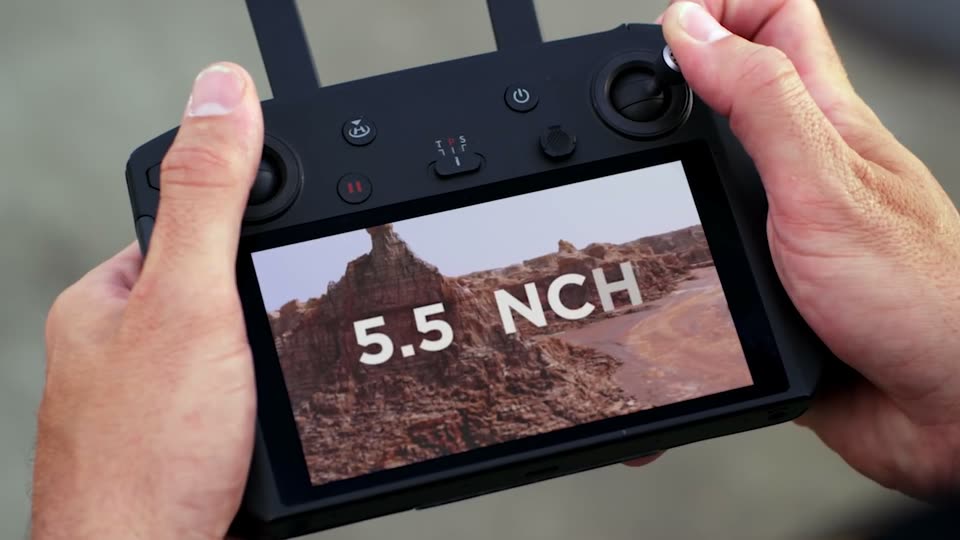
Close-up of two hands gripping a black drone controller, thumbs resting on the sticks. The built-in screen shows a canyon feed as the word GO scales in, then 5.5 INCH snaps to center in large white type.
On-screen text: “GO”, “5.5 INCH”
Techniques: Kinetic type
Camera: Static
Wide live-action shot of two people standing on a rocky shore facing the water, with a cable-stayed bridge and hazy hills behind. Large gradient words fill the pale sky: blue-purple ULTRA holds, then red-orange BRIGHT scales up in its place.
On-screen text: “ULTRA”, “2X BRIGHTER”, “5.5INCH”
Techniques: Kinetic type
Camera: Push in
A split screen compares two drone controllers held in hands: a left gray unit with a mounted phone and a right black unit with a built-in display, both showing the same coastal bridge view, the right screen brighter. Red gradient text reading 2X BRIGHTER scales up across the top.
On-screen text: “2X BRIGHTER”
Techniques: Split screen, Kinetic type
Camera: Static
On a black background, white uppercase text builds word by word in the center, starting with OF and ending with OF COURSE IT HAS. The frame stays locked off throughout the build.
On-screen text: “OF COURSE IT HAS”
Techniques: Kinetic type
Camera: Static
A wide shot of a snow-covered ridge and frozen lake under a pale sky, with a small figure in red at the cliff's edge. White headline text sits over the left side, settling into place as the camera holds still.
On-screen text: “OF COURSE IT HAS”, “OCUSYNC 2.0”, “TRANSMISSION”
Camera: Static
On a black field, the white word CRYSTAL spins and scales into center, then CLEAR follows the same rotation and settle. OCUSYNC 2.0 and TRANSMISSION remain still and locked off.
On-screen text: “OCUSYNC 2.0”, “TRANSMISSION”, “CRYSTAL”, “CLEAR”
Techniques: Kinetic type
Camera: Static
A gloved hand holds a drone controller; its screen shows a live feed of snowy peaks. A thin white circle with the word VIDEO sits at the center, then the word swaps to FEED as the circle tightens to a single ring.
On-screen text: “VIDEO”, “FEED”
Techniques: Kinetic type
Camera: Static
Black screen holds the white headline EXPAND YOUR RANGE centered. The type starts with a horizontal motion-blur echo that sharpens over the clip, settling into a clean static line.
On-screen text: “EXPAND YOUR RANGE”
Techniques: Kinetic type
Camera: Static
A gray drone hovers over snow-covered peaks, then the view rushes forward in a fast blurred whoosh down the slope. Large white text reading UP TO 8 KM scales in at center while a small disclaimer line sits at the bottom.
On-screen text: “EXPAND YOUR RANGE”, “UP TO 8 KM”, “Always fly within visual line of sight unless otherwise permitted.”
Techniques: Kinetic type, Speed ramp
Camera: Push in
A drone glides over a snow-covered mountain range at dusk, two hikers in red jackets stand on a rocky ridge. Large white text reading UP TO and 8 KM stays locked on the right of the frame while the terrain drifts past beneath it.
On-screen text: “UP TO”, “8 KM”, “Always fly within visual line of sight unless otherwise permitted.”
Techniques: Parallax
Camera: Push in
White bold headline text on a black background. The words FAST SET UP hold center frame, then cut to HOW FAST? in the same style, each phrase locked off and static.
On-screen text: “FAST SET UP”, “HOW FAST?”
Camera: Static
Split screen of two outdoor shots. Left, a hand slides a red-framed phone into the DJI controller mount. Right, two hands hold the controller, its screen showing a pilot. A white digital timer counts up at the top of each panel.
On-screen text: “00:05”, “00:14”
Techniques: Split screen
Camera: Static
Split screen shows two live shots of hands holding a gray drone controller against a blurred wooden fence. Left, the controller is fitted with a smartphone; right, it is held horizontally, its screen switching from a video to a map. White seven-segment timers count up over each half.
On-screen text: “00:28”, “00:31”, “00:30”, “00:33”
Techniques: Split screen
Camera: Static
Split screen: left, hands hold a gray drone controller with a phone docked; right, a gray quadcopter hovers before a brown slatted fence. A white digital timer counts up at the top left while the top right stays fixed at 00:30.
On-screen text: “00:33”, “00:30”
Techniques: Split screen
Camera: Static
Split screen: the left panel shows hands gripping a drone controller with a phone, the right shows a gray quadcopter hovering before a wooden fence. White digital timers read 01:30 and 00:30. The left panel then cuts to the drone in flight.
On-screen text: “01:30”, “00:30”
Techniques: Split screen
Camera: Static
On a black background, bold white text reads IT'S SMART with a horizontal glitch offset, then swaps to the phrase REALLY SMART, centered and static in the middle of the frame.
On-screen text: “IT'S SMART”, “REALLY SMART”
Techniques: Kinetic type
Camera: Static
A man in a purple polo and khaki pants stands on the gravel beside the tracks, looking down at a handheld device, while a freight train of stacked containers sits on the parallel track. On the right, large white words “KEEP” then “YOUR” swap in place, each entering with a blurred leading letter.
On-screen text: “KEEP”, “YOUR”
Techniques: Kinetic type
Camera: Static
A white bold sans-serif word flashes center on a black background, then swaps to the next word with a quick scale and slight blur. “SIGNAL” holds, then “SOLID” takes its place, each centered and locked off.
On-screen text: “SIGNAL”, “SOLID”
Techniques: Kinetic type
Camera: Static
A quadcopter drone flies low over parallel railway tracks, shot from above in warm evening light. A blue signal-strength graph is overlaid at the bottom, its highlighted frequency window sliding leftward across the spectrum while the drone advances.
On-screen text: “2.4 GHZ”, “STRONG”, “WEAK”
Camera: Pan
A white quadcopter drone flies rightward over a sunlit container yard as a frequency graph with a sliding scan window runs along the bottom. The white headline REAL-TIME holds, then AUTO-SWITCHING drops in beneath it.
On-screen text: “REAL-TIME”, “AUTO-SWITCHING”
Techniques: Kinetic type
Camera: Pan
Hands hold a black drone controller with a glowing blue screen. The camera pans right, tracking the black antenna cable as it stretches out of the frame.
Camera: Pan
A tight shot of a Sony monitor's edge and black cable pulls back to reveal the full screen, which plays an aerial view of a river winding through green forest. The monitor sits on a metal rig outdoors, with a blurred park lawn behind it.
Camera: Pull out
A Sony field monitor in a camera rig sits outdoors against blurred greenery, its screen showing an aerial river through forest. White spec text overlays the display as the second line drops in beneath the first.
On-screen text: “4K 60P”, “HDMI OUTPUT”
Techniques: Kinetic type
Camera: Static
A black charging cable slides into a port on the edge of a dark device, shot in macro with shallow focus, while the white headline slides in above the frame.
On-screen text: “FULL CHARGE IN 2 HOURS”
Techniques: Kinetic type
Camera: Static
A flat battery icon sits centered on a plain teal field. A red sliver fills up to a full mint bar while the white figure below jumps from 5% to 50% to 100%, and the caption FULL CHARGE IN 2 HOURS slides in.
On-screen text: “5%”, “50%”, “100%”, “FULL CHARGE IN 2 HOURS”
Techniques: Kinetic type
Camera: Static
A black quadcopter drone flies across a snow-covered mountain ridge, the camera tracking it left to right. A white caption builds in word by word along the bottom, the numeral 2.5 set larger than the rest.
On-screen text: “USE IT FOR UP TO 2.5HRS”
Techniques: Kinetic type
Camera: Pan
A high aerial shot looks straight down a steep snowfield as a single skier in dark gear carves a series of S-turns, while a dotted line of tracks runs down the slope. The camera holds a wide top-down frame and drifts slightly to follow the descent.
On-screen text: “USE IT FOR UP TO 2.5HRS”
Camera: Pull out
A man in a blue beanie and orange jacket holds a black two-antenna radio to his mouth against a blurred snowy backdrop. White text “-20°C” scales in above the static word “RESISTANT”.
On-screen text: “-20°C”, “RESISTANT”
Techniques: Kinetic type
Camera: Static
Two men in black tactical vests stand on a sunlit cliff above the sea. One squints and grimaces, holding a small black device, while the other looks down at his rig. A white temperature figure above the word RESISTANT ticks from 46 to 40.
On-screen text: “46°C”, “RESISTANT”, “40°C”
Techniques: Kinetic type
Camera: Static
On a black background, the letters G and S sit apart at center, then the middle letters fill in to complete the word GO SHARE. The camera stays locked off while the type assembles in place.
On-screen text: “GO SHARE”
Techniques: Kinetic type
Camera: Static
Top-down shot of a wooden desk holding a black drone controller and a white phone. A hand enters from below and taps the controller screen, which shows a grid of landscape photos, while the phone displays an empty video list.
On-screen text: “GO SHARE”
Camera: Static
A close-up of a dark touchscreen menu. A finger taps the Go-Share icon, which highlights blue with a circular ripple effect.
Camera: Static
On a black background, the words QUICK PHONE and TRANSFER start small at the left and right edges, then scale up and slide inward to lock into one centered line.
On-screen text: “QUICK PHONE”, “TRANSFER”
Techniques: Kinetic type
Camera: Static
A black drone controller and a white smartphone rest on a wooden table, both screens showing a photo album. The phone display fills with a grid of landscape thumbnails while a caption scales in beside the devices.
On-screen text: “QUICK PHONE”, “TRANSFER”
Techniques: Kinetic type
Camera: Static
On a black background, the white text USE IT sits centered with horizontal scanlines across the letters, then swaps to WITH in the same spot. The frame stays locked off while the words change one after another.
On-screen text: “USE IT”, “WITH”
Techniques: Kinetic type
Camera: Static
A grey Mavic 2 drone sits on a black reflective surface with its controller to the left, both lit against darkness. The drone's front arms unfold outward while the white headline word PRO flips in 3D into ZOOM under the fixed Mavic 2 line.
On-screen text: “MAVIC 2”, “PRO”, “ZOOM”
Techniques: Morph, Masking
Camera: Static
A dark drone and controller rest on a black surface beneath the static title Mavic 2 Enterprise. The word Android scales in below the title as the drone's red lights glow.
On-screen text: “MAVIC 2 ENTERPRISE”, “ANDROID”
Techniques: Kinetic type, 3D mockup
Camera: Static
On a black field, the word ANDROID scales in at center, then SYSTEM appears beneath it to form a two-line lockup. The frame stays locked off throughout.
On-screen text: “ANDROID”, “SYSTEM”
Techniques: Kinetic type
Camera: Static
A close-up of a DJI controller screen shows a grid of app icons as a finger taps it, then the frame cuts to black with the word ANDROID scaling in.
On-screen text: “DJI is not responsible for incompatible 3rd party apps”, “ANDROID”
Techniques: Kinetic type
Camera: Static
On a black background, the white headline CHOOSE YOUR APPS assembles in the center as letters fade in and tighten from wide tracking.
On-screen text: “CHOOSE YOUR APPS”
Techniques: Kinetic type
Camera: Static
A close-up of a remote controller's screen shows a grid of app icons over a dark map background. A finger slides in from the right edge and swipes upward across the icons, moving from the lower rows to the top. The angled screen stays framed throughout the short clip.
Camera: Static
A close-up of a drone controller's screen shows a grid of app icons as a finger taps it, then the display switches to a live aerial feed of a rocky desert with mountains, the view panning past a tall rock spire.
Camera: Static
A dark gray drone body frames its rear display, which shows a fast, motion-blurred flyover of a reddish-brown desert with pale rock outcrops under a pale blue sky. The screen jitters slightly as the footage rushes forward.
Camera: Static
A gray remote controller with a built-in screen sits centered on black, a blurred Mavic 2 drone behind it. The screen shows a desert dune image with a blue GO button, and the white title fades in above the device.
On-screen text: “DJI SMART CONTROLLER”
Camera: Static
A black frame holds the gray DJI logo, which fades in at center and stays still as the sign-off. The title DJI SMART CONTROLLER remains static on screen.
On-screen text: “DJI SMART CONTROLLER”
Camera: Static
The DJI logo sits centered on black. A dark drone controller fades in on the left, its screen faintly lit. A thin white line stretches from the logo, and SUBSCRIBE HERE! with a play icon appears to the right, with BUY NOW STORE.DJI.COM at the far right.
On-screen text: “SUBSCRIBE HERE!”, “BUY NOW”, “STORE.DJI.COM”
Camera: Static
A black DJI remote controller with two antennas sits centered on a pure black background, its screen glowing with a drone video. The frame is locked off; the text blocks brighten from near black over the first second. Blue headings and white body copy describe the Mavic 2 and Mavic 2 Enterprise, a subscribe line with a play arrow crosses the middle, and a buy-now URL sits at the right edge.
On-screen text: “DJI - Introducing the DJI Mavic 2”, “The Mavic 2 is a feat of engineering and technological innovation and comes in two versions. The Mavic 2 Pro comes equipped with the all-new Hasselblad L1D-20c ”, “SUBSCRIBE HERE!”, “DJI - Mavic 2 Enterprise”, “Introducing the Mavic 2 Enterprise”, “A revolutionary tool to usher in a new generation of work – the Mavic 2 Enterprise is the world's smallest and most powerful drone built for commercial users. ”, “BUY NOW”, “STORE.DJI.COM”, “YOUR DRONE”
Camera: Static
A dark outro card over a dim drone controller in 3D perspective. Blue headings and white body copy describe the Mavic 2 and Mavic 2 Enterprise, with a subscribe line and store URL; the controller screen slowly brightens.
On-screen text: “DJI - Introducing the DJI Mavic 2”, “The Mavic 2 is a feat of engineering and technological innovation and comes in two versions. The Mavic 2 Pro comes equipped with the all-new Hasselblad LID-20c”, “camera while the Mavic 2 Zoom sports a 12 MP, 1/2.3-inch”, “sensor with up to 4x zoom for even more options.”, “SUBSCRIBE HERE!”, “BUY NOW”, “STORE.DJI.COM”
Camera: Static
A dim 3D DJI controller with two antennas sits on black while two blue-and-white text blocks, a subscribe line and a store URL overlay the frame, the controller screen playing a short clip.
On-screen text: “DJI - Introducing the DJI Mavic 2”, “The Mavic 2 is a feat of engineering and technological innovation and comes in two versions. The Mavic 2 Pro comes equipped with the all-new Hasselblad LID-20c”, “camera while the Mavic 2 Zoom sports a 12 MP, 1/2.3-inch”, “sensor with up to 4x zoom for even more creative options.”, “SUBSCRIBE HERE!”, “DJI - Mavic 2 Enterprise”, “Introducing the Mavic 2 Enterprise”, “A revolutionary tool to usher in a new generation of work –”, “The Mavic 2 Enterprise is the world's smallest and most”, “powerful drone built for commercial users. It comes built in with a range of advanced controls and an extended port for mounting additional accessories. It is a”
Techniques: 3D mockup
Camera: Static