0:58

SKUVE — AI Shopping Assistant for Shopify
SKUVE · Sep 2026
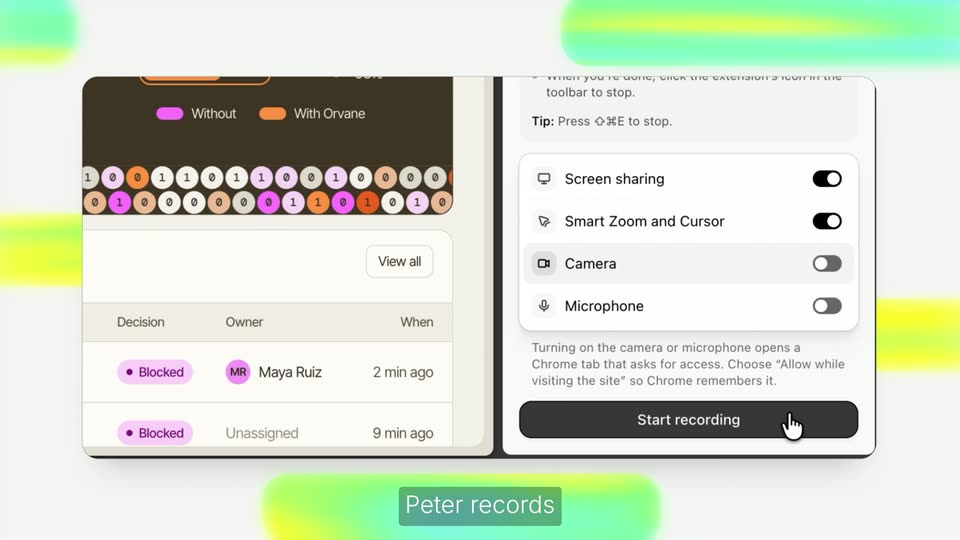
Motion’s 3:58 launch film runs 28 scenes, about 8.5 s each. The product is on screen from the first frame and 3 features are revealed. There is no explicit call to action; a voiceover carries the film. A presenter-led launch video that alternates between talking-head shots in a bright loft and dimmed UI screen recordings, walking through three features in order: new navigation, bulk operations, and the activity feed. Its signature moves are word-by-word caption highlighting, red annotation arrows, a circular presenter inset, and black logo cards that bookend the piece.
Is this your launch? to your site or press kit.
SKUVE · Sep 2026
Vexo · Consumer · Oct 2026
Films whose music sounds like this one, voice left out
Retell AI · Upbeat electronic
Assemble · Corporate electronic
NODI Energy · Electronic, Corporate
A white liquid shape with dripping edges expands from the right across a black field, framing a black disc that holds a thin white scribble mark. Small black droplets float above the drips.
Techniques: Masking
Camera: Static
A black circle with a white m mark sits centered on a plain white field, ringed by black ink splatters and scattered dots that fade out, the logo scaling gently into place.
Camera: Static
A man with glasses and a white T-shirt sits in a bright loft living room with a hanging hammock chair behind him. He waves, then speaks to the camera while caption lines appear at the bottom with word highlights. Locked-off framing.
On-screen text: “Hello, this is Luis.”, “Head of Product at Motion.”, “Today, I'm going to show you the biggest release of 2024 for Motion.”, “In this release, we have a brand new navigation system.”, “We're introducing bulk operations and we have a brand new activity feed for tasks and projects.”, “Let's take a look.”
Camera: Static
A man's circular avatar sits bottom left on a light gray field. A caption line spans the center with blue highlights on the spoken words, then drops to the bottom as a 3D-tilted calendar interface fades in above it.
On-screen text: “Let's take a look.”, “If you're familiar with Motion right now, you'll see that Motion has its main navigation up here.”
Techniques: 3D mockup
Camera: Static
A static screenshot of the Motion calendar interface fills the top, an orange box briefly outlining the Calendar, Projects, Booking tabs. Below, gray captions swap sentence by sentence, a blue highlight sweeping across the words in sync with the voiceover; a circular webcam feed of the presenter sits bottom left.
On-screen text: “If you're familiar with Motion right now, you'll see that Motion has its main navigation up here.”, “We have a calendar projects and a booking tab.”, “Clicking on calendar shows you your calendar with your tasks and events.”, “Clicking on projects shows you your workspaces and your projects along with your tasks.”
Techniques: Kinetic type
Camera: Static
A bearded man in clear glasses and a white tee faces the camera in a bright living room, a striped hammock and plants behind him. He speaks while white captions with highlighted words sit at the bottom of the locked-off frame.
On-screen text: “So why did we want to change this?”, “We wanted to change this, to make it much faster, to get from one part of the product, to the other.”
Camera: Static
A man in glasses and a white t-shirt speaks to the camera in a bright living room, a hanging hammock, sofa and plants behind him. Subtitles at the bottom highlight each spoken word in turn as he talks.
On-screen text: “We wanted to change this, to make it much faster, to get from one part of the product, to the other.”, “We want to make you more efficient and save you time as you're going through your day to day.”
Camera: Static
A bearded man in clear glasses and a white tee talks to camera in a sunlit living room, a hanging hammock chair and plants behind him. White subtitles with highlighted keywords appear at the bottom center.
On-screen text: “We want to make you more efficient and save you time as you're going through your day to day.”, “So, what did we change?”
Camera: Static
A man with glasses and a white T-shirt speaks to camera in a bright living room. A Motion calendar interface then overlays the frame, showing a week view and side panels while the presenter remains faintly visible behind it.
On-screen text: “Let's take a look.”
Camera: Static
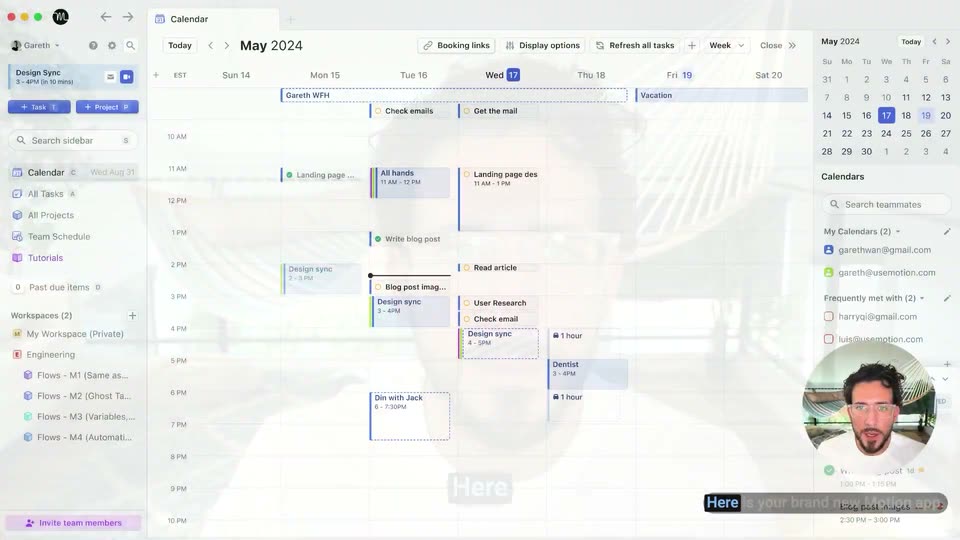
A screen recording of the Motion calendar app shows a week view with a left sidebar. An orange outline box highlights the Calendar, All Tasks and All Projects items, and the presenter's video circle moves from bottom right to the top of the sidebar. Captions appear bottom right.
On-screen text: “Here is your brand new Motion app.”, “As you can see, we moved our main navigation, calendar and projects, into the sidebar.”, “So now the sidebar becomes your main navigation portal into all of Motion's features.”, “Let's take a closer look at each of the things that are moved into the sidebar.”, “Start at the top up here.”
Camera: Static
A dimmed calendar screen of the Motion app fills the frame. A circular video feed of the presenter sits at the top, with red arrows pointing to sidebar and top-bar controls. Caption lines swap in a dark box below him as he walks through the interface.
On-screen text: “You can see that the account control is right at the top right now.”, “From here, you can take any account actions.”, “You can also see the help, settings, and search are right here together at the top of Motion.”, “As a reminder, you can use command and slash to trigger a search.”, “Right below that, we have the up next control and the up next control has been redesigned to match closer to your calendar.”, “So if you have a meeting coming up, it looks like a meeting.”, “And if you have a task coming up, it looks like a task.”, “It's also colored in the same color that your events and tasks are set up so that you can more easily find.”, “Let's keep going down the sidebar into this search sidebar control.”, “This is one of the most powerful ways to now navigate Motion. And you can see that it has a shortcut of S. As soon as you press S you'll be able to filter the, ”
Camera: Static
A bearded man in clear glasses and a white T-shirt faces the camera in a bright living room with a hammock behind him. He speaks to the lens in a static shot while bottom captions track his words, highlighting the current one in a dark box.
On-screen text: “With this new sidebar, you should be able to get to anywhere you need to go very quickly.”, “We also have all the new keyboard shortcuts that would allow you to navigate even faster.”
Camera: Static
A week calendar interface with a left sidebar and right agenda panel. A red arrow points at the Booking links button in the top toolbar, a circular portrait sits mid-screen, and a caption box reads The booking link is a part of calendar. The frame dims slightly at the end.
On-screen text: “We also have all the new keyboard shortcuts”, “that would allow you to navigate even faster.”, “The booking link is a part of calendar.”
Camera: Static
A dimmed calendar interface holds a circular speaker portrait and a red arrow pointing to the Booking links button, while caption boxes swap in sequence below.
On-screen text: “The booking link is a part of calendar.”, “And so when you go to the calendar tab, you'll be able to find all your booking links up here.”, “And you'll be able to set them up with just one click.”
Camera: Static
The calendar interface darkens as a red arrow points from a circular avatar to the right-hand panel, while a bold white caption names the calendar picker.
On-screen text: “On the right side of the calendar is the calendar picker.”
Camera: Static
A dimmed calendar interface with a right sidebar. A circular presenter avatar and a red arrow slide down the sidebar, pointing to the calendar picker, calendars list, and agenda section, while yellow outlines highlight the frequently met with and agenda controls. Subtitle captions swap beneath the avatar.
On-screen text: “On the right side of the calendar is the calendar picker.”, “And your calendars control.”, “So you will be able to find your frequently met with and all your accounts from there.”, “And lastly, agenda view has moved down here.”, “You can expand it and collapse it to see more or less events.”
Camera: Static
A split screen shows a bearded man in glasses speaking to camera on the right, against a bright room with a hanging hammock. On the left black panel, white captions swap line by line above an animated waveform and a gray circular logo.
On-screen text: “And that's it.”, “That's all we've changed in the navigation.”, “We're hoping this sets you up to be even more efficient when you're using Motion.”, “And if you're using Motion with your team we should be able to support all your workflows in a much better way.”
Techniques: Split screen
Camera: Static
A bearded man in clear-framed glasses and a white tee speaks to a static camera in a sunlit living room with a hammock behind him. Bottom subtitles caption his words, highlighting key terms like lot, top, navigation, favorites, folders in light blue.
On-screen text: “We'll be building a lot more features on top of this new navigation system.”, “For example, favorites and folders.”
Camera: Static
A bearded man in clear glasses and a white tee talks to camera in a sunlit loft with a hanging chair; a bottom caption bar shows his words, a gray highlight tracking each spoken word.
On-screen text: “Next thing I want to show you today is the ability to do bulk operations in Motion.”, “For example, favorites and folders.”
Camera: Static
A bearded man in clear glasses and a white tee speaks to a locked-off camera in a bright loft with a hanging hammock chair behind him. White caption text in a rounded bar runs along the bottom, a black highlight box stepping to each spoken word.
On-screen text: “Next thing I want to show you today is the ability to do bulk operations in Motion.”, “Bulk operations has been one of our most requested features.”, “So let's learn how this works.”
Camera: Static
A man in glasses and a white tee faces the camera in a bright living room with a hanging hammock. A task-management app screenshot fades in on the right beside him, and a cursor hovers over a list row. Bottom captions change to follow the voiceover.
On-screen text: “So let's learn how this works.”, “Let's take a look here.”
Techniques: Split screen, Cursor demo
Camera: Static
A task list view sits beside a circular presenter inset on a blue field; the cursor ticks two checkboxes, sets priority High and 30-min duration in the bulk bar, saves, then checks the group header to select all rows while white captions build word by word.
On-screen text: “Let's take a look here.”, “If I want to select these two tasks, I can select them like this.”, “And you can see here, then I can change, their priorities to high, their durations to 30 minutes.”, “And when I click save, both of them get updated.”, “I can also quickly select.”, “By clicking on the header and it selects all the tasks within that group.”, “I can unselect all . And I can also select the main header to select all the tasks in the group”
Techniques: Kinetic type, Cursor demo
Camera: Static
A centered man in a white tee and clear glasses speaks to a locked-off camera in a sunlit living room with a hammock. Captions track his speech. The activity feed UI then fades in over him, showing a list of task updates.
On-screen text: “And last but not least.”, “I want to show you the new activity feed for tasks and projects.”
Camera: Static
Split frame: a static activity-feed UI panel sits left while a bespectacled presenter talks to camera right in a bright room. Gray caption pills build word by word at the bottom right, highlighting the current word in blue as he explains the feed's new features.
On-screen text: “The new activity feed, not only looks great.”, “But it also has a couple of new functionalities.”, “First thing I want to show you is the ability to collapse updates.”, “So if there's many updates that are made at the same time,”, “Motion automatically collapses them into just one line.”, “Second.”, “It's it looks beautiful.”, “And so all this new activity items are much easier to see because now they have icons.”, “And lastly, now we support all kinds of activity items.”, “Now every single change that you make to a project or task is logged in the activity feed.”
Techniques: Split screen
Camera: Static
Split screen: a black panel on the left holds a caption whose words turn blue in sequence, above a thin waveform and a gray circular logo; on the right, a bearded man in a white T-shirt and clear glasses talks to camera in a bright room with a hammock.
On-screen text: “This should make it very easy to audit any changes that happened to any of your projects or tasks.”
Techniques: Split screen
Camera: Static
A bearded man in clear glasses sits in a bright living room with a hanging hammock chair, plants and a white sofa, speaking straight to a locked-off camera. White subtitles run along the bottom, a highlight box stepping across each word as he talks.
On-screen text: “And now you've seen the biggest update to Motion of 2024.”, “We're hoping that with these new changes, you'll be able to more efficiently track your projects and tasks.”, “Even if you're working by yourself or with your team.”
Camera: Static
A bearded man in clear glasses and a white t-shirt sits centered in a bright loft with a hanging hammock, sofa and plants, speaking to the camera. Caption lines appear at the bottom of the frame while he talks.
On-screen text: “That's all for me today.”, “Thank you so much.”
Camera: Static
A black frame holds, then a white single-stroke M logo appears centered and remains still.
Camera: Static