1:48
Explore
Assemble - Assemble builds agents that help IT teams maintain enterprise systems
Assemble · Jul 2026 · 1:07 · AI-annotated
- Length
- 1:07
- Scenes
- 27 · 2.5 s avg
- Product on screen
- 0:35
- Call to action
- 0:53 · 79%
- Voiceover
- Yes
00:00:00 / 01:07:22
Assemble’s 1:07 launch film runs 27 scenes, about 2.5 s each. The product shows up at 0:35. The call to action lands at 0:53 (79% in), over a voiceover. The video is built as a typographic argument: single-phrase cards assemble word by word with one blue-highlighted word, punctuated by light 3D and isometric diagrams, then the Assemble logo hands off to a long, slow UI demo of the agent run. Pacing is steady at about 108 bpm with blur-in and blur-out text transitions, slow pans across interface panels, and a pale grid-and-gradient look throughout.
No filming indicatedEstimated needs: 1 capture group — your screens or recordings · 1 official logo — reused across the film · 7 graphic passages — draw or supply
Is this your launch? to your site or press kit.
More like this
0:48


OpenAI - Now in beta: Businesses in ChatGPT. Claim your business, manage your
OpenAI · AI · Nov 2026
1:23


Introducing Levocred AI (YC S26)
Levocred AI · Fintech · Aug 2026
Assemble - Assemble builds agents that help IT teams maintain enterprise systems, scene by scene
· 27 scenes as text
01 · Hook · 0:00–0:02
Thin dashed and solid orbital rings rotate in a tilted layout on a pale background. The gray headline “Sales closed the customer in” assembles word by word at center, then a dotted clock circle with the soft time “29:17” appears.
On-screen text: “Sales closed the customer in”, “29:17”
Techniques: Kinetic type
Camera: Push in
02 · Hook · 0:02–0:04
A plain white frame holds a circular dial of blue and gray tick marks, with a large black 30:00 centered and a small gray minutes label below. The caption line reads Sales closed the customer in; everything stays locked off.
On-screen text: “Sales closed the customer in”, “30:00”, “minutes”
Camera: Push in
03 · Hook · 0:04–0:05
A dashed blue and gray circle rotates and expands around the centered caption its implementation took, the word implementation set in blue. The phrase blurs into focus, holds sharp, then blurs out as the ring widens toward the frame edges on a white background.
On-screen text: “its implementation took”
Techniques: Kinetic type
Camera: Push in
04 · Hook · 0:05–0:07
A large charcoal 6 fills the center of a white grid, then shrinks as the slate-blue word weeks slides in from the right, settling as a smaller 6 weeks left of center; a small still caption reads its implementation took.
On-screen text: “its implementation took”, “6 weeks”
Techniques: Kinetic type
Camera: Static
05 · Problem · 0:07–0:11
On a white background with a faint blue grid, text phrases appear in sequence. 'Custom Pricing' scales in, a large 'weeks' slides across, then 'New Payment terms' and 'New Compliance requirements' hold still, each highlighting one word in blue.
On-screen text: “Custom Pricing”, “weeks”, “New Payment terms”, “New Compliance requirements”
Techniques: Kinetic type
Camera: Pan
06 · Problem · 0:11–0:15
A light-blue isometric grid with a dashed white loop; white cards holding blue icons of buildings, boxes, a team and a storefront pop in at its corners. A standing label reading IT implementation scales up at the far edge while a small caption New Compliance requirements holds still.
On-screen text: “New Compliance requirements”, “IT implementation”
Techniques: Kinetic type
Camera: Pan
07 · Problem · 0:15–0:19
Gray sans words build the line “A change started in Salesforce” on white, the Salesforce cloud sitting inline. The cloud then scales up and the text clears, opening into a thin line diagram with a node and a small blue receipt icon.
On-screen text: “IT implementation”, “A change”, “started in”, “salesforce”
Techniques: Kinetic type, Morph
Camera: Static
08 · Problem · 0:19–0:22
A dashed selection box on a pale background cycles the words Billing, Finance, Compliance, each scaling in as matching icons (receipt, dollar invoice, shield document) scroll up on the right. Thin arcs drift, then the box empties and the gray caption All without breaking slides in.
On-screen text: “Billing”, “Finance”, “Compliance”, “All without breaking”
Techniques: Kinetic type
Camera: Pan
09 · Problem · 0:22–0:24
Centered gray line “All without breaking” sits above a 3D wireframe stack of white frames. The stack slides down out of frame as the line fades and “years of custom logic.” slides in, with “custom logic.” in blue.
On-screen text: “All without breaking”, “years of custom logic.”
Techniques: Kinetic type
Camera: Static
10 · Problem · 0:24–0:27
A pale gradient fills the frame. A gray line slides out as gray sans-serif text builds word by word into the phrase about enterprise IT. A large steel-blue word then scales in with a soft motion blur.
On-screen text: “years of custom logic.”, “That is where enterprise IT”, “gets stuck”
Techniques: Kinetic type
Camera: Static
11 · Problem · 0:27–0:29
A checkerboard of blue tiles holds white platform logos, a Zapier zigzag, a salesforce cloud, a W, a node diagram and an S, around a centered blue headline. The whole grid scales down steadily, spreading the tiles apart as the clip runs.
On-screen text: “Multiple platforms”
Camera: Pull out
12 · Problem · 0:29–0:30
On a white background, Undocumented types out left to right under a moving blue highlight block, then decisions scales in below in blue.
On-screen text: “Undocumented”, “decisions”
Techniques: Kinetic type
Camera: Static
13 · Problem · 0:30–0:31
On a plain off-white background, the phrase “Undocumented decisions” in gray and blue holds center, then slides up and out as “Teams trying to understand” scales in to take its place.
On-screen text: “Undocumented”, “decisions”, “Teams trying to”, “understand”
Techniques: Kinetic type
Camera: Static
14 · Problem · 0:31–0:32
A two-line dark gray headline sits centered on a plain white background. The text scales up from a soft blur into sharp focus during the first half second, then holds still on a locked-off frame.
On-screen text: “Teams trying to understand”
Techniques: Kinetic type
Camera: Static
15 · Problem · 0:32–0:33
A white frame holds a dark gray sans-serif headline on the left that builds line by line, while a column of thin blue outline shapes, circles, squares, triangles and four-point stars, drifts and rotates down the right edge.
On-screen text: “Teams trying to”, “understand”, “how one change”, “affects”
Techniques: Kinetic type
Camera: Static
16 · Problem · 0:33–0:34
A light off-white card with thin blue outline shapes, circles, a star and rounded rectangles, clustered along the bottom edge. The word “affects” slides in from the left in pale gray while “Everything else” settles into the center in dark gray, leaving the phrase centered.
On-screen text: “how one change”, “affects”, “Everything else”
Techniques: Kinetic type
Camera: Static
17 · Problem · 0:34–0:35
A pale off-white background holds the centered dark gray headline, while a row of light blue line-art shapes, circles, a rounded rectangle and a triangle, drifts slowly along the bottom edge.
On-screen text: “Everything else”
Camera: Static
18 · Product intro · 0:35–0:36
On a pale white-to-blue gradient, the Assemble wordmark and its vertical-bar icon fade in at center. The bars brighten from faint grey to blue and dark while the black letters resolve, settling into a locked-off logo lockup.
Camera: Static
19 · Demo · 0:36–0:38
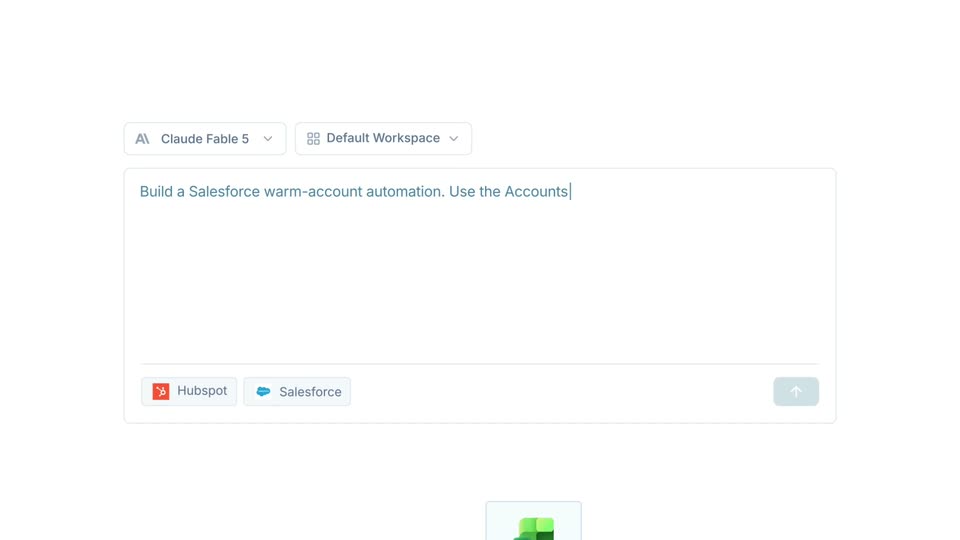
A prompt input field types a request to build a Salesforce automation while Hubspot and Salesforce tool chips sit below. A CSV file attachment drops in at the bottom of the screen.
On-screen text: “Assemble”
Camera: Pull out
20 · Demo · 0:38–0:41
A white prompt composer with two dropdowns at the top. A CSV file chip drops in, then a long prompt about a Salesforce automation types out across four lines. The send button turns blue and the frame zooms to it as the cursor hovers.
Techniques: Cursor demo, UI zoom
Camera: Push in
21 · Demo · 0:41–0:42
A code-agent interface fills the frame. A terminal block scrolls its output, listing files and CSV rows, then action chips for Read, Tool and AGENTS.md slide in at the bottom with a DONE tag on the right.
Camera: Pan
22 · Demo · 0:42–0:46
A documentation panel scrolls through implementation notes and a numbered test list, a cursor drifting across it. The view blurs and crossfades to a node canvas, where a white AWS node card scales in on a connector line and a blue Assemble button slides up beneath the cursor.
Techniques: Cursor demo
Camera: Pan
23 · Demo · 0:46–0:48
A cloud architecture diagram fills the product UI. A white AWS node card sits over the center, then the viewport pans down, revealing the Databricks node, the Networking & Edge row, and the Microservices (EKS) row with their purple component boxes.
Camera: Pull out
24 · Demo · 0:48–0:49
A white activity feed of action cards scrolls upward at a steady pace, each card pairing a bold title with a green APPLIED badge and a revert button on the right.
Camera: Pan
25 · Demo · 0:49–0:53
A light “Agent trace” table with rows for Query, Agent, Tools, Filesystem and Browser fills the left of a pale gradient. The view pans right along the timeline, revealing teal bash and salesforce bars and a purple file-write bar, then the panel fades and slides out left.
Techniques: UI zoom
Camera: Pan
26 · CTA · 0:53–0:59
Dark gray text builds the sentence word by word on a pale gradient. Blue words consultants, solution architects, internal teams cycle in on the right, the last joining the line, then the Arc logo bars start to draw in.
On-screen text: “instead of spending”, “weeks”, “weeks coordinating”, “consultants”, “solution architects”, “internal teams”
Techniques: Kinetic type
Camera: Static
27 · CTA · 0:59–1:07
The Assemble bar logo and wordmark sit centered on a soft white-to-teal gradient, the bars pulsing. They scale down and fade as the line 'Learn more at assemble.ai' fades in, then resolves to the URL 'assemble.ai/today'.
On-screen text: “Learn more at assemble.ai”, “assemble.ai/today”
Techniques: Kinetic type
Camera: Static