0:38


Karan Singhal - Today, we’re bringing ChatGPT closer to the systems, information, and
OpenAI · AI · Sep 2026
LangEase · 1:48 · AI-annotated
LangEase’s 1:48 launch film runs 23 scenes, about 4.7 s each. The product is on screen from the first frame and 4 features are revealed. The call to action lands at 1:38 (91% in), over a voiceover. The video opens with a logo and promise card, then runs four back-to-back screen-recording demos (videos, channels, articles, images), each kicked off by a copy-paste gesture and capped by a sliding headline card. Pacing holds near ten cuts per minute, with signature moves of zooming into the interface for each action, revealing headlines word by word, and popping a Ctrl keycap badge at every paste.
Is this your launch? to your site or press kit.
OpenAI · AI · Sep 2026
Waybill · B2B · Aug 2026
Polygon · Oct 2026
The blue LangEase logo holds center on a pale lavender field. Beneath it, the caption “To localize any type of” slides in, the first words in blue and the remainder in light gray.
On-screen text: “To localize any type of”
Techniques: Kinetic type
Camera: Static
A plain off-white background holds a centered two-line headline. The first line slides in word by word, its trailing words shifting from light blue to dark navy, then the second line scales in below with the same blue-to-dark reveal.
On-screen text: “To localize any type of content”, “all in one place”
Techniques: Kinetic type
Camera: Static
Two headline lines slide and scale in over a locked-off LangEase Library screen. Below, the Videos tab, search bar and two media cards sit static while a purple cursor glides from the tabs to the search field.
On-screen text: “To localize any type of content”, “all in one place”
Techniques: Kinetic type, Cursor demo
Camera: Static
A library interface with a left navigation rail and a tabbed content panel. A cursor clicks the Files, Images and Audio tabs in turn, and the card grid below swaps from document previews to newspaper image thumbnails to audio file rows.
Techniques: Cursor demo
Camera: Static
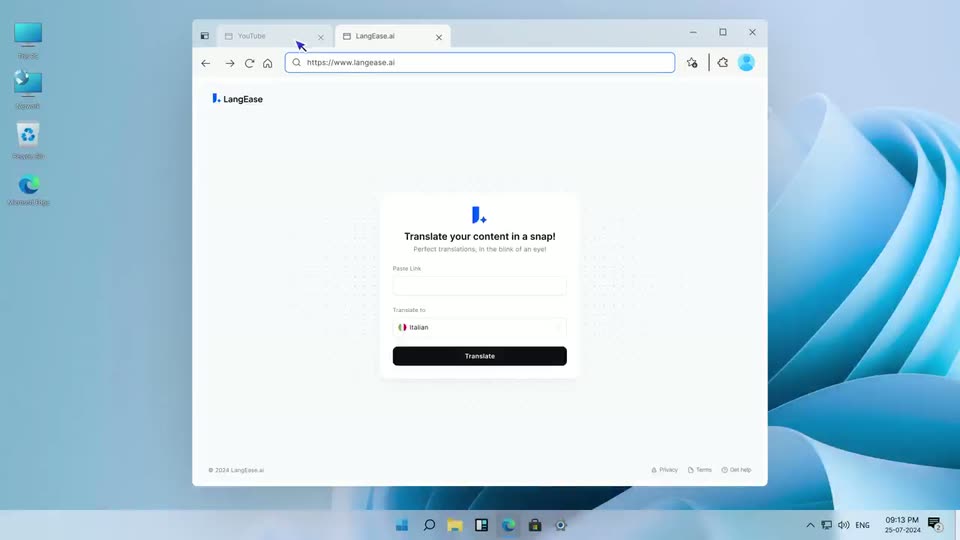
A locked-off Windows desktop shows the Langease.ai browser window, its translation form centered with a link field and an Italian dropdown. Two purple cursors sit over the form, then one glides up to the browser tab.
Techniques: Cursor demo
Camera: Static
A Windows desktop shows a browser window open to a YouTube video of a man speaking in front of a bookshelf. A cursor moves across the top tabs and a Ctrl+C key label pops up at the bottom.
On-screen text: “Translate your content in a snap!”, “海”, “Ctrl+C”
Techniques: Cursor demo
Camera: Static
A browser window on a desktop zooms into the LangEase card. A cursor pastes a YouTube link, a Ctrl+V keycap pops below, the dropdown opens and three language chips fill the field, then the cursor presses the black Translate button.
On-screen text: “Ctrl+V”
Techniques: UI zoom, Cursor demo
Camera: Push in
A pale off-white loading screen centers a blue logo with a pulsing sparkle, a bold headline and gray caption, and a progress bar that fills left to right with a blue gradient as the counter ticks from 0% to 100%. A static cursor arrow sits below.
Camera: Static
A Windows desktop holds a browser on the LangEase.ai library page, where three video thumbnails for Italian, Spanish and Japanese sit in a row. A cursor drifts across the empty grid below them as a caption notes the AI is generating the videos.
On-screen text: “Performing LangEase.ai Magic!”, “Behind the scenes, our AI is working hard to bring you the videos in selected language”, “100%”
Techniques: Cursor demo
Camera: Static
A browser window on a Windows desktop shows the LangEase library page with a video preview of a man speaking Spanish. The camera zooms in as a cursor toggles voice and subtitle buttons, expands the script panel, clicks a word, and picks a replacement from a dropdown.
Techniques: UI zoom, Cursor demo
Camera: Push in
A desktop screen recording shows a browser open on a YouTube channel page. The cursor clicks the address bar, highlighting the channel URL as a Ctrl+C hint appears, then moves to the second tab labeled LangEase.ai.
Techniques: Cursor demo
Camera: Static
A Windows desktop shows a browser window open to a translation webpage. The frame zooms in on the white page as a cursor moves over the form.
Techniques: Cursor demo, UI zoom
Camera: Push in
A white card on a dotted grid shows a translate form with a pasted YouTube link, Italian dropdown and black Translate button. A cursor glides from the link field to the button and clicks it as a Ctrl+V badge pops in below.
On-screen text: “Translate your content in a snap!”, “Perfect translations, in the blink of an eye!”, “Ctrl+V”
Techniques: Cursor demo
Camera: Static
A screen recording of the LangEase web app shows a grid of video thumbnails; a cursor clicks checkboxes on several cards, each gaining a purple outline and a blue check, while a black Translate Videos button sits below. The view zooms in on the grid.
Techniques: Cursor demo, UI zoom
Camera: Push in
A full-screen Windows desktop shows a browser open to a blog article titled Video Marketing Strategy 2024. The mouse cursor glides from the right edge to the address bar, and a dark Ctrl+C pill pops up at the bottom center as the link is copied, then fades.
On-screen text: “Ctrl+C”
Techniques: Cursor demo
Camera: Static
A screen capture of the LangEase browser page, opening zoomed on the link form as a cursor pastes a URL and clicks Translate. The view then pulls back to the full browser window on the desktop while a progress bar fills under the performing magic message.
On-screen text: “Ctrl+V”
Techniques: Cursor demo, UI zoom
Camera: Static
A browser window on a desktop shows the LangEase.ai article page. The frame zooms into the interface as a cursor clicks Add Keywords, opens a keyword modal, ticks two suggested keywords and clicks Save.
On-screen text: “Performing LangEase.ai Magic!”
Techniques: UI zoom, Cursor demo
Camera: Push in
A browser window eases up to reveal the address bar over a LangEase library page with an Italian article. A cursor glides from the body text to the Real-Time Translation toggle and clicks it, flipping the switch from gray to blue. The page then holds still.
On-screen text: “https://www.langeease.ai”
Techniques: Cursor demo
Camera: Static
A web browser window on a Windows desktop displays a library interface. A cursor drags a small image thumbnail from the right edge into the center of the browser window.
Techniques: Cursor demo
Camera: Static
A cursor clicks a yoga poster thumbnail in the LangEase library, the view zooms into the detail card, the language dropdown opens and German is picked, swapping the poster text to German, then the page scrolls down to the Videos tab.
Techniques: Cursor demo, UI zoom
Camera: Push in
A two-line headline fades in at the top while the LangEase Library screen, a flat white panel with a row of video thumbnails, slides up from the bottom of the frame into place, leaving a faint motion trail.
On-screen text: “Reaching a global audience has never been easier”
Camera: Pan
On a pale lavender background, the line “LangEase makes your content” fades in word by word, then swaps to “accessible to millions around the world”. The second line morphs into a “Join the waitlist” pill button as a blue sparkle pops in above it.
On-screen text: “LangEase makes your content”, “accessible to millions”, “around the world”, “Join the waitlist”
Techniques: Kinetic type, Morph
Camera: Static
On a pale lavender background, a blue J logo with a four-pointed star sits above a pill button that fills from a purple outline to a purple-to-cyan gradient as a white cursor hovers and leaves. The button reads “Join the waitlist”; the URL www.LangEase.ai sits at the bottom.
On-screen text: “www.LangEase.ai”
Techniques: Cursor demo
Camera: Static