0:47
Meet Phone (4a)
Nothing · Hardware · Mar 2026
Nothing’s 3:27 launch film runs 61 scenes, about 3.4 s each. The product is on screen from the first frame and 6 features are revealed. There is no explicit call to action; a voiceover carries the film. Built as back-to-back feature chapters, each opened by a dot-matrix label on black and carried by 3D renders, flat icon cards, and UI mockups on alternating black and white fields. Signature moves are the morphing twin-circle logo, halftone dot wipes, glitch RGB splits, and locked-off serif tagline cards, all cut to a steady 124 BPM pulse.
Is this your launch? to your site or press kit.
Nothing · Hardware · Mar 2026
Apple · Hardware · Oct 2026
A black screen holds, then two solid white circles fade in side by side at the center, evenly spaced and identical in size.
Camera: Static
Two white circles sit centered on a black field. The left dot shrinks while the right one stretches into a tall vertical ellipse, the shapes deforming in place without a cut.
Techniques: Morph
Camera: Static
On a locked-off black frame, two white ovals morph and rotate, settling into two large circles that read as 00, then merging into a single circle with a small vertical dash at its center.
On-screen text: “00”
Techniques: Morph, Kinetic type
Camera: Pull out
A small black phone sits in a white disc on black. The camera zooms in as the disc expands to fill the frame, and the phone grows into a close-up of a white back with two lenses, then rotates to show its edge and front screen.
Techniques: 3D mockup
Camera: Push in
A silver iPhone in 3D perspective tilts and rotates against a pale gray backdrop, its screen showing a grid of frosted widgets; the camera pans down the device to reveal the side buttons and lower widgets.
Techniques: 3D mockup
Camera: Pull out
A white phone with a transparent back cover floats on a plain white background. The camera glides from the bottom edge, up the side, and settles on a close-up of the dual camera lenses.
Techniques: 3D mockup
Camera: Push in
A thin white sheet curves across a white void. The camera glides along its raised edge, bringing three small circular ports and a thin seam line into focus on the right.
Camera: Static
A white phone back in 3D starts as a blurred extreme close-up, then the camera pulls back to show the full device with a circular dual-lens module and a winding cooling channel. The device tilts slightly before the view pushes in tight on the two black lenses.
Techniques: 3D mockup
Camera: Push in
Two white circles on a black background merge into one blob and split apart while the dot-matrix word PERFORMANCE forms on the left. The circles then scatter and settle into a ring of eight dots that rotates like a loader.
On-screen text: “PERFORMANCE”
Techniques: Morph
Camera: Pan
An arc of soft white dots on black zooms in fast; the dots blur into large out-of-focus discs as the view passes through the ring.
Camera: Static
Two white rounded-rectangle panels rotate and slide across a black field in a fast, motion-blurred sweep. The blur peaks as a red and dark interface panel flashes through the center, then the panels blur back out.
Techniques: Speed ramp
Camera: Static
A smartphone spins in 3D inside a white circular spotlight on a black background, its screen shifting from a blue widget grid to a red one. Blurred duplicates of the phone sit at the left and right edges.
Techniques: 3D mockup
Camera: Static
A white smartphone spins around its vertical axis in 3D, turning from a red widget screen to its plain back with dual cameras, then to a blue screen. It sits in a soft white spotlight on black, with blurred copies at the frame edges.
Techniques: 3D mockup
Camera: Static
A phone mockup floats in 3D against a black backdrop ringed by soft white oval glows. It rotates to show the front launcher and rear camera, the launcher shifting from blue to red, then the body fades to a see-through X-ray revealing internal camera modules and battery.
Techniques: 3D mockup
Camera: Static
A grayscale X-ray model of a smartphone spins in place inside a bright circular spotlight on black, two blurred ovals flanking it. The phone turns to a thin edge-on profile, then back to its internal layout.
Techniques: 3D mockup
Camera: Static
A black square chip marked MediaTek Dimensity 7200 PRO spins in 3D inside a circular spotlight, turning to show its front, the copper solder-ball back, then the front again. Two blurred circles flank the view over a soft circuit-board background.
Techniques: 3D mockup
Camera: Static
A defocused square chip marked 5G MediaTek Dimensity 7200 PRO sits centered between two blurred grey discs on black. The frame then holds a black field as a soft white orb slides in from the right edge and settles at center.
Camera: Static
Two white circles on black morph into a battery icon inside a rounded square and a circular icon with a diagonal pill, then settle slightly smaller with a soft glow.
Techniques: Morph
Camera: Static
A dark rounded square holding a white battery icon and a dark clock face sit side by side on black. The clock hands rotate continuously while the battery icon and its small spec label stay fixed.
Camera: Static
A white battery icon in a rounded dark card labeled 5000 mAh sits left of a dark clock face with white and gray hands. The hands rotate and the red markers shift as a soft light glow sweeps in from the left edge.
On-screen text: “5000 mAh”
Techniques: Light sweep
Camera: Static
Two dark rounded tiles sit on a black field, a white battery glyph with the label 5000 mAh on the left and a minimalist clock face on the right. A bright flash flares between them as the tiles sharpen and the clock hands tick.
On-screen text: “5000 mAh”
Camera: Static
On a black background, a rounded card holds a white battery icon above the label 5000 mAh, while a circular dial on the right spins its white hands clockwise, the red arcs shifting with them.
On-screen text: “5000 mAh”
Camera: Static
A black rounded card holds a white battery icon above the caption 5000 mAh, set left of a dark clock face. The clock's white hands rotate fast while red arcs mark the dial, all on a plain dark background.
On-screen text: “5000 mAh”
Camera: Static
A dark rounded square holds a battery icon above the label 5000 mAh, beside a circle with a rotating clock hand and red arcs. The battery fill becomes a charging bolt, the hand spins, and a bright beam of light sweeps across the frame from right to left.
On-screen text: “5000 mAh”
Techniques: Light sweep, Morph
Camera: Static
On a dark void, a black rounded card with a white cracked-battery icon and pixel text sits left of a tilted black watch dial with white hands. A soft light sweeps from the left edge toward the gap between them while the watch hands tick forward.
On-screen text: “5000 mAh”
Techniques: Light sweep
Camera: Static
A black rounded card holds a white battery icon above the text 5000 mAh at left, while a minimal clock face with white hands and red dots sits at right. A bright flash of light flares in the gap between them and fades out as the clock hands shift.
On-screen text: “5000 mAh”
Camera: Static
A dark rounded card with a white battery icon and 5000 mAh sits left of a black wall clock. A bright glow at the right edge drifts upward as the clock hands tick and the whole frame dims.
On-screen text: “5000 mAh”
Camera: Static
On a black field, the word CAMERA in white dot-matrix type holds at left. Two white circles, the rear lenses, fade in at center, then a thin line traces the rounded edge of the phone on the right.
On-screen text: “CAMERA”
Camera: Static
A phone back with a twin-lens island sits centered on a dark gray field while a white dot-matrix CAMERA label streaks in from the left. The frame inverts to white; the phone turns light and its back reveals a meandering internal channel.
On-screen text: “CAMERA”
Techniques: Kinetic type
Camera: Static
A white cutaway phone floats on a pale background, its transparent back exposing internal components around two black camera lenses. The device rotates in 3D, tilting from a flat rear view into a diagonal flip that reveals the front screen showing a leopard.
Techniques: 3D mockup
Camera: Static
A white smartphone mockup rotates from a tilted 3D angle to a flat frontal view on a light gray background. Its screen shows a camera app in portrait mode framing a brown owl, which turns from side profile to face the lens directly.
Techniques: 3D mockup
Camera: Pan
A centered owl photo stretches into a horizontal strip of repeated frames fading right, then tilts into 3D and collapses into a landscape phone running the camera app. A red focus box tracks the owl's eye as it turns its head while the background fades from white to black.
Techniques: 3D mockup, Morph
Camera: Static
The frame stays black until the white dot-matrix label NOTHING OS appears in the lower right corner, then holds still for the rest of the clip.
On-screen text: “NOTHING OS”
Camera: Static
Small white dots form the words NOTHING OS right of center on black. The dots then blur into large streaks as they rush past the camera.
On-screen text: “NOTHING OS”
Techniques: Particles, Speed ramp
Camera: Push in
A wireframe phone outline on black fills with a red lock screen, then transitions to the home screen where a context menu slides in. A customization panel opens with colour, icon and layout controls and wallpaper thumbnails, swiping between home and lock screen previews.
Camera: Static
A smartphone mockup on a black background rotates from a front view of its home screen to a thin side profile, exposing the metallic frame and side buttons.
Techniques: 3D mockup
Camera: Static
A phone with a pixel-icon home screen stands front-on on black, its widgets still. It then rotates in 3D to a three-quarter view, exposing the metal frame and the back of a second phone behind it.
Techniques: 3D mockup
Camera: Static
A phone front view on black pulls from blur into focus, showing a home screen of dotted pixel widgets and a red Do Not Disturb pill. The widgets then burst outward and drift as floating cards around the dim phone outline.
Techniques: Particles
Camera: Static
A black field fills with a dense grid of small black, white, and red UI tiles that pop in one by one. Clocks, weather cards, photos, and a flight info panel settle into place, some swapping their content as the grid completes.
Camera: Push in
On a black field, the word DISPLAY forms in white dot-matrix type at the left. At the right, a dark smartphone mockup fades in, its screen showing a grid of app icons that switches to a dashboard with a photo tile of a seated woman, a pixel icon, and small control buttons.
On-screen text: “DISPLAY”
Techniques: Kinetic type
Camera: Static
A red-gradient phone lock screen sits on black, framed by the dotted label DISPLAY on the left. The device pushes in slowly, revealing a pixel icon, a photo widget, and two round buttons.
On-screen text: “DISPLAY”
Camera: Static
A 3D phone mockup floats on black, its red gradient screen showing a pixel logo icon and a selfie photo widget. The camera pushes in on the widget, the icon blurs behind, until the woman's selfie fills the frame. A dotted DISPLAY label holds at the left edge.
On-screen text: “DISPLAY”
Techniques: 3D mockup, UI zoom
Camera: Push in
A person in a white hoodie holds a white dual-lens smartphone up against a white background and makes an exaggerated face. The shot cuts to an extreme close-up of the wet-haired face, then to one eye fringed with heavy chromatic aberration glitch.
On-screen text: “00”, “e”
Techniques: Masking
Camera: Push in
A glitchy RGB-split field of horizontal scanlines ripples and blurs, then resolves into a white halftone dot grid. A black circle and a white block sit inside the dots as the pattern wipes across the frame.
Techniques: Morph, Masking
Camera: Push in
A black-and-white halftone dot field pulses across the screen as three black circles pop in side by side. Each circle carries a spec in dot-matrix type: 6.7″ Flexible AMOLED, 120 Hz Adaptive Refresh Rate, 1,500 nits Peak Brightness. The words scale in, then the dots shrink to black.
On-screen text: “6.7″ Flexible AMOLED”, “120 Hz Adaptive Refresh Rate”, “1,500 nits Peak Brightness”
Techniques: Kinetic type
Camera: Push in
A dense field of white circles of varying sizes sweeps diagonally across a black background. The cluster drifts toward the left and thins out, leaving only two isolated dots near the center and lower edge by the end.
Techniques: Particles
Camera: Push in
On a black field, a soft white dot glides upward and exits the top edge while a smaller, dimmer dot fades in near the center, evoking a minimal light pattern.
Camera: Static
On a black field, a white dome rises from the bottom while dot-matrix text reads GLYPH INTERFACE, then updates to MEET THE GLYPH INTERFACE. A dark phone back with a camera module emerges from behind the dome.
On-screen text: “GLYPH INTERFACE”, “MEET THE GLYPH INTERFACE”
Techniques: Kinetic type, Masking
Camera: Static
A black smartphone back with a horizontal dual-lens camera module and a small red square sits centered above a white curved dome on a black void. The phone rises into frame as a horizontal line of small white dots drifts across the upper left and fades out.
On-screen text: “GLYPH INTERFACE”
Techniques: 3D mockup, Particles
Camera: Static
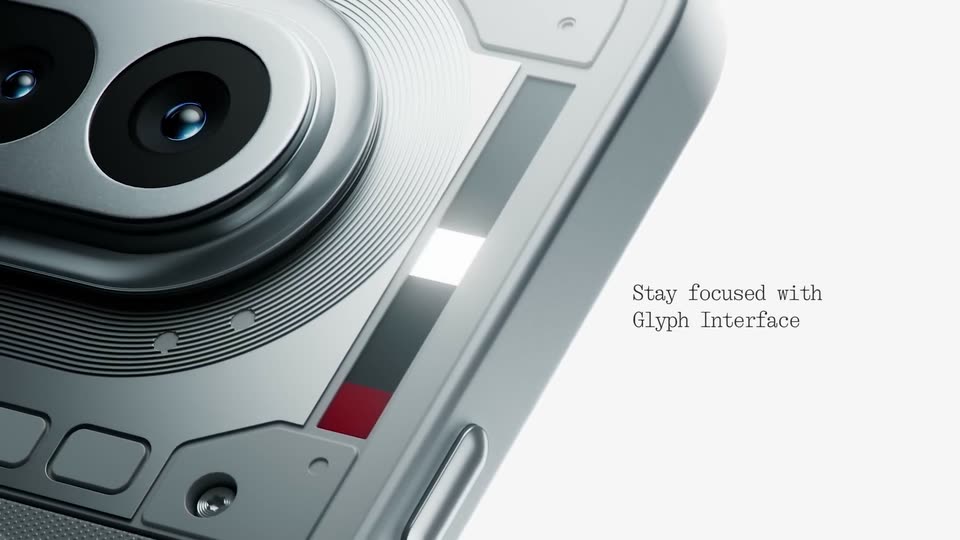
A black phone stands upright on a white surface, back cover removed, exposing the dual camera, circular ring, and serpentine coil. A light arc moves around the ring while dotted uppercase labels NOTIFICATIONS, CALLS, and VOLUME appear in turn on the right.
On-screen text: “NOTIFICATIONS”, “CALLS”, “VOLUME”
Techniques: 3D mockup, Light sweep
Camera: Static
A dark phone stands centered on black. A gray control bar with the label Essential Glyph and a toggle floats in front; the toggle flips on, a soft glow appears on the phone, then the bar fades and the engraved back panel with camera and S mark is revealed.
Camera: Static
A black smartphone stands upright on a glowing white disc against a black void, its dual camera facing the viewer. A vertical light strip on the right edge ignites and holds, then the phone rotates to reveal its thin side profile.
On-screen text: “Essential Glyph”, “Until notifications are read”
Techniques: 3D mockup
Camera: Static
A smartphone stands upright on a white disc against a black backdrop, its lock screen showing a red wavy wallpaper, the time 10:20 and a message notification. The camera slowly pushes in toward the device.
Techniques: 3D mockup
Camera: Static
The back of a black smartphone fades in from transparent on a black background with a white light pool below. A glint sweeps across the dual camera module while a dot-matrix countdown 5, 4, 2, 1 forms and drifts across the top of the frame.
On-screen text: “5”, “4”, “2”, “1”
Techniques: Light sweep, Kinetic type, Morph
Camera: Static
A soft white glow fills a pale blue field, then the scene cuts to black. A blurred white bar in the center sharpens and splits into two crisp white circles sitting side by side.
Techniques: Morph
Camera: Static
Two white circles centered on a black field stretch into tall vertical pills, slide across the frame, and resolve back into two small circles.
Techniques: Morph
Camera: Static
White serif text “Fresh. Eyes.” centered on black. A dark phone with its back cover open, revealing the battery and camera module, fades in at center, the two words settling on either side of it.
On-screen text: “Fresh. Eyes.”, “Fresh.”, “Eyes.”
Techniques: 3D mockup
Camera: Static
A black and a white smartphone stand back-to-back at center on a black field, the white unit's transparent case exposing its circuitry and round camera plate. The words 'Fresh.' and 'Eyes.' sit fixed in white serif type on the left and right edges, the frame locked off and still.
On-screen text: “Fresh.”, “Eyes.”
Camera: Static
A white serif line reading “Powerfully unique” holds centered on a flat black background, static for the full shot with no movement or reveal.
On-screen text: “Powerfully unique”
Camera: Static
A black frame holds a single line of small white dot-matrix text, “phone (2a)”, centered and perfectly still. The pixel letters flicker subtly as the locked-off shot holds with no camera or element movement.
On-screen text: “Powerfully unique”, “phone (2a)”
Camera: Static
A small white pixelated brand wordmark holds centered on a black field, then the frame cuts to black. A tiny caption appears in the final second.
On-screen text: “NOTHING (R)”, “phone (2a)”
Camera: Static