1:07
Explore
00:00:00 / 00:55:34
- Length
- 0:55
- Scenes
- 23 · 2.4 s avg
- Product on screen
- 0:00
- Features shown
- 3
- Voiceover
- Yes
- Views
- 2.2K on X
as of November 14, 2026
Dust’s 0:55 launch film runs 23 scenes, about 2.4 s each. The product is on screen from the first frame and 3 features are revealed. There is no explicit call to action; a voiceover carries the film. The video alternates centered title cards with tight UI screen recordings, each feature announced by a short phrase and then shown in a quick scroll or cascade. Signature moves: gradient line-drawing that traces the puzzle-piece Skills mark, bobbing flat icons, and lime Added pills popping on a pale blue field.
No filming indicatedEstimated needs: 4 capture groups — your screens or recordings · 1 official logo — reused across the film · 6 graphic passages — draw or supply
Is this your launch? to your site or press kit.
More like this
Dust - 🔧 Your agent fleet just got an upgrade. Today we’re launching Skills, scene by scene
· 23 scenes as text
01 · Product intro · 0:00–0:02
Centered text on a pale gradient background fades in, with Introducing in gray above Skills in bold navy. The top line then fades out as a blue-to-pink gradient line draws a corner bracket at the lower right.
On-screen text: “Introducing”, “Skills”
Techniques: Kinetic type
Camera: Static
02 · Product intro · 0:02–0:02
A white field holds the locked headline while a thin blue-to-green gradient line traces a rounded bottom corner and a right vertical edge. A soft blurred mark sits in the top right as the color glides along the line.
On-screen text: “Introducing”, “Skills”
Techniques: Light sweep
Camera: Static
03 · Product intro · 0:02–0:03
A gradient line, shifting from purple to blue to green, traces the outline of a folder-like shape on a white background.
Camera: Static
04 · Product intro · 0:03–0:05
A rounded puzzle-piece outline glows in a green-to-violet gradient around the word Skills in black sans, centered on a pale background. The frame stays locked off and still throughout the clip.
On-screen text: “Skills”
Camera: Static
05 · Product intro · 0:05–0:07
A plain white background with a faint blue tint at the corners. The word One fades in light gray at center, then the full phrase One source of truth resolves into dark gray, centered and static. The frame stays locked off.
On-screen text: “One source of truth”
Techniques: Kinetic type
Camera: Static
06 · Product intro · 0:07–0:13
A pale gradient background holds centered words that swap from Specialized to Reusable to Shared, flanked by dots that morph into triangles. Four icons then fade in: a Gmail tile, a Salesforce tile, a CRM document, a blue folder, as a large cursor rises below.
On-screen text: “Specialized”, “Reusable”, “Shared”, “One source of truth”
Techniques: Kinetic type, Morph
Camera: Static
07 · Product intro · 0:13–0:15
Flat vector icons float on a pale background: a Gmail tile, a Salesforce cloud, a CRM document, a blue folder, and a central white node outlined in rainbow gradient reading Skills with a black cursor. The tiles bob and scale gently in place.
On-screen text: “Skills”, “Company Data”, “salesforce”
Camera: Pull out
08 · Product intro · 0:15–0:16
A white puzzle-piece outline with a rainbow gradient border is centered on a pale background. The word Skills in bold black type scales up inside the shape.
On-screen text: “Skills”
Techniques: Kinetic type
Camera: Static
09 · Feature reveal · 0:16–0:16
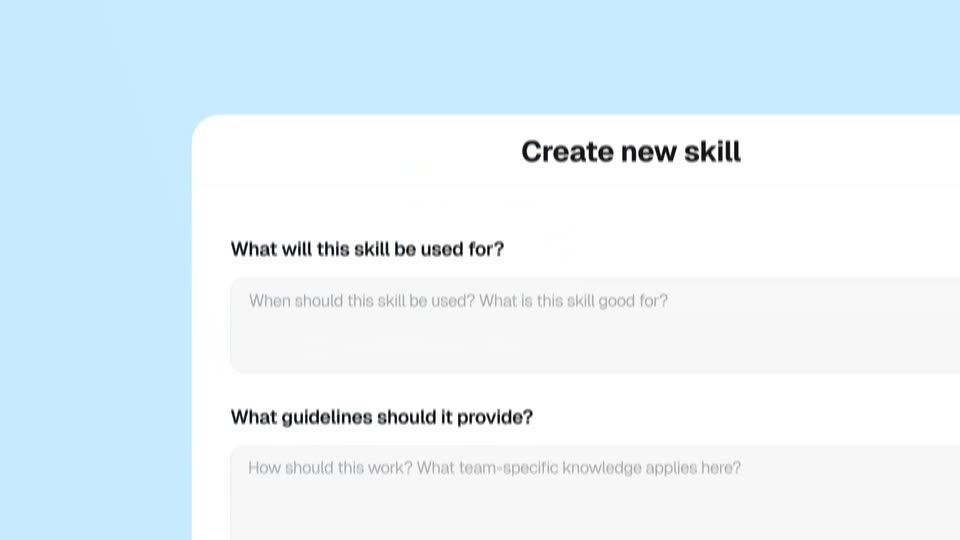
A white form card on a light blue background holds a rainbow-outlined puzzle piece labeled Skills. The piece scales away and the card slides up to reveal the Create new skill form fields and placeholders.
On-screen text: “Skills”
Techniques: Kinetic type, UI zoom
Camera: Pan
10 · Feature reveal · 0:16–0:23
A white Create new skill form scrolls down on a light blue background as text fills the usage and guidelines fields, Salesforce and Gmail tool cards appear, and a cursor slides in to press the blue Save button.
Techniques: UI zoom, Cursor demo
Camera: Push in
11 · Feature reveal · 0:23–0:24
A dimmed agent-settings screen sits behind a right-hand Add capabilities panel. The active tab flips from Skills to Tools, swapping the item list, then the layout updates to a selected-capabilities row with a CRM Deals chip while a Save button slides in at the lower left.
Camera: Push in
12 · Feature reveal · 0:24–0:25
A white “Add capabilities” panel slides in from the right over a dimmed screen, showing a two-column grid of skill cards. The “Assign CRM” card tints green and its Add button swaps to an Added badge.
Camera: Static
13 · Demo · 0:25–0:28
A chat input field on a pale background. After an @Sales tag, the text 'Add John Smith from Acme Corp to our CRM' is typed in. The view zooms in to follow it, then a black cursor arrow moves to the blue send button.
Techniques: UI zoom, Cursor demo
Camera: Pan
14 · Demo · 0:28–0:32
A chat app window opens with a left navigation sidebar, then the view zooms in to crop it and center the conversation. Dora's message sits top right; the Sales bot shows a typing indicator, its analysis text types out, then three skill cards stack in one by one.
On-screen text: “Hey Dora”
Techniques: UI zoom, Kinetic type
Camera: Push in
15 · Demo · 0:32–0:34
Three white rounded rows on a gray field slide and stack vertically. Each row holds a small dark icon, a label, and a right-side toggle that morphs from a square or triangle into a circle as the rows settle.
Techniques: Kinetic type, Morph
Camera: Static
16 · Demo · 0:34–0:35
A light chat view shows the Sales header and three white rows labeled Enabling skill sliding in, their right-edge icons settling into squares. The caption Add John Smith from Acme Corp to our CRM slides in beneath the rows, then the rows shift again as the line clears.
Techniques: Kinetic type
Camera: Static
17 · Demo · 0:35–0:39
A white chat screen shows a reply building line by line. Skill cards at the top scroll up and out while the prompt, two bullet lists, and a closing line slide in, finishing with a row of reaction icons.
Techniques: Kinetic type
Camera: Static
18 · Feature reveal · 0:39–0:41
On a pale blue-and-white gradient, the centered phrase “Build your library” resolves from a faint gray blur into solid black, holding still for the rest of the shot.
On-screen text: “Build your library”
Camera: Static
19 · Feature reveal · 0:41–0:43
A white integration card labeled Assign CRM sits centered on a pale blue gradient. The card slides up and shrinks as a lime-green Added pill pops in at its right edge, confirming the add.
On-screen text: “Build your library”
Camera: Static
20 · Feature reveal · 0:43–0:45
A pale blue screen holds a three-column grid of white integration cards. The cards brighten from dim gray to full opacity, labels turn bold black, and the '+ Add' buttons flip into green 'Added' pills in a quick cascade, then the grid eases with a slight vertical scroll.
Camera: Static
21 · Other · 0:45–0:47
A light blue and white gradient background with the text 'Use everywhere, update once' in dark grey sans-serif font. The text is centered and static.
On-screen text: “Use everywhere, update once”
Camera: Static
22 · Other · 0:47–0:50
Puzzle outlines draw across a grid of pale tiles with blue robot icons; the center tile's gradient border shifts while the word Skills slides in and darkens, and the tagline Use everywhere, update once holds still.
On-screen text: “Skills”, “Use everywhere, update once”
Techniques: Kinetic type
Camera: Static
23 · Outro · 0:50–0:55
A multicolor geometric mark inside a rounded-square gradient outline sits centered on a soft blue-white gradient. It eases into place, then a blue two-line tagline fades in beneath it. The frame holds steady on the logo and tagline.
On-screen text: “The operating system”, “for AI agents”
Camera: Static