0:48


OpenAI - Now in beta: Businesses in ChatGPT. Claim your business, manage your
OpenAI · AI · Nov 2026
Harvey · Sep 2025 · 0:40 · AI-annotated
Harvey’s 0:40 launch film runs 15 scenes, about 2.7 s each. The product is on screen from the first frame and 1 feature is revealed. There is no explicit call to action; a voiceover carries the film. The video is built as a run of locked-off, centered cards and UI close-ups on a near-white field, cut slowly at about one and a half cuts per minute. Signature moves are letter-spacing eases that settle serif headlines, scale-in zooms into interface elements, and a morph from the Outlook Send button into the Harvey and Microsoft lockup.
Is this your launch? to your site or press kit.
OpenAI · AI · Nov 2026
OpenAI · AI · Sep 2026
Harvey · Jun 2025
The serif wordmark Harvey sits centered on a pale off-white field, then it gives way to the tagline Legal Work On in the same type. Both are static and locked off, with no camera move.
On-screen text: “Harvey”, “Legal Work On”
Camera: Static
On a plain light gray background, the centered black serif line Legal Work, On the Move. settles from a jumbled, overlapping letterform into its clean final position. The frame stays locked off throughout the shot.
On-screen text: “Legal Work, On the Move.”
Techniques: Kinetic type
Camera: Static
A black smartphone mockup is centered on a plain off-white background. The device scales up gradually while the white serif H on its dark screen enlarges in step, the frame staying locked.
Camera: Static
A flat front-facing phone mockup sits centered on a pale gray field. The device and its white screen scale up steadily, zooming into the interface so the faint serif Harvey wordmark and the bottom action row grow larger and fill more of the frame.
Techniques: UI zoom
Camera: Static
A centered search field with the placeholder 'Ask Harvey anything' rests on a pale gray background. The plus icon highlights, a white card scales up over the field, and a five-item menu with line icons fades in.
Camera: Static
White prompt card with a meeting-notes chip on a light gray field. A purple stop button and animated waveform appear as the prompt types out word by word. The camera pulls back to reveal the card docked in a phone frame, field reset to its placeholder.
Techniques: Kinetic type, UI zoom
Camera: Static
A front-facing iPhone mockup fades in, centered on a pale gray field. A document titled Post-Meeting Summary and Required Next Steps streams in line by line, starting with Hi Jonathan, while the Ask Harvey anything input bar stays fixed at the bottom.
Techniques: Kinetic type
Camera: Static
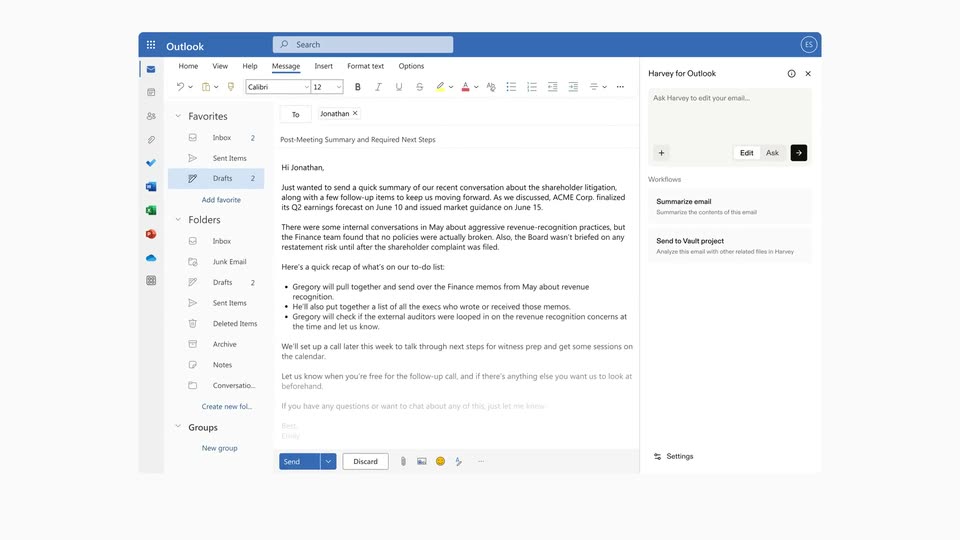
A Microsoft Outlook email window sits on a white background, with the compose pane on the left and a Harvey for Outlook sidebar on the right. The whole window eases slightly outward to settle into frame, revealing the full layout.
Camera: Push in
The Outlook compose screen with a Harvey for Outlook panel on the right. The frame zooms into the panel as the phrase Make this email more concise types into the prompt box, then a cursor clicks the arrow button, a spinner loads, and the view pulls back to full width.
Techniques: UI zoom, Cursor demo
Camera: Static
An Outlook compose window with a Harvey for Outlook panel on the right shows the email body rewriting itself, dropping strikethrough and highlighted phrases into a clean concise draft, then the view zooms in on the message.
Techniques: UI zoom
Camera: Push in
The Outlook compose view fades to white as the enlarged Send button shrinks and morphs into the Harvey and Microsoft logo lockup, which settles centered on the plain background.
On-screen text: “Harvey”, “Microsoft”
Techniques: Morph
Camera: Static
On a plain off-white field, the black serif wordmark Harvey slides into the center beside a thin slash. To its right, the four-color Microsoft mark and gray Microsoft wordmark scale in. The frame stays locked and centered throughout.
On-screen text: “Harvey”, “Microsoft”
Techniques: Kinetic type
Camera: Static
On a white field, the 'Harvey / Microsoft' lockup sits center, its letters sliding and scaling. It dissolves into three app icons: a blue square with O, a teal cloud with S, a blue square with W. These clear to reveal the serif headline 'Work Without Boundaries'.
On-screen text: “Harvey”, “Microsoft”, “Work Without Boundaries”
Techniques: Kinetic type
Camera: Static
A plain off-white background holds three centered black serif phrases in turn: Work Without Boundaries, then Coming Soon, then AI Tailored for Law. Each line stays static and locked off, then swaps to the next with a simple cut.
On-screen text: “Work Without Boundaries”, “Coming Soon”, “AI Tailored for Law”
Camera: Static
A plain off-white card holds the black serif headline “AI Tailored for Law” centered, with the smaller brand name “Harvey” below. In the first second the headline letters ease from a tight, overlapping tracking to normal spacing, then the frame holds still.
On-screen text: “AI Tailored for Law”, “Harvey”
Techniques: Kinetic type
Camera: Static