0:59
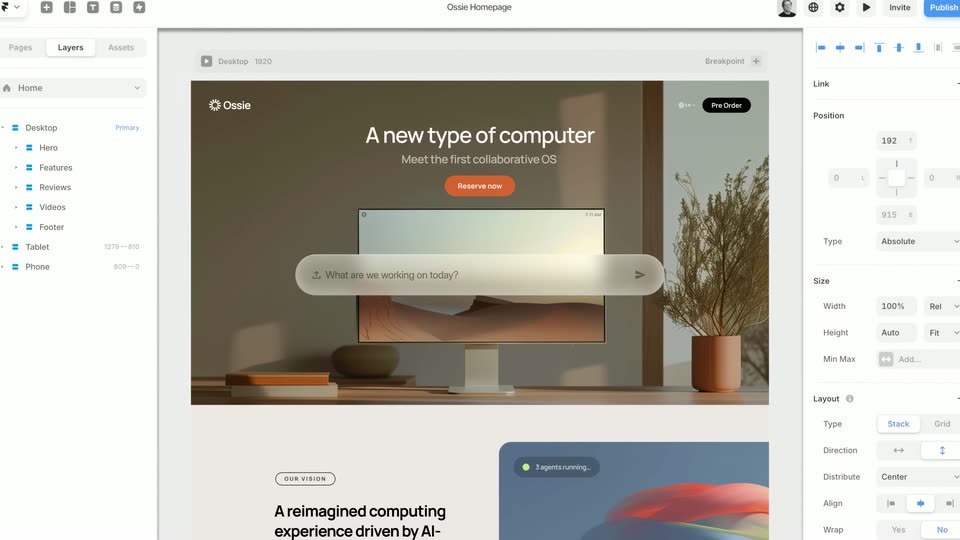

Framer Design: Design on an intuitive Canvas
Framer · Design · Jul 2024
Morphic’s 0:36 launch film runs 14 scenes, about 2.6 s each. The product shows up at 0:01 and 3 features are revealed. The call to action lands at 0:31 (86% in). The video alternates black title cards that name each feature with tight UI demos on a dotted dark canvas, using cinematic boardroom footage as the content being organized. Pacing is brisk at about five cuts per minute, with signature moves of blue-outlined cards popping in, slash menus expanding, and a zoom-out that reveals the full storyboard.
Is this your launch? to your site or press kit.
Framer · Design · Jul 2024
Clicks Health · B2B · Oct 2025
Films whose music sounds like this one, voice left out
Superhuman · Electronic dance music with funk and Latin influences
Alai · Modern funk, disco, and EDM
Spline · Future bass / EDM
A dark boardroom clip plays inside a centered window on a black dotted grid, labeled 12A. The window widens and a second shot, a low angle of a man in a teal jacket, appears at the right, splitting the frame into two panels.
On-screen text: “12A · Boardroom wide”, “12A · Boardroom wide, low angle”
Techniques: Split screen, Masking
Camera: Pan
A dark dot-grid canvas holds two labeled video clips. The view pans right, the cursor opens a context menu over the empty grid, and a note card with a blue outline pops in beside the clips.
Techniques: UI zoom, Cursor demo
Camera: Pan
On a solid black background, the centered line 'Introducing Documents' fades in, rising from a dim gray to a brighter light gray while staying locked in place.
On-screen text: “Introducing Documents”
Camera: Static
A dark document editor types a screenplay page as a cursor selects a word and opens a slash menu; a shot list table is inserted, then a cut to a black card with a fading white tagline.
On-screen text: “Live collab with your team”
Techniques: Cursor demo
Camera: Static
A dark script page titled Glass Crown: EP04 sits on a dotted grid. Three colored cursors with name pills, red, purple and orange, drift across the layout while the dialogue line is struck through and retyped with a blinking caret, ending near the checkbox row.
On-screen text: “Live collab with your team”
Techniques: Cursor demo
Camera: Static
A dark script document titled Glass Crown: EP04 shows a shot table and a checklist line, with three colored comment tags and two cursors floating over the right side. The view holds still.
Camera: Static
A centered line of light gray text holds on a solid black background. The frame is locked and static for the full duration.
On-screen text: “Or just ask Copilot”
Camera: Static
A dark note card titled Sc12: notes sits centered on a black dotted background. The body line is selected in blue, a context menu opens with a Suggested list, the cursor picks Adapt to screenplay format, a status pill spins, then the text morphs into a monospace screenplay block that loses its highlight.
On-screen text: “Or just ask Copilot”
Techniques: Cursor demo, Morph
Camera: Pan
A dark two-panel UI: a script document card with a shot table slides in from the left and gets a blue focus border, while the right Copilot panel shows a file chip, the typed command Generate scene 12 sent, then a Reading the attached brief status with a pulsing bar.
Techniques: Cursor demo
Camera: Static
A dark media interface with a faint dotted grid. Three video thumbnails fade in across the top row as a metadata card in the center brightens, listing shot frames and durations in a small table.
Camera: Static
A dark storyboard canvas on a dot grid holds video clips and annotation cards. New cards fade in along the bottom, then the whole group shrinks and shifts to reveal a Scene 12 tab at the left.
Camera: Static
A dark production interface fills the frame. On the left, a Scene 12 panel holds a grid of film stills; on the right, Characters and Scripts panels show stills and document cards. An orange Ana Ruiz tag slides leftward across the layout while a cursor hovers over the scripts.
Techniques: Cursor demo
Camera: Static
On a black background, the centered headline “Documents are now live” fades in from dim to full light gray, then holds still for the rest of the clip.
On-screen text: “Documents are now live”
Camera: Static
On a black background, the white Morphic logo and wordmark sit centered on a locked-off frame, fading up to full brightness and then fading back to black.
Camera: Static