
2:03
Explore
Introducing Lightspeed: faster legal research | Moonlit
Moonlit · Apr 2026 · 2:37 · Clip · AI-annotated
- Length
- 2:37
- Scenes
- 12 · 13.2 s avg
- Product on screen
- 0:00
- Features shown
- 3
- Voiceover
- No
00:00:00 / 02:37:29
- Length
- 2:37
- Scenes
- 12 · 13.2 s avg
- Product on screen
- 0:00
- Features shown
- 3
- Voiceover
- No
Moonlit’s 2:37 clip runs 12 scenes, about 13 s each. The product is on screen from the first frame and 3 features are revealed. The video is a continuous flat screen capture built from cursor-driven UI actions, modals, loaders, and table fills. Its pacing is steady and functional, relying on small interface transitions and status toasts to mark each step.
No filming indicatedEstimated needs: 4 capture groups — your screens or recordings
Is this your launch? to your site or press kit.



Introducing Lightspeed: faster legal research | Moonlit, scene by scene
· 12 scenes as text
01 · Product intro · 0:00–0:04
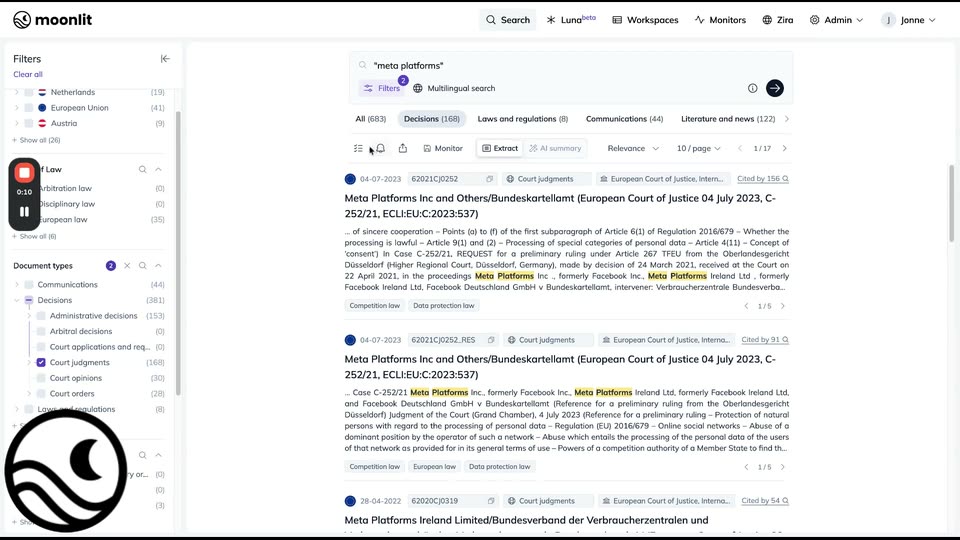
A flat front-on view of the Moonlit search screen. A cursor types the query “meta platforms” into the central search field, character by character. The page then cuts to a results view with a left filter panel and gray skeleton rows loading under the query chip.
Techniques: Cursor demo
Camera: Static
02 · Feature reveal · 0:04–0:13
A full-screen view of the Moonlit legal search interface. A cursor expands the Decisions filter, ticks Court judgments so the count jumps to 168, then a selection bar appears at the bottom as the cursor clicks Select all on page and hovers Add to workspace.
Techniques: Cursor demo
Camera: Static
03 · Feature reveal · 0:13–0:14
A dimmed document search screen shows a centered modal with a spinning loader and the line 'Preparing documents to add'. A mouse cursor hovers inside the modal while the background list of legal documents and the left filter panel remain still.
Techniques: Cursor demo
Camera: Static
04 · Feature reveal · 0:14–0:21
A workspace picker dialog sits over a dimmed document app. A cursor clicks Create new Workspace, types Meta case law into the name field, and presses Create and add documents. A spinner shows, then a green success note confirms 168 documents added.
Techniques: Cursor demo
Camera: Static
05 · Feature reveal · 0:21–1:13
A flat screen capture of the moonlit workspace, where a cursor types a question into the side panel, toggles Yes/No, and the table fills row by row with red No and green Yes badges as a progress bar climbs to 100%, then a filter isolates the No rows.
Techniques: Cursor demo
Camera: Static
06 · Feature reveal · 1:13–1:38
A workspace table opens on a remove confirmation dialog; the cursor clicks Remove, the list empties, then refills with filtered rows. The cursor types a new question into the side panel, and a fresh column fills row by row with generated answers.
Techniques: Cursor demo
Camera: Static
07 · Feature reveal · 1:38–1:40
A legal research web interface fills the frame, a list of court decisions beside a left filters panel. A black cursor glides from the top corner down to the toolbar and rests on the Monitor button.
Techniques: Cursor demo
Camera: Static
08 · Feature reveal · 1:40–1:42
A centered modal dialog opens over a dimmed legal-research interface. It scales in from a faded duplicate, settling into a full-opacity panel with a query-name field and a list of monitors, each row carrying Save and Open buttons. The left sidebar and document panel stay dimmed behind.
Camera: Static
09 · Feature reveal · 1:42–1:58
Flat screen capture of the moonlit interface. A white modal overlays a dimmed search view. The cursor types Meta Monitor, clicks Create, searches meta in the list, fills the query field, and hovers a save button. Green toasts confirm each step.
Techniques: Cursor demo
Camera: Static
10 · Feature reveal · 1:58–2:28
Flat screen capture of the moonlit Meta Monitor page. A cursor opens the date picker, picks Last 180 days, applies it; the table fills with rows. The cursor types a summary prompt in the Add Question box and submits, then a progress bar climbs as answers stream in.
Techniques: Cursor demo
Camera: Static
11 · Feature reveal · 2:28–2:34
A Monitor Queries modal sits over the Meta Monitor list. Gray placeholder bars resolve into a saved query card showing the query text and document-type filters, then the cursor moves to the close icon and the modal fades out to reveal the document list.
Techniques: Cursor demo
Camera: Static
12 · Feature reveal · 2:34–2:37
A screen recording of the moonlit Meta Monitor dashboard shows a document table with dates and summaries beside an Add Question panel. A cursor moves across the top navigation bar, then to the date range and toolbar. A red-dot recording control with a timer sits on the left edge.
Techniques: Cursor demo
Camera: Static