
2:08
Explore
Introducing the enhanced Mind Map in Miro
Miro · Dec 2020 · 1:09 · Full motion · AI-annotated
- Length
- 1:09
- Scenes
- 20 · 3.5 s avg
- Product on screen
- 0:00
- Features shown
- 6
- Call to action
- 1:00 · 88%
- Voiceover
- Yes
- Views
- 17K on YouTube
as of November 27, 2026
00:00:00 / 01:09:03
- Length
- 1:09
- Scenes
- 20 · 3.5 s avg
- Product on screen
- 0:00
- Features shown
- 6
- Call to action
- 1:00 · 88%
- Voiceover
- Yes
- Views
- 17K on YouTube
as of November 27, 2026
Miro’s 1:09 launch film runs 20 scenes, about 3.5 s each. The product is on screen from the first frame and 6 features are revealed. The call to action lands at 1:00 (88% in), over a voiceover. The video is built as a clean feature tour: a brand lockup, a one-line problem (a tangle of strokes), then the named feature introduced with a three-point value prop, followed by a setup step and a run of headline-led capability demos, two related template demos, and a closing line plus URL. Its style is a flat white stage with a single recurring hand-drawn line motif, soft drop shadows under UI panels, a rounded sans wordmark, and a calm, evenly paced cut rhythm where each section is announced,
No filming indicatedEstimated needs: 8 capture groups — your screens or recordings · 1 official logo — reused across the film · 2 graphic passages — draw or supply
Is this your launch? to your site or press kit.
More like this
1:32

Introducing Trellis Reports
Trellis · Nov 2026
1:13

StoreTrack – Simplify Store Discovery & Location Management
StoreTrack · Jun 2026
Similar soundtrack
Films whose music sounds like this one, voice left out
0:53

Introducing Linear Mobile
Linear · Modern electronic, lo-fi hip-hop
4:32

Qantum · L'ERP financier IA natif · Présentation
Qantum · Modern electronic corporate background
0:59


Sekoia | Autonomous defensive intelligence
Sekoia · Electronic
Introducing the enhanced Mind Map in Miro, scene by scene
· 20 scenes as text
01 · Product intro · 0:00–0:02
On a white field, the Miro lockup (yellow rounded square with a navy chevron, navy wordmark) holds centered while a yellow hand-drawn line strokes in along the bottom. The lockup then exits the top of frame as the line grows and a purple shape enters the corner.
Camera: Static
02 · Problem · 0:02–0:06
Curved strokes in orange, blue, purple, pink and red draw themselves across a white background, looping and crossing until they pile into a dense tangled knot at center frame. The tangle keeps shifting slightly as the voiceover compares it to the brain.
Techniques: Masking
Camera: Pull out
03 · Product intro · 0:06–0:08
A purple line on a white background draws itself, extending from a wavy stroke on the left into a closed rounded rectangle on the right.
Camera: Static
04 · Product intro · 0:08–0:10
A Miro whiteboard with a toolbar above a purple rounded shape. The text 'Miro Mind Map' types in word by word, then a cursor drags the right connector dot and a purple line extends right.
On-screen text: “Miro Mind Map”
Techniques: Kinetic type, Cursor demo
Camera: Static
05 · Product intro · 0:10–0:11
On a plain white background, a short purple curved stroke sits at the left edge while the word Visualize is typed out letter by letter in black to its right.
On-screen text: “Visualize”
Techniques: Kinetic type
Camera: Static
06 · Product intro · 0:11–0:18
Left half builds a list of three phrases that type in one by one, each with a colored dash. Right half shows a Miro mind-map canvas where named cursors move over branching diagrams that switch between topics.
On-screen text: “Visualize ideas”, “Brainstorm solutions”, “Plan as a team”
Techniques: Kinetic type, Split screen
Camera: Static
07 · Product intro · 0:18–0:18
A Miro mind map sits on the right with three colored collaborator cursors over its branches. On the left, three feature lines with magenta accents stay static. A white rounded card slides in from the left edge, covering the text as the scene ends.
On-screen text: “Visualize ideas”, “Brainstorm solutions”, “Plan as a team”
Camera: Static
08 · Demo · 0:18–0:23
A Miro board fills the frame under the caption “Add it to your toolbar.” A cursor clicks the more button, the Apps panel opens, then the cursor drags the Mind map entry onto the left toolbar, where a new icon appears as the panel fades out.
On-screen text: “Add it to your toolbar”
Techniques: Cursor demo
Camera: Static
09 · Feature reveal · 0:23–0:24
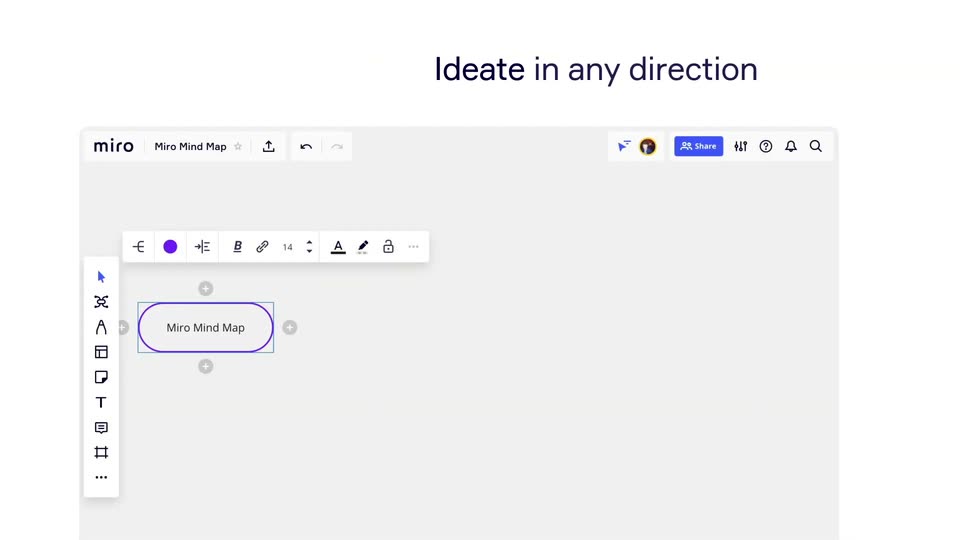
A Miro whiteboard fills the frame with a purple oval node being typed as “Miro Mind Map”, while the headline “Ideate in any direction” fades in word by word above the canvas.
On-screen text: “Ideate in any direction”
Techniques: Kinetic type, Cursor demo
Camera: Static
10 · Feature reveal · 0:24–0:29
A dark indigo headline sits above two side-by-side Miro panels. In the left panel, branches grow rightward from the central node; in the right panel they grow downward. Labels are typed into each new node as the floating toolbar follows the cursor.
On-screen text: “Ideate in any direction”
Techniques: Split screen, Cursor demo
Camera: Static
11 · Feature reveal · 0:29–0:37
A Miro mind map fills a light canvas beneath a centered navy headline. A cursor drags a leaf node up to a new branch, then drags another node across the map, opening a context menu as a blank node appears.
On-screen text: “Organize and link concepts”
Techniques: Cursor demo
Camera: Static
12 · Feature reveal · 0:37–0:46
A Miro mind map sits under a headline. A cursor selects the center node, opens a toolbar, switches the connectors from curved pink to straight purple, then opens a color palette. The map restyles in place.
On-screen text: “Group ideas with styling options”
Techniques: Cursor demo
Camera: Static
13 · Feature reveal · 0:46–0:47
A Miro presentation view shows a left slide panel and a mind map canvas beneath the headline “Present your thinking”, which resolves from a ghosted overlay to solid ink. A cursor moves down the panel and selects slide 2, swapping the highlighted frame.
On-screen text: “Present your thinking”
Techniques: Cursor demo
Camera: Static
14 · Feature reveal · 0:47–0:50
A Miro presentation window shows a thumbnail sidebar and a canvas of colored sticky notes under a navy headline. A cursor clicks the third thumbnail, and the canvas pans right and zooms to the Planning slide.
On-screen text: “Present your thinking”
Techniques: Cursor demo, UI zoom
Camera: Pull out
15 · Feature reveal · 0:50–0:52
Two lines of centered text on a plain white background fade from pale lavender to dark navy, then hold still on a locked-off frame.
On-screen text: “Explore even more”, “inspiring templates”
Techniques: Kinetic type
Camera: Static
16 · Feature reveal · 0:52–0:53
A cream card reading “Explore even more inspiring templates” cross-dissolves into a Miro board view. The board, titled “User Story Map,” fills the frame under a new headline, fading from translucent to solid as the cursor rests at the bottom.
On-screen text: “Explore even more”, “inspiring templates”, “Create interactive user journeys with User Story Mapping”
Techniques: Masking
Camera: Static
17 · Feature reveal · 0:53–0:56
A Miro board showing a user story map of colored cards sits under a navy headline. Three video-call tiles of team members stack on the right while named cursors drift across the board and a pointer hovers a card, then the board fades out.
On-screen text: “Create interactive user journeys with User Story Mapping”
Techniques: Cursor demo
Camera: Static
18 · Feature reveal · 0:56–1:00
A Miro Kanban board fills the frame under a centered headline. Three video call tiles on the right show people talking, while named cursors move and a card is dragged from the Backlog column into In progress. The headline fades in from a blurred state to solid dark text.
On-screen text: “Plan releases and track progress with Kanban”
Techniques: Cursor demo
Camera: Static
19 · CTA · 1:00–1:01
A plain white frame holds the centered gray line “Try Mind Map in Miro today”, with a purple curved stroke in the top-left corner. The text stays still on a locked-off frame.
On-screen text: “Try Mind Map in Miro today”
Camera: Static
20 · Outro · 1:01–1:09
A purple line draws looping curves across a white background, sweeping over the centered headline, which fades out. The line closes into an ellipse around the Miro logo as the wordmark types in and the URL appears below; the line then fades, leaving the logo and URL.
On-screen text: “Try Mind Map in Miro today”, “miro.com/mind-map”
Camera: Static