
1:19
Explore
00:00:00 / 01:32:03
- Length
- 1:32
- Scenes
- 27 · 3.4 s avg
- Product on screen
- 0:00
- Features shown
- 7
- Call to action
- 1:21 · 88%
- Voiceover
- Yes
- Views
- 15 on YouTube
as of November 23, 2026
Trellis’s 1:32 launch film runs 27 scenes, about 3.4 s each. The product is on screen from the first frame and 7 features are revealed. The call to action lands at 1:21 (88% in), over a voiceover. A founder-led launch cut as a talking head alternating with clean UI demos, where each capability gets a bold sans-serif headline card and a short product mockup animation. The style is bright and minimal, built on a light gray canvas, a green accent, and recurring pill captions, with a single watercolor landscape closing the loop.
Footage neededEstimated needs: 8 capture groups — your screens or recordings · 1 official logo — reused across the film · 4 filmed passages — shoot, supply or replace · 1 graphic passage — draw or supply · 2 3D passages — build or supply
Is this your launch? to your site or press kit.
More like this

3:40


Fish Audio MCP Now Supports Image & Video Generation
Fish Audio · Sep 2026
1:38

The Pika x ChatGPT Plugin Extension is here
Pika · AI · Oct 2026
Similar soundtrack
Films whose music sounds like this one, voice left out
2:44
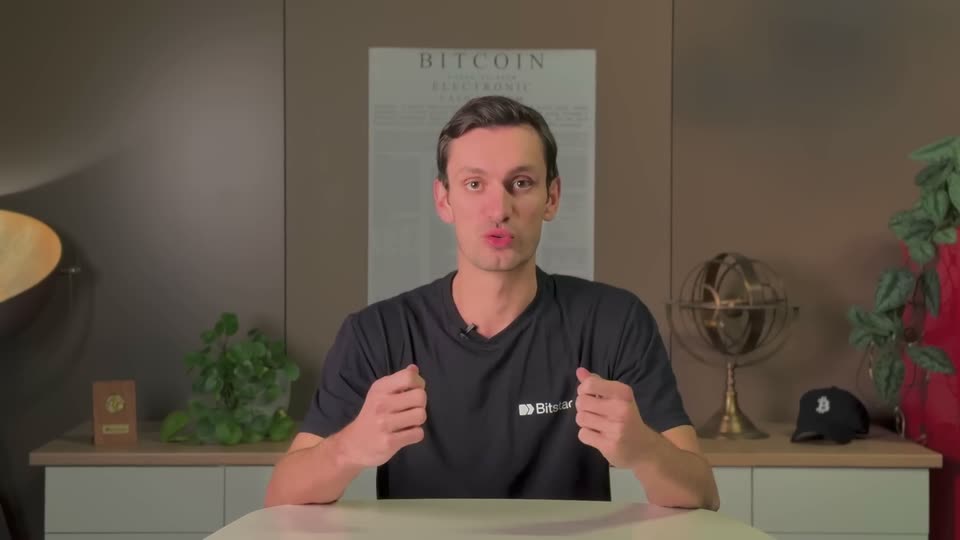

Découvrez le prochain chapitre de l’histoire de Bitstack
Bitstack · Modern electronic
1:15

Trope (YC S26) Launch Video
Trope · Corporate Tech Promo
4:49
Introducing Akool Live Camera: Real-Time AI Video Creation
Akool Inc · Electronic
Introducing Trellis Reports, scene by scene
· 27 scenes as text
01 · Product intro · 0:00–0:04
A long-haired man in an olive shirt sits before a whiteboard covered in handwritten notes, holding a small white device with a green light near his mouth and talking to camera. A name badge marks him at bottom right, then a Reports callout pops in on the right.
On-screen text: “Hey, I'm Jan, co-founder of Trellis,”, “Jan Co-founder, Trellis”, “and we recently launched an amazing feature called Reports.”, “Reports”
Camera: Static
02 · Demo · 0:04–0:06
A dimmed dashboard view lifts to full brightness as the cursor clicks Reports in the left sidebar, swapping the Overview panel for a grid of report cards and a Recent runs list. A white pill callout reading Reports fades out top right while a lower-third caption sits at the bottom.
On-screen text: “You're just going to go to the Reports section,”, “Reports”
Techniques: UI zoom
Camera: Static
03 · Demo · 0:06–0:08
A light-themed analytics dashboard shows the Reports page, with a left navigation sidebar and a grid of saved report cards above a recent runs table. A cursor travels from the Reports menu item to the New report button in the top right corner.
On-screen text: “and then to create a report, you just click Create,”
Techniques: Cursor demo
Camera: Push in
04 · Demo · 0:08–0:09
A light SaaS reports dashboard fills the frame, a left sidebar and a grid of saved report cards. A cursor rests on the dark New report button top right. A white caption with dark outline sits centered at the bottom.
On-screen text: “and then to create a report, you just click Create,”
Techniques: Cursor demo
Camera: Pull out
05 · Feature reveal · 0:09–0:11
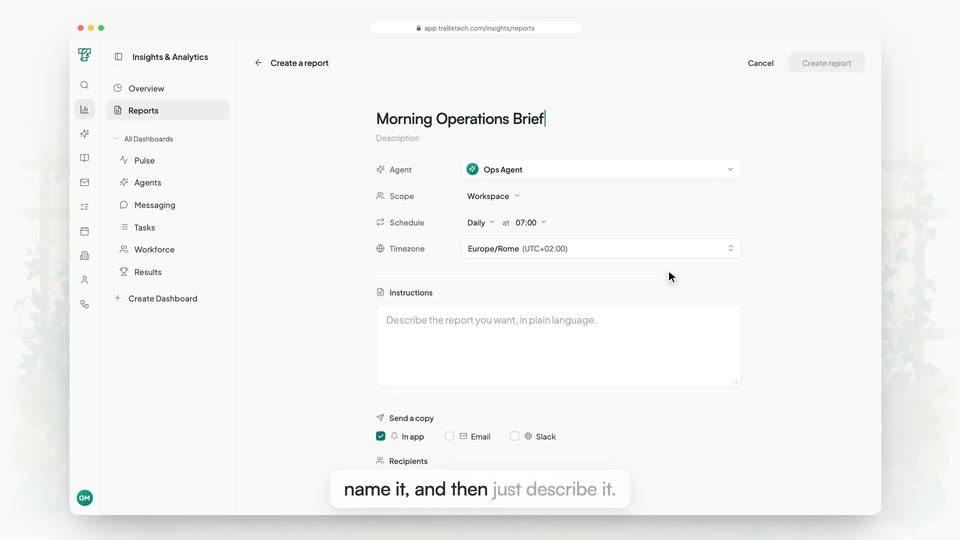
A light report form fills a browser window. The title reads Morning Operations Brief, then the view scrolls down to the empty Instructions box while a cursor hovers. A caption at the bottom switches between two lines.
On-screen text: “and then create a report, you just click Create,”, “name it, and then just describe it.”
Techniques: Cursor demo
Camera: Push in
06 · Feature reveal · 0:11–0:19
A light agent-setup form fills the frame, its Instructions field active as a cursor types a plain-language sentence. Below, a bold “Describe it.” headline and a white pill caption echo the words in sync, segment by segment.
On-screen text: “Describe it.”, “An example could be:”, “every morning, show me all the open issues that we have”, “by property, who's on them,”, “and what's overdue.”
Techniques: Kinetic type, Cursor demo
Camera: Pull out
07 · Feature reveal · 0:19–0:21
A browser window shows a report-creation form; a cursor clicks the green Create report button and the view switches to a report page with a gray skeleton loading layout. A white caption pill at the bottom reads the voiceover line.
On-screen text: “And you just hit Create, and that's it.”
Techniques: Cursor demo
Camera: Push in
08 · Feature reveal · 0:21–0:25
A close-up of a report page fills in from gray placeholder blocks: four stat cards, a bar chart, and a task table load in sequence while the Ops Agent pill cycles status text. The view then pulls back to reveal the full app window in a browser frame.
On-screen text: “And you just hit Create, and that's it”, “The thing that I like the most about this feature is that there's no template.”
Techniques: UI zoom
Camera: Pull out
09 · Feature reveal · 0:25–0:35
A long-haired man in an olive shirt holds a small mic with a furry windscreen in front of a whiteboard of handwritten notes, gesturing as he speaks. White pill badges with short claims pop in on the right, and dark caption bars appear at the bottom.
On-screen text: “No templates.”, “So the only limit to the report that you build is your imagination.”, “Only limit: your imagination.”, “As we are centralizing all the operational data of your business,”, “All your operational data.”, “we have everything to build anything.”, “Everything to build anything.”
Techniques: Kinetic type
Camera: Pull out
10 · Feature reveal · 0:35–0:37
A tilted 3D browser mockup of a dashboard sits on a faint world-map background, with a white caption pill reading 'So you can create an owner statement,' at the bottom. The mockup rotates to a flat front view and the caption fades out.
On-screen text: “So you can create an owner statement,”
Techniques: 3D mockup
Camera: Pull out
11 · Feature reveal · 0:37–0:37
A white owner statement document, listing revenue, occupancy, a bar chart and channel bookings, sharpens from a soft blur into focus against a hazy photo of a building. A white caption box at the bottom right holds the spoken line.
On-screen text: “So you can create an owner statement,”
Camera: Static
12 · Feature reveal · 0:37–0:39
A flat owner-statement report card with a soft shadow hovers over a blurred, bright interior backdrop. Its text lines resolve from an overlapping jumble into a clean layout, and a white rounded caption pill at the bottom carries the spoken line.
On-screen text: “So you can create an owner statement,”
Camera: Static
13 · Feature reveal · 0:39–0:39
Two flat white dashboard cards sit side by side over a pale, faint skyline. The left owner statement stays still while the right live-operations card fades from translucent to fully opaque. A white caption pill at the bottom center holds the line.
On-screen text: “a cleaning schedule,”
Camera: Static
14 · Feature reveal · 0:39–0:43
Three flat UI panels (owner statement, check-in dashboard, credit card report) sit side by side on a light background. The right panel fades in, then the headline “Same data. Any design.” appears above as the panels shift down, and a bottom caption updates with the voiceover.
On-screen text: “a cleaning schedule,”, “or a month-end pack for your accountant.”, “Same data. Any design.”, “And a cool thing is that it can be fully branded to your company.”
Techniques: Kinetic type
Camera: Static
15 · Feature reveal · 0:43–0:50
Three report mockups line up beneath the headline, and in sequence each card gains a branded header and accent color, with a small brand tag fading in below it, as the bottom caption swaps to a new line.
On-screen text: “Your brand. Your reports.”, “And a cool thing is that it can be fully branded to your company.”, “Leis Stays - Carolinas”, “You just give it your colors, your logos, anything.”, “Haven - Gatlinburg”, “Alpéon - Megève”
Camera: Static
16 · Feature reveal · 0:50–0:57
A cursor drags the corner handle of a selected operations dashboard, resizing it from a wide 16:9 layout to square and then to a small portrait; the cards and chart reflow, and the size list on the left highlights the matching preset.
On-screen text: “Any size.”, “And you can make different sizes.”, “If you want A4 with the right fonts and everything, it's ready for print.”
Techniques: Cursor demo
Camera: Static
17 · Feature reveal · 0:57–0:58
A phone-sized report card with selection handles sits center on white, flanked by a black 'Any size.' headline and a four-row size list on the left and faint dashed ghost frames on the right. The card then expands into a full-width desktop dashboard with a left sidebar, while the headline, list and bottom caption clear away.
On-screen text: “Any size.”, “16:9 slide 1600 x 900”, “A4 page 210 x 297 mm”, “Square 1080 x 1080”, “Phone 390 x 844”, “If you want A4 with the right fonts and everything, it's ready for print.”
Techniques: Morph
Camera: Static
18 · Feature reveal · 0:58–1:02
A white Share report modal sits centered over a blurred dashboard. Three format cards for PDF, Link and HTML fade in, then each lights up in sequence with a teal border, filled icon and checkmark while a caption pill below swaps text.
On-screen text: “And it's super easy to share.”, “You can share it in any format: PDF, link, HTML, whatever.”
Camera: Static
19 · Feature reveal · 1:02–1:03
A white share card listing PDF, Link and HTML options sits centered over a blurred analytics dashboard. The dashboard then sharpens while the card shrinks, shifts left and fades, revealing the full report view. A bottom caption bar names the share formats.
On-screen text: “You can share it in any format: PDF, link, HTML, whatever.”
Techniques: UI zoom
Camera: Static
20 · Feature reveal · 1:03–1:04
A flat browser mockup of a dashboard report fills the frame; the view zooms into the stat cards as a cursor hovers over the Open Operations figure, while the bottom caption switches from sharing formats to detail.
On-screen text: “You can share it in any format: PDF, link, HTML, whatever.”, “You can also see the numbers in more detail.”
Techniques: UI zoom, Cursor demo
Camera: Push in
21 · Feature reveal · 1:04–1:08
A light dashboard under the headline 'Explore every detail.' shows a bar chart; a cursor hovers the blue Cleaning bar with a tooltip, then the view reframes into an Operations Brief page with a right-hand list of turnovers and an Assign button.
On-screen text: “Explore every detail.”, “You can also see the numbers in more detail.”, “If you click on one here, you'll get more information.”
Techniques: Cursor demo, UI zoom
Camera: Pull out
22 · Feature reveal · 1:08–1:14
A browser window shows an Operations Brief dashboard; a cursor clicks Save and a Save report panel opens on the right. The view zooms in as the cursor ticks Email and Slack under Send a copy, then rests on the Save report button. A bottom caption bar reads the narration.
On-screen text: “Then the last part: you can automatically have this report sent”, “to you or to anyone, on a schedule,”
Techniques: UI zoom, Cursor demo
Camera: Static
23 · Feature reveal · 1:14–1:16
A 3D-tilted analytics window reframes from a grid of saved report cards into one operations report with stat tiles and a bar chart. A white caption box at the bottom swaps its line of text.
On-screen text: “to you or to anyone, on a schedule,”, “on any channel: Slack, email, WhatsApp, you name it.”
Techniques: 3D mockup, UI zoom
Camera: Pull out
24 · Feature reveal · 1:16–1:21
A white title card reading On schedule. Delivered. slides left off a light background, revealing a dashboard mockup on the left and a stack of Email, Slack and WhatsApp delivery cards on the right. The WhatsApp card flips from Sending to Delivered as a bottom caption swaps text.
On-screen text: “On schedule. Delivered.”, “Daily · 07:00”, “on any channel: Slack, email, WhatsApp, you name it.”, “Whatever you have connected, it gets sent there,”
Techniques: Masking, Split screen
Camera: Pull out
25 · CTA · 1:21–1:23
A man in an olive shirt holds a small gray wearable with a green light up to the camera, gesturing with his other hand in front of a whiteboard marked with a URL and a logo sketch. A caption bar appears at the bottom.
On-screen text: “and you're always on top of what's happening in your business.”
Camera: Static
26 · CTA · 1:23–1:27
A man with long hair and a mustache stands before a whiteboard marked 'trellistech.com' and 'Book a demo', holding a small device with a green light to his mouth. He points at the camera as two white pill badges with a URL and booking line slide in on the right.
On-screen text: “trellistech.com”, “Just go to trellistech.com,”, “Book a demo with Jan”, “book a demo with me, and let's get started.”
Camera: Pull out
27 · Outro · 1:27–1:32
A watercolor Tuscan landscape with stone walls, flowers and trellises fades up from black, framing a centered lockup. The Trellis wordmark slides in beside Reports, with a demo CTA line and a URL pill settling below.
On-screen text: “Trellis”, “Reports”, “Book a demo with Jan today.”, “trellistech.com”
Techniques: Kinetic type
Camera: Static