0:56

Lottielab - Introducing Magic Animator beta 3.0✨ Prompt and edit animations in F
Lottielab · Jun 2026
Microsoft’s 1:01 launch film runs 25 scenes, about 2.5 s each. The product shows up at 0:01 and 2 features are revealed. There is no explicit call to action; a voiceover carries the film. The video is one continuous board: it opens on a blank canvas, fills it with named cursors, sticky notes and hand-drawn flowcharts, then pulls the flat UI back into 3D rooms and devices. Signature moves are the pixel-mosaic resolve, shallow-depth tilts of the interface, and the morph from a flat board to a laptop, wall display, conference screen and phone.
Is this your launch? to your site or press kit.
Lottielab · Jun 2026
Figma · Design · Oct 2026
Films whose music sounds like this one, voice left out
Topaz Labs · Upbeat pop-funk and electronic dance music
Adobe · Upbeat instrumental electronic music blending funk, soul, and retro synthwave elements.
Nintendo · Electronic
A plain white gradient background sits empty, then a blue mouse cursor and a blue rounded pill carrying the name Ray Farnau pop in at the center of the frame.
On-screen text: “Ray Farnau”
Camera: Static
A pixelated mosaic resolves into a whiteboard app. Four colored collaborator cursors glide across the canvas as sticky notes pop in. A rainbow marker line sweeps in a curve from one note to a cursor.
Techniques: Cursor demo
Camera: Pull out
A flat whiteboard view shows sticky notes, a looping hand-drawn arrow and four colored name pills. Handwritten text writes itself into a purple-outlined note as a magenta cursor rests at its lower corner.
Techniques: Kinetic type
Camera: Static
A collaborative whiteboard canvas holds purple, orange and blue sticky notes, a gray handwritten note box and a rainbow crayon arrow. Named collaborator cursors in teal, orange, magenta and blue drift slightly across the board.
Camera: Static
A whiteboard canvas tilts in 3D with shallow depth of field. The camera pans right as colored name pills slide in, while hand-drawn red and green shapes and arrow cursors are sketched around them.
Techniques: 3D mockup
Camera: Pan
A hand-drawn flowchart on a whiteboard pans across as colored cursors with name tags glide over the shapes. Green boxes, a diamond and arrows link the steps, while a tilted document mockup sits at the right edge.
Techniques: Cursor demo
Camera: Pull out
A whiteboard flowchart of green boxes and a diamond sits on a light canvas. A pink and a blue named cursor glide across it; the pink one drops an elephant photo with three stars at the top as the view pulls back to reveal blurred cards on the right.
Techniques: Cursor demo
Camera: Pull out
A whiteboard app shows a hand-drawn flowchart with an elephant photo and two document cards. Four colored name tags drift to new positions as a red arrow is drawn toward the Revise box.
Techniques: Cursor demo
Camera: Static
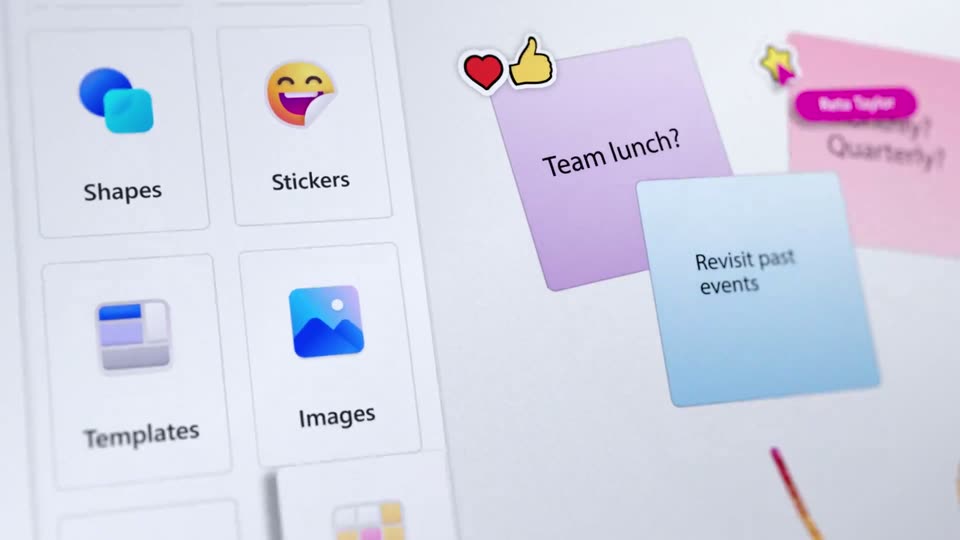
A tilted 3D view of a whiteboard interface: a Create panel slides in from the left and its tiles pop in one by one, while a pink cursor hovers over the Stickers tile and presence tags appear on blurred sticky notes.
Techniques: 3D mockup, Cursor demo, Parallax
Camera: Pan
Locked-off close-up of a light interface grid showing Templates and Images cards. An orange cursor with a rounded label reading Babek Shammas slides down from the top right and hovers between the two cards.
On-screen text: “Babek Shammas”
Techniques: Cursor demo
Camera: Static
Close-up of a light interface grid: an orange cursor hovers over the Templates tile, which gains a blue selection border, while an orange pill reading Babek Shammas slides in beside the cursor.
On-screen text: “Babek Shammas”
Techniques: Cursor demo
Camera: Static
A whiteboard interface opens zoomed in on a Kanban title and three column headers. The view pulls back to reveal the full board, with colored sticky-note cards stacked under BACKLOG, IN PROGRESS and COMPLETE, while named multiplayer cursors drift across the canvas.
Techniques: UI zoom, Cursor demo
Camera: Pull out
A tilted close-up of a Kanban board shows orange Backlog and blue In Progress columns. A purple cursor hovers the Hire x2 new designers card and moves it right, while name chips float over the board.
On-screen text: “problematic work stages, and by improving those, your team will soon work more efficiently”
Techniques: Cursor demo, 3D mockup
Camera: Static
A tilted close-up of a Kanban board with three columns. A blue Ray Tanaka cursor and a purple Charlotte de Crum cursor glide across the cards. An orange card turns blue under Ray's cursor while a red hand-drawn circle slides down to another card.
Techniques: Cursor demo
Camera: Static
A whiteboard Kanban board with orange, blue and green columns fills the frame. Colored name tags for four users drift across the sticky notes. The view zooms out to reveal the top toolbar and a right-hand panel of participant video tiles.
Techniques: UI zoom
Camera: Pull out
A whiteboard interface with a Kanban board and colored name-tagged cursors fills the frame beside a video-call strip. The view then pulls back, morphing into a 3D laptop on a wooden desk, its screen showing the same board.
Techniques: Morph, 3D mockup
Camera: Pull out
A 3D room corner with green and blue walls, a chameleon drawing and a palm. A monitor on a wheeled stand shows a collaborative board cycling through a flowchart, a mind map and a kanban layout, with video call tiles on the right. The camera slowly pulls back.
Techniques: 3D mockup
Camera: Pull out
A 3D-rendered conference room with a long wooden table and black chairs. The wall display shows a board of colored sticky notes, a pyramid chart and a column of video-call tiles. A tablet lies on the table. The camera eases back to reveal the room.
Techniques: 3D mockup
Camera: Pull out
Locked-off 3D render of a blue-walled conference room with a long wooden table and black chairs. A wall-mounted display shows a video call app: a mind map of avatars beside a column of participant tiles, and the board content swaps between layouts during the shot.
Techniques: 3D mockup
Camera: Pull out
A smartphone displaying a video call interface with a map and whiteboard lies flat on a wooden cafe table, next to a green coffee cup.
Techniques: 3D mockup
Camera: Static
A smartphone lies flat on a wooden cafe table, its screen showing a video call with a pink presentation document and a column of participant tiles. A green cup and saucer sit left, a chalkboard menu and shelves fill the background. The camera holds low at table level.
Techniques: 3D mockup
Camera: Static
A 2x2 split screen shows the same whiteboard app on a laptop, a standing display, a conference wall screen, and a smartphone, each in a different 3D room. The camera drifts slowly through each scene while the interface shows a flowchart canvas and a participant sidebar.
Techniques: Split screen, 3D mockup, Parallax
Camera: Static
On a white background, the word Whiteboard slides left to join the stationary Microsoft, forming the centered lockup. An orange Ray Tanaka tag sits under Microsoft and a blue Greta Taylor tag with a cursor slides in under Whiteboard, then the line holds.
On-screen text: “Microsoft Whiteboard”
Camera: Static
The title Microsoft Whiteboard sits centered on a pale gray canvas. Two named collaboration cursors, one orange and one blue, drift leftward across the lower part of the title and exit the frame.
On-screen text: “Microsoft Whiteboard”
Camera: Static
The Microsoft 365 logo lockup sits centered on a plain white background, then the 365 drops away to leave the Microsoft wordmark, which holds static for the rest of the clip.
Camera: Static