1:25

Instaplay: Make or Play Anything
General Context Labs · Consumer · Aug 2026
Figma · Oct 2026 · 0:34 · AI-annotated
Figma’s 0:34 launch film runs 22 scenes, about 1.6 s each. The product shows up at 0:07. There is no explicit call to action. The video is built as one long sentence: a list of code sources shown as flat UI cards on a gray field, then a sustained demo of named cursors collaborating over floating app screens in 3D space. Pacing is brisk with short cuts, perspective drifts, and cursor-triggered interactions, closing on a hard cut to black for the tagline and the assembling logo.
Is this your launch? to your site or press kit.
General Context Labs · Consumer · Aug 2026
Webflow · Design · Aug 2020
The Browser Company · Productivity · Apr 2024
Two centered lines of text appear on a light gray background, moving from a blue offset position to solid black.
On-screen text: “Bring code to”, “the canvas from”
Camera: Static
Two mobile app screens sit side by side on a gray backdrop: a marketplace home feed on the left inside a blue selection frame, and a checkout panel on the right. A large black cursor arrow rests over the left feed while the words 'a frame' sit to the left.
On-screen text: “a frame”
Camera: Static
A tilted browser mockup of the PickUp site fills the right side while the label a web page holds the left. A large cursor clicks Capture page in the toolbar, which collapses into a Capturing status pill above the page.
On-screen text: “a web page”
Techniques: 3D mockup, Cursor demo
Camera: Static
A flat UI card on a light gray background shows a chat prompt with a folder tag, a Figma URL, an Agent dropdown and a purple send button; a black cursor rests on the send button while the headline Figma MCP sits to the left.
On-screen text: “Figma MCP”
Camera: Static
On a light gray background, a white agent card sits right, holding a prompt line and a purple send button that a black cursor hovers over. The black label Figma MCP anchors the left. Toward the end the card blurs and a blue Git Hub word crossfades across the label.
On-screen text: “Figma MCP”
Camera: Static
A white dialog card titled Clone remote repository sits on a flat gray field, with the caption a GitHub repository set to its left. A black arrow cursor rests on the blue Clone button and nudges down to press it.
On-screen text: “a GitHub repository”
Techniques: Cursor demo
Camera: Static
A light gray screen holds the black headline 'a GitHub repository' on the left and a white 'Clone remote repository' dialog on the right, listing the pickup org with a blue Clone button. A black cursor sits below the button, and both elements ghost and drift as the scene transitions.
On-screen text: “a GitHub repository”
Techniques: Cursor demo
Camera: Pan
A vertical column of small gray CSS variable code sits over a larger, fainter layer of the same names on a pale background. The two text layers hold in place, the dense strip and the big ghosted words forming a flat code wall.
Camera: Pull out
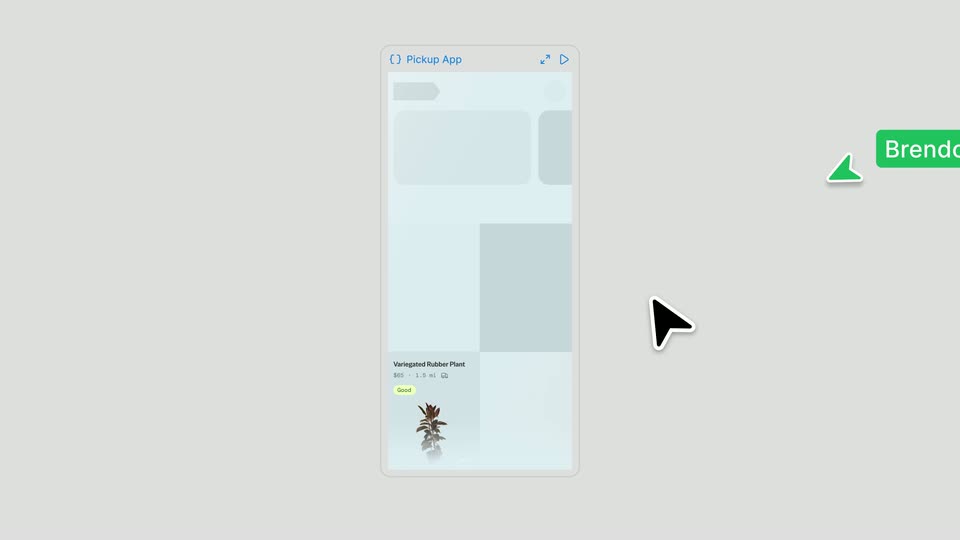
A centered phone mockup of the Pickup App fades in with a search bar and a list of items, each with a photo, price and condition tag. A black cursor drifts left while a green cursor tagged Brendon slides in from the right.
On-screen text: “Brendon”
Camera: Pull out
The Pickup App phone mockup centers on a gray canvas, its product list scrolling under a black cursor while pink and green tags named Bianca and Brendon drift around it; the frame then widens to show the phone beside a code panel with a blue selection outline.
On-screen text: “Brendon”, “Bianca”
Techniques: Cursor demo, UI zoom, Split screen
Camera: Static
Three angled phone mockups stand side by side, each running the Pickup App feed. A pink cursor tagged Bianca and green cursors tagged Brendon move across the listings while the product grids scroll.
On-screen text: “Bianca”, “Brendon”
Techniques: 3D mockup, Split screen, Cursor demo
Camera: Static
Five flat Pickup App screens drift and settle into a loose grid on a light gray field. Colored name tags, Kim, Bianca, Siobhan, Brendon and Yeojin, pop in beside each screen while a cursor hovers over one product listing.
On-screen text: “Kim”, “Bianca”, “Siobhan”, “Brendon”, “Yeojin”
Camera: Pull out
Pickup App screens, mobile and desktop, float scattered on a light gray field. Colored name pills, Kim, Bianca, Siobhan, Brendon and Yeojin, each with an arrow cursor, tag a different screen, the panels drifting in layered depth.
On-screen text: “Kim”, “Bianca”, “Siobhan”, “Brendon”, “Yeojin”
Techniques: 3D mockup, Parallax
Camera: Push in
A light gray 3D space holds several floating Pickup App mockups: a browse screen with category icons, a mobile listings card, and a code panel. A green collaborator cursor tagged Brendon glides across the central screen while the cards drift in perspective.
Techniques: 3D mockup, Cursor demo
Camera: Push in
A centered mobile app screen shows a BROWSE grid of product thumbnails on a light gray field, with partial product-list and map screens at the left and right edges. A green pointer cursor moves across the grid as a green Brendon tag slides in beside it.
On-screen text: “Brendon”
Techniques: Cursor demo
Camera: Static
A board of Pickup App cards, a $75 dutch oven and $85 headphones, drifts left across a gray canvas, the layers moving at different speeds. A green name tag with an arrow points to a browse card, then a blue tag appears on the right.
On-screen text: “Brendon”, “Yejin”
Techniques: Parallax
Camera: Pan
A blue Yeojin cursor clicks Update code layer, a code sheet flashes over the phone and the green headphones card refreshes. The cursor selects the frame, swapping in a yellow chair card. The view pans to a map screen with a red Galaxia cursor.
Techniques: Cursor demo, UI zoom
Camera: Push in
Two flat phone mockups sit side by side on gray. The left Browse grid scrolls through product thumbnails while the right map pans and a red cursor taps a pin, marked by a red Galaxia tag. The map zooms into a clock pin, opening a detail card.
On-screen text: “Galaxia”
Techniques: Split screen, Cursor demo, UI zoom
Camera: Pan
Three flat phone mockups of the Pickup App sit side by side: a grid, a map with pins, and a detail page. Blue and red cursors, Yeojin and Galaxia, glide between them as listings change and a Wall Clock card pops up; a red bubble says “Let's build this one.”
On-screen text: “Yeojin”, “Galaxia”, “Let's build this one”
Techniques: Split screen, Cursor demo
Camera: Push in
On a black field, the line 'Explore and build' appears in yellow, then turns white as 'with code.' drops in beneath it. The frame holds still on the centered two-line headline.
On-screen text: “Explore and build”, “with code.”
Techniques: Kinetic type
Camera: Static
On a black background, a logo of colored rectangles and serif code text assembles itself. The blocks slide and reposition across three frames, settling into a compact mark that reads app.tsx, var and a hex color code.
Camera: Static
A multicolor geometric logo sits centered on a black background, built from a red and orange pill, a purple and blue circle, and a green corner shape. A faint glow around the edges fades out during the clip.
Camera: Static