1:27

Personal Computer, by Perplexity
Perplexity · AI · Mar 2026
Microsoft’s 1:01 launch film runs 28 scenes, about 2.2 s each. The product shows up at 0:07 and 9 features are revealed. There is no explicit call to action; a voiceover carries the film. The video alternates macro 3D product renders, abstract light graphics, and clean live-action desk shots, capping each beat with a single short caption. Pacing is fast with hard cuts on the beat, using radial-burst transitions and focus pulls to move between features.
Is this your launch? to your site or press kit.
Perplexity · AI · Mar 2026
Samsung Galaxy S26 Ultra · Mar 2026
Galaxy S26 Ultra · Feb 2026
Films whose music sounds like this one, voice left out
Airbnb · A mix of indie folk, pop/R&B, dubstep, and EDM
Figma · Cinematic trailer hybrid blending orchestral, electronic trap, and pop elements
Make · Corporate Tech Launch
A dark device corner rests on a gray textured surface in a shallow-focus macro shot. The frame stays locked off while a white caption appears in the lower right.
On-screen text: “A new class of device”
Camera: Static
A dark, defocused 3D surface fills the frame, its edge catching a soft gradient highlight, on a locked-off shot. A white caption fades in along the bottom edge.
On-screen text: “A new class of device”, “Purpose-built for Windows 365”
Camera: Static
A thin vertical beam of blue light rises from the center of a dark glossy slab in 3D perspective. It widens and brightens into a solid column with a hexagonal base, while the camera slowly tilts down. A white caption sits locked at the bottom.
On-screen text: “Purpose-built for Windows 365”
Techniques: Morph
Camera: Static
A black Windows mini-PC with a four-pane logo on its top sits on a light wood table, its front ports in focus. The camera slowly pans across it while the caption fades in at the lower left.
On-screen text: “Introducing Windows 365 Link”
Camera: Static
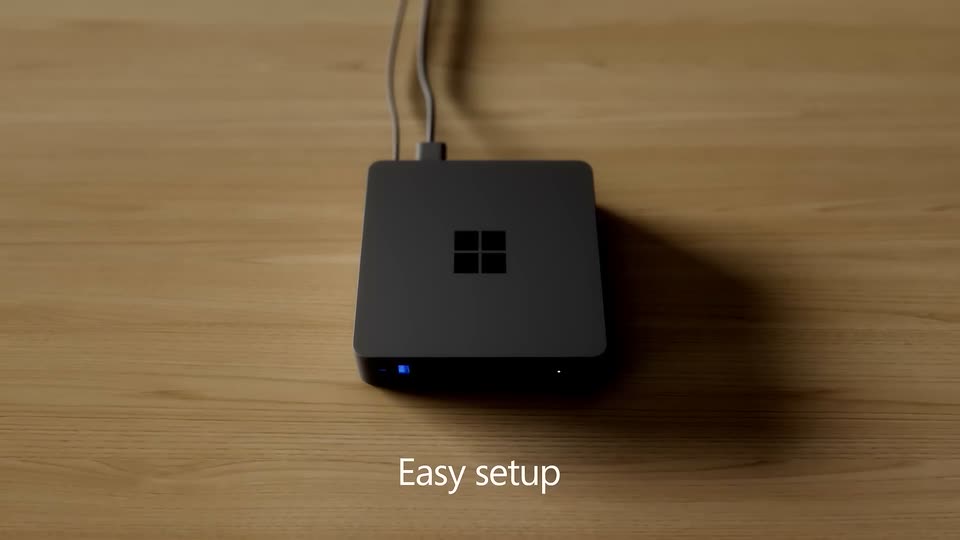
Top-down shot of a black square device with the Windows logo on a wooden desk. The logo lights up and the top face glows blue as the caption Easy setup fades in below, then the camera drops to a low angle and whips away in a blur.
On-screen text: “Introducing Windows 365 Link”, “Easy setup”
Camera: Pull out
A monitor on a wooden desk against a plain wall starts defocused, then racks into sharp focus while the blue wallpaper stays still. A white caption sits centered at the bottom throughout the shot.
On-screen text: “Simple and secure by design”
Camera: Pull out
A white sign-in card with the Windows logo and a row of PIN dots floats sharp in the center over a blurred desk and monitor, while the caption sits at the bottom. The frame then bursts into radial streaks.
On-screen text: “Simple and secure by design”
Techniques: Speed ramp
Camera: Push in
A radial burst of blue and black motion-blurred streaks expands outward from a bright white center. The white headline scales in across the middle as the streaks fill the frame.
On-screen text: “Connect in seconds”
Techniques: Kinetic type
Camera: Push in
A radial burst of white and blue streaks expands outward from the center of a black field. The white headline holds center, then scales up and blurs as the view rushes forward through the particle field.
On-screen text: “Connect in seconds”
Techniques: Kinetic type, Particles, Speed ramp
Camera: Push in
A fast forward push through a 3D server room decelerates to a stable wide shot of two rows of blue-lit racks, a glowing cyan A-shaped mark at the far end. A white caption “Cloud-powered performance” sits centered at the bottom.
On-screen text: “Cloud-powered performance”
Techniques: Speed ramp, 3D mockup
Camera: Static
Rows of dark 3D server racks with glowing blue and teal front panels fill the frame in perspective. The camera drifts slowly across the array while a white caption rests in the lower right corner.
On-screen text: “Cloud-powered performance”, “Limitless scalability”
Techniques: 3D mockup
Camera: Pull out
A dark 3D field of server racks with glowing blue data screens fills the frame as the camera glides over the rows. White captions appear in the lower right in turn, one replacing the other.
On-screen text: “Limitless scalability”, “Simple to set up and manage”
Techniques: 3D mockup
Camera: Pull out
A woman with white hair and a headset points at a monitor showing a Windows sign-in screen over a blue abstract wallpaper. A black box, keyboard and mouse sit on the desk. A white caption fades in at the bottom reading Passwordless authentication.
On-screen text: “Simple to set up and manage”, “Passwordless authentication”
Camera: Static
A split screen pairs a Windows sign-in card on a blue wallpaper at left with a close-up of a finger pressing a round fingerprint reader on a black key at right. White caption sits along the bottom.
On-screen text: “Passwordless authentication”
Techniques: Split screen
Camera: Static
A white Windows sign-in card with a blue four-pane logo and small gray 'Connecting...' text sits on a blue abstract desktop, then the view zooms in until the login screen fills the frame.
Techniques: UI zoom
Camera: Static
Locked-off shot of an angled desk monitor showing a browser with a presentation slide and a Copilot panel. A cursor types a prompt into the panel, then the panel closes to reveal slide images. White caption lines appear across the bottom.
On-screen text: “The Windows you know”, “without compromises”
Techniques: Cursor demo
Camera: Pull out
Locked-off shot of a desk with a monitor showing an Excel spreadsheet and a Copilot side panel, keyboard and mouse in front. A white caption 'Copilot ready' appears at the left edge over the desk.
On-screen text: “Copilot ready”
Camera: Static
A monitor on a wooden desk displays a spreadsheet with the Copilot panel open on the right. The shot is locked off, with the caption “Copilot ready” resting at the left edge.
On-screen text: “Copilot ready”
Camera: Static
A white input box overlay sits over a blurred desk. The text 'Show me a breakdown of Proseware sales growth' is typed into the field. The overlay fades to reveal a monitor displaying a spreadsheet with a green chart and a Copilot pane.
On-screen text: “Show me a breakdown of Proseware sales growth”
Techniques: Kinetic type
Camera: Static
A monitor on a wooden office desk shows a spreadsheet with a green data table and a chat panel. A green, pink and blue mountain-shaped area chart fills the empty plot area, then the camera pulls back to widen the view of the desk.
Camera: Static
A camera pans left across a desk set, revealing a second monitor with a four-person video call beside a monitor showing a spreadsheet. A black box, keyboard, and mouse rest on the desk in soft focus.
On-screen text: “4”
Camera: Pull out
Two desktop monitors sit on a wooden desk against a pale wall. The left screen runs a six-person video call; the right displays a spreadsheet. A small black adapter box rests between the stands, with a keyboard and mouse in front. A white caption is locked at the bottom.
On-screen text: “Works with the peripherals you need”
Camera: Pull out
A slightly tilted video call window shows a woman with long dark curly hair speaking in a bright office. A blue Teams logo and the caption slide in at the lower left over the footage.
On-screen text: “Optimized for video conferencing”
Camera: Static
A tight crop on a woman in a video call tile pulls back to reveal a four-person grid on a laptop screen, with a sidebar at the right edge. A white caption with a blue logo mark sits along the bottom.
On-screen text: “Optimized for video conferencing”
Techniques: UI zoom
Camera: Pull out
A monitor on a desk shows a four-person video call grid with a Copilot panel; the camera pulls back from a close-up of the screen to reveal the webcam and a second monitor with a spreadsheet, while a caption reads “Optimized for video conferencing”.
On-screen text: “Optimized for video conferencing”
Camera: Pull out
A black mini PC with a four-square logo on its lid rests on a pale grey surface, shot in 3D perspective from a low angle. The camera drifts slowly right while a single white word on the right side crossfades from Simple to Secure to Purpose-built.
On-screen text: “Simple”, “Secure”, “Purpose-built”
Techniques: 3D mockup
Camera: Static
A near-black card with a soft light gradient that drifts slowly across the frame. The product name Windows 365 Link sits centered and locked off, the word Link rendered in a dimmer gray than the white text before it.
On-screen text: “Purpose-built”, “Windows 365 Link”
Camera: Static
The white Microsoft logo, a four-pane window icon beside the wordmark, sits centered on a dark charcoal gradient with a soft glow in the upper right. The frame is locked off and the logo holds still for the full duration.
Camera: Static