2:03
Explore
Make - Available now: #MakeGrid 🚀 Take control of your entire AI and automa
Make · Jun 2025 · 1:04 · AI-annotated
- Length
- 1:04
- Scenes
- 21 · 3.1 s avg
- Product on screen
- 0:12
- Call to action
- 0:48 · 75%
- Voiceover
- Yes
00:00:00 / 01:04:20
Make’s 1:04 launch film runs 21 scenes, about 3.1 s each. The product shows up at 0:12. The call to action lands at 0:48 (75% in), over a voiceover. The video builds from an abstract node multiplication into a 3D field of glowing panels and node maps, then resolves to a brand lockup. Signature moves are light pulses running along connector lines, slow dollies across floating panels, and a blur-to-focus title reveal.
No filming indicatedEstimated needs: 1 official logo — reused across the film · 4 graphic passages — draw or supply · 10 3D passages — build or supply
Is this your launch? to your site or press kit.
More like this

1:34
Dr. Alex Wissner-Gross - I'm delighted to share that Physical Superintelligence PBC (PSI), whi
Physical Super intelligence · Sep 2026
0:50

LIGHTMILL_ NEXT-GEN_LASER MILLING _ METALS_LM PROMO V1
Lightmill · Jun 2026
Make - Available now: #MakeGrid 🚀 Take control of your entire AI and automa, scene by scene
· 21 scenes as text
01 · Problem · 0:00–0:00
A solid black screen holds for the full duration with no visual elements, framing the voiceover as a quiet lead-in.
Camera: Static
02 · Problem · 0:00–0:12
On a near-black purple field, a single white-ringed circle splits and multiplies into a central node network, the circles linking with dotted white lines. Blurred purple node clusters drift in from the edges at varying depths, filling the frame.
Techniques: Parallax
Camera: Pull out
03 · Product intro · 0:12–0:13
A blurred purple network of nodes fills a dark frame, then the scene settles on the white three-bar MakeGrid mark centered on a solid purple disc.
Techniques: Particles, Morph
Camera: Pull out
04 · Product intro · 0:13–0:14
A purple disc with a white three-bar logo sits on black while a thin white ring circles it. The disc then locks into a glowing rounded-square tile, tilted in 3D perspective.
Techniques: 3D mockup
Camera: Static
05 · Product intro · 0:14–0:17
On a black background, a glossy black panel with a glowing purple edge sits in 3D perspective. Colorful 3D hexagon and triangle tokens pop onto its surface and link with pink lines into a node graph. The camera pulls back to reveal a second panel below holding more tokens.
Techniques: 3D mockup, Parallax
Camera: Pull out
06 · Product intro · 0:17–0:20
Three dark panels with glowing magenta edges float in 3D perspective on black, each scattered with small hexagon and triangle tokens in cyan, purple and red. Thin light lines link some tokens, and a bright beam traces a new connection as the view drifts across the panels.
Techniques: 3D mockup
Camera: Pull out
07 · Product intro · 0:20–0:21
A low 3D camera orbits a glowing purple hexagonal node on a dark grid floor, a white circular logo on its top face. Magenta light beams radiate outward, a bright pulse travels along them. The node reflects on the floor.
Techniques: 3D mockup, Light sweep
Camera: Pull out
08 · Product intro · 0:21–0:22
On a gray dotted grid, purple hexagonal nodes with white icons sit at the ends of thin lines. A magenta light pulse travels along the line from the left node toward a second node on the right as the camera tracks sideways.
Camera: Static
09 · Demo · 0:22–0:25
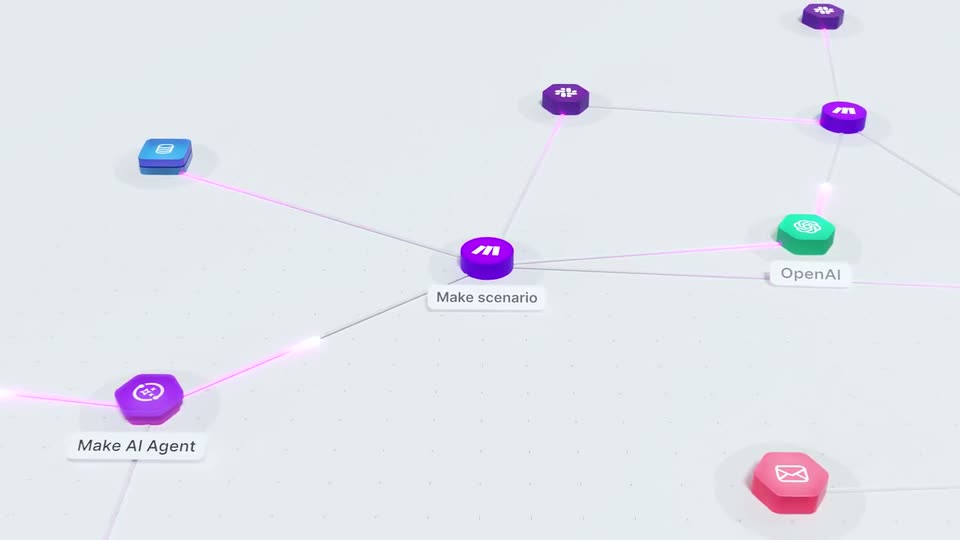
A 3D network graph on a light dotted plane, colored hexagon and square nodes linked by thin lines. Pink pulses travel the links as white pill labels for Make scenario and OpenAI fade in, and the camera pulls back to reveal the full map.
Techniques: 3D mockup
Camera: Pull out
10 · Demo · 0:25–0:33
On a pale gray field, a workflow network of extruded 3D icon nodes, mostly purple M circles, links to green, blue, pink and dark nodes. Bright pulses travel along the thin connector lines while the camera drifts across the graph, early node labels fading out.
Techniques: 3D mockup, Parallax
Camera: Pull out
11 · Demo · 0:33–0:33
A network of colored nodes, circles, hexagons, triangles and squares with small icons, is linked by thin lines on a light gray field. White pulses travel along the connections while the frame pans slowly to the right.
Camera: Static
12 · Demo · 0:33–0:34
A purple 3D disc bearing a white abstract mark rests on a pale grid plane marked with small crosses. Thin lines radiate from the disc in every direction, and a pink light pulse travels along one line while the camera tilts to a steeper top-down angle.
Techniques: Light sweep
Camera: Pull out
13 · Demo · 0:34–0:36
A white cylinder hub sits at the center of a black 3D grid, with lines radiating to glowing colored icon blocks. A red error tag hovers to the right. The camera pulls back from a tight view to reveal the full radial network.
Techniques: 3D mockup
Camera: Pull out
14 · Demo · 0:36–0:43
A 3D node network floats on a dark plane. A central cylinder connects to colored app icons beside a red error tooltip; the camera whips to a purple node with an operations stats card as magenta pulses run along the links, then pulls back to reveal the full board.
Techniques: 3D mockup, Light sweep, Parallax
Camera: Pull out
15 · Demo · 0:43–0:44
A dark tablet with a glowing purple rim floats in 3D perspective on black, its screen showing a network of colored spheres linked by pink lines. The camera drifts right, revealing two more tablets with similar node graphs.
Techniques: 3D mockup
Camera: Pull out
16 · Demo · 0:44–0:48
A receding 3D grid of dark square tiles, each edged in glowing purple and holding a small multicolor node-and-line graph, drifts across a black void. In the lower left, a rounded stat card counts operations upward while the camera slowly dollies forward.
On-screen text: “Operations consumed”, “29 642”, “In last 30 days”
Techniques: 3D mockup, Parallax
Camera: Pull out
17 · CTA · 0:48–0:54
A low 3D camera glides across dark panels with glowing purple edges, each scattered with small colored dots linked by thin lines. The focus softens as the view pulls back. Centered white text reads “See more”, then swaps to “Know more”.
On-screen text: “See more”, “Know more”
Techniques: Parallax, Kinetic type
Camera: Pull out
18 · CTA · 0:54–1:00
A blurred purple grid of glowing lines and multicolored dots sits on black. Centered white text cycles “Know more” then “Do more”, then clears. The big white “grid” wordmark glows in, and the make logo slides in above it.
On-screen text: “Know more”, “Do more”, “grid”, “make”
Techniques: Kinetic type
Camera: Pull out
19 · Outro · 1:00–1:01
A dark 3D grid of glowing colored dots recedes into the background as the white make logo and large grid wordmark hold still at center, the letters edged with a soft purple glow.
On-screen text: “make”, “grid”
Camera: Static
20 · Outro · 1:01–1:03
The make logo and a large white lowercase grid wordmark sit centered over a dark, blurred 3D grid of multicolored glowing dots. The text stays still while the background holds a soft purple glow.
On-screen text: “make”, “grid”
Camera: Static
21 · Outro · 1:03–1:04
The white Arc logo, a thin circle with a horizontal line, holds center on a black field for the full beat.
On-screen text: “grid”, “make”
Camera: Static