1:02

New Apple Watch Series 12: The most accurate heart rate sensing in a wearable
Apple · Hardware · Sep 2026
Perplexity · Mar 2026 · 1:27 · AI-annotated
Perplexity’s 1:27 launch film runs 28 scenes, about 3.1 s each. The product shows up at 0:08 and 4 features are revealed. There is no explicit call to action; a voiceover carries the film. The video opens on a physical Mac mini, then walks through a chain of feature demos (briefing, recruiting, board deck, mobile) on a dark desktop, and closes on a serif tagline and the Perplexity mark. Its style is a near-black canvas with diagonal teal and gold light streaks, rounded translucent UI panels, and signature moves of typing text, expanding notification pills, and slow camera zooms.
Is this your launch? to your site or press kit.
Apple · Hardware · Sep 2026
Frame.io · Apr 2024
Microsoft · AI · Nov 2024
Films whose music sounds like this one, voice left out
RootPath · Electronic, chiptune
HeroUI · Modern electronic, ambient
Linear · Electronic / Ambient
The frame fades up from black to a top-down shot of a silver Mac mini centered on a warm wooden desk. The Apple logo sits on the device lid as the lighting brightens.
Camera: Static
A white Apple desktop unit rests on a wooden desk, framed top-down. The camera tilts forward to a low front angle, bringing the two USB-C ports into view while the desk props blur against a dark backdrop.
Techniques: 3D mockup
Camera: Pull out
A white Mac mini floats on a black background, its top Apple logo and front ports facing the viewer. The device rotates slowly and drifts right as a dark translucent panel with faint text slides in from the right edge.
Techniques: 3D mockup
Camera: Static
A dark teal notification pill sits centered on black, holding a small 3D Mac mini icon, status text, and a circular progress ring. The icon scales down from a large 3D box into the icon slot as the status line cycles and the ring fills.
Techniques: 3D mockup
Camera: Static
Two stacked notification pills on black: a teal one with a podcast icon and a gray one with a Mac mini icon and a loading ring. They ease into place while a cursor glides in from the right and drifts down toward the lower banner.
Techniques: Cursor demo
Camera: Static
Two macOS notification banners animate in over a dark background, one scaling, the other sliding, with a cursor resting on the lower one. The view then pulls back to the full desktop, where the Nabu app window sits open showing tasks, a connected Mac mini and file cards above the dock.
Techniques: UI zoom
Camera: Pull out
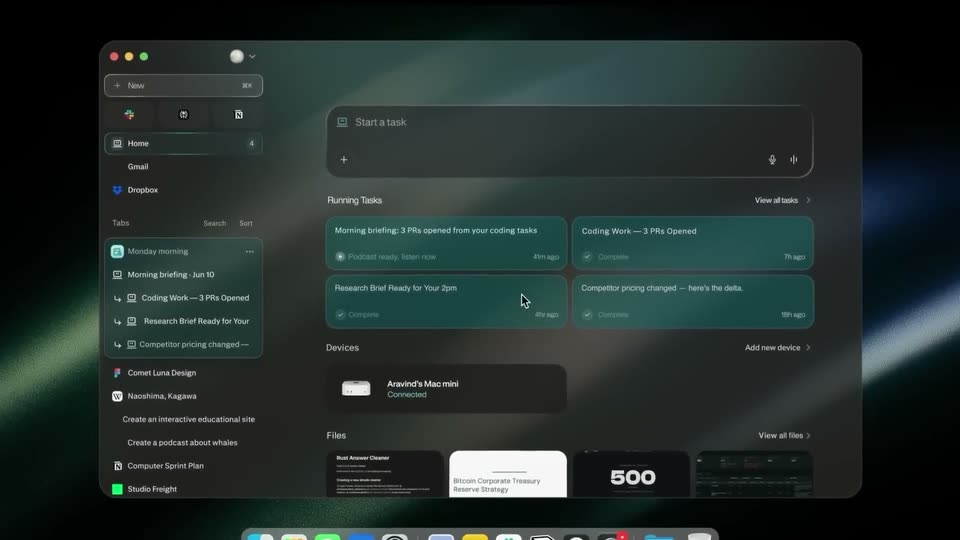
A dark desktop shows a task manager window centered over a blurred green and blue wallpaper. The window zooms in to fill the frame, and a cursor moves to hover over a teal task card in the running tasks grid.
Techniques: UI zoom, Cursor demo
Camera: Push in
A dark dashboard interface displays a left sidebar, a task input field, and a grid of cards showing running tasks, devices, and files.
Camera: Static
A dark task app interface fills the frame. The main pane scrolls upward through a weekend summary of grouped threads, while the left sidebar of tabs and projects stays fixed. A mouse cursor hovers over the body text.
Techniques: Cursor demo
Camera: Push in
A dark productivity app interface fills the frame, sidebar on the left with a cursor resting on a task row. The sharp UI blurs and a teal light wash floods the frame as the document text in the main pane swaps to a Bitcoin research brief.
Techniques: Cursor demo
Camera: Static
A macOS desktop shows a settings window on the left under a bright white flare on the right. The flare clears, the window vanishes, diagonal light streaks cross the green wallpaper, and the dock fades in at the bottom.
Techniques: Light sweep
Camera: Static
A static macOS desktop with a dark, streaked wallpaper, a top menu bar, and a row of app preview cards along the bottom. A rounded search bar in the center types a hiring query word by word, wrapping to three lines.
Techniques: Kinetic type
Camera: Static
A dark macOS desktop with an Ask anything bar and app cards; the camera zooms to the top-right menu bar as a cursor clicks the app icon. A notification pill expands into three stacked task cards, their status lines updating from Gathering sources to Compiling sources and Thinking.
Techniques: UI zoom, Cursor demo
Camera: Push in
A dark tablet home screen with diagonal bands of blue and gold light; the fn app icon sits in the center. A notification card in the top right fades in with a task list, then condenses into a Listening... banner with a mic and stop button.
Techniques: Morph
Camera: Static
A macOS desktop with a dark, grainy wallpaper. A brown pill in the top right reads “Listening...” with a pulsing dot grid, then turns teal and types out “Got it. Re-ranking candidates for SwiftUI...” while the Mail app window fades in below.
Techniques: Kinetic type
Camera: Static
A dark Mail compose window fades in centered on a black desktop with diagonal light streaks. The email body types itself out line by line, a blue link appears, then the closing lines fill in before the window dims.
Techniques: Kinetic type
Camera: Pull out
A macOS desktop displays a Mail compose window that transitions into a PDF viewer showing a revenue report. The background shifts from a teal gradient to a darker tone.
Camera: Static
A PDF report window fills a dark desktop, then the view zooms out to reveal a curved row of app windows along the bottom edge. A floating search bar with a microphone icon fades in at the center of the light background.
Techniques: UI zoom
Camera: Push in
A white Executive Summary document with bullet points and large figures fills the frame, backed by a row of tilted app windows in 3D perspective along the bottom. A dark command pill overlays the center as white text types out word by word, then the camera zooms in on the document.
On-screen text: “Turn the Q4 revenue report into a 10-slide board deck with our brand template.”
Techniques: 3D mockup, Kinetic type, UI zoom
Camera: Pan
A PDF titled Revenue Report sits in 3D perspective on a dark background, angled to the right. A large white headline 2025 Revenue Report slides out across the top left while a notification pill reading Create a board deck, Uploading file fades in at the top right.
On-screen text: “2025 Revenue Report”
Techniques: Kinetic type, 3D mockup
Camera: Pan
A macOS screen shows a revenue report PDF while a top-right card labeled Create a board deck cycles status text, poses an audience question, and a cursor clicks Board of Directors then Open. The camera pulls back to reveal the full report window.
Techniques: Cursor demo
Camera: Pull out
A dark green abstract desktop with a dock and menu bar. A presentation window showing a title slide sits centered; a second window behind it slides up and out, leaving the front window to settle in place.
Camera: Static
A white flash sweeps right across a teal scanner view, receding to reveal a rounded screen frame. A cloud of small white particles drifts at the top, while two round buttons, a flashlight and a camera, sit at the bottom.
Techniques: Light sweep, Particles
Camera: Static
The lower half of a phone lock screen fades up from black against a dark backdrop. A Perplexity notification banner hovers over a dotted teal flower wallpaper, above circular flashlight and camera buttons. The frame stays locked.
Camera: Static
A dark task list fills the frame in close-up, then the view zooms out to reveal the full smartphone standing in 3D perspective on a black background. The screen shows several notification cards with teal accents and a bottom input bar.
Techniques: UI zoom, 3D mockup
Camera: Pull out
A black screen holds centered white serif text that fades in and out, cycling through four phrases that end on Personal Computer.
On-screen text: “Personal Assistant”, “Personal Researcher”, “Personal Conductor”, “Personal Computer”
Camera: Static
On a black field, the perplexity wordmark and its asterisk symbol materialize at center, the letters resolving from a soft horizontal blur into crisp white, holding, then defocusing back to black.
On-screen text: “perplexity”
Camera: Static
A solid black screen holds for the entire duration. No text, logo, interface, or motion appears; the frame stays uniformly dark from start to finish.
Camera: Static