0:59

Introducing Claude Managed Agents
Anthropic · AI · Apr 2026
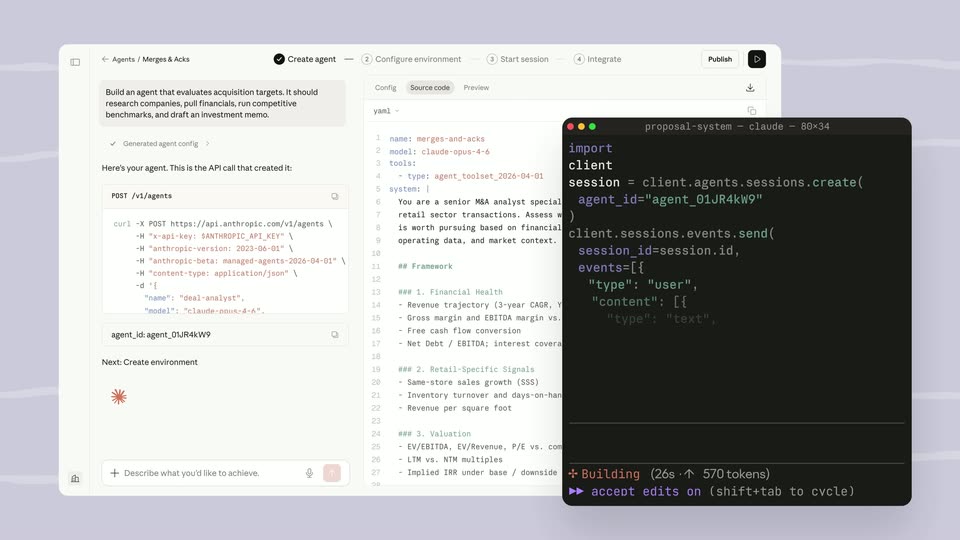
The video opens with a typed promise and a 3D laptop montage, names the product with an install command and an 'Introducing' title, then walks through the agent building a metrics dashboard before three titled feature beats (Generative UI, Customize Agent, Every Interface) and a short call to action that ends on the brand lockup. Its signature moves are letter-by-letter typed text, soft 3D camera pushes on a floating laptop, and UI panels that materialize from dotted placeholders, all set on a h
Anthropic · AI · Apr 2026
Webflow · Design · Sep 2026
Runway · AI · Sep 2026
On a soft white-to-light-blue gradient, the phrase types in at center, starting with a single letter and completing by the end of the clip. The finished line sits still in a large dark sans-serif.
On-screen text: “Make any product”
Techniques: Kinetic type
Camera: Static
Centered on a pale gradient, the dark headline “Make any product” sits in place, then a 3D laptop tilts into view, its screen showing a map of Buenos Aires.
On-screen text: “Make any product”
Techniques: 3D mockup
Camera: Pull out
A silver laptop sits in 3D perspective on a pale background. Its screen crossfades from a Trip Planner dashboard, with a Rome destination card and catalog grid, into a sneaker storefront showing a product grid and filter sidebar.
Techniques: 3D mockup
Camera: Pull out
A silver laptop faces the camera on a white background. Its screen cross-dissolves from a food atlas page with a pizza photo to a financial dashboard, while a blurred, enlarged copy of that dashboard fades in behind the device.
Techniques: 3D mockup
Camera: Push in
On a pale lavender gradient with faint drifting particles, the words AI Native fade in at center, AI in dark gray and Native in purple. Native then fades out and AI settles at the center of the frame.
On-screen text: “AI Native”, “AI”
Techniques: Kinetic type, Particles
Camera: Static
A white rounded command bar floats on a soft lavender gradient with faint drifting dots. The command types out letter by letter behind a purple caret, then a mouse cursor glides in from the lower right toward the two purple arrow buttons.
On-screen text: “AI Native”, “npm install @heroui/agent”
Techniques: Kinetic type, Cursor demo, Particles
Camera: Static
A silver laptop in 3D perspective on a pale purple field shows a finance dashboard. A command bar with the install command and a glowing purple button sits at the bottom, a cursor hovering it. The view zooms into the screen onto a transaction list with a purple sparkle button.
On-screen text: “npm install @heroui/agent”
Techniques: 3D mockup, Kinetic type, Cursor demo, UI zoom
Camera: Pan
A 3D laptop recedes on a lavender gradient as the white title “Introducing HeroUI” settles center. An “Agents” pill slides in, centers and turns purple while the title fades, then a cursor clicks it and the frame pans onto the laptop's agent list.
On-screen text: “Introducing HeroUI”, “Agents”
Techniques: 3D mockup, Kinetic type, Particles, Cursor demo, UI zoom
Camera: Static
A silver laptop angled to the right on a pale purple background displays a billing dashboard with account balances and a transaction list. A purple circular button with a white sparkle icon sits at the lower right of the screen as a black cursor arrow drifts slowly past it.
Techniques: 3D mockup, Cursor demo
Camera: Static
A silver laptop mockup in 3D perspective sits on a plain white field, its screen showing a light banking dashboard with a welcome line, a large balance and stacked account cards. The device slowly scales up, the soft purple shadow beneath it widening.
Techniques: 3D mockup
Camera: Static
A rounded white input bar sits on a soft purple gradient. A prompt types out letter by letter, ending with a blinking caret, then a mouse cursor glides in and hovers the purple send button on the right.
Techniques: Cursor demo
Camera: Static
A 3D laptop sits at a low angle on a lavender gradient, its screen filled with a metrics dashboard and chat panel. A white chat card slides in from the right and centers as the laptop blurs into the background.
Techniques: 3D mockup, UI zoom
Camera: Pull out
A white chat panel on a lavender gradient scrolls down: a user prompt and the agent's ticking task list give way to KPI cards and line charts for MRR, ARR, burn and cash balance; a cursor hovers over the burn legend.
Techniques: Cursor demo
Camera: Pull out
A laptop mockup rotates from an angled 3D tilt to a flat front view against a pale lavender backdrop. Its screen shows a dashboard with KPI cards and a chat panel. A floating chart card with a blue line graph hovers above the lid at the start.
Techniques: 3D mockup
Camera: Push in
A white chat input bar centered on a pale lavender background. 'From natural language' types out letter by letter with a purple cursor as the bar settles from a larger size. A plus, shield, model dropdown, mic and purple send button line the bottom.
Techniques: Kinetic type
Camera: Static
A white prompt bar with a mic icon and a purple send button sits on a soft lavender gradient. The bar fades away and the dark gray line “To Generative UI” settles in the center as the headline.
On-screen text: “From natural language”, “To Generative UI”
Techniques: Kinetic type, Morph
Camera: Static
A white results panel slides in from the left, replacing a translucent purple card with a dot grid and a 4.4 star badge. The panel shows a pin icon, the heading 'Best pizza delivery near San Isidro', and ranked list rows fading in beneath a 'Generating...' label.
On-screen text: “To Generative UI”
Camera: Static
A pizza search UI finishes loading as the “Generating...” header fades out and the map of San Isidro expands to fill the frame. Rating badges (4.8, 4.5) sit over the map near Tarariras, and two place cards, “Trópico Pizza Napoletana” and “Almacén,” fade up at the bottom.
Techniques: UI zoom
Camera: Static
A white order card labeled Generating slides into place over a restaurant listing. A pink loading panel clears to reveal three menu items with prices, a tax breakdown, and Add to cart and Purchase buttons.
Camera: Static
A white order card with a Generating header and a purple Purchase button sits left; to its right, four restaurant cards materialize from dotted placeholders, each pairing a pizza photo with a name, rating and match badge, while the card slides toward the left edge.
Techniques: Split screen
Camera: Static
A collage of dashboard cards fades in and scales up against a pale lavender field, settling into a 3D perspective. A donut chart, a revenue line graph, a calendar tile and an error alert card arrange at tilted angles, gaining full opacity by the end.
Techniques: 3D mockup
Camera: Static
A grid of product interface cards floats in 3D perspective on a white background. The camera pushes in toward the center, enlarging the panels and bringing their charts, metrics and text into focus.
Techniques: 3D mockup, Parallax
Camera: Push in
A cluster of tilted UI cards floats in 3D space on a pale background. Sneaker, calendar, line-chart and budget panels sit at different depths and glide past as the camera drifts across them, reframing the field.
Techniques: 3D mockup, Parallax
Camera: Pan
A curved wall of floating dark UI panels on a starry black background: analytics gauges, a travel itinerary, an order summary, a revenue chart, and a flight card. The central flight card slides right into place as the surrounding panels drift apart.
Techniques: 3D mockup
Camera: Pull out
The black text “Customize Agent” scales down from an oversized position on the left to a centered size on a soft lavender gradient. Faint white specks drift slowly across the background.
On-screen text: “Customize Agent”
Techniques: Kinetic type, Particles
Camera: Static
A pale backdrop with a soft blue-purple glow and faint star dots. The dark headline scales in on the left beside two chat cards on the right, then the frame zooms into one card showing a typed question and a Ctrl 2 shortcut badge.
On-screen text: “Customize Agent”
Techniques: Kinetic type, UI zoom, Particles
Camera: Static
A white rounded card settles onto a pale background, its heading, three suggestion rows and an input field resolving from a stacked, overlapping state into a clean list. A blue circular button with a white sparkle eases down and shrinks at the lower right as the card scales back.
Camera: Static
A mobile chat card floats in 3D on a pale field of drifting dots. Tilted at first, it rotates to face the camera, revealing a chat screen titled “Ask about your data” with an input line, then the screen fades back to a purple halftone gradient.
Techniques: 3D mockup, Particles
Camera: Static
A dark chat panel is centered on a starry background, showing an “Ask about your data” heading, three query suggestion rows and an input bar with an “Approve for me” chip. The frame is locked off and static, with a small sparkle button below the card.
Camera: Static
A dark chat interface card with prompt suggestions fades out as the background shifts from dark to a light purple gradient, revealing the centered One Agent wordmark.
On-screen text: “One Agent”
Camera: Static
On a pale lavender gradient with faint white dots drifting, the centered dark gray text “One Agent” gives way to “Every Interface,” which scales in at the center of the locked-off frame.
On-screen text: “One Agent”, “Every Interface”
Techniques: Kinetic type, Particles
Camera: Static
On a pale lavender gradient, the dark headline Every Interface scales away, and a vertical column of white icon chips assembles, the center Commerce Ops chip enlarged with a soft shadow while the others stay flat.
On-screen text: “Every Interface”
Techniques: Kinetic type
Camera: Static
A vertical list of category rows with rounded icons tilts in 3D perspective over a pale gradient. The enlarged Support row shrinks to normal size as the list scrolls up to reveal Commerce Ops and Travel, then recedes with soft depth blur.
Techniques: 3D mockup
Camera: Static
A vertical list of category chips with colored icons scrolls upward on a soft white-to-teal gradient. Middle items stay large and sharp while edge items shrink and fade, over faint drifting dots.
Techniques: Parallax, Particles
Camera: Static
A pale white-to-blue gradient fills the frame. A small dark word sits centered and swaps in place, one at a time: “now”, “on”, “Available”, “on”. Each word fades in to replace the previous with no other elements moving.
On-screen text: “now”, “on”, “Available”, “on”
Techniques: Kinetic type
Camera: Static
A dark grey HeroUI logo is centered on a soft gradient background fading from white to light blue. Tiny white particles drift across the frame as the text sharpens from a brief visual glitch.
On-screen text: “HeroUI”
Techniques: Particles, Morph
Camera: Static
On a pale off-white field, a small extruded logo mark fades from light gray to solid black while the wordmark “hero” scales in, letters appearing left to right. A small gray tagline with a URL fades in beneath, then the lockup holds still.
On-screen text: “Visit to heroui.pro/agents to get started”
Techniques: Kinetic type
Camera: Static